Diffusion-SDF:通过体素化扩散实现文本到形状转换
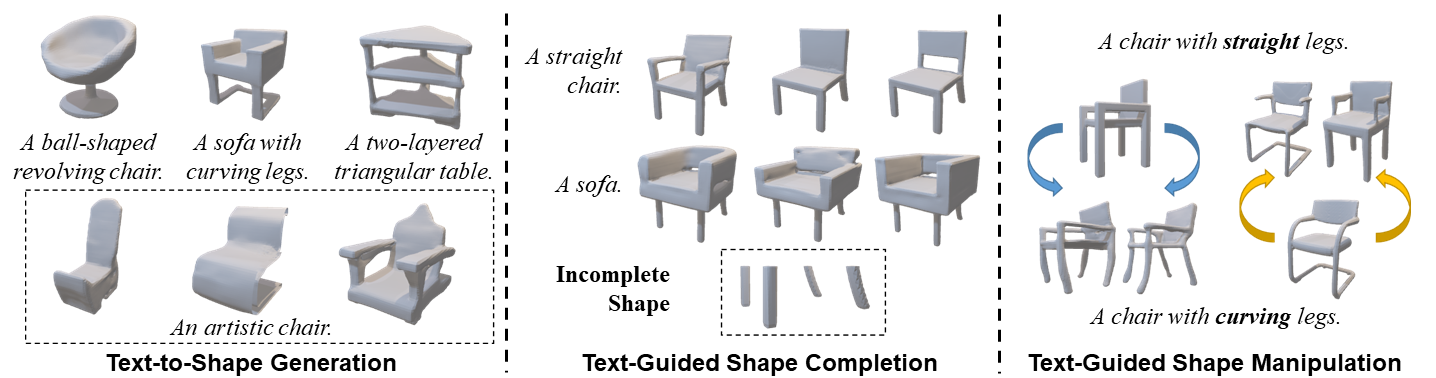
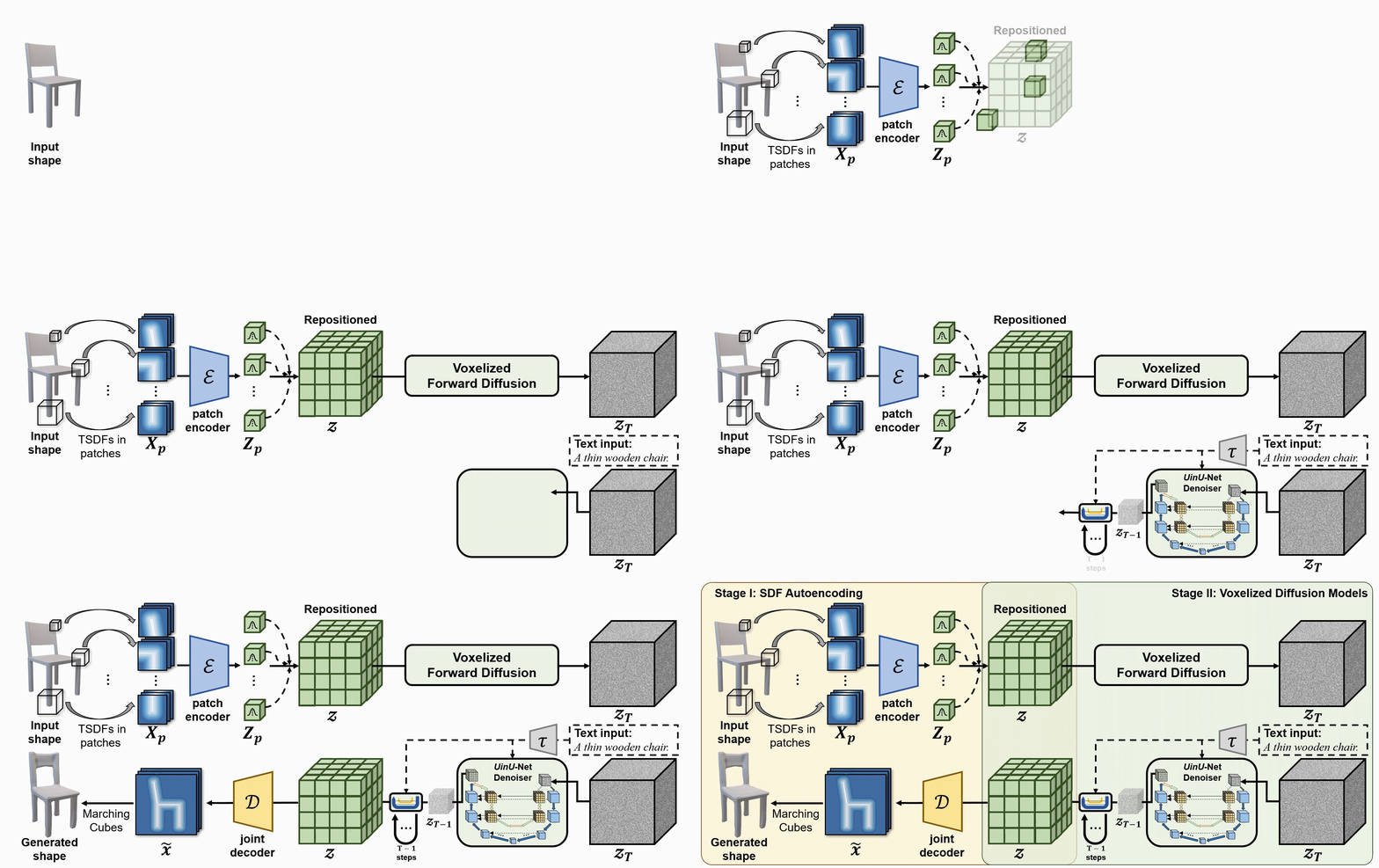
We propose a new generative 3D modeling framework called Diffusion-SDF for the challenging task of text-to-shape synthesis. Previous approaches lack flexibility in both 3D data representation and shape generation, thereby failing to generate highly diversified 3D shapes conforming to the given text descriptions. To address this, we propose a SDF autoencoder together with the Voxelized Diffusion model to learn and generate representations for voxelized signed distance fields (SDFs) of 3D shapes. Specifically, we design a novel UinU-Net architecture that implants a local-focused inner network inside the standard U-Net architecture, which enables better reconstruction of patch-independent SDF representations. We extend our approach to further text-to-shape tasks including text-conditioned shape completion and manipulation. Experimental results show that Diffusion-SDF is capable of generating both high-quality and highly diversified 3D shapes that conform well to the given text descriptions. Diffusion-SDF has demonstrated its superiority compared to previous state-of-the-art text-to-shape approaches.
[[项目主页]](https://ttlmh.github.io/DiffusionSDF/) [[arXiv]](https://arxiv.org/abs/2212.03293)
代码
安装
要设置 Diffusion-SDF 环境,可以使用提供的diffusionsdf.yml 文件来创建 Conda 环境。请按照以下步骤操作:
- 克隆仓库:
git clone https://github.com/ttlmh/Diffusion-SDF.git- 使用提供的 YAML 文件创建 Conda 环境并激活:
conda env create -f diffusionsdf.yml
conda activate diffusionsdf
下载预训练模型
下载SDF自动编码器模型文件(vae_epoch-120.pth:百度网盘 / 谷歌云盘)和体素扩散模型文件(voxdiff-uinu.ckpt:百度网盘 / 谷歌云盘))。将下载的模型文件放置在目录``./ckpt`中。
推理
文本到形状生成
使用Diffusion-SDF从文本描述生成3D形状,运行:python txt2sdf.py --prompt "a revolving chair" --save_obj
生成的3D形状将以GIF渲染图像和OBJ文件的形式保存在outputs/目录下。文本条件形状补全
给定一个部分/不完整的3D形状(以.h5格式的SDF文件)和文本提示,Diffusion-SDF可以补全缺失区域:# Axial cut: mask out the bottom half along the Z axis
python shape_completion.py \
--input_sdf path/to/partial.h5 \
--prompt "a wooden chair" \
--mask_axis z --mask_ratio 0.5SDF-value based masking (mask voxels with SDF >= threshold)
python shape_completion.py \
--input_sdf path/to/shape.h5 \
--prompt "a dining table" \
--mask_type threshold --mask_value 0.0
结果(GIF 渲染和可选的 OBJ 文件)保存在 outputs/shape_completion/ 目录下。文本条件形状操作
给定一个现有的 3D 形状和文本提示,Diffusion-SDF 通过 SDEdit 方法修改形状——将形状编码到潜在空间,添加噪声直到选定的时间步,然后使用新的文本提示进行去噪:# Moderate manipulation (50% noise strength)
python shape_manipulation.py \
--input_sdf path/to/shape.h5 \
--prompt "a chair with a cushion" \
--strength 0.5Strong manipulation (75% noise strength — more creative freedom)
python shape_manipulation.py \
--input_sdf path/to/shape.h5 \
--prompt "a modern minimalist chair" \
--strength 0.75
结果保存在 outputs/shape_manipulation/ 下,包括用于对比的原始形状渲染图。
训练
数据准备
训练需要两样东西:三维形状的体素化 SDF 文件,以及 Text2Shape 提供的文本描述。
#### 第 0 步 — 下载 ShapeNet Core v1
注册并下载 ShapeNet Core v1,并解压到某处(例如
data/ShapeNetCore.v1/)。#### 第 1 步 — 预计算 64³ SDF 体积
ShapeNet 提供三角网格;自编码器和扩散模型需要在 64³ 网格上的体素化符号距离场,存储为 HDF5 文件。我们遵循与 SDFusion 相同的预处理流程:
# Install system dependencies (Ubuntu/Debian)
sudo apt-get install freeglut3-dev libtbb-devClone SDFusion and run their SDF generation scripts
(see SDFusion repo for the full launcher scripts)
cd preprocess
bash launch_create_sdf_shapenet.sh \
--shapenet_root data/ShapeNetCore.v1 \
--out_root data/ShapeNet/sdf
预期的输出布局是:data/ShapeNet/
sdf/
/ e.g. 03001627 (chair), 04379243 (table)
/
pc_sdf_sample.h5 float32 array of shape (262144,) = 64³ SDF values
HDF5 键为
pc_sdf_sample,数组以扁平形式存储(262144 = 64×64×64 个元素)。#### 第 2 步 — 准备 Text2Shape 标注
Text2Shape 仅提供 ShapeNet 椅子和桌子的自然语言描述。其他类别将进行无条件训练(空标注)。
# Download the caption CSV
mkdir -p data/ShapeNet/text
wget http://text2shape.stanford.edu/dataset/captions.tablechair.csv \
-O data/ShapeNet/text/captions.tablechair.csvConvert to captions.json and generate train/val/test splits
python preprocess/prepare_text2shape.py --data_root data/ShapeNet
这将产生:data/ShapeNet/
text/
captions.tablechair.csv (raw Text2Shape CSV)
captions.json {model_id: [caption, ...]}
train_models.json [model_id, ...]
val_models.json
test_models.json
如果您有 ShapeNet 的官方拆分 JSON 文件,请通过
--shapenet_split_dir 传递它们,以使用规范拆分而不是随机拆分:python preprocess/prepare_text2shape.py \
--data_root data/ShapeNet \
--shapenet_split_dir data/ShapeNet/splits
第一步 — 训练 SDF 自编码器
训练逐块变分自编码器,将 64³ 的 SDF 体积编码为紧凑的 8³ 潜在空间:# Single GPU
python train_ae.py --data_root data/ShapeNet --cat allResume from a checkpoint
python train_ae.py --data_root data/ShapeNet \
--resume ckpt/vae_epoch-120.pth --start_epoch 121Multi-GPU (DDP via torchrun)
torchrun --nproc_per_node=4 train_ae.py --data_root data/ShapeNet --dist_train
检查点保存到 ./ckpt/,文件名为 vae_epoch-{N}.pth。第2步 — 训练体素扩散模型
AE训练完成后,使用PyTorch Lightning训练文本条件的3D扩散模型:# Single GPU
python main.py --config configs/voxdiff-uinu.yamlResume from a checkpoint
python main.py --config configs/voxdiff-uinu.yaml --resume /path/to/checkpoint.ckptMulti-GPU
python main.py --config configs/voxdiff-uinu.yaml --gpus 0,1,2,3
检查点保存在
logs/致谢
我们的代码基于 Stable-Diffusion 和 AutoSDF。引用
如果您在研究中发现我们的工作有用,请考虑引用:@inproceedings{li2023diffusionsdf,
author={Li, Muheng and Duan, Yueqi and Zhou, Jie and Lu, Jiwen},
title={Diffusion-SDF: Text-to-Shape via Voxelized Diffusion},
booktitle={Proceedings of the IEEE Conference on Computer Vision and Pattern Recognition (CVPR)},
year={2023}
}--- Tranlated By Open Ai Tx | Last indexed: 2026-04-13 ---