
Vidmerger
A wrapper around FFmpeg which simplifies merging of multiple videos.
🙉 What is this exactly?
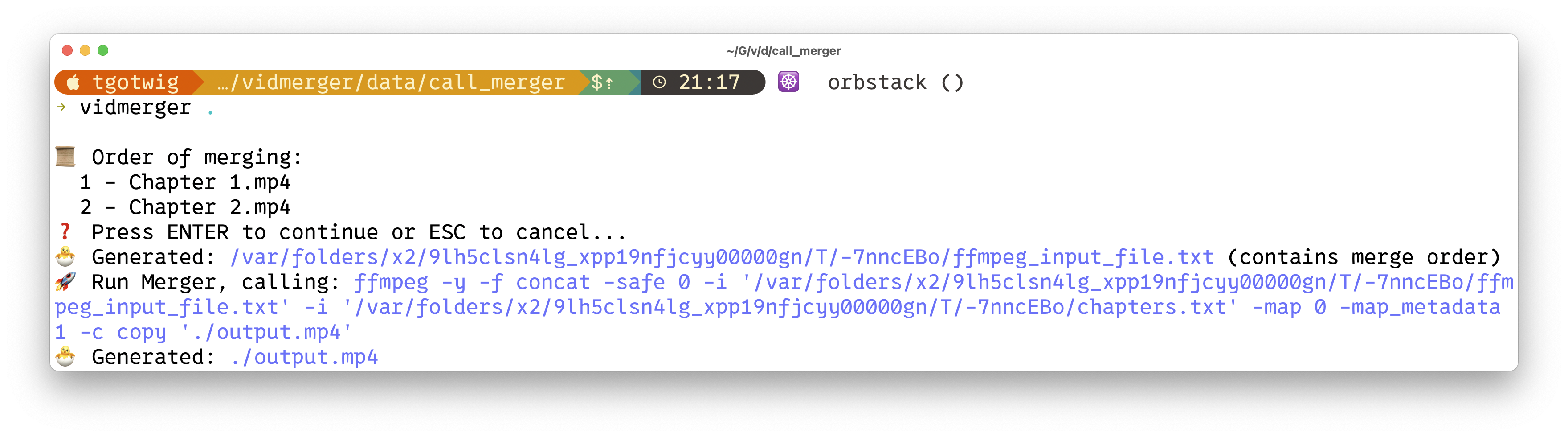
Vidmerger is a command-line tool that uses ffmpeg to merge multiple video files with the same file extension into one file, for example running vidmerger . on mp4 files would create a merged video called output.mp4 🐣
Here is the usage help of vidmerger 🤗
A wrapper around ffmpeg which simplifies merging multiple videos 🎞 Everything in between the first - till the fill extension of the input files will be used as chapter titles 📖.Usage: vidmerger [OPTIONS]
Arguments:
Sets the input file to use
Options:
-f, --format Specifies which formats should be merged individually, the default is 👉 3g2,3gp,aac,ac3,alac,amr,ape,au,avi,awb,dts,f4a,f4b,f4p,f4v,flac,flv,m4a,m4b,m4p,m4r,m4v,mkv,mov,mp2,mp3,mp4,mpeg,mpg,oga,ogg,ogm,ogv,ogx,opus,pcm,spx,wav,webm,wma,wmv
--fps Generates videos inside a temporary folder with this fps value and merges them
--shutdown For doing a shutdown at the end (needs sudo)
--skip-fps-changer Skips the fps changer
-y, --yes Skips confirmation of merge order
--verbose Prints detailed logs
-h, --help Print help
-V, --version Print version
%%{init: {'themeVariables': { 'mainBkg': 'white', 'nodeBorder': 'black' }}}%%
graph LR;
VideoA((Video_A))-->Vidmerger;
VideoB((Video_B))-->Vidmerger;
Vidmerger-->|no fps mismatch detected| Merger;
Vidmerger-->FPS_Changer-->Merger;
Merger-->Video_A+B_and_chapters;--format or -f, example: --format mp4,mkv. |
| FPS_Changer | After detecting not matching fps values, it scales all the higher fps videos down to the lowest detecting fps value. Can be skipped by --skip-fps-changer. The desired fps value can be set by --fps, example: --fps 23.976. |
| Merger | Finally, it merges the videos and adds chapters. Chapter titles are automatically extracted from the input file names — specifically, the text between the first dash and the file extension. Example: Video_A - Chapter 1.mp4. |✨ Installing / Getting started
You can install it on all the three major operating systems 🤗
X64
| Platform | Packager | Command |
| :-------- | :----------------------------------------------------------------------------------------- | :----------------------------------------------------------------------------------------------------------------------------------------------------------------------------------------------- |
| 🍎 MacOS | 🍺 Homwbrew | brew tap tgotwig/vidmerger
brew install vidmerger |
| 🐧 Linux | 🍺 Homwbrew | brew tap tgotwig/linux-vidmerger
brew install vidmerger |
| 🐧 Linux | 🍺 CURL | sudo curl -L https://github.com/TGotwig/vidmerger/releases/latest/download/vidmerger-linux.tar.gz -o /tmp/vidmerger-linux.tar.gz && sudo tar -xzvf /tmp/vidmerger-linux.tar.gz -C /usr/local/bin |
| 🏳️🌈 Windows | 🍫 Chocolatey | choco install ffmpeg # prerequisite
choco install vidmerger |
ARM64
| Platform | Packager | Command |
| :------- | :----------------------------------------------------------------------------------- | :---------------------------------------------------------------------------------------------------------------------------------------------------------------------------------------------------------------- |
| 🍎 MacOS | 🍺 Homwbrew | brew tap tgotwig/vidmerger
brew install vidmerger |
| 🐧 Linux | 🍺 CURL | sudo curl -L https://github.com/tgotwig/vidmerger/releases/download/0.4.0/vidmerger-linux-arm64.tar.gz -o /tmp/vidmerger-linux-arm64.tar.gz && sudo tar -xzvf /tmp/vidmerger-linux-arm64.tar.gz -C /usr/local/bin |
Docker (X64 & ARM64)
You can also use Docker to run vidmerger without installing anything except Docker, hosted on Dockerhub 🐳
docker container run -it -v :/data tgotwig/vidmerger Examples with Bash:
docker container run tgotwig/vidmerger --help
docker container run tgotwig/vidmerger --version
docker container run -it -v ./data/call_merger:/data tgotwig/vidmerger
⚙️ Developing
The primary requirements are rust, ffmpeg, and go-task. The devcontainer provides all necessary components 🔧
If you see anything to improve, just create an issue or directly open a pull request 🤗✨
Deploying / Publishing
For details on how to publish a new version, you can look up the Publish new version wiki page 📖
🧪 Tests
- For major tests:
task test - For linting tests:
task lint