AlphaEvolve Writing
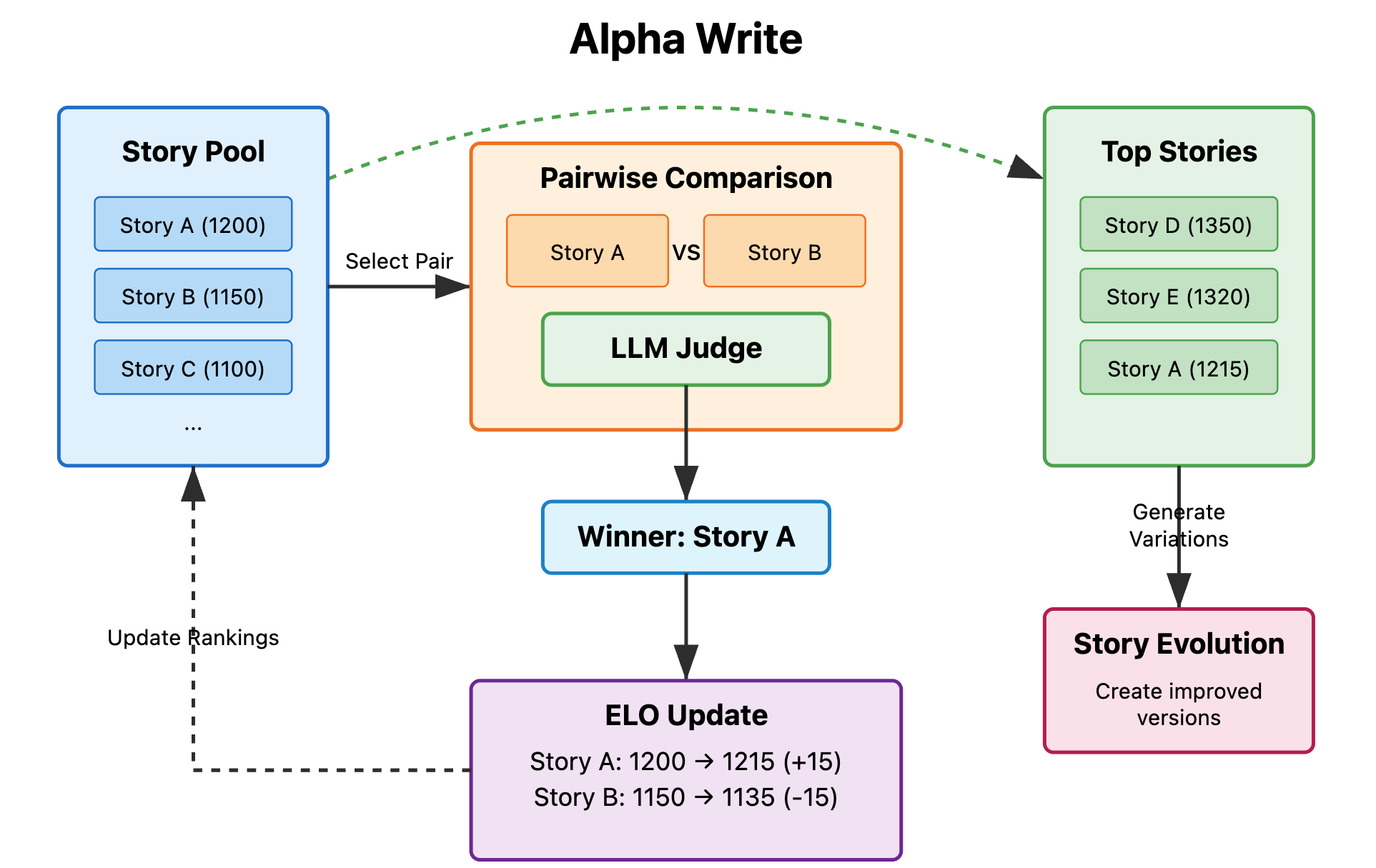
詳細な解説はこちらをご覧ください。
執筆コンペに提出されたサンプルストーリーはこちらでご覧いただけます。
AIモデルを用いて創造的なストーリーや一般的な文章を生成・評価・進化させる、現代的な進化的執筆システム。クリーンでモジュラーなPythonアーキテクチャに基づき、最新の設計原則を採用しています。
✨ 特徴
- 🧬 進化的アルゴリズム: AI主導のトーナメントで物語が進化
- 🎯 2つの執筆モード: クリエイティブなストーリーテリングと一般文書の最適化
- 🏆 ELOトーナメントシステム: ペアごとの比較による高度なランキング
- 🌐 ウェブインターフェース: 人間による検証とストーリー比較ツール
- 🔧 設定可能: JSON設定による広範なカスタマイズ
🚀 クイックスタート
インストール
# Clone the repository
git clone https://github.com/your-org/alphaevolve-writing
cd alphaevolve-writingInstall with uv (recommended)
uv syncOr install with pip
pip install -e .Configure your API keys (see Configuration section below)
進化を実行
# Run 5 evolution iterations
python evolve.py 5Fresh start with 3 iterations
python evolve.py 3 --freshUse general writing mode
python evolve.py 5 --generalShow help
python evolve.py --help
🏗️ アーキテクチャ
システムは、関心事の明確な分離を伴う最新のPython設計原則に従っています:
├── src/
│   ├── core/           # Pipeline orchestration
│   │   └── pipeline.py # Main EvolutionPipeline class
│   ├── generators/     # Story generation logic
│   │   ├── story_generator.py      # Initial & next batch generators
│   │   ├── generate_response.py    # Creative writing generation
│   │   ├── generate_response_general.py # General writing generation
│   │   └── judge_response.py       # AI judging system
│   ├── rankers/        # ELO ranking system
│   │   ├── elo_rank.py            # Core ELO algorithm
│   │   └── tournament_runner.py    # Tournament management
│   └── utils/          # Utility functions
│       └── inference.py           # Multi-provider LLM interface
├── evolve.py           # Clean CLI entry point
├── pyproject.toml      # Modern Python packaging
├── config.json         # Configuration
└── web_interface/      # Web UI for validation
主要コンポーネント
EvolutionPipeline:進化サイクル全体を管理するメインオーケストレーターInitialStoryGenerator:プロンプトから最初の世代の物語を生成NextBatchGenerator:上位の物語を改良したバリアントに進化させるTournamentRunner:物語のランキングのためにELOトーナメントを管理EloRankingSystem:高度なランキングアルゴリズムを実装
📖 仕組み
システムは3段階の進化サイクルに従います:
1. 初期バッチの生成
- プロンプトから複数の物語を生成
- 設定可能なAIモデルを使用(GPT、Claude、Llamaなど)
- 初期ELO評価を割り当て
2. ELOトーナメントの実行
- 物語同士がペアで競い合う
- AIジャッジがルーブリックに基づいて評価
- 勝敗に基づいてELO評価を更新
3. 次バッチの生成
- 成績上位の物語を選出
- 改良を加えたバリアントを生成
- このプロセスを複数世代にわたり繰り返す
⚙️ 設定
基本セットアップ
以下の主要ファイルを編集してください:
prompt.txt- 文章のプロンプト/テーマrubric.txt- 評価のための審査基準config.json- システム設定
APIキーの設定
システムは複数のAIプロバイダーをconfig.jsonで設定可能です。設定ではモデルをプロバイダーにマッピングし、APIキーを含む環境変数を指定します:
{
  "llm_providers": {
    "openai": {
      "type": "openai",
      "base_url": "https://api.openai.com/v1",
      "api_key_env": "OPENAI_API_KEY"
    },
    "anthropic": {
      "type": "anthropic",
      "api_key_env": "ANTHROPIC_API_KEY"
    },
    "deepinfra": {
      "type": "openai_compatible",
      "base_url": "https://api.deepinfra.com/v1/openai",
      "api_key_env": "DEEPINFRA_API_KEY"
    },
    "deepseek": {
      "type": "openai_compatible",
      "base_url": "https://api.deepseek.com/v1",
      "api_key_env": "DEEPSEEK_API_KEY"
    },
    "gemini": {
      "type": "openai_compatible",
      "api_key_env": "GEMINI_API_KEY",
      "base_url": "https://generativelanguage.googleapis.com/v1beta/openai/"
    }
  },
  "model_provider_mapping": {
    "gpt-4": "openai",
    "gpt-3.5-turbo": "openai",
    "claude-3-sonnet-20240229": "anthropic",
    "meta-llama/Meta-Llama-3-70B-Instruct": "deepinfra",
    "deepseek-chat": "deepseek",
    "gemini-2.5-flash": "gemini"
  }
}export OPENAI_API_KEY="your-openai-key" # For GPT models
export ANTHROPIC_API_KEY="your-anthropic-key" # For Claude models
export DEEPINFRA_API_KEY="your-deepinfra-key" # For Llama models
export DEEPSEEK_API_KEY="your-deepseek-key" # For DeepSeek models
export GEMINI_API_KEY="your-gemini-key" # For Gemini models使用する予定のプロバイダーのキーのみを設定すれば十分です。システムは設定に基づいてモデルリクエストを正しいプロバイダーに自動的にルーティングします。
設定オプション
config.json ファイルはすべてのシステム動作を制御します:
{
  "batch_generation": {
    "num_stories": 10,
    "model": "gpt-4",
    "initial_elo": 1500
  },
  "elo_ranking": {
    "tournament_rounds": 50,
    "judge_model": "claude-3-sonnet-20240229",
    "k_factor": 32
  },
  "next_batch_generation": {
    "top_stories_to_select": 3,
    "variants_per_story": 2,
    "include_original_stories": true
  },
  "evolution_pipeline": {
    "max_iterations": 5,
    "auto_continue_from_existing": true
  }
}
🎭 ライティングモード
クリエイティブライティングモード(デフォルト)
- ストーリーテリング、キャラクター開発、ナラティブ技法に焦点を当てる
- ミッションベースの生成戦略を使用する
- 創造性とエンゲージメントを最適化する
一般ライティングモード(--general)
- 学術論文、エッセイ、レポート、専門的な文章に焦点を当てる
- 分析的かつ構造化されたアプローチを使用する
- 明確さと説得力を最適化する
🔧 高度な設定
生成戦略のカスタマイズ
上級ユーザー向けに、src/generators/ ディレクトリ内のファイルを編集して、生成プロンプト、作者スタイル、ミッションセットをカスタマイズできます:
#### クリエイティブライティングのカスタマイズ(src/generators/generate_response.py)
ミッションセット - 創造的なアプローチと目標を定義:
mission_sets = {
    "emotional_depth": [
        "Focus on the psychological depth of characters",
        "Explore complex emotional landscapes",
        "Create moments of genuine human connection"
    ],
    "narrative_craft": [
        "Experiment with unique narrative structures",
        "Use vivid, sensory descriptions",
        "Create compelling story arcs"
    ],
    "dialogue_mastery": [
        "Write authentic, character-specific dialogue",
        "Use subtext and implied meaning",
        "Balance dialogue with action and description"
    ]
}author_styles = [
"Write with the psychological insight of Virginia Woolf",
"Adopt the sparse, powerful prose of Ernest Hemingway",
"Use the magical realism style of Gabriel García Márquez",
"Employ the detailed world-building of Tolkien"
]src/generators/generate_response_general.py)学術的焦点分野 - 特定の執筆領域を対象とする:
academic_focuses = [
    "Rigorous analytical argument development",
    "Clear thesis statement and supporting evidence",
    "Proper academic citation and source integration",
    "Logical flow and coherent structure"
]writing_approaches = [
"Comparative analysis with multiple perspectives",
"Problem-solution framework with evidence",
"Cause-and-effect reasoning with examples",
"Critical evaluation with balanced arguments"
]判定基準のカスタマイズ (src/generators/judge_response.py)
判定基準や評価プロンプトを変更して、文章の特定の品質要素に焦点を当てることができます:
# Edit the judge_responses function to customize evaluation criteria
evaluation_criteria = [
    "Technical writing proficiency",
    "Creative originality and innovation",
    "Emotional impact and reader engagement",
    "Structural coherence and flow",
    "Character development and authenticity"
]
高度な設定のヒント
- 元のファイルをバックアップ:変更を加える前に必ず元のジェネレーターファイルのコピーを保存してください
- 段階的にテスト:少しずつ変更を加え、全進化サイクルを実行する前に数回のイテレーションでテストしましょう
- 結果を監視:カスタマイズがストーリーの質を向上させているか、ウェブインターフェースで確認してください
- 組み合わせる:異なるミッションセットや作者スタイルを組み合わせて独自の生成戦略を作成しましょう
- バージョン管理:gitでカスタマイズを管理し、必要に応じて元に戻せるようにしましょう
🌐 ウェブインターフェース
内蔵のウェブインターフェースで進化の結果を検証しましょう:
cd web_interface
pip install -r requirements.txt
python app.py
http://localhost:5000 を開いてアクセスしてください:
- ストーリー比較:並べて読み、好みを選択
- ELOランキング:現在の順位と統計を表示
- 進化追跡:後の世代が改善されていることを検証
- データエクスポート:解析用に結果をダウンロード
--- Tranlated By Open Ai Tx | Last indexed: 2025-07-18 ---