Mousehole, a Seedbox IP Updater for MAM
A background service to update a seedbox IP for MAM and an HTTP server to manage it.

This can be helpful if you are using a host/VPN/seedbox to seed and its IP address is not stable.
Features:
- Background service that regularly updates MAM with the IP address of the host.
- Frontend website to manage the service, allowing:
- Setting your MAM cookie
- Displaying status information
- Manual triggering of checks
- API server with management endpoints.
Getting Started
To use Mousehole, you need to:
Running the service
#### Docker Compose (recommended)
services:
gluetun:
image: qmcgaw/gluetun:latest
cap_add:
- NET_ADMIN
devices:
- /dev/net/tun:/dev/net/tun
ports:
- "5010:5010" # Mousehole port
- "8080:8080" # qBittorrent Web UI port
- "6881:6881/tcp" # qBittorrent TCP torrent port
- "6881:6881/udp" # qBittorrent UDP torrent port
environment:
VPN_SERVICE_PROVIDER: "your-vpn-provider"
FIREWALL_VPN_INPUT_PORTS: "6881" # qBittorrent torrent
# more is needed here -- see Gluetun documentation
# https://github.com/qdm12/gluetun-wiki
# https://github.com/qdm12/gluetun-wiki/tree/main/setup/providers
restart: unless-stopped qbittorrent:
image: lscr.io/linuxserver/qbittorrent:latest
network_mode: "service:gluetun"
environment:
TZ: Etc/UTC # Set to your timezone for localization
WEBUI_PORT: 8080
TORRENTING_PORT: 6881
restart: unless-stopped
mousehole:
image: tmmrtn/mousehole:latest
network_mode: "service:gluetun"
environment:
TZ: Etc/UTC # Set to your timezone for localization
volumes:
# persist cookie data across container restarts
- "mousehole:/srv/mousehole"
restart: unless-stoppedvolumes:
mousehole:
#### Unraid
See the Unraid Installation Guide for instructions.
#### Local
Run the server with:
bun run startSetting Your MAM Cookie
Once Mousehole is running, navigate to its web UI at http:// in
your browser. This is likely to be
When running for the first time (or if the cookie gets out of sync), you need to set Mousehole's cookie manually.
On navigating to the Mousehole web interface, you will see a form to set the cookie -- paste your cookie and click the "Set" button.
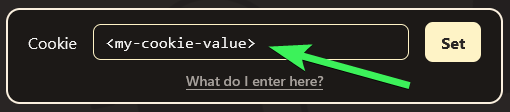
If you need help getting the cookie, click the "What do I enter here?" button for a tutorial.
Handling Errors
Even with Mousehole up and running, things can still go wrong that Mousehole cannot fix automatically. Here are some of the common ones:
Docker Tags
Mousehole publishes several image tags to Docker Hub:
- SemVer versions (
0,0.1,0.1.11, etc) latest, the latest released versionedge, the tip ofmasterbranch- Pull requests targeting
masterfor testing, tagged aspr-
latest if you do not know which to pick.Environment Variables
MOUSEHOLE_PORT: _(Default5010)_ The port on which the HTTP server will
MOUSEHOLE_STATE_DIR_PATH: _(Default/srv/mousehole)_ The directory where
MOUSEHOLE_USER_AGENT: _(Defaultmousehole-by-timtimtim/)_ The
MOUSEHOLE_CHECK_INTERVAL_SECONDS: _(Default300(5 minutes))_ The interval
MOUSEHOLE_STALE_RESPONSE_SECONDS: _(Default86400(1 day))_ The number of
TZ: _(DefaultEtc/UTC)_ The timezone for displaying localized times.
Contributing
Want to contribute? Check out the contribution guidelines.
There is also a contrib directory with useful, supplementary
functionality.
Links
Development
- Start the dev server with:
bash
  bun run dev
`- New versions can be tagged, released and pushed to Docker Hub by simply
changing the version in Attribution
Mouse Hole by Sergey Demushkin from Noun Project (CC BY 3.0)
--- Tranlated By Open Ai Tx | Last indexed: 2026-04-12 ---