🌐 Language
Annotator

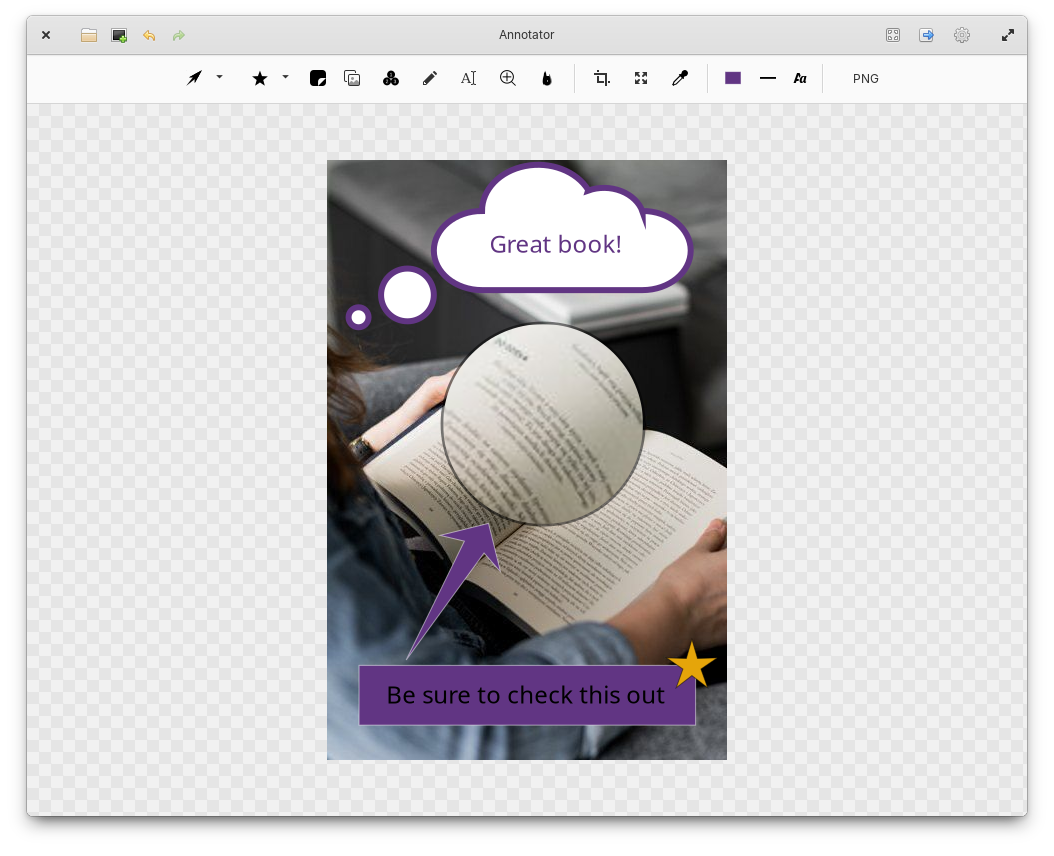
Overview
Annotate your images and let a picture say 1000 words.
- Load images from the file system, clipboard, or create a screenshot for annotation.
- Add shapes, stickers, images, text, drawings, and other callouts to highlight details in the image.
- Add magnifiers to enhance image details.
- Blur out parts of the image to hide data.
- Crop, resize, and add borders to images.
- Control colors, line thickness, and font details.
- Zoom support.
- Color picker support within a loaded image.
- Unlimited undo/redo for any change.
- Drag-and-drop PNG copies of the annotated image.
- Export to JPEG, PNG, TIFF, BMP, PDF, SVG, and WebP image formats.
- Support for copying the annotated image to the clipboard.
- Printer support.
Installation
Debian (from source)
You will need the following dependencies to build Annotator:
- meson
- valac
- debhelper
- gobject-2.0
- glib-2.0
- libgee-0.8-dev
- libgranite-7-dev
- libgtk-4-dev
- libxml2-dev
- libarchive-dev
- libwebp-dev
./app install.To run Annotator, run io.github.phase1geo.annotator.
Ubuntu (PPA)
You can use the PPA maintained by @PandaJim. The PPA supports Ubuntu 20.04+. Enter the following commands one by one
sudo add-apt-repository ppa:ubuntuhandbook1/annotator
sudo apt update
sudo apt install io.github.phase1geo.annotator
Arch Linux
If you're an Arch Linux user, there's an
AUR package
annotator:
% yay -S annotatorFlatpak
Additionally, Annotator can be installed and run via Flatpak.
To build the elementary Flatpak from source, run ./app elementary.
To build the Flathub Flatpak from source, run ./app flathub.
Afterwards, you can run it via: ./app run-flatpak.
Credits
Incorporates document-edit-symbolic.svg and image-crop-symbolic.svg from
elementary/icons,
under the terms of the GPL v3.0 license.
--- Tranlated By Open Ai Tx | Last indexed: 2026-06-30 ---