s3 - การฝึกตัวแทนค้นหาที่มีประสิทธิภาพผ่าน RL
คุณไม่จำเป็นต้องใช้ข้อมูลมากขนาดนั้นเพื่อฝึกตัวแทนค้นหา

ภาพรวมประสิทธิภาพ:
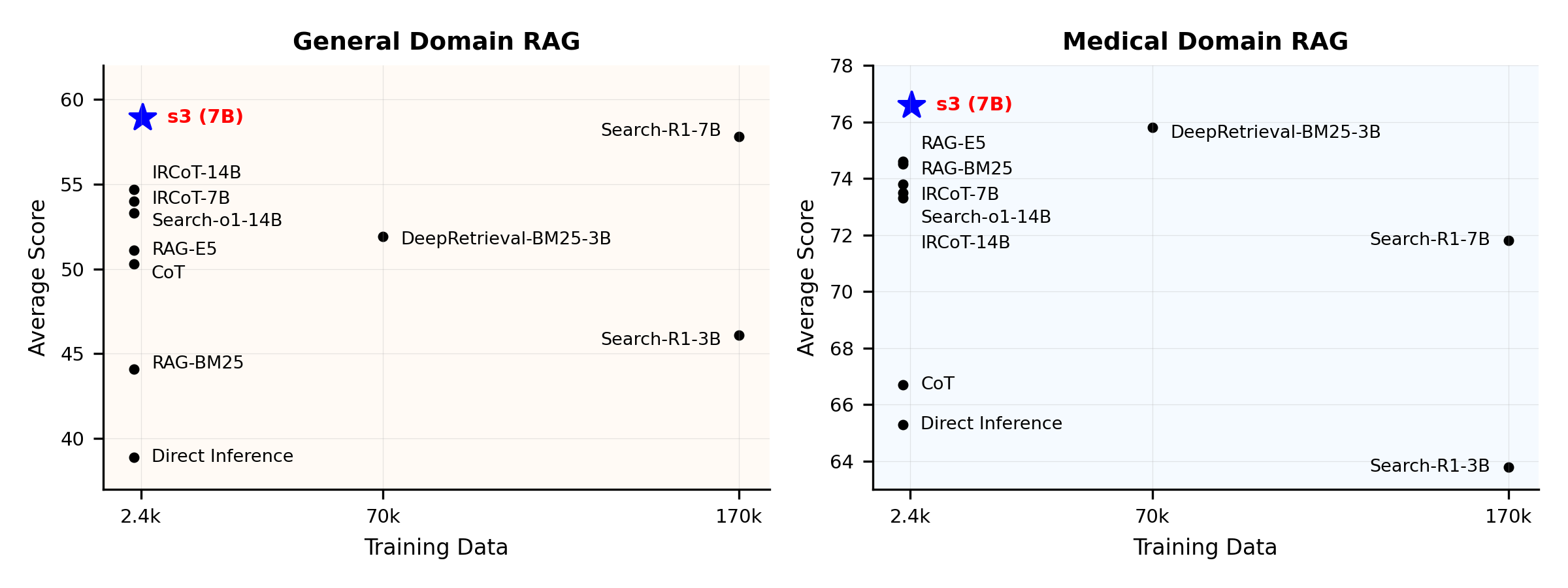
s3 คืออะไร?
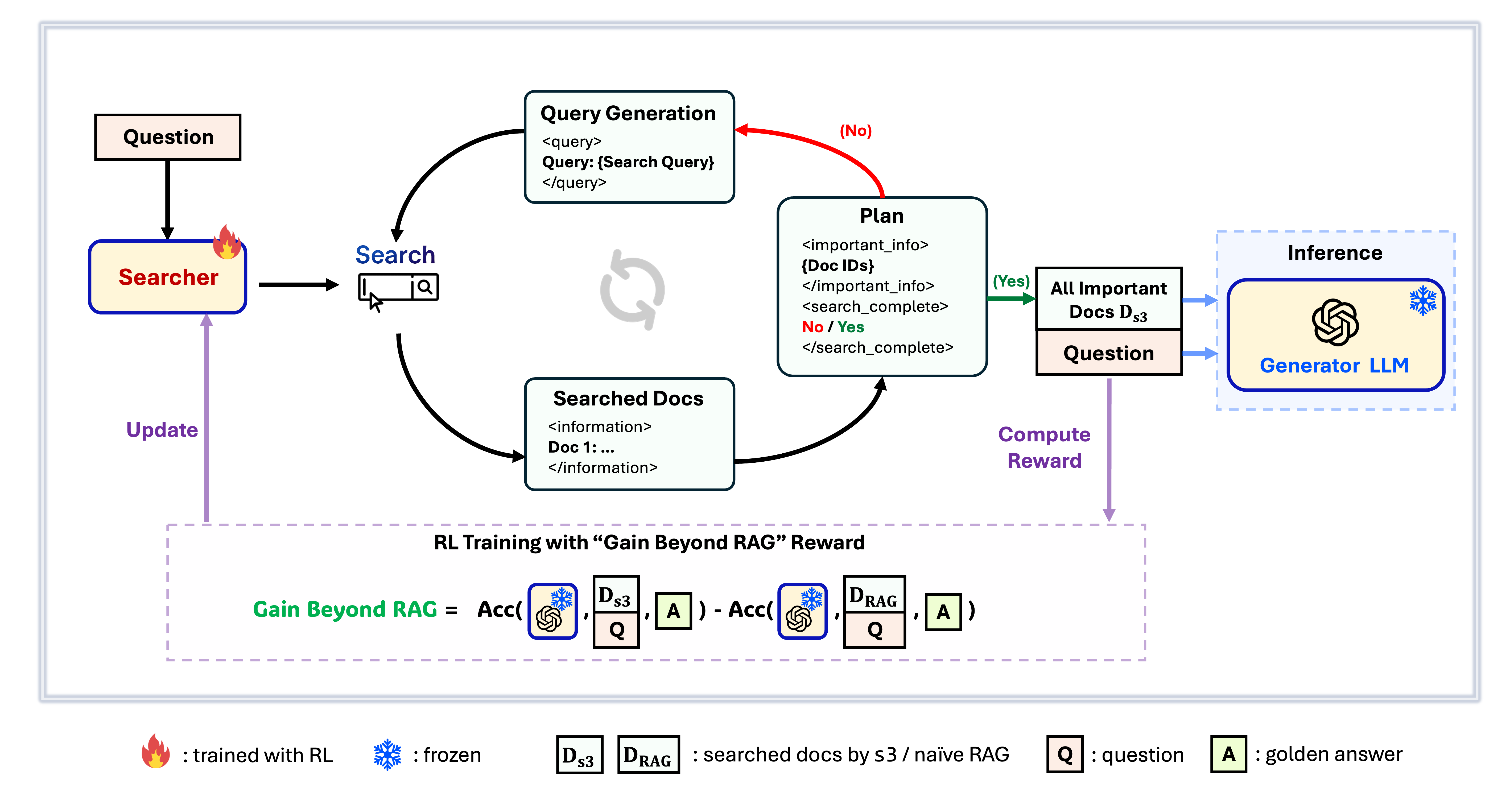
เฟรมเวิร์ก s3
s3 คือเฟรมเวิร์กที่เรียบง่ายแต่ทรงพลังสำหรับฝึก search agent ใน retrieval-augmented generation (RAG) โดยสอนให้ language model ค้นหาได้อย่างมีประสิทธิภาพมากขึ้น—โดยไม่ต้องเปลี่ยนตัว generator เลย ด้วยการเน้นเฉพาะส่วนของการค้นหา s3 จึงทำผลงานได้ดีในงาน QA ด้วยข้อมูลเพียงเศษเสี้ยวเมื่อเทียบกับวิธีเก่าๆ มีความเป็นโมดูลาร์ มีประสิทธิภาพ และถูกออกแบบให้ทำงานร่วมกับ LLM แบบกล่องดำใดก็ได้อย่างไร้รอยต่อ
สารบัญ
📦 การติดตั้ง
สภาพแวดล้อมของ Searcher & Generator
conda create -n s3 python=3.9
install torch [or you can skip this step and let vllm to install the correct version for you]
pip install torch==2.4.0 --index-url https://download.pytorch.org/whl/cu121
install vllm
pip3 install vllm==0.6.3 # or you can install 0.5.4, 0.4.2 and 0.3.1
pip3 install rayverl
cd code
pip install -e .flash attention 2
pip3 install flash-attn --no-build-isolationwe use pyserini for efficient retrieval and evaluation
pip install pyserini    # the version we used is 0.22.1quality of life
pip install wandb IPython matplotlib huggingface_hubconda create -n ret python=3.10
conda activate retconda install pytorch==2.4.0 torchvision==0.19.0 torchaudio==2.4.0 pytorch-cuda=12.1 -c pytorch -c nvidia
pip install transformers datasets pyserini
conda install -c pytorch -c nvidia faiss-gpu=1.8.0
pip install uvicorn fastapi
💡 การเตรียมตัว
ดาวน์โหลดดัชนี & คลังข้อมูลpython scripts/download.py --save_path $save_path
cat $save_path/part_* > $save_path/e5_Flat.index
gzip -d $save_path/wiki-18.jsonl.gzเตรียมข้อมูลล่วงหน้าสำหรับการเริ่มต้น Naïve RAG (หรือคุณสามารถดาวน์โหลดข้อมูลที่เราประมวลผลแล้วได้ที่นี่: huggingface)
# deploy retriever
bash scripts/deploy_retriever/retrieval_launch.sh # or scripts/deploy_retriever/retrieval_launch_mirage.sh for MedCorp corpus.
deploy generator
bash generator_llms/host.sh # modify tensor-parallel-size to the number of GPUs you use
run precompute
bash scripts/precompute.sh # this step will take a while, as it will precompute the naïve RAG Cache for training
🏋️ เริ่มการฝึกอบรม
ขั้นตอนนี้สำหรับการฝึกอบรม S3# deploy retriever
bash scripts/deploy_retriever/retrieval_launch.sh
deploy generator
bash generator_llms/host.sh
run training
bash scripts/train/train_s3.sh🔍 ดำเนินการค้นหา/ดึงข้อมูล
ขั้นตอนนี้ใช้สำหรับการรวบรวมบริบทของ s3 / baseliness3
# deploy retriever
bash scripts/deploy_retriever/retrieval_launch.sh
run s3 inference
bash scripts/s3_inference/evaluate-8-3-3.sh
ค่าพื้นฐาน
RAG
bash scripts/deploy_retriever/retrieval_launch.sh # or retrieval_launch_bm25.sh # deploy retriever
bash scripts/baselines/rag.sh # run RAG bash retrieval_launch_bm25.sh # deploy BM25 Model
bash generator_llms/deepretrieval.sh # deploy DeepRetrieval Model
bash scripts/baselines/deepretrieval.sh # run DeepRetrieval Query Rewriting + Retrievalbash retrieval_launch.sh # deploy e5 retriever
bash scripts/baselines/search_r1.sh # run Search-R1bash retrieval_launch.sh # deploy e5 retriever
python scripts/baselines/ircot.pybash retrieval_launch.sh # deploy e5 retriever
bash scripts/baselines/search_o1.sh # run Search-o1📈 ดำเนินการประเมินผล
ขั้นตอนนี้สำหรับการประเมินผล s3 / baselinesbash scripts/evaluation/run.shคำถามที่พบบ่อย
ข้อมูลที่กำหนดเอง?
หากคุณต้องการทดสอบ s3 กับคลังข้อมูล/ชุดข้อมูลของคุณเอง คุณสามารถดูรายละเอียดจาก commit นี้เพื่อดูว่าคุณต้องทำอะไรบ้างในการสร้าง pipeline ของคุณเอง: commit 8420538การทำซ้ำผลลัพธ์?
มีนักพัฒนาหลายคนที่สามารถทำซ้ำผลลัพธ์ของเราได้สำเร็จแล้ว หากคุณมีคำถามหรือพบปัญหาใด ๆ สามารถ เปิด issue ได้ตามสะดวก — เรายินดีให้คำแนะนำแบบลงมือปฏิบัติ (ดูตัวอย่างได้ที่ this example)แม้ว่าการสร้างแบบจำลองขึ้นมาใหม่ด้วยตัวเองจะไม่ซับซ้อน — และเรายัง แนะนำให้ฝึกจากศูนย์ เพราะการประเมินผลมักจะใช้เวลามากกว่าการฝึก — แต่เราก็มี checkpoint อ้างอิงให้ด้วย: s3-8-3-3-20steps ซึ่งใช้เวลาฝึกประมาณหนึ่งชั่วโมง
การอ้างอิง
@article{jiang2025s3,
  title={s3: You Don't Need That Much Data to Train a Search Agent via RL},
  author={Jiang, Pengcheng and Xu, Xueqiang and Lin, Jiacheng and Xiao, Jinfeng and Wang, Zifeng and Sun, Jimeng and Han, Jiawei},
  journal={arXiv preprint arXiv:2505.14146},
  year={2025}
}--- Tranlated By Open Ai Tx | Last indexed: 2025-12-30 ---