s3 - 効率的かつ効果的な検索エージェントの強化学習によるトレーニング
検索エージェントのトレーニングにはそれほど多くのデータは必要ありません

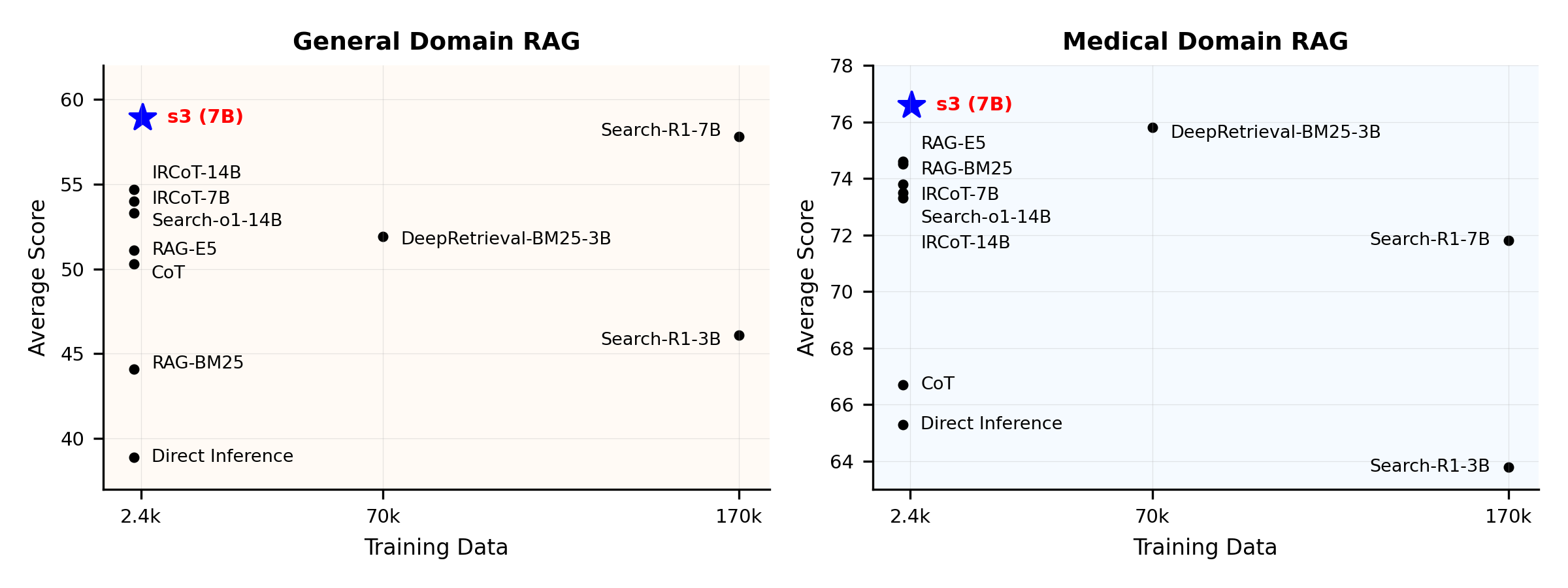
パフォーマンス概要:
s3とは何ですか?
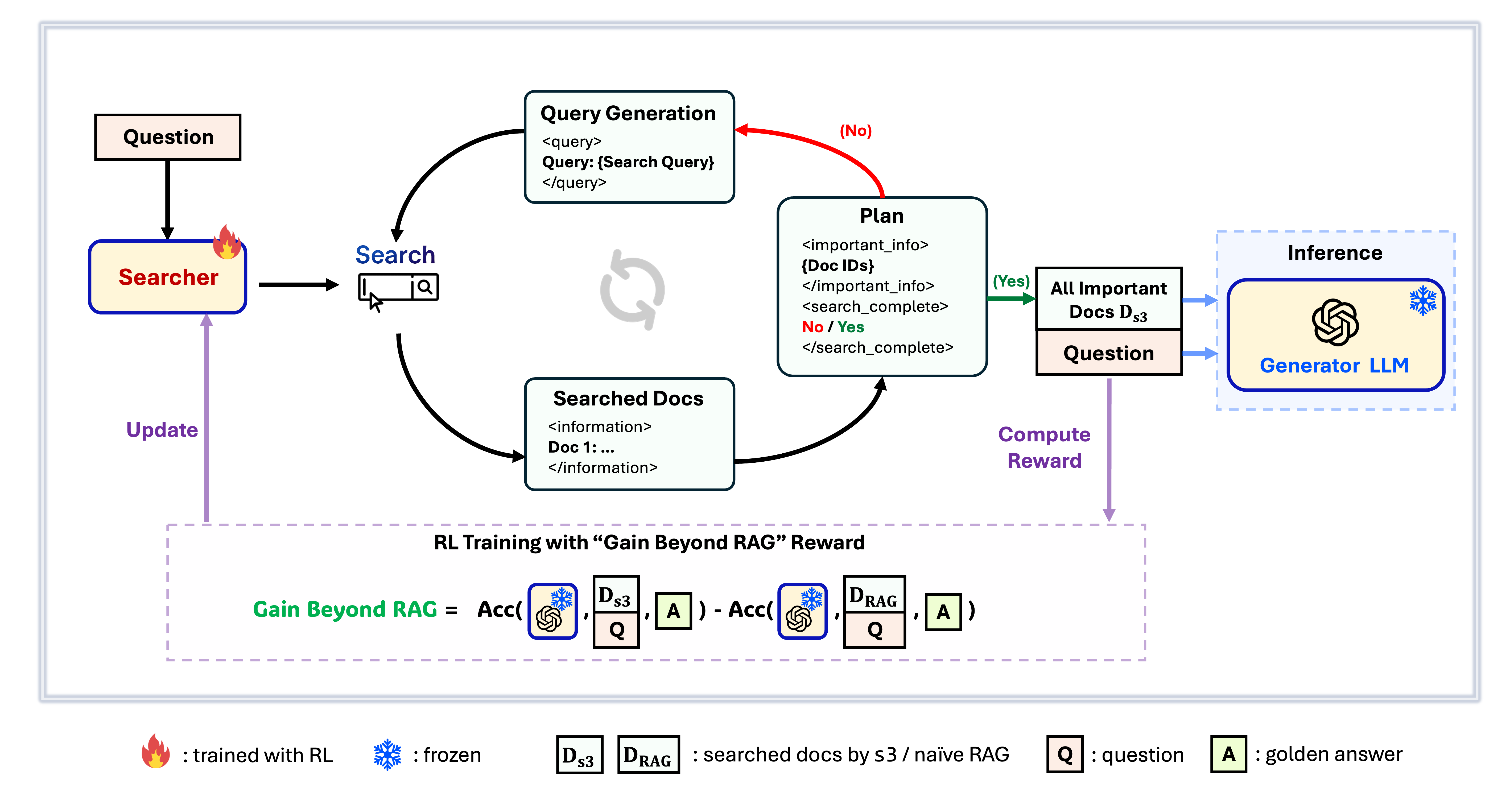
s3フレームワーク
s3は、検索エージェントを訓練するためのシンプルで強力なフレームワークであり、検索強化生成(RAG)で利用されます。これは言語モデルに、生成器自体を変更することなく、より効果的に検索する方法を教えます。検索コンポーネントのみに注力することで、s3は従来手法のごく一部のデータのみで、QAタスクにおいて高いパフォーマンスを実現します。モジュール構造で効率的、あらゆるブラックボックスLLMとシームレスに動作するよう設計されています。
目次
📦 インストール
サーチャー&ジェネレーター環境
conda create -n s3 python=3.9
install torch [or you can skip this step and let vllm to install the correct version for you]
pip install torch==2.4.0 --index-url https://download.pytorch.org/whl/cu121
install vllm
pip3 install vllm==0.6.3 # or you can install 0.5.4, 0.4.2 and 0.3.1
pip3 install rayverl
cd code
pip install -e .flash attention 2
pip3 install flash-attn --no-build-isolationwe use pyserini for efficient retrieval and evaluation
pip install pyserini    # the version we used is 0.22.1quality of life
pip install wandb IPython matplotlib huggingface_hubconda create -n ret python=3.10
conda activate retconda install pytorch==2.4.0 torchvision==0.19.0 torchaudio==2.4.0 pytorch-cuda=12.1 -c pytorch -c nvidia
pip install transformers datasets pyserini
conda install -c pytorch -c nvidia faiss-gpu=1.8.0
pip install uvicorn fastapi
💡 準備
インデックスとコーパスのダウンロードpython scripts/download.py --save_path $save_path
cat $save_path/part_* > $save_path/e5_Flat.index
gzip -d $save_path/wiki-18.jsonl.gzナイーブRAG初期化の事前計算(または、こちらから処理済みデータをダウンロードできます:huggingface)
# deploy retriever
bash scripts/deploy_retriever/retrieval_launch.sh # or scripts/deploy_retriever/retrieval_launch_mirage.sh for MedCorp corpus.
deploy generator
bash generator_llms/host.sh # modify tensor-parallel-size to the number of GPUs you use
run precompute
bash scripts/precompute.sh # this step will take a while, as it will precompute the naïve RAG Cache for training
🏋️ トレーニングの実行
このステップはS3のトレーニング用です# deploy retriever
bash scripts/deploy_retriever/retrieval_launch.sh
deploy generator
bash generator_llms/host.sh
run training
bash scripts/train/train_s3.sh🔍 検索/取得の実行
このステップは s3 / ベースラインのコンテキスト収集のためのものですs3
# deploy retriever
bash scripts/deploy_retriever/retrieval_launch.sh
run s3 inference
bash scripts/s3_inference/evaluate-8-3-3.sh
ベースライン
RAG
bash scripts/deploy_retriever/retrieval_launch.sh # or retrieval_launch_bm25.sh # deploy retriever
bash scripts/baselines/rag.sh # run RAG bash retrieval_launch_bm25.sh # deploy BM25 Model
bash generator_llms/deepretrieval.sh # deploy DeepRetrieval Model
bash scripts/baselines/deepretrieval.sh # run DeepRetrieval Query Rewriting + Retrievalbash retrieval_launch.sh # deploy e5 retriever
bash scripts/baselines/search_r1.sh # run Search-R1bash retrieval_launch.sh # deploy e5 retriever
python scripts/baselines/ircot.pybash retrieval_launch.sh # deploy e5 retriever
bash scripts/baselines/search_o1.sh # run Search-o1📈 実行評価
このステップはs3 / ベースラインの評価用ですbash scripts/evaluation/run.shQ&A
カスタマイズされたデータについて
独自のコーパスやデータセットで s3 をテストしたい場合は、このコミットを参考にして独自のパイプラインを構築する手順を確認できます: commit 8420538結果の再現について
複数の開発者がすでに当社の結果を正常に再現しています。ご質問や問題が発生した場合は、issue をオープン してください — 実践的なガイダンスを喜んで提供します(この例 をご参照ください)。モデルの再現自体は簡単ですが、実際には一からの学習を推奨しています。評価は多くの場合、学習よりもはるかに時間がかかるためです。参考用のチェックポイントも提供しています: s3-8-3-3-20steps(約1時間で学習済み)。
引用
@article{jiang2025s3,
  title={s3: You Don't Need That Much Data to Train a Search Agent via RL},
  author={Jiang, Pengcheng and Xu, Xueqiang and Lin, Jiacheng and Xiao, Jinfeng and Wang, Zifeng and Sun, Jimeng and Han, Jiawei},
  journal={arXiv preprint arXiv:2505.14146},
  year={2025}
}--- Tranlated By Open Ai Tx | Last indexed: 2025-12-30 ---