
dbslice


提取最小且参照完整的数据库子集,用于本地开发和调试。
问题
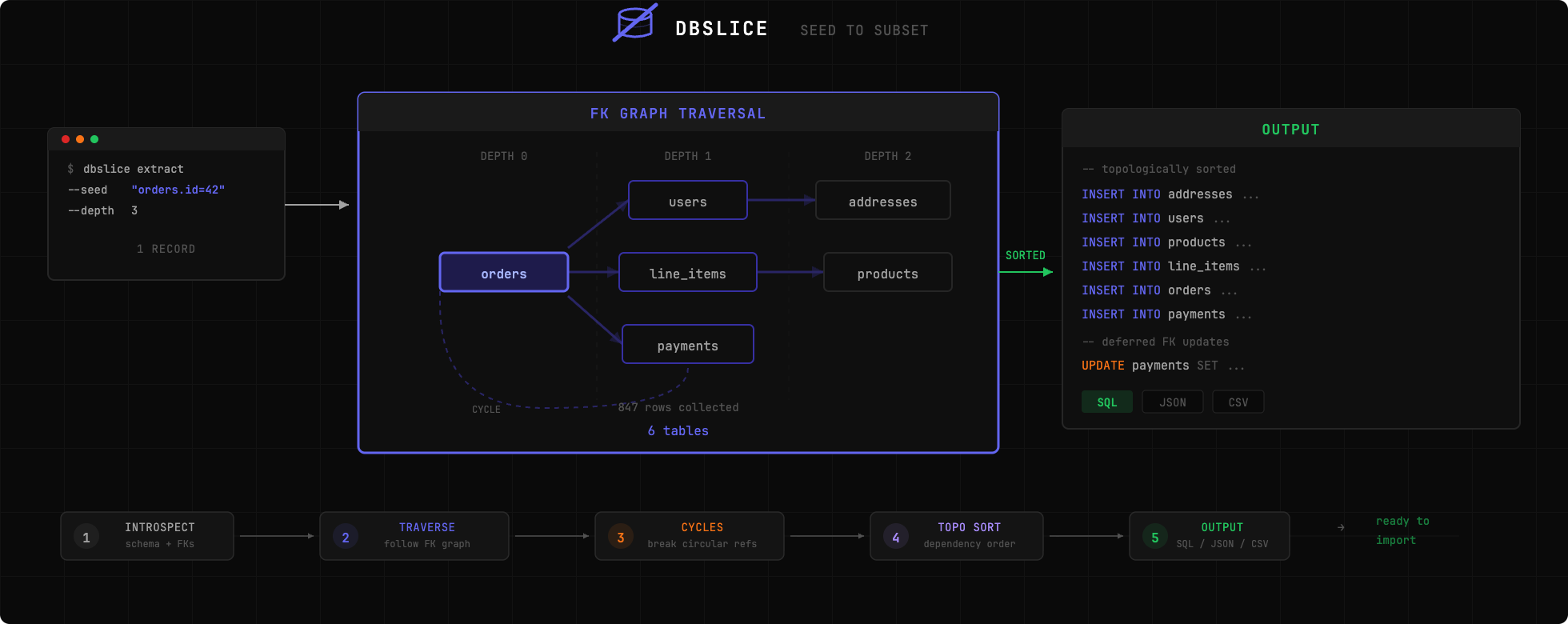
将整个生产数据库复制到您的机器上是不可行的。但复现一个错误通常需要拥有导致该错误的准确数据。dbslice 通过仅提取您需要的记录,沿着外键关系确保参照完整性,从而解决了这个问题。
快速开始
# Install globally
uv tool install dbslice   # or: pip install dbsliceExtract an order and all related records
dbslice extract postgres://localhost/myapp --seed "orders.id=12345" > subset.sqlImport into local database
psql -d localdb < subset.sql
特性
- 零配置启动 -- 自动检测模式,无需数据模型文件
- 单命令操作 -- 一条CLI命令提取完整数据子集
- 默认安全 -- 自动检测并匿名化敏感字段(邮件、电话、社会保障号等)
- 合规配置文件 -- 内置GDPR、HIPAA安全港和PCI-DSS配置文件,支持两阶段PII扫描
- 列映射界面 -- 本地浏览器UI,可视化映射列、应用合规配置并导出配置
- 多种输出格式 -- 支持SQL、JSON和CSV
- 流式处理 -- 内存高效,适合大数据集(10万+行)提取
- 虚拟外键 -- 支持Django的GenericForeignKeys及通过配置隐式关系
- 配置文件 -- 基于YAML的配置,实现可重复提取
- 验证功能 -- 检查提取数据的引用完整性
数据库支持
| 数据库 | 状态 | |------------|-----------------------| | PostgreSQL | 完全支持 | | MySQL | 计划中(尚未实现) | | SQLite | 计划中(尚未实现) |
安装
# Install with uv (recommended)
uv add dbsliceTry without installing
uvx dbslice --helpOr with pip
pip install dbslice
使用方法
基本提取
# Extract by primary key
dbslice extract postgres://user:pass@host:5432/db --seed "orders.id=12345"Extract with WHERE clause
dbslice extract postgres://localhost/db --seed "orders:status='failed' AND created_at > '2024-01-01'"Multiple seeds
dbslice extract postgres://localhost/db \
  --seed "orders.id=100" \
  --seed "orders.id=101"
控制遍历
# Limit depth (default: 3)
dbslice extract postgres://... --seed "orders.id=1" --depth 2Direction: up (parents only), down (children only), both (default)
dbslice extract postgres://... --seed "orders.id=1" --direction up
匿名化
# Auto-anonymize detected sensitive fields
dbslice extract postgres://... --seed "users.id=1" --anonymizeRedact additional fields
dbslice extract postgres://... --seed "users.id=1" --anonymize --redact "audit_logs.ip_address"
列映射界面
可视化映射列,应用合规配置文件,并生成可直接使用的配置——全部通过本地浏览器界面完成。
dbslice map postgres://localhost/myappCustom port
dbslice map postgres://localhost/myapp --port 8888Also works with uvx (no install needed)
uvx dbslice map postgres://localhost/myapp| 将列映射到匿名化规则 | 生成并导出配置 |
 |
 |
运行于 127.0.0.1:9473,使用一次性会话令牌——数据不会离开您的机器。只需一键应用 GDPR、HIPAA 或 PCI-DSS 配置文件,审核将被屏蔽的内容,然后下载 YAML 文件。
合规配置文件
# HIPAA Safe Harbor — auto-masks all 18 identifier types
dbslice extract postgres://... --seed "patients.id=1" --compliance hipaa --compliance-strictMultiple profiles + audit manifest
dbslice extract postgres://... --seed "users.id=1" --compliance gdpr --compliance pci-dss -f subset.sql
Produces subset.sql + subset.manifest.json
输出格式
# SQL (default)
dbslice extract postgres://... --seed "orders.id=1" --output sqlJSON fixtures
dbslice extract postgres://... --seed "orders.id=1" --output json --out-file fixtures/CSV
dbslice extract postgres://... --seed "orders.id=1" --output csv --out-file data/
虚拟外键
对于数据库模式中未定义的关系(Django GenericForeignKeys,隐式关系):
# dbslice.yaml
database:
url: postgres://localhost:5432/myappvirtual_foreign_keys:
- source_table: notifications
source_columns: [object_id]
target_table: orders
description: "Generic FK to orders via ContentType"- source_table: audit_log
source_columns: [user_id]
target_table: users
description: "Implicit FK without DB constraint"dbslice extract --config dbslice.yaml --seed "users.id=1"检查模式
dbslice inspect postgres://localhost/myapp配置文件
# Generate config from database
dbslice init postgres://localhost/myapp --out-file dbslice.yamlUse config
dbslice extract --config dbslice.yaml --seed "orders.id=12345"
工作原理
- 内省 -- 读取数据库模式以发现表和外键关系
- 遍历 -- 从种子记录开始,通过 BFS 追踪外键关系
- 提取 -- 获取所有识别出的记录
- 排序 -- 拓扑排序表以确保正确的 INSERT 顺序
- 输出 -- 生成带有适当转义的 SQL/JSON/CSV
比较
| 功能 | dbslice | Jailer | Greenmask | slice-db | |---------|---------|--------|-----------|----------| | 语言 | Python | Java | Go | Ruby | | 配置 | 零配置 | 需要模型文件 | 需要配置 | 手动 YAML | | 设置时间 | 几秒 | 几小时 | 中等 | 中等 | | 匿名化 | 内置(Faker) | 插件式 | 高级转换器 | 不支持 | | 合规配置 | GDPR, HIPAA, PCI-DSS | 无 | 无 | 无 | | 列映射界面 | 内置(本地) | 无 | 无 | 无 | | PII 值扫描 | 双阶段(掩码前后) | 无 | 无 | 无 | | 子集化 | 外键遍历 | 外键遍历 | 有限 | 外键遍历 | | 输出格式 | SQL, JSON, CSV | SQL, XML, CSV | SQL | 仅 SQL | | 循环处理 | 自动 | 手动配置 | 不适用 | 手动 | | 流式处理 | 内置 | 可配置 | 内置 | 不支持 | | 维护状态 | 活跃 | 活跃 | 活跃 | 不维护 |
dbslice 是轻量级、零配置的 Python 选项:安装后一分钟内即可提取。
开发
git clone https://github.com/nabroleonx/dbslice.git
cd dbslice
uv sync --dev
uv run pytest
License
MIT
--- Tranlated By Open Ai Tx | Last indexed: 2026-07-19 ---