ZenCad ====== 为正直禅意程序员设计的CAD系统
它是什么? ----------- ZenCad - 是一个用于在openscad脚本风格中使用oce几何内核的系统。 所以,它将openscad的理念、python语言和opencascade的强大功能合二为一。
手册和信息 ----------------------
- 手册: 这里。
- 文章:
- habr: 脚本式3D建模系统ZenCad
- 社区聊天(Telegram): https://t.me/zencad
安装 xcb
apt install libxcb*常见问题:
Zencad 需要 pythonocc 和 opencascade core(OCCT)。首次启动后 (输入zencad 或 python3 -m zencad 命令)
库安装工具将启动。您可以使用它来安装 pythonocc 和 OCCT。也可以手动安装这些库。
apt install qt5-default
python3 -m pip install zencad[gui]
zencad
On first launch, Zenсad will ask you to download the required libraries.
After completing the necessary operations, close the installation utility and run the program again.
zencad
无图形界面部分的安装:
安装 zencad 作为无 GUI 部分的库: ``python3 -m pip install zencadpython3 -m zencad --install-occt-force`
python3 -m zencad --install-pythonocc-force
对于 Windows:
Windows 版本的 ZenCad 需要 vcredist(微软可再发行软件包)。
请安装适用于 Python3.7 的 vcredist 2015,以及适用于 Python3.8 及更高版本的 vcredist 2019。独立发行版
-----------------------
ZenCad 有适用于 Windows 的独立版本。
Windows 预发布版本见 releases。
源码
---------------
主项目仓库:
https://github.com/mirmik/zencad
相关仓库:
https://github.com/mirmik/zenframe
https://github.com/mirmik/evalcache
HelloWorld
----------
python
#!/usr/bin/env python3
#coding: utf-8from zencad import *
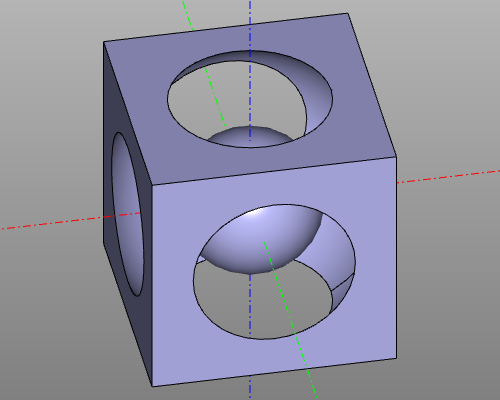
model = box(200, center = True) - sphere(120) + sphere(60)
display(m)
show()
``
Result:
--- Tranlated By Open Ai Tx | Last indexed: 2026-04-15 ---