ZenCad ====== Système CAO pour programmeurs zen vertueux
Qu'est-ce que c'est ? --------------------- ZenCad - c'est un système pour utiliser le noyau géométrique oce dans le style script d'openscad. Donc, c'est l'idée d'openscad, le langage python et la puissance d'opencascade en un seul.
Manuel et Informations ----------------------
- Manuel : ici.
- Articles :
- habr : Система скриптового 3д моделирования ZenCad
- Chat communautaire (Telegram) : https://t.me/zencad
Installer xcb
apt install libxcb*Commun :
Zencad nécessite pythonocc et noyau opencascade (OCCT). Après le premier lancement (tapez les commandeszencad ou python3 -m zencad)
l’utilitaire d’installation des bibliothèques démarrera. Vous pouvez l’utiliser pour l’installation de pythonocc et OCCT. Vous pouvez également installer les bibliothèques manuellement.
apt install qt5-default
python3 -m pip install zencad[gui]
zencad
On first launch, Zenсad will ask you to download the required libraries.
After completing the necessary operations, close the installation utility and run the program again.
zencad
Installation sans partie graphique :
Installez zencad en tant que bibliothèque sans partie gui : ``python3 -m pip install zencadpython3 -m zencad --install-occt-force`
python3 -m zencad --install-pythonocc-force
Pour Windows :
La version Windows de ZenCad nécessite vcredist (package redistribuable Microsoft).
Veuillez installer vcredist 2015 pour Python3.7 ainsi que vcredist 2019 pour Python3.8 et versions ultérieures.Distribution autonome
---------------------
ZenCad dispose d’une version autonome pour Windows.
Version préliminaire Windows dans les releases.
Code source
-----------
Dépôt principal du projet :
https://github.com/mirmik/zencad
Dépôts associés :
https://github.com/mirmik/zenframe
https://github.com/mirmik/evalcache
HelloWorld
----------
python
#!/usr/bin/env python3
#coding: utf-8from zencad import *
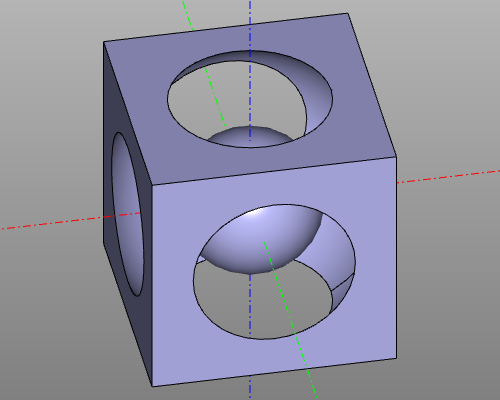
model = box(200, center = True) - sphere(120) + sphere(60)
display(model)
show()
``
Result:
--- Tranlated By Open Ai Tx | Last indexed: 2026-04-15 ---