ZenCad ====== CAD system for righteous zen programmers
What is it? ----------- ZenCad - it's a system for using the geometry core in OpenSCAD's script style. So, it's OpenSCAD idea, Python language and OpenCascade power in one.
Manual and Information ----------------------
- Manual: here.
- Articles:
- habr: Script-based 3D modeling system ZenCad
- Community chat (Telegram): https://t.me/zencad
Install xcb
apt install libxcb*Common:
Zencad needs pythonocc and opencascade core (OCCT). After the first launch (typezencad or python3 -m zencad commands)
the library installation utility will start. You can use it for pythonocc and OCCT installation. Also, you can install libraries manually.
apt install qt5-default
python3 -m pip install zencad[gui]
zencad
On first launch, Zenсad will ask you to download the required libraries.
After completing the necessary operations, close the installation utility and run the program again.
zencad
Installation without graphical part:
Install zencad as a library without the GUI part: ``python3 -m pip install zencadpython3 -m zencad --install-occt-force`
python3 -m zencad --install-pythonocc-force
For Windows:
Windows version of ZenCad requires vcredist (Microsoft Redistributable Package).
Please install vcredist 2015 for Python3.7 and also vcredist 2019 for Python3.8 and later.Standalone Distribution
-----------------------
ZenCad has a standalone version for Windows.
Windows prerelease version is available in releases.
Source code
---------------
Main project repo:
https://github.com/mirmik/zencad
Related repos:
https://github.com/mirmik/zenframe
https://github.com/mirmik/evalcache
HelloWorld
----------
python
#!/usr/bin/env python3
#coding: utf-8from zencad import *
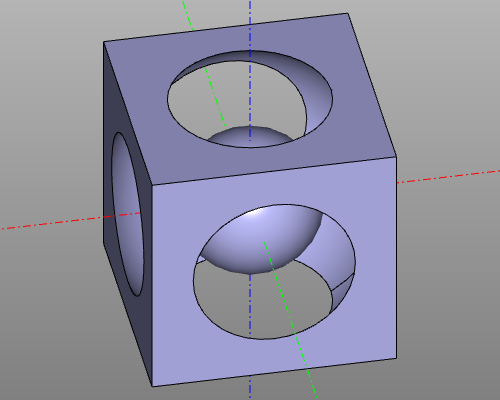
model = box(200, center = True) - sphere(120) + sphere(60)
display(m)
show()
``
Result:
--- Tranlated By Open Ai Tx | Last indexed: 2026-04-15 ---