






Einführung
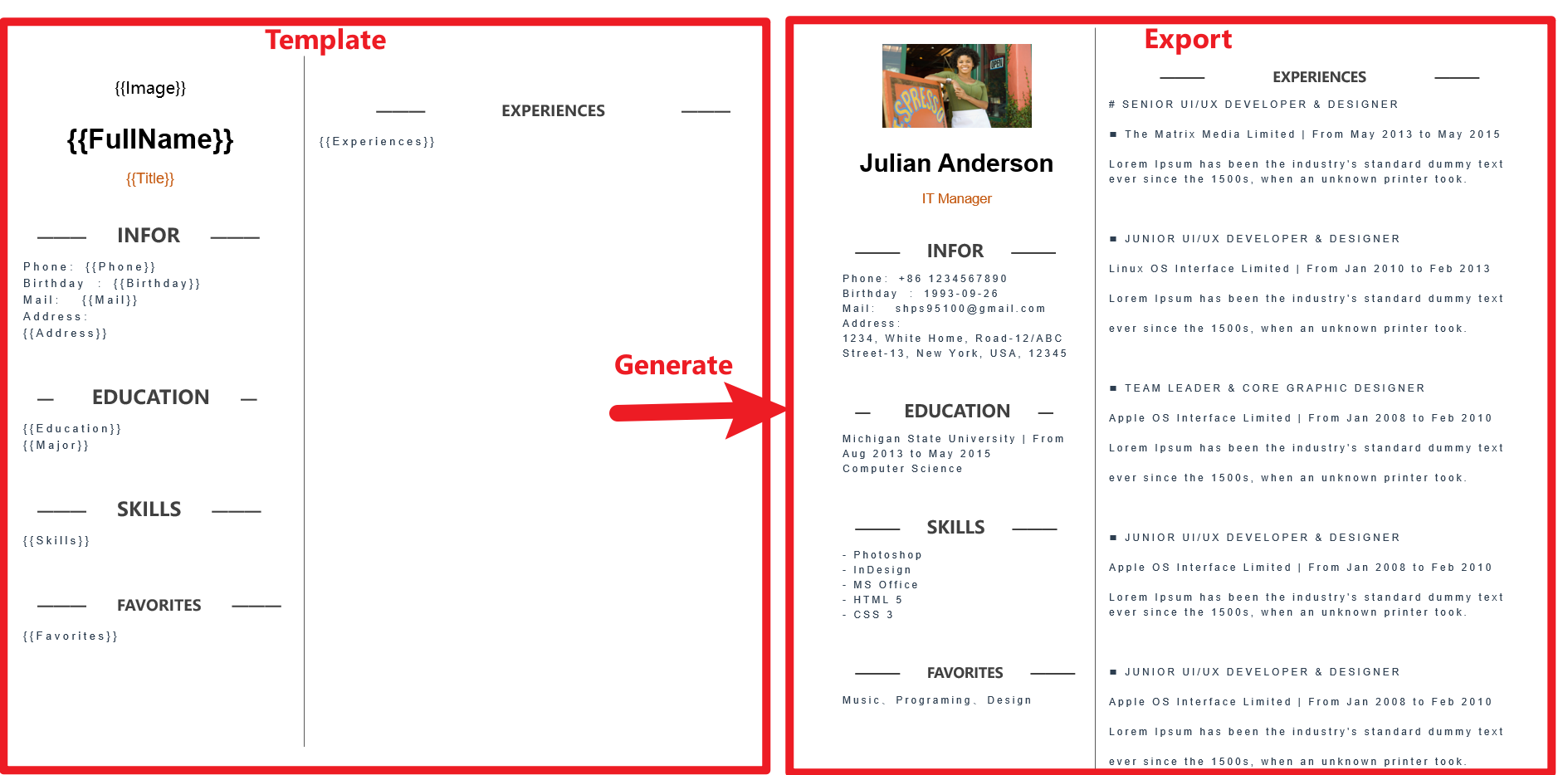
MiniWord ist eine einfache und effektive .NET Word-Template-Bibliothek.
Erste Schritte
Installation
- nuget Link : https://www.nuget.org/packages/MiniWord
Schnellstart
Vorlagen folgen dem "WHAT you see is what you get"-Prinzip, und die Tag-Stile der Vorlage bleiben vollständig erhalten.
var value = new Dictionary(){["title"] = "Hello MiniWord"};
MiniSoftware.MiniWord.SaveAsByTemplate(outputPath, templatePath, value); 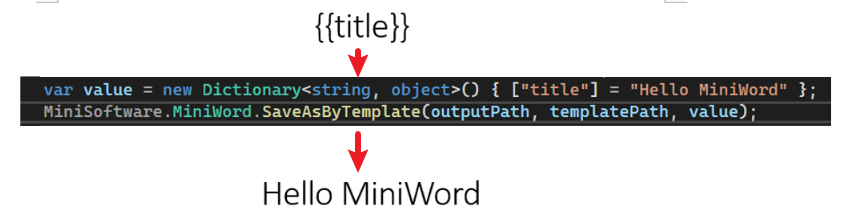
Eingabe, Ausgabe
- Eingabe unterstützt Dateipfad, byte[]
- Ausgabe unterstützt Dateipfad, byte[], Stream
SaveAsByTemplate(string path, string templatePath, Dictionary value)
SaveAsByTemplate(string path, byte[] templateBytes, Dictionary value)
SaveAsByTemplate(this Stream stream, string templatePath, Dictionary value)
SaveAsByTemplate(this Stream stream, byte[] templateBytes, Dictionary value)
Tags
MiniWord-Template-Formatzeichenfolge wie bei Vue, React {{tag}}, Benutzer müssen lediglich sicherstellen, dass Tag und Wertparameter-Schlüssel übereinstimmen, dann ersetzt das System sie automatisch.
Text
{{tag}}var value = new Dictionary()
{
["Name"] = "Jack",
["Department"] = "IT Department",
["Purpose"] = "Shanghai site needs a new system to control HR system.",
["StartDate"] = DateTime.Parse("2022-09-07 08:30:00"),
["EndDate"] = DateTime.Parse("2022-09-15 15:30:00"),
["Approved"] = true,
["Total_Amount"] = 123456,
};
MiniWord.SaveAsByTemplate(path, templatePath, value); 
##### Ergebnis

Bild
Der Werttyp ist MiniWordPicture
##### Beispiel
var value = new Dictionary()
{
    ["Logo"] = new MiniWordPicture() { Path= PathHelper.GetFile("DemoLogo.png"), Width= 180, Height= 180 }
};
MiniWord.SaveAsByTemplate(path, templatePath, value); 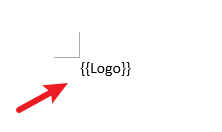
##### Ergebnis

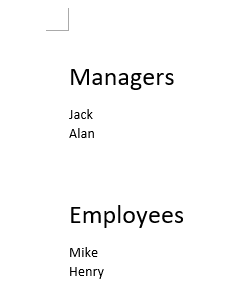
Liste
Der Tag-Wert ist vom Typ string[] oder IList
##### Beispiel
var value = new Dictionary()
{
    ["managers"] = new[] { "Jack" ,"Alan"},
    ["employees"] = new[] { "Mike" ,"Henry"},
};
MiniWord.SaveAsByTemplate(path, templatePath, value); 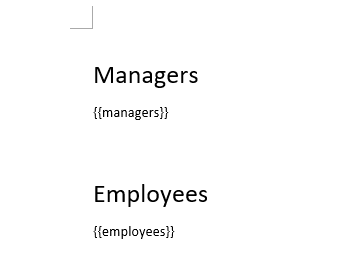
##### Ergebnis
Tabelle
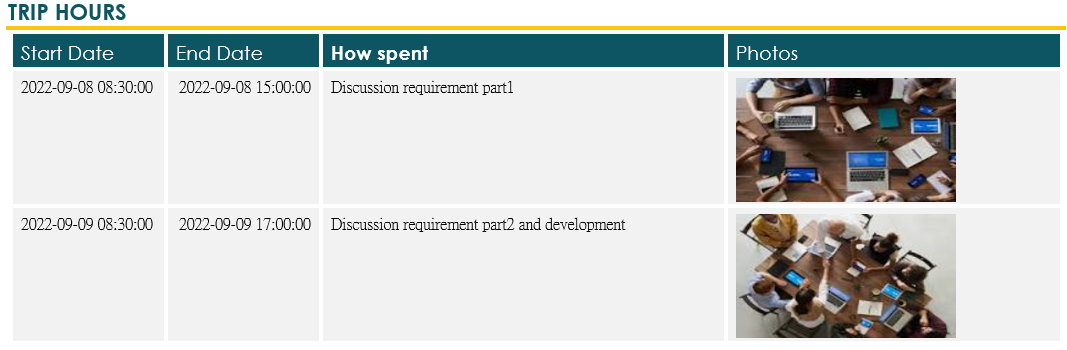
Der Tag-Wert ist vom Typ IEmerable
##### Beispiel
var value = new Dictionary()
{
    ["TripHs"] = new List>
    {
        new Dictionary
        {
            { "sDate",DateTime.Parse("2022-09-08 08:30:00")},
            { "eDate",DateTime.Parse("2022-09-08 15:00:00")},
            { "How","Discussion requirement part1"},
            { "Photo",new MiniWordPicture() { Path = PathHelper.GetFile("DemoExpenseMeeting02.png"), Width = 160, Height = 90 }},
        },
        new Dictionary
        {
            { "sDate",DateTime.Parse("2022-09-09 08:30:00")},
            { "eDate",DateTime.Parse("2022-09-09 17:00:00")},
            { "How","Discussion requirement part2 and development"},
            { "Photo",new MiniWordPicture() { Path = PathHelper.GetFile("DemoExpenseMeeting01.png"), Width = 160, Height = 90 }},
        },
    }
};
MiniWord.SaveAsByTemplate(path, templatePath, value); 
##### Ergebnis
Liste in Liste
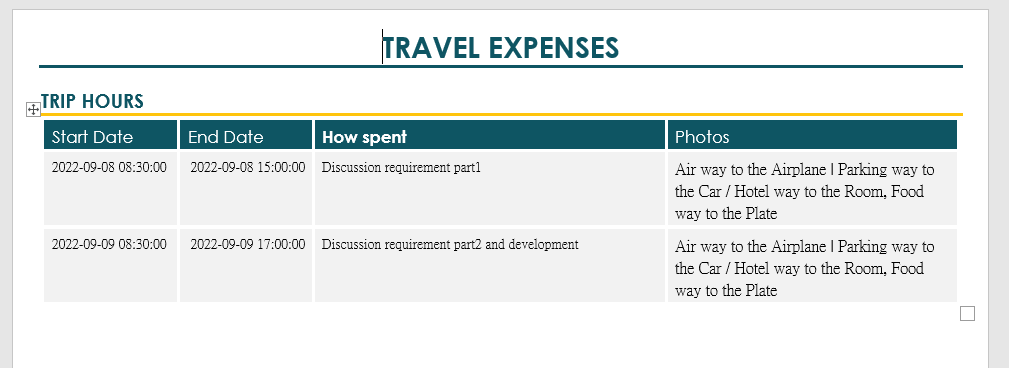
Der Tag-Wert ist vom Typ IEnumerable. Das Hinzufügen von {{foreach und endforeach}}-Tags zur Vorlage ist erforderlich.
##### Beispiel
var value = new Dictionary()
{
    ["TripHs"] = new List>
    {
        new Dictionary
        {
            { "sDate", DateTime.Parse("2022-09-08 08:30:00") },
            { "eDate", DateTime.Parse("2022-09-08 15:00:00") },
            { "How", "Discussion requirement part1" },
            {
                "Details", new List()
                {
                    new MiniWordForeach()
                    {
                        Value = new Dictionary()
                        {
                            {"Text", "Air"},
                            {"Value", "Airplane"}
                        },
                        Separator = " | "
                    },
                    new MiniWordForeach()
                    {
                        Value = new Dictionary()
                        {
                            {"Text", "Parking"},
                            {"Value", "Car"}
                        },
                        Separator = " / "
                    }
                }
            }
        }
    }
};
MiniWord.SaveAsByTemplate(path, templatePath, value); 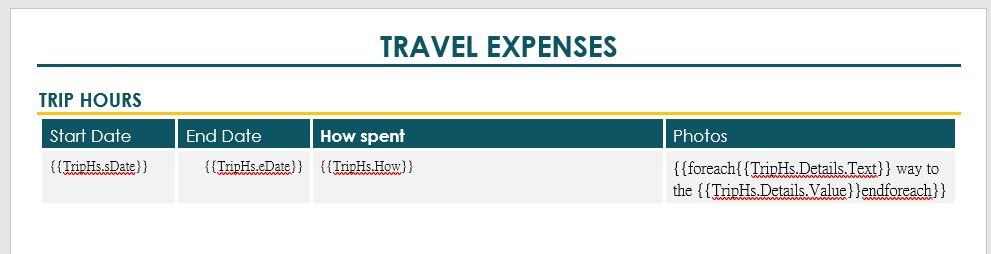
##### Ergebnis
If-Anweisung innerhalb der Vorlage
Für mehrere Absätze verwenden Sie @if und @endif Tags.
Für einzelne Absätze und innerhalb von foreach verwenden Sie {{if und endif}} Tags, um die Vorlage zu definieren.
##### Beispiel
var value = new Dictionary()
{
    ["Name"] = new List(){
        new MiniWordHyperLink(){
            Url = "https://google.com",
            Text = "測試連結22!!"
        },
        new MiniWordHyperLink(){
            Url = "https://google1.com",
            Text = "測試連結11!!"
        }
    },
    ["Company_Name"] = "MiniSofteware",
    ["CreateDate"] = new DateTime(2021, 01, 01),
    ["VIP"] = true,
    ["Points"] = 123,
    ["APP"] = "Demo APP",
};
MiniWord.SaveAsByTemplate(path, templatePath, value); 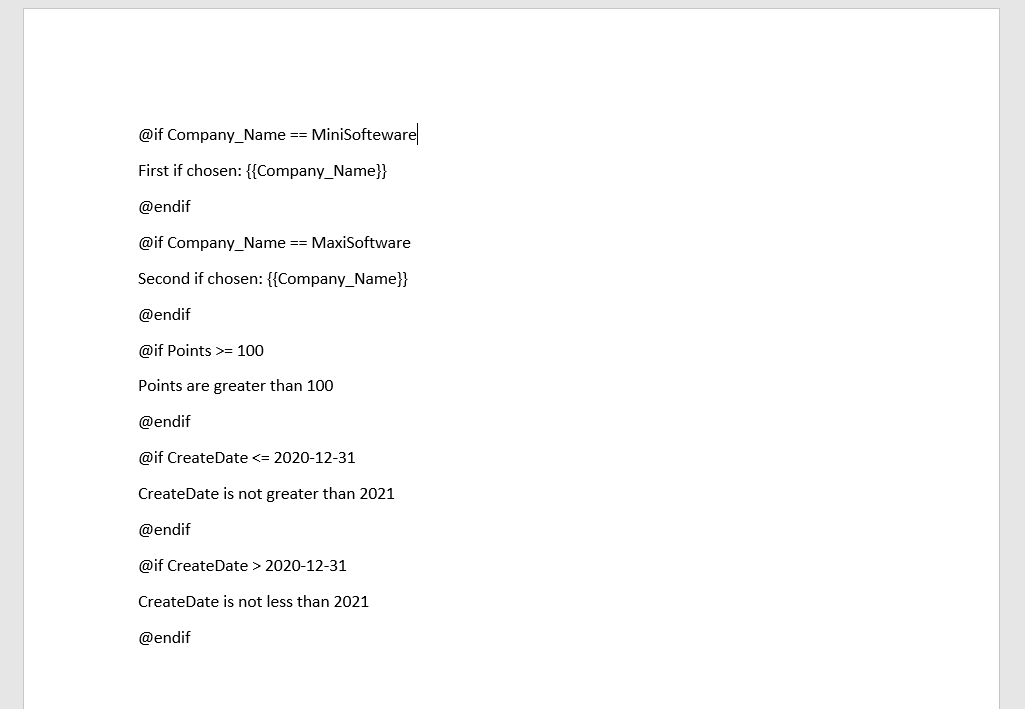
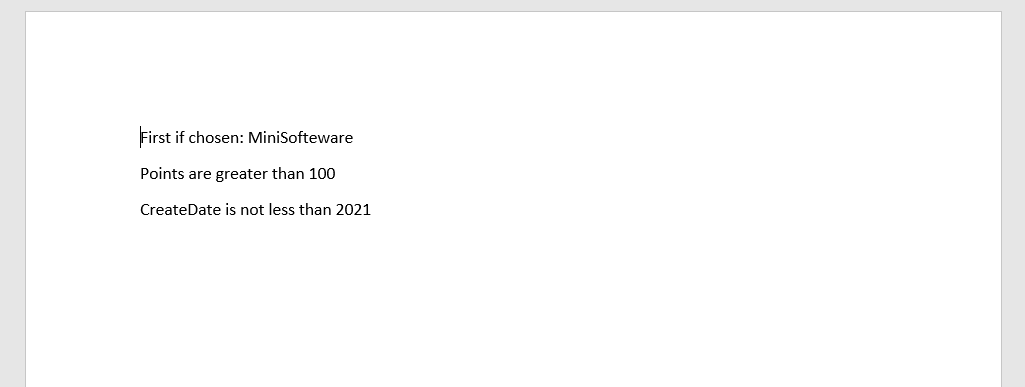
##### Ergebnis für mehrere Absätze
##### Vorlage für einen einzelnen Absatz
##### Ergebnis für einen einzelnen Absatz
ColorText
##### Beispiel
var value = new
{
    Company_Name = new MiniWordColorText { Text = "MiniSofteware", FontColor = "#eb70AB", },
    Name = new[] {
        new MiniWordColorText { Text = "Ja", HighlightColor = "#eb70AB" },
        new MiniWordColorText { Text = "ck", HighlightColor = "#a56abe" }
    },
    CreateDate = new MiniWordColorText
    {
        Text = new DateTime(2021, 01, 01).ToString(),
        HighlightColor = "#eb70AB",
        FontColor = "#ffffff",
    },
    VIP = true,
    Points = 123,
    APP = "Demo APP",
};
MiniWord.SaveAsByTemplate(path, templatePath, value);
Sonstiges
POCO- oder dynamischer Parameter
v0.5.0 unterstützt POCO- oder dynamischen Parameter
var value = new { title = "Hello MiniWord" };
MiniWord.SaveAsByTemplate(outputPath, templatePath, value);
Schriftfarbe und Hervorhebungsfarbe
var value = new
{
    Company_Name = new MiniWordColorText { Text = "MiniSofteware", FontColor = "#eb70AB" },
    Name = new MiniWordColorText { Text = "Jack", HighlightColor = "#eb70AB" },
    CreateDate = new MiniWordColorText { Text = new DateTime(2021, 01, 01).ToString(), HighlightColor = "#eb70AB", FontColor = "#ffffff" },
    VIP = true,
    Points = 123,
    APP = "Demo APP",
};
HyperLink
Wenn der Wertetyp MiniWordHyperLink ist, ersetzt das System die Vorlagenzeichenfolge durch einen Hyperlink.
- Url: HyperLink URI-Zielpfad
- Text: Beschreibung
var value = new
{
    ["Name"] = new MiniWordHyperLink(){
        Url = "https://google.com",
        Text = "Test Link!!"
    },
    ["Company_Name"] = "MiniSofteware",
    ["CreateDate"] = new DateTime(2021, 01, 01),
    ["VIP"] = true,
    ["Points"] = 123,
    ["APP"] = "Demo APP",
};
MiniWord.SaveAsByTemplate(path, templatePath, value);
Beispiele
#### ASP.NET Core 3.1 API-Export
using Microsoft.AspNetCore.Builder;
using Microsoft.AspNetCore.Hosting;
using Microsoft.AspNetCore.Mvc;
using Microsoft.Extensions.DependencyInjection;
using Microsoft.Extensions.Hosting;
using System;
using System.Collections.Generic;
using System.IO;
using System.Net;
using MiniSoftware;public class Program
{
public static void Main(string[] args) => CreateHostBuilder(args).Build().Run();
public static IHostBuilder CreateHostBuilder(string[] args) => Host.CreateDefaultBuilder(args).ConfigureWebHostDefaults(webBuilder => webBuilder.UseStartup());
}
public class Startup
{
public void ConfigureServices(IServiceCollection services) => services.AddMvc();
public void Configure(IApplicationBuilder app, IWebHostEnvironment env)
{
app.UseStaticFiles();
app.UseRouting();
app.UseEndpoints(endpoints =>
{
endpoints.MapControllerRoute(
name: "default",
pattern: "{controller=api}/{action=Index}/{id?}");
});
}
}
public class ApiController : Controller
{
public IActionResult Index()
{
return new ContentResult
{
ContentType = "text/html",
StatusCode = (int)HttpStatusCode.OK,
Content = @"
DownloadWordFromTemplatePath
DownloadWordFromTemplateBytes
"
};
} static Dictionary defaultValue = new Dictionary()
{
["title"] = "FooCompany",
["managers"] = new List> {
new Dictionary{{"name","Jack"},{ "department", "HR" } },
new Dictionary {{ "name", "Loan"},{ "department", "IT" } }
},
["employees"] = new List> {
new Dictionary{{ "name", "Wade" },{ "department", "HR" } },
new Dictionary {{ "name", "Felix" },{ "department", "HR" } },
new Dictionary{{ "name", "Eric" },{ "department", "IT" } },
new Dictionary {{ "name", "Keaton" },{ "department", "IT" } }
}
};
public IActionResult DownloadWordFromTemplatePath()
{
string templatePath = "TestTemplateComplex.docx";
Dictionary value = defaultValue;
MemoryStream memoryStream = new MemoryStream();
MiniWord.SaveAsByTemplate(memoryStream, templatePath, value);
memoryStream.Seek(0, SeekOrigin.Begin);
return new FileStreamResult(memoryStream, "application/vnd.openxmlformats-officedocument.wordprocessingml.document")
{
FileDownloadName = "demo.docx"
};
}
private static Dictionary TemplateBytesCache = new Dictionary();
static ApiController()
{
string templatePath = "TestTemplateComplex.docx";
byte[] bytes = System.IO.File.ReadAllBytes(templatePath);
TemplateBytesCache.Add(templatePath, bytes);
}
public IActionResult DownloadWordFromTemplateBytes()
{
byte[] bytes = TemplateBytesCache["TestTemplateComplex.docx"];
Dictionary value = defaultValue;
MemoryStream memoryStream = new MemoryStream();
MiniWord.SaveAsByTemplate(memoryStream, bytes, value);
memoryStream.Seek(0, SeekOrigin.Begin);
return new FileStreamResult(memoryStream, "application/vnd.openxmlformats-officedocument.wordprocessingml.document")
{
FileDownloadName = "demo.docx"
};
}
}
Unterstützung : Spendenlink
--- Tranlated By Open Ai Tx | Last indexed: 2025-07-17 ---