Cheat Sheet



An AI-powered, open-source Google Sheets competitor built with Tambo AI.
Build and manipulate interactive spreadsheets with natural language, alongside graphs and visualizations.
Demo
Try it yourself: CheatSheetPreview
https://github.com/user-attachments/assets/da72aa8b-6bc5-468e-8f42-0da685105d22Features
- Edit with AI: Use natural language to interact with a spreadsheet.
- Cell Selection: Select cells to have the AI interact with.
- Multi-Modal: Attach Images along with Messages.
- Charts and Graphs: Create visualizations from your spreadsheet data
- Model Context Protocol (MCP): Connect external data sources and tools
Roadmap
- Voice Input: Use voice input in addition to typing.
- Formula Support: Spreadsheet formulas (SUM, AVERAGE, IF, VLOOKUP, etc.)
- Better Formatting: More visual options for tables (colors, borders, fonts, alignment)
- Import/Export: CSV, XLSX, and JSON support
Get Started
- Clone this repository
- Navigate to the project directory:
cd spreadsheet-template
``
- Install dependencies:
`bash
npm install
`
- Set up your environment variables:
Option A: Using Tambo CLI (Recommended)
`bash
npx tambo init
`
This will interactively prompt you for your Tambo API key and create .env.local automatically. Option B: Manual Setup
`bash
cp example.env.local .env.local
`
Then edit .env.local and add your API key from tambo.co/dashboard.- Start the development server:
`bash
npm run dev
`- Open http://localhost:3000 in your browser to use the app!
Architecture Overview
This template shows how the AI reads and updates the spreadsheet through three ways:
How AI Accesses Spreadsheet State
Context Helpers (Read-only data)
- Gives the AI the current tab's data as a markdown table
spreadsheetSelectionContextHelper - Tells the AI what's currently selected
tabContextHelper - Lists all tabs and highlights the active tab
Runs automatically whenever you send a message
See: src/lib/spreadsheet-context-helper.ts, src/lib/spreadsheet-selection-context.ts, src/lib/tab-context-helper.tsTools (Make changes)
- Spreadsheet + tab tools for the AI to change state or inspect metadata
- Context helpers are read-only; tools make changes
- See:
, src/tools/tab-tools.tsSpreadsheet Tools Reference
| Tool | Purpose |
|------|---------|
|
| Update a single cell's value |
| updateRange | Update multiple cells at once |
| addColumn | Add a new column |
| removeColumn | Remove a column |
| addRow | Add a new row |
| removeRow | Remove a row |
| readCell | Read a single cell's value |
| readRange | Read multiple cells |
| clearRange | Clear cell values in a range |
| sortByColumn | Sort rows by column values |Key Files
Configuration
src/lib/tambo.ts - Component and tool registration
src/app/chat/page.tsx - Main chat interface with TamboProviderSpreadsheet System
src/components/ui/spreadsheet-tabs.tsx - FortuneSheet workbook wrapper + tab UI
src/lib/fortune-sheet-store.tsx - In-memory global store wiring workbook state
src/lib/fortune-sheet-utils.ts - FortuneSheet-centric helpers (ranges, lookups)State Management
src/lib/canvas-storage.ts - Canvas/tab state management
Spreadsheet state flows through the FortuneSheet provider and workbook APIs. Note on Dependencies: FortuneSheet (
@fortune-sheet/{core,react}) powers all spreadsheet interactions.Customizing
Adding Custom Components
Register components in
src/lib/tambo.ts that the AI can render inline in chat. Example structure:
const components: TamboComponent[] = [ { name: "MyComponent", description: "When to use this component", component: MyComponent, propsSchema: myComponentSchema, // Zod schema }, ];
tsx export const myTool = { name: "toolName", description: "What this tool does", tool: async (param: string) => { // Implementation return { success: true, message: "Result" }; }, toolSchema: z.function().args( z.string().describe("Parameter description") ).returns(z.object({ success: z.boolean(), message: z.string().optional(), })), }; `Seesrc/components/tambo/for component examples and Tambo Components docs for detailed guidance.src/tools/Creating Custom Tools
Add tools in
following this pattern:
Register in src/lib/tambo.ts tools array. See Tambo Tools docs for details.Model Context Protocol (MCP)
Configure MCP servers via the settings modal to connect external data sources. Servers are stored in browser localStorage and wrapped with
TamboMcpProvider` in the chat interface.Documentation
Learn more about Tambo:
Built with Tambo AI - A framework for building AI-powered UIs. Tambo is open source: tambo-ai/tambo.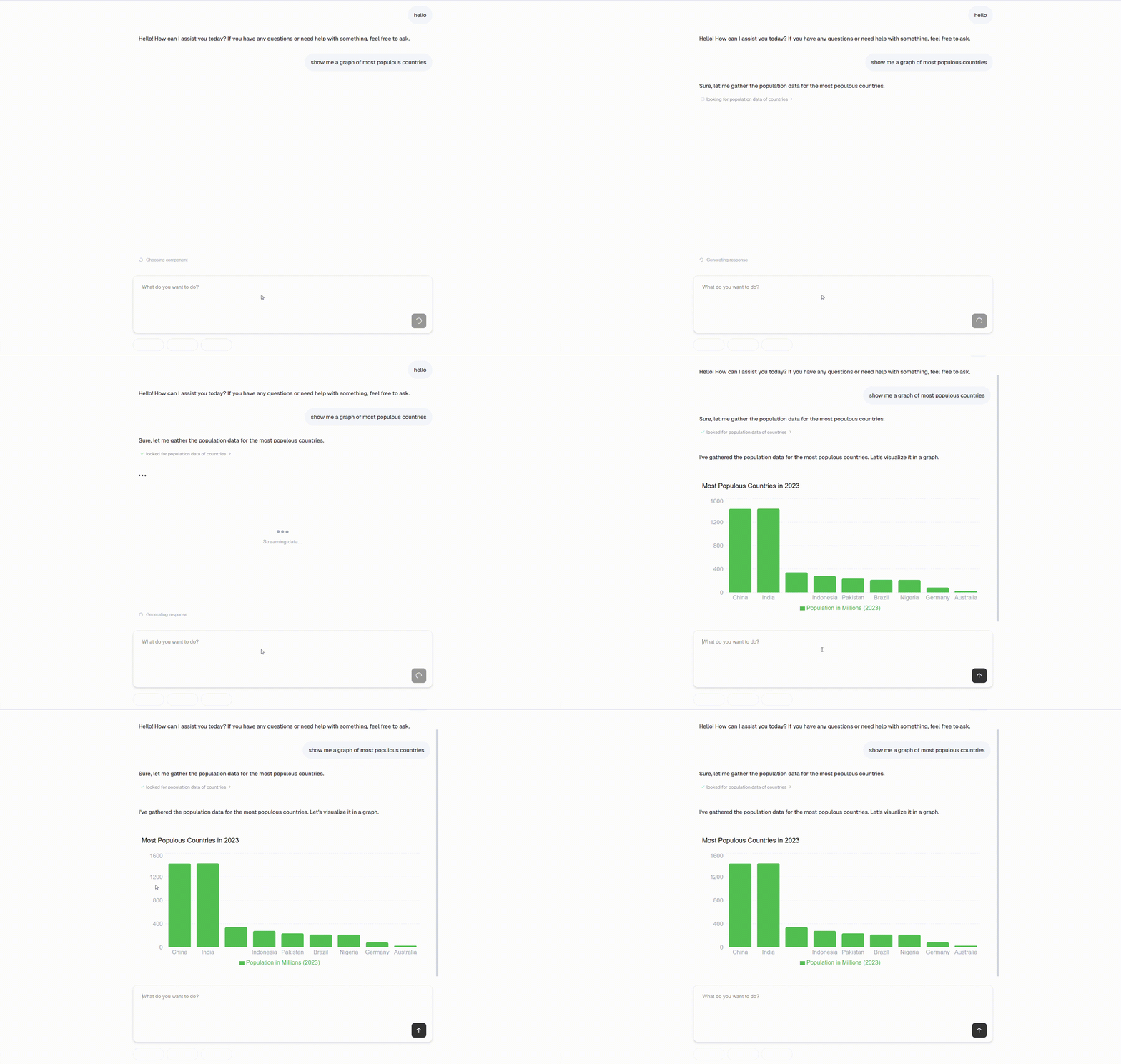
Contributing
Contributions welcome! See CONTRIBUTING.md for guidelines.
License
MIT License
--- Tranlated By Open Ai Tx | Last indexed: 2026-01-15 ---