macOS Config
macOS Config is an open-source project designed to streamline the setup of your MacBook with custom settings, program installations, and wallpapers. Built using shell scripts, this tool automates the process of configuring your macOS environment for productivity and ricing.
- Specifically designed for macOS customization and ricing.
- Includes
.shscripts to install all programs you need for work. - Applies your custom settings for installed programs automatically.
- Adds your favorite wallpapers for a personalized macOS experience.
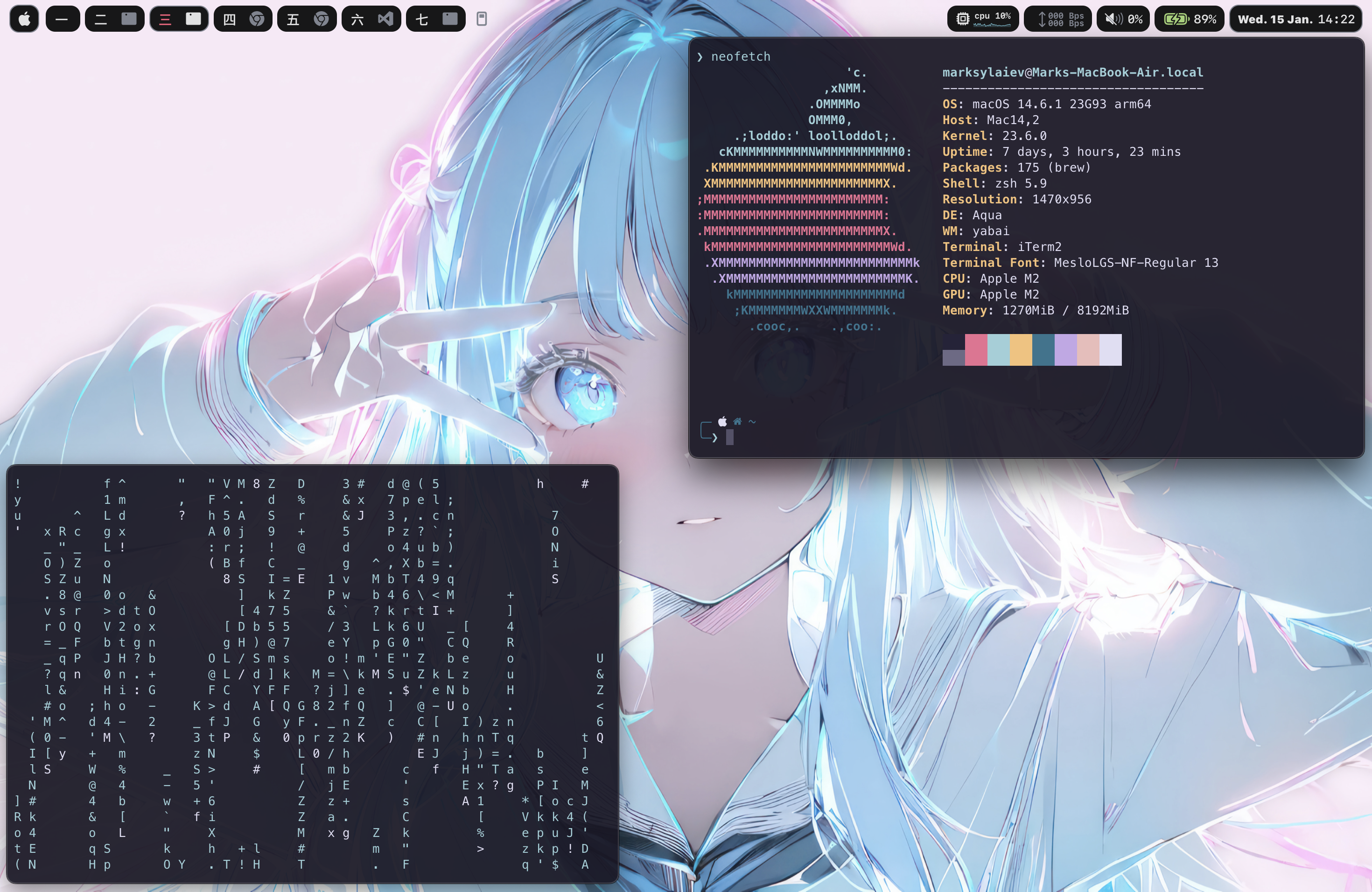
🖼️ Preview
🛠️ 安装
要安装此项目,请在系统上启动终端应用程序,然后运行以下命令。
- 如果在运行第一个命令后弹出提示下载 Xcode 命令行工具的窗口,请点击“下载”,然后再次运行第一个命令。
- 克隆仓库
git clone https://github.com/marsdevx/macOS-config.git ~/Downloads/macOS-config- 安装 Homebrew
/bin/bash -c "$(curl -fsSL https://raw.githubusercontent.com/Homebrew/install/HEAD/install.sh)"
echo 'eval "$(/opt/homebrew/bin/brew shellenv)"' >> ~/.zshrc
eval "$(/opt/homebrew/bin/brew shellenv)"- 禁用桌面图标
defaults write com.apple.finder CreateDesktop false; killall Finder- 创建配置目录
mkdir -p ~/.config- 更新系统设置
- 辅助功能与控制中心
- 系统设置 -> 辅助功能 -> 显示 -> 减少动态效果 -> 开
- 系统设置 -> 控制中心 -> 自动隐藏和显示菜单栏 -> 始终
- 桌面与坞站
- 系统设置 -> 桌面与坞站 -> 自动隐藏和显示坞站 -> 开
- 系统设置 -> 桌面与坞站 -> 根据最近使用自动重新排列空间 -> 关
- 系统设置 -> 桌面与坞站 -> 切换到应用时切换到空间... -> 关
- 系统设置 -> 桌面与坞站 -> 按应用分组窗口 -> 关
- 系统设置 -> 桌面与坞站 -> 显示器拥有独立空间 -> 开
- 键盘
- 系统设置 -> 键盘 -> 键盘快捷键 -> Spotlight -> 显示Spotlight搜索 -> 关
- 系统设置 -> 键盘 -> 键盘快捷键 -> Spotlight -> 显示Finder搜索窗口 -> 关
- 系统设置 -> 键盘 -> 键盘快捷键 -> 任务控制 -> 切换到桌面1 -> 开
- 系统设置 -> 键盘 -> 键盘快捷键 -> 任务控制 -> 切换到桌面2 -> 开
- 系统设置 -> 键盘 -> 键盘快捷键 -> 任务控制 -> 切换到桌面3 -> 开
- 系统设置 -> 键盘 -> 键盘快捷键 -> 任务控制 -> 切换到桌面4 -> 开
- 系统设置 -> 键盘 -> 键盘快捷键 -> 任务控制 -> 切换到桌面5 -> 开
🚀 使用
- 循环
zsh ~/Downloads/macOS-config/loop.sh- 运行脚本后,使用以下设置配置 Loop 应用
- 主题颜色 -> 壁纸 -> 渐变 -> 开启
- 行为 -> 登录时启动 -> 开启
- 行为 -> 动画速度 -> 平滑
- 行为 -> 包含内边距 -> 开启 -> 配置内边距 -> 7px
- 行为 -> 使用光标所在屏幕 -> 关闭
- 快捷键 -> 居中 -> 移除
- 快捷键 -> 添加 -> 通用 -> macOS 居中 -> Fn + Enter
- Raycast
zsh ~/Downloads/macOS-config/raycast.sh- 运行脚本后,使用以下设置配置 Raycast 应用
- 点击开始设置 -> 继续。
- 设置新的快捷键:录制新快捷键 -> 指定 Cmd + 空格。
- 点击继续以完成设置。
- Sketchybar
zsh ~/Downloads/macOS-config/sketchybar.sh- SKHD
zsh ~/Downloads/macOS-config/skhd.sh- Yabai
zsh ~/Downloads/macOS-config/yabai.sh- Iterm
- 安装 Oh My Zsh
sh -c "$(curl -fsSL https://raw.githubusercontent.com/ohmyzsh/ohmyzsh/master/tools/install.sh)"- 为 Oh My Zsh 安装主题
git clone https://github.com/romkatv/powerlevel10k.git $ZSH_CUSTOM/themes/powerlevel10k- 安装并设置 Iterm2
zsh ~/Downloads/macOS-config/iterm.sh- 更新 zshrc
source ~/.zshrc- 配置 Powerlevel10k
- 风格:Lean
- 字符集:Unicode
- 颜色方案:8 色
- 提示符分隔符:无
- 布局:两行
- 连接状态:断开
- 提示符对齐:左对齐
- 强调色:蓝色
- 提示符密度:稀疏
- 图标风格:多图标
- 提示符风格:简洁
- 即时提示:是
- 冗长度:详细
- 配置 iTerm2
- 打开 iTerm2 并进入设置。
- 通用 -> 关闭 -> 确认“退出 iTerm2(CmdQ)” -> 关闭
- 外观 -> 通用 -> 主题:Minimal
- 外观 -> 通用 -> 顶部栏位置:底部
- 外观 -> 窗口 -> 隐藏滚动条 -> 开启
- 外观 -> 窗口 -> 标题栏下显示线条 ... -> 关闭
- 外观 -> 面板 -> 侧边距:8
- 外观 -> 面板 -> 上下边距:12
- 配置文件 -> 颜色 -> 颜色预设 -> 导入 -> 下载 -> rose-pine.itermcolors
- 配置文件 -> 颜色 -> 颜色预设 -> rose-pine
- 配置文件 -> 窗口 -> 透明度:7
- 配置文件 -> 文字 -> 字体 -> MesloLGS NF
- 配置文件 -> 文字 -> 字号 -> 13
- 配置文件 -> Shell 集成 -> 显示标记指示器 -> 关闭
- 壁纸
- 打开系统设置
- 壁纸 -> 添加文件夹或相册 -> 选择文件夹 -> 下载 -> macOS-config -> wallpapers
- 点击页面底部的壁纸文件夹
- 调整设置:
- 随机播放:每分钟
- 在所有空间显示:开启
📋 许可协议
本仓库中的所有代码均遵循MIT 许可证授权。
MIT LicenseCopyright (c) 2025 marsdevx
Permission is hereby granted, free of charge, to any person obtaining a copy
of this software and associated documentation files (the "Software"), to deal
in the Software without restriction, including without limitation the rights
to use, copy, modify, merge, publish, distribute, sublicense, and/or sell
copies of the Software, and to permit persons to whom the Software is
furnished to do so, subject to the following conditions:
The above copyright notice and this permission notice shall be included in all
copies or substantial portions of the Software.
THE SOFTWARE IS PROVIDED "AS IS", WITHOUT WARRANTY OF ANY KIND, EXPRESS OR
IMPLIED, INCLUDING BUT NOT LIMITED TO THE WARRANTIES OF MERCHANTABILITY,
FITNESS FOR A PARTICULAR PURPOSE AND NONINFRINGEMENT. IN NO EVENT SHALL THE
AUTHORS OR COPYRIGHT HOLDERS BE LIABLE FOR ANY CLAIM, DAMAGES OR OTHER
LIABILITY, WHETHER IN AN ACTION OF CONTRACT, TORT OR OTHERWISE, ARISING FROM,
OUT OF OR IN CONNECTION WITH THE SOFTWARE OR THE USE OR OTHER DEALINGS IN THE
SOFTWARE.
⭐ 支持
如果你喜欢这个项目,别忘了给它点 ⭐ 星标 并 关注 我! 你的 支持 帮助我创造更多项目。🚀
🔗 在 GitHub 上探索我的更多作品,发现其他精彩项目! --- Tranlated By Open Ai Tx | Last indexed: 2026-03-05 ---