⚠️ 警告: 本自述文件略显过时。教程部分可能与 Guifier V2 不匹配。更新的文档即将发布。
Guifier
一个交互式前端工具包,简化 JSON、YAML、TOML 和 XML 数据。可视化、编辑并执行实时数据操作。为您的数据驱动应用提供用户友好的数据处理和交互式可视化功能。
快速开始
安装
在您的 npm 项目中执行此命令,即可轻松安装 guifier。npm install guifier导入
import Guifier from 'guifier'你好,世界示例
下面,您将看到一个示例,演示如何根据您提供给Guifier类的数据生成HTML表示。const jsonString = '{
"name": "Alice",
"age": 25,
"isStudent": true,
"hobbies": ["reading", "painting"],
"address": {
"city": "London",
"zipcode": "SW1A 1AA",
"country": "United Kingdom"
}
}'const params = {
// To select a container element, you can use a selector
// such as a hashtag followed by the element's id (similar to CSS selectors).
elementSelector: '#app',
// Here, you need to specify the JSON string.
data: jsonString,
// You should specify the data type (in this case, JSON)
// as Guifier supports five data formats: 'json', 'yaml', 'xml', 'toml' and 'js' (javascipt object).
dataType: 'json'
}
const guifier = new Guifier(params)
That's it! When you execute this code, it will parse your data, generate an HTML GUI, and paste it into the element you selected using the elementSelector property of the params.
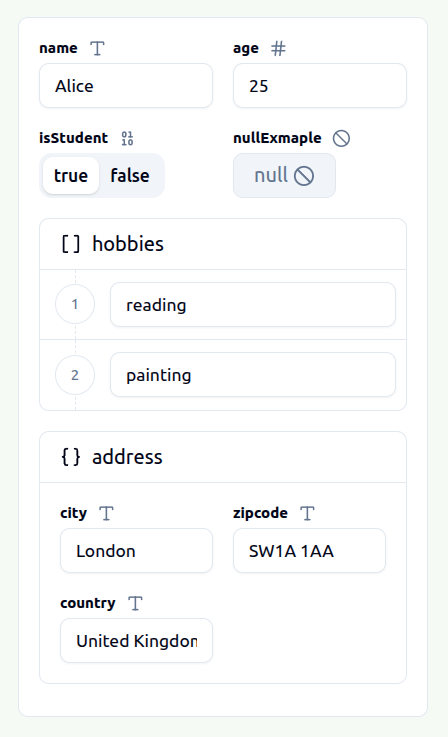
This GUI will allow you to visualize and edit your JSON data easily. Once you've made the necessary modifications, you can obtain the edited version of your JSON data simply by executing this Guifier method.
// The first parameter is used to indicate the data format in which you wish to receive your data.
const editedData = guifier.getData('json')如果您希望修改 GUI 表示中显示的数据,可以执行该方法。
// The first parameter is used to indicate the data format in which you wish to set your data.
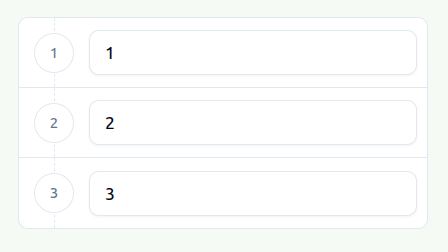
guifier.setData('[1,2,3]', 'json')
After executing this method, your GUI representation element will be updated to accommodate your new data.
--- Tranlated By Open Ai Tx | Last indexed: 2026-04-02 ---