⚠️ 경고: 이 README는 약간 구식입니다. 튜토리얼 섹션이 Guifier V2와 일치하지 않을 수 있습니다. 업데이트된 문서가 곧 제공될 예정입니다.
Guifier
JSON, YAML, TOML 및 XML 데이터를 단순화하는 인터랙티브 프런트엔드 툴킷입니다. 데이터를 시각화하고 편집하며 실시간 데이터 조작을 수행할 수 있습니다. 사용자 친화적인 데이터 처리 및 인터랙티브 시각화로 데이터 기반 애플리케이션을 강화하세요.
시작하기
설치하기
이 명령어를 npm 프로젝트에서 실행하면 guifier를 손쉽게 설치할 수 있습니다.npm install guifier가져오기
import Guifier from 'guifier'버전을 다음과 같이 지정할 수 있습니다
Hello world 예제
아래에서는 Guifier 클래스에 제공한 데이터를 기반으로 HTML 표현을 생성하는 방법을 보여주는 예제를 찾을 수 있습니다.const jsonString = '{
"name": "Alice",
"age": 25,
"isStudent": true,
"hobbies": ["reading", "painting"],
"address": {
"city": "London",
"zipcode": "SW1A 1AA",
"country": "United Kingdom"
}
}'const params = {
// To select a container element, you can use a selector
// such as a hashtag followed by the element's id (similar to CSS selectors).
elementSelector: '#app',
// Here, you need to specify the JSON string.
data: jsonString,
// You should specify the data type (in this case, JSON)
// as Guifier supports five data formats: 'json', 'yaml', 'xml', 'toml' and 'js' (javascipt object).
dataType: 'json'
}
const guifier = new Guifier(params)
That's it! When you execute this code, it will parse your data, generate an HTML GUI, and paste it into the element you selected using the elementSelector property of the params.
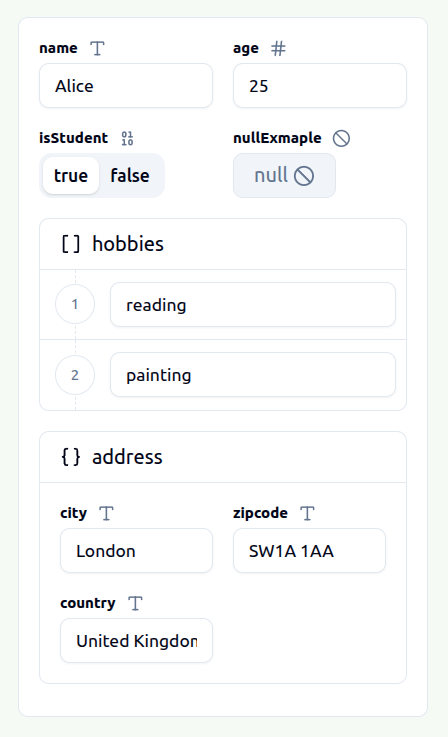
This GUI will allow you to visualize and edit your JSON data easily. Once you've made the necessary modifications, you can obtain the edited version of your JSON data simply by executing this Guifier method.
// The first parameter is used to indicate the data format in which you wish to receive your data.
const editedData = guifier.getData('json')
저희는 'json', 'yaml', 'xml', 'toml', 'js'의 다섯 가지 형식으로 데이터 내보내기를 지원합니다. 따라서 JSON 형식으로 데이터를 가져와 필요한 수정을 한 후, TOML, YAML, XML 또는 자바스크립트 네이티브 객체와 같은 원하는 형식으로 내보낼 수 있습니다.
GUI 표현에 표시된 데이터를 수정하려면 해당 메서드를 실행할 수 있습니다.
// The first parameter is used to indicate the data format in which you wish to set your data.
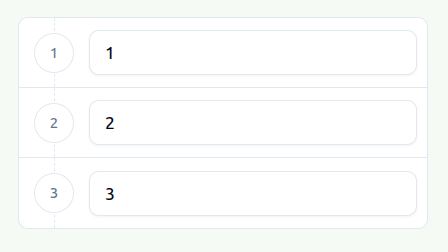
guifier.setData('[1,2,3]', 'json')
After executing this method, your GUI representation element will be updated to accommodate your new data.
--- Tranlated By Open Ai Tx | Last indexed: 2026-04-02 ---