⚠️ 警告: このREADMEはやや古くなっています。チュートリアルの内容がGuifier V2と一致しない場合があります。更新されたドキュメントは間もなく公開予定です。
Guifier
JSON、YAML、TOML、XMLデータを簡単に扱えるインタラクティブなフロントエンドツールキットです。データの可視化、編集、リアルタイム操作が可能です。ユーザーフレンドリーなデータ処理とインタラクティブな可視化で、データ駆動型アプリを強化します。
はじめに
インストール
npmプロジェクトでこのコマンドを実行するだけで、簡単にguifierをインストールできます。npm install guifierインポート
import Guifier from 'guifier'このようにバージョンを指定できます
Hello worldの例
以下に、Guifierクラスに提供したデータに基づいてHTML表現を生成する方法の例を示します。const jsonString = '{
"name": "Alice",
"age": 25,
"isStudent": true,
"hobbies": ["reading", "painting"],
"address": {
"city": "London",
"zipcode": "SW1A 1AA",
"country": "United Kingdom"
}
}'const params = {
// To select a container element, you can use a selector
// such as a hashtag followed by the element's id (similar to CSS selectors).
elementSelector: '#app',
// Here, you need to specify the JSON string.
data: jsonString,
// You should specify the data type (in this case, JSON)
// as Guifier supports five data formats: 'json', 'yaml', 'xml', 'toml' and 'js' (javascipt object).
dataType: 'json'
}
const guifier = new Guifier(params)
That's it! When you execute this code, it will parse your data, generate an HTML GUI, and paste it into the element you selected using the elementSelector property of the params.
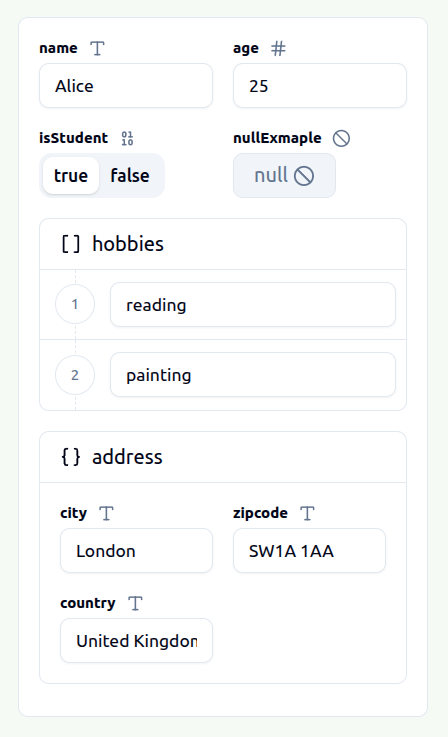
This GUI will allow you to visualize and edit your JSON data easily. Once you've made the necessary modifications, you can obtain the edited version of your JSON data simply by executing this Guifier method.
// The first parameter is used to indicate the data format in which you wish to receive your data.
const editedData = guifier.getData('json')
私たちは、データのエクスポートを「json」、「yaml」、「xml」、「toml」、「js」の5つの形式でサポートしています。したがって、データをJSONとしてインポートし、必要な編集を行った後、TOML、YAML、XML、またはネイティブのJavaScriptオブジェクトなど、希望の形式でエクスポートできます。
GUI表示のデータを変更したい場合は、メソッドを実行できます。
// The first parameter is used to indicate the data format in which you wish to set your data.
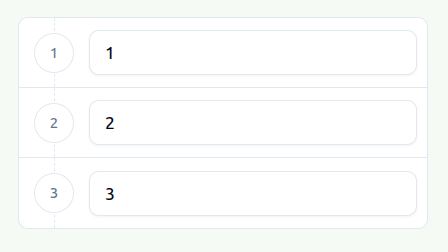
guifier.setData('[1,2,3]', 'json')
After executing this method, your GUI representation element will be updated to accommodate your new data.
--- Tranlated By Open Ai Tx | Last indexed: 2026-04-02 ---