⚠️ Advertencia: Este README está ligeramente desactualizado. Las secciones del tutorial pueden no coincidir con Guifier V2. Los documentos actualizados llegarán pronto.
Guifier
Un conjunto de herramientas front-end interactivo que simplifica datos en JSON, YAML, TOML y XML. Visualiza, edita y realiza manipulaciones de datos en tiempo real. Potencia tus aplicaciones basadas en datos con procesamiento de datos fácil de usar y visualización interactiva.
Comenzando
Instalación
Ejecutando este comando en tu proyecto npm, puedes instalar guifier sin esfuerzo.npm install guifierImportación
import Guifier from 'guifier'Puedes especificar una versión así
Ejemplo Hola mundo
A continuación, encontrarás un ejemplo que demuestra cómo generar una representación HTML basada en los datos que proporcionaste a la clase Guifier.const jsonString = '{
"name": "Alice",
"age": 25,
"isStudent": true,
"hobbies": ["reading", "painting"],
"address": {
"city": "London",
"zipcode": "SW1A 1AA",
"country": "United Kingdom"
}
}'const params = {
// To select a container element, you can use a selector
// such as a hashtag followed by the element's id (similar to CSS selectors).
elementSelector: '#app',
// Here, you need to specify the JSON string.
data: jsonString,
// You should specify the data type (in this case, JSON)
// as Guifier supports five data formats: 'json', 'yaml', 'xml', 'toml' and 'js' (javascipt object).
dataType: 'json'
}
const guifier = new Guifier(params)
That's it! When you execute this code, it will parse your data, generate an HTML GUI, and paste it into the element you selected using the elementSelector property of the params.
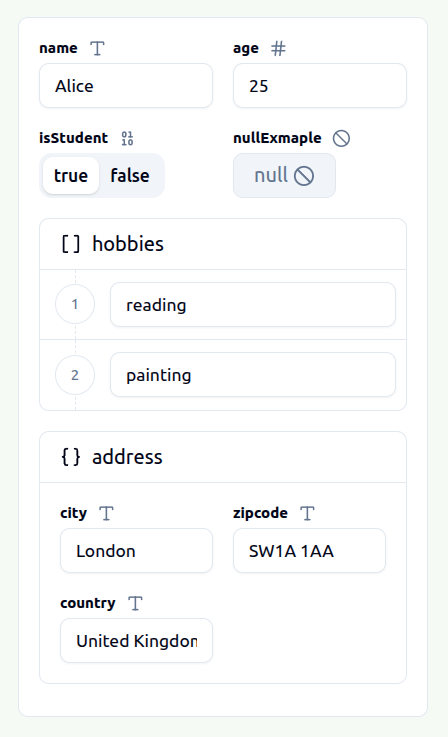
This GUI will allow you to visualize and edit your JSON data easily. Once you've made the necessary modifications, you can obtain the edited version of your JSON data simply by executing this Guifier method.
// The first parameter is used to indicate the data format in which you wish to receive your data.
const editedData = guifier.getData('json')Si desea modificar los datos que se muestran en la representación GUI, puede ejecutar el método.
// The first parameter is used to indicate the data format in which you wish to set your data.
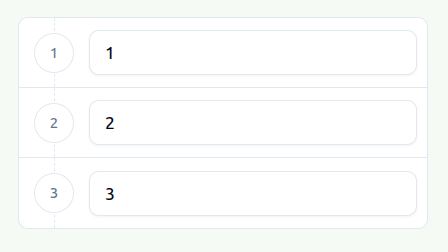
guifier.setData('[1,2,3]', 'json')
After executing this method, your GUI representation element will be updated to accommodate your new data.
--- Tranlated By Open Ai Tx | Last indexed: 2026-04-02 ---