Partition Kit

最近登上了十月安卓和iOS十大流行库以及5个提升你应用的iOS库!

什么是 PartitionKit?
- 它是满足 SwiftUI 中可组合且动态大小用户界面内容需求的解决方案。
- 也是我首次将软件做成库的作品,请多包涵(无论是使用场景还是对我的心情)。
- PartitionKit 不是用于处理任何形式存储数据的工具,这不是用来分区硬盘或任何其他类型可格式化数据驱动器的。
要求
PartitionKit 默认需要 SwiftUI 框架支持,因此仅支持以下平台:
- macOS 10.15 或更高版本
- iOS 13 或更高版本
- tvOS 13 或更高版本
- watchOS 6 或更高版本
如何添加到你的项目
- 从 GitHub 仓库获取那个 URL
- 在 Xcode 中 -> 文件 -> Swift Packages -> 添加包依赖
- 粘贴 URL 到输入框
- 指定最低版本号(这是新功能,因此 1.0.0 及以上版本均可)。
少于两分钟的教程视频
如何使用
垂直分区
- 决定您希望将哪个视图放在“顶部”,哪个视图放在“底部”,以及可选的用于拖动分区调整大小的“手柄”。
- 执行此操作
Swift
VPart(top: {
MyTopView()
}, bottom: {
MyBottomView()
}) {
MyHandle()
}
水平分区
- 决定您希望在“左侧”显示的视图,您希望在“右侧”显示的视图,以及可选的用于拖动分区调整大小的“手柄”。
- 执行此操作
Swift
HPart(left: {
MyLeftView()
}, right: {
MyRightView()
}) {
MyHandle()
}
GridPartition
- 决定哪些视图将放置在每个角落
TopLeft、TopRight、BottomLeft、BottomRight,以及可选的一个用于用户拖动和调整视图大小的 Handle。
执行此操作
Swift
GridPart(topLeft: {
MyTopLeftView()
}, topRight: {
MyTopRightView()
}, bottomLeft: {
MyBottomLeftView()
}, bottomRight: {
MyBottomRightView()
}) {
MyHandle()
}
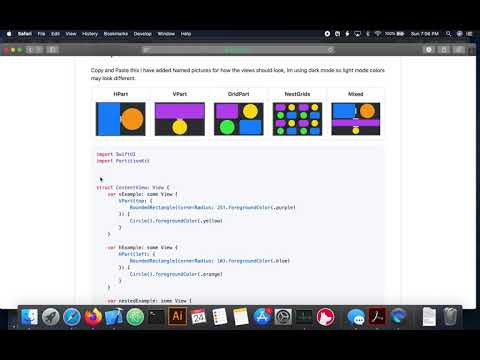
## 示例复制并粘贴此内容,我添加了命名图片以展示视图应有的外观,我使用的是暗模式,因此浅色模式的颜色可能看起来不同。
| H部分 | V部分 | 网格部分 | 嵌套网格 | 混合 |
|-------------------------|-------------------------|-------------------------------|----------------------------------------|-----------------------------|
|  |
|  |
|  |
|  |
|  |
|
Swift
import SwiftUI
import PartitionKitstruct ContentView: View {
var vExample: some View {
VPart(top: {
RoundedRectangle(cornerRadius: 25).foregroundColor(.purple)
}) {
Circle().foregroundColor(.yellow)
}
}
var hExample: some View {
HPart(left: {
RoundedRectangle(cornerRadius: 10).foregroundColor(.blue)
}) {
Circle().foregroundColor(.orange)
}
}
var nestedExample: some View {
VPart(top: {
hExample
}) {
vExample
}
}
var gridExample: some View {
GridPart(topLeft: {
RoundedRectangle(cornerRadius: 25).foregroundColor(.purple)
}, topRight: {
Circle().foregroundColor(.yellow)
}, bottomLeft: {
Circle().foregroundColor(.green)
}) {
RoundedRectangle(cornerRadius: 25).foregroundColor(.blue)
}
}
var nestedGridsExample: some View {
GridPart(topLeft: {
gridExample
}, topRight: {
gridExample
}, bottomLeft: {
gridExample
}) {
gridExample
}
}
var body: some View {
nestedExample
}
}
struct ContentView_Previews: PreviewProvider {
static var previews: some View {
ContentView()
}
}
`
待办事项
- 添加约束,防止分区在拖动手柄超出容器框架时导致负帧值从而反转视图
- 增加初始布局的自定义功能
- 添加一种
List`样式的网格集合布局,可通过可识别数据元素列表初始化
--- Tranlated By Open Ai Tx | Last indexed: 2026-05-11 ---