핀치
핀치는 안드로이드 앱 개발을 위한 맞춤형 디버그 메뉴를 제공합니다. 프로덕션 코드에 영향을 미치지 않습니다. 개발자는 간단한 단계로 자신만의 맞춤 디버깅 기능을 쉽게 추가할 수 있습니다.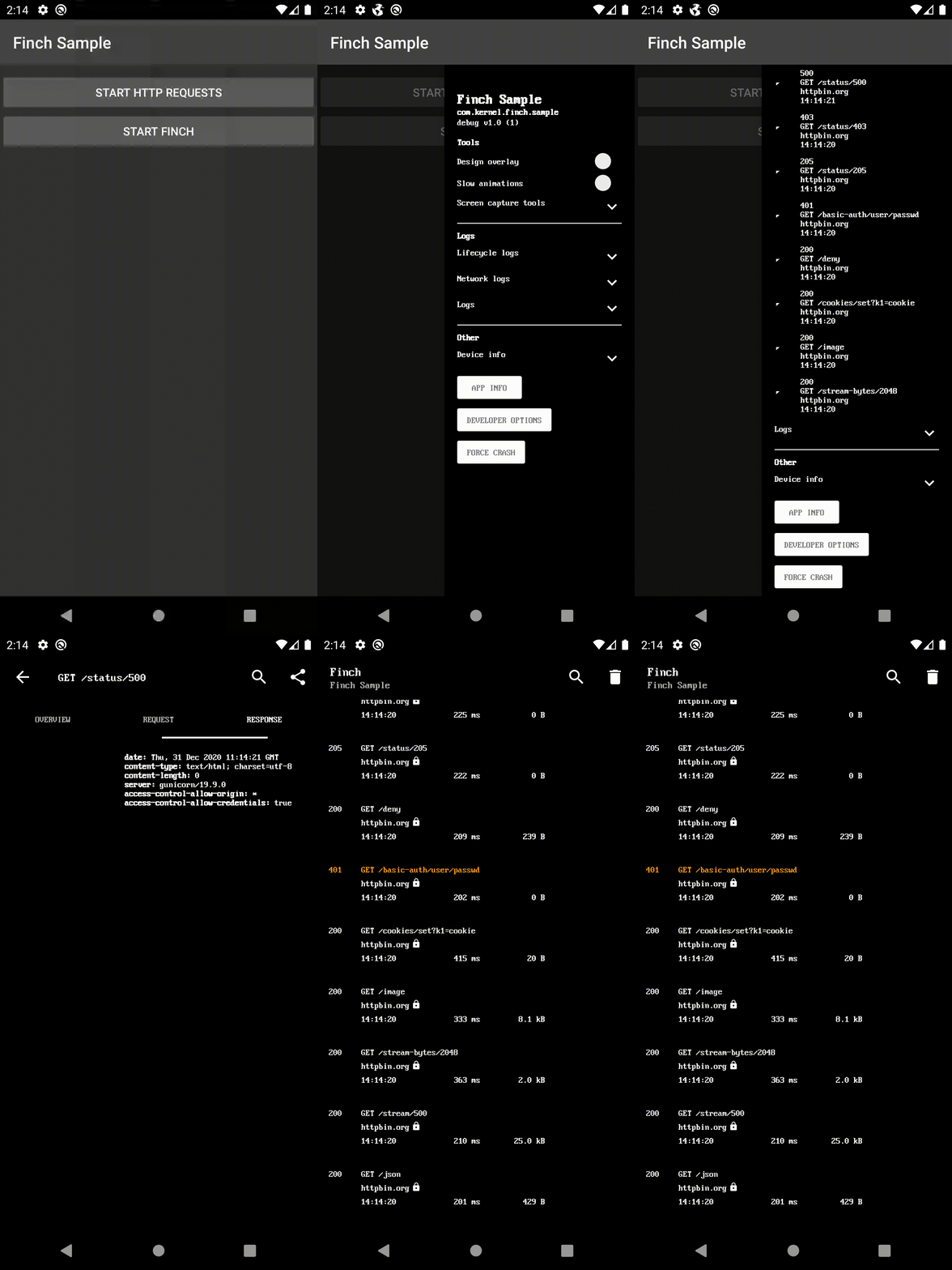
Gradle 의존성
루트 build.gradle의 repositories 끝에 추가하세요:
dependencyResolutionManagement {
    repositoriesMode.set(RepositoriesMode.FAIL_ON_PROJECT_REPOS)
    repositories {
        mavenCentral()
        maven { url 'https://jitpack.io' }
    }
}
- ui-activity - 디버그 메뉴를 새로운 화면으로 표시합니다.
- ui-bottom-sheet - 디버그 메뉴를 모달 바텀 시트로 표시합니다.
- ui-dialog - 디버그 메뉴를 모달 대화상자로 표시합니다.
- ui-drawer - 디버그 메뉴를 측면 네비게이션 드로어로 표시합니다.
- ui-view - 디버그 메뉴를 뷰로 표시합니다.
- noop - 릴리스 빌드용입니다.
dependencies {
    debugImplementation 'com.github.kernel0x.finch:ui-drawer:2.3.6'
    releaseImplementation 'com.github.kernel0x.finch:noop:2.3.6'
    // optional only for OkHttp
    debugImplementation 'com.github.kernel0x.finch:log-okhttp:2.3.6'
    releaseImplementation 'com.github.kernel0x.finch:log-okhttp-noop:2.3.6'
    // optional only for GRPC
    debugImplementation 'com.github.kernel0x.finch:log-grpc:2.3.6'
    releaseImplementation 'com.github.kernel0x.finch:log-grpc-noop:2.3.6'
    // optional only for logs
    debugImplementation 'com.github.kernel0x.finch:log:2.3.6'
    releaseImplementation 'com.github.kernel0x.finch:log-noop:2.3.6'
}
작동 방식
Finch의 인스턴스를 초기화합니다 (가능하면 애플리케이션의 onCreate() 메서드에서).
Finch.initialize(this)
다음으로, 디버그 메뉴에 표시할 구성 요소를 추가해야 합니다. 선택적으로, 로깅 및 네트워크 이벤트 가로채기(OkHttp 사용)를 추가로 구성할 수 있습니다.
로깅
디버그 메뉴에 로그 메시지를 추가하려면 Finch.log()를 간단히 호출하고 Configuration 객체에 FinchLogger를 추가하세요.
Finch.log("message")Finch.initialize(
application = this,
configuration = Configuration(
logger = FinchLogger,
...
),
)OkHttp
OkHttp 클라이언트를 빌드할 때 addInterceptor 메서드에 FinchOkHttpLogger.logger를 추가하고 Configuration 객체에 FinchOkHttpLogger를 추가합니다.
OkHttpClient.Builder()
    .addInterceptor(FinchOkHttpLogger.logger as? Interceptor ?: Interceptor { it.proceed(it.request()) })
    .build()
Finch.initialize(
application = this,
configuration = Configuration(
networkLoggers = listOf(FinchOkHttpLogger),
...
),
)Grpc
ManagedChannel을 빌드할 때 메서드 인터셉트에 FinchGrpcLogger.logger를 추가하고 Configuration 객체에 FinchGrpcLogger를 추가합니다.
ManagedChannelBuilder.forAddress(networkConfig.hostname, networkConfig.port)
    .intercept(FinchGrpcLogger.logger as? ClientInterceptor ?: object : ClientInterceptor {
        override fun  interceptCall(
            method: MethodDescriptor?,
            callOptions: CallOptions?,
            next: Channel?
        ): ClientCall {
            return object : ForwardingClientCall.SimpleForwardingClientCall(
                next?.newCall(
                    method,
                    callOptions
                )
            ) {}
        }
    })
    .build()
Finch.initialize(
application = this,
configuration = Configuration(
networkLoggers = listOf(FinchGrpcLogger),
...
),
)예제 초기화
대부분의 프로젝트에서 작동해야 하는 최소한의 예제입니다
Finch.initialize(
    application = this,
    configuration = Configuration(
        logger = FinchLogger,
        networkLoggers = listOf(FinchOkHttpLogger)
    ),
    components = arrayOf(
        Header(
            title = getString(R.string.app_name),
            subtitle = BuildConfig.APPLICATION_ID,
            text = "${BuildConfig.BUILD_TYPE} v${BuildConfig.VERSION_NAME} (${BuildConfig.VERSION_CODE})"
        ),
        Padding(),
        Label("Tools", Label.Type.HEADER),
        DesignOverlay(),
        AnimationSpeed(),
        ScreenCaptureToolbox(),
        Divider(),
        Label("Logs", Label.Type.HEADER),
        LifecycleLogs(),
        NetworkLogs(),
        Logs(),
        Divider(),
        Label("Other", Label.Type.HEADER),
        DeviceInfo(),
        AppInfo(),
        DeveloperOptions(),
        ForceCrash()
    )
)
일반적인 사례
#### 백엔드 환경
data class Environment(
    val type: Type,
    override val title: Text = Text.CharSequence(type.name)
) : FinchListItemenum class Type {
    TEST,
    PROD
}
SingleSelectionList(
    title = "Backend environment",
    items = listOf(Environment(Type.TEST), Environment(Type.PROD)),
    initiallySelectedItemId = Type.TEST.name,
    isValuePersisted = true,
    onSelectionChanged = {
        when (it?.type) {
            Type.TEST -> {
                ...
            }            Type.PROD -> {
                ...
            }            else -> {
                // nothing
            }
        }
    }
),
#### 기능 토글
fun Application.initializeDebugMenu(
    featureManager: FeatureManager
) {
    val toggles = featureManager.getAll().map {
        Switch(
            text = it.description,
            initialValue = it.isEnabled(),
            isEnabled = true,
            onValueChanged = { value ->
                featureManager.save(it.key, value)
                if (!it.canChangedInRuntime) {
                    Toast.makeText(this, "Restart app to apply changes!", Toast.LENGTH_LONG).show()
                }
            }
        )
    }
    Finch.initialize(
        ...
        components = arrayOf(
            ...
            Divider(),
            Label("Feature Toggles", Label.Type.HEADER),
            Switch(
                text = "Show",
                initialValue = false,
                isEnabled = true,
                id = "feature_toggles",
                onValueChanged = {
                    if (it) {
                        Finch.add(
                            components = toggles.toTypedArray(),
                            position = Position.Below("feature_toggles")
                        )
                    } else {
                        toggles.forEach { item ->
                            Finch.remove(item.id)
                        }
                    }
                }
            ),
            ...
        )
    )
}
#### 로그
class LogTree : Timber.Tree() {
    override fun log(priority: Int, tag: String?, message: String, t: Throwable?) {
        FinchLogger.log(message)
    }
}
fun Application.initializeDebugMenu() {
...
Timber.plant(LogTree())
Finch.initialize(
application = this,
configuration = Configuration(
logger = FinchLogger,
),
...
)
}Components
CheckBox Divider ItemList KeyValueList Label LongText MultipleSelectionList Padding ProgressBar SingleSelectionList Slider Switch TextInput AnimationSpeed AppInfo DesignOverlay DeveloperOptions DeviceInfo ForceCrash Header LifecycleLogs Logs LoremIpsumGenerator NetworkLogsProguard
-keep,allowobfuscation,allowshrinking class com.google.gson.reflect.TypeToken
-keep,allowobfuscation,allowshrinking class * extends com.google.gson.reflect.TypeToken
릴리스
모든 릴리스 정보는 릴리스 탭을 확인하세요.
--- Tranlated By Open Ai Tx | Last indexed: 2025-12-25 ---