Finch
Finchは、Androidアプリ開発向けのカスタマイズ可能なデバッグメニューを提供します。プロダクションコードには影響しません。開発者は簡単な手順で独自のカスタムデバッグ機能を簡単に追加できます。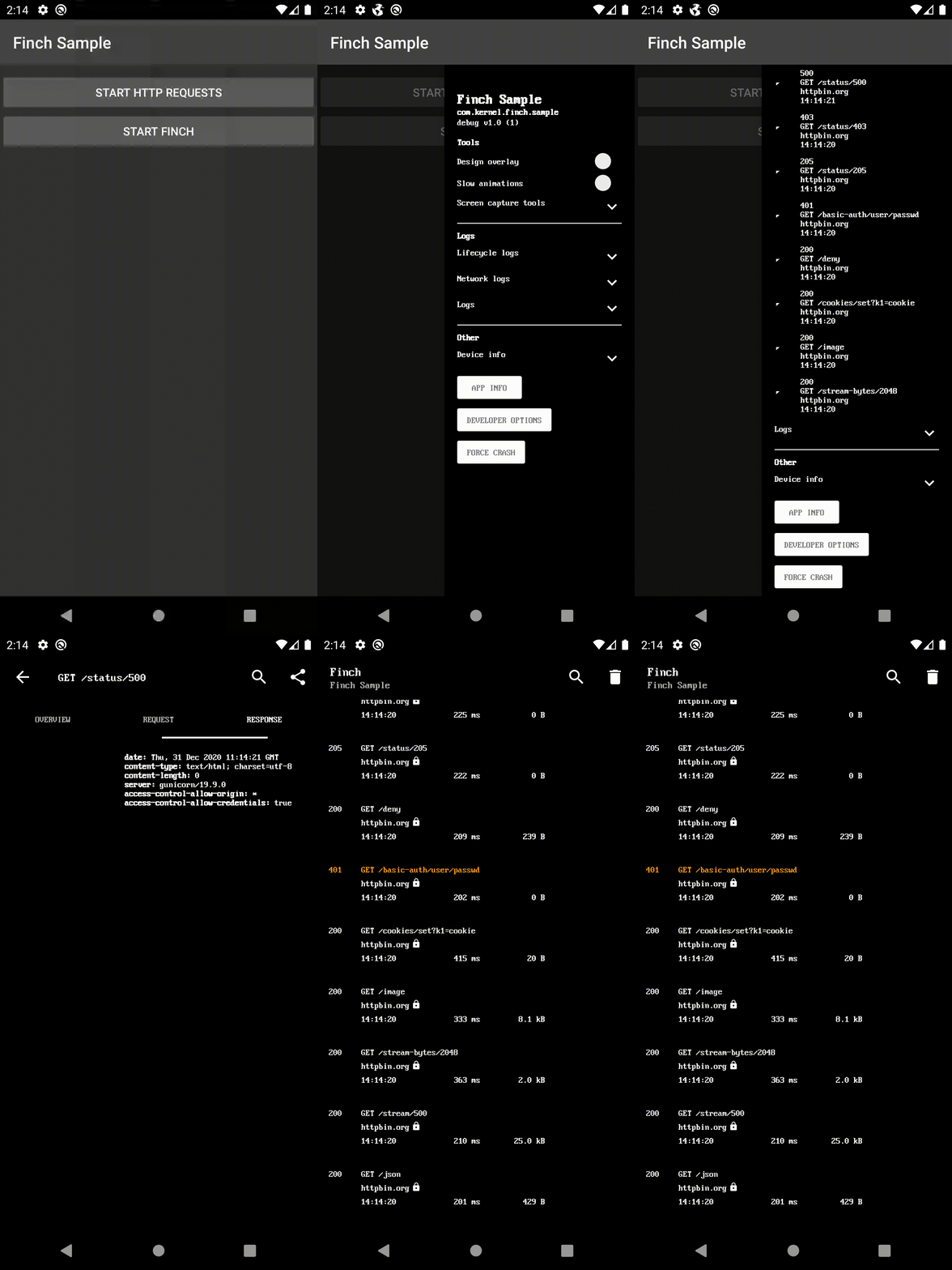
Gradle依存関係
rootのbuild.gradleのrepositoriesの最後に追加してください:
dependencyResolutionManagement {
    repositoriesMode.set(RepositoriesMode.FAIL_ON_PROJECT_REPOS)
    repositories {
        mavenCentral()
        maven { url 'https://jitpack.io' }
    }
}
UI実装を選択して依存関係を追加してください:
- ui-activity - デバッグメニューを新しい画面として表示します。
- ui-bottom-sheet - デバッグメニューをモーダルボトムシートとして表示します。
- ui-dialog - デバッグメニューをモーダルダイアログとして表示します。
- ui-drawer - デバッグメニューをサイドナビゲーションドロワーとして表示します。
- ui-view - デバッグメニューをビューとして表示します。
- noop - リリースビルド用。
dependencies {
    debugImplementation 'com.github.kernel0x.finch:ui-drawer:2.3.6'
    releaseImplementation 'com.github.kernel0x.finch:noop:2.3.6'
    // optional only for OkHttp
    debugImplementation 'com.github.kernel0x.finch:log-okhttp:2.3.6'
    releaseImplementation 'com.github.kernel0x.finch:log-okhttp-noop:2.3.6'
    // optional only for GRPC
    debugImplementation 'com.github.kernel0x.finch:log-grpc:2.3.6'
    releaseImplementation 'com.github.kernel0x.finch:log-grpc-noop:2.3.6'
    // optional only for logs
    debugImplementation 'com.github.kernel0x.finch:log:2.3.6'
    releaseImplementation 'com.github.kernel0x.finch:log-noop:2.3.6'
}
動作方法
Finchのインスタンスを初期化します(できればアプリケーションのonCreate()メソッド内で)
Finch.initialize(this)
次に、デバッグメニューに表示したいコンポーネントを追加する必要があります。オプションで、ログ記録やネットワークイベントのインターセプト(OkHttp使用)も設定できます。
ロギング
デバッグメニューにログメッセージを追加するには、単に Finch.log() を呼び出し、Configurationオブジェクトに FinchLogger を追加します。
Finch.log("message")Finch.initialize(
application = this,
configuration = Configuration(
logger = FinchLogger,
...
),
)OkHttp
OkHttpクライアントのビルド時に、メソッドaddInterceptorにFinchOkHttpLogger.loggerを追加し、ConfigurationオブジェクトにFinchOkHttpLoggerを追加します。
OkHttpClient.Builder()
    .addInterceptor(FinchOkHttpLogger.logger as? Interceptor ?: Interceptor { it.proceed(it.request()) })
    .build()
Finch.initialize(
application = this,
configuration = Configuration(
networkLoggers = listOf(FinchOkHttpLogger),
...
),
)Grpc
ManagedChannelの構築時にメソッドインターセプトにFinchGrpcLogger.loggerを追加し、ConfigurationオブジェクトにFinchGrpcLoggerを追加します。
ManagedChannelBuilder.forAddress(networkConfig.hostname, networkConfig.port)
    .intercept(FinchGrpcLogger.logger as? ClientInterceptor ?: object : ClientInterceptor {
        override fun  interceptCall(
            method: MethodDescriptor?,
            callOptions: CallOptions?,
            next: Channel?
        ): ClientCall {
            return object : ForwardingClientCall.SimpleForwardingClientCall(
                next?.newCall(
                    method,
                    callOptions
                )
            ) {}
        }
    })
    .build()
Finch.initialize(
application = this,
configuration = Configuration(
networkLoggers = listOf(FinchGrpcLogger),
...
),
)初期化の例
ほとんどのプロジェクトで機能する最小限の例を示します。
Finch.initialize(
    application = this,
    configuration = Configuration(
        logger = FinchLogger,
        networkLoggers = listOf(FinchOkHttpLogger)
    ),
    components = arrayOf(
        Header(
            title = getString(R.string.app_name),
            subtitle = BuildConfig.APPLICATION_ID,
            text = "${BuildConfig.BUILD_TYPE} v${BuildConfig.VERSION_NAME} (${BuildConfig.VERSION_CODE})"
        ),
        Padding(),
        Label("Tools", Label.Type.HEADER),
        DesignOverlay(),
        AnimationSpeed(),
        ScreenCaptureToolbox(),
        Divider(),
        Label("Logs", Label.Type.HEADER),
        LifecycleLogs(),
        NetworkLogs(),
        Logs(),
        Divider(),
        Label("Other", Label.Type.HEADER),
        DeviceInfo(),
        AppInfo(),
        DeveloperOptions(),
        ForceCrash()
    )
)
一般的なケース
#### バックエンド環境
data class Environment(
    val type: Type,
    override val title: Text = Text.CharSequence(type.name)
) : FinchListItemenum class Type {
    TEST,
    PROD
}
SingleSelectionList(
    title = "Backend environment",
    items = listOf(Environment(Type.TEST), Environment(Type.PROD)),
    initiallySelectedItemId = Type.TEST.name,
    isValuePersisted = true,
    onSelectionChanged = {
        when (it?.type) {
            Type.TEST -> {
                ...
            }            Type.PROD -> {
                ...
            }            else -> {
                // nothing
            }
        }
    }
),
#### 機能トグル
fun Application.initializeDebugMenu(
    featureManager: FeatureManager
) {
    val toggles = featureManager.getAll().map {
        Switch(
            text = it.description,
            initialValue = it.isEnabled(),
            isEnabled = true,
            onValueChanged = { value ->
                featureManager.save(it.key, value)
                if (!it.canChangedInRuntime) {
                    Toast.makeText(this, "Restart app to apply changes!", Toast.LENGTH_LONG).show()
                }
            }
        )
    }
    Finch.initialize(
        ...
        components = arrayOf(
            ...
            Divider(),
            Label("Feature Toggles", Label.Type.HEADER),
            Switch(
                text = "Show",
                initialValue = false,
                isEnabled = true,
                id = "feature_toggles",
                onValueChanged = {
                    if (it) {
                        Finch.add(
                            components = toggles.toTypedArray(),
                            position = Position.Below("feature_toggles")
                        )
                    } else {
                        toggles.forEach { item ->
                            Finch.remove(item.id)
                        }
                    }
                }
            ),
            ...
        )
    )
}
#### ログ
class LogTree : Timber.Tree() {
    override fun log(priority: Int, tag: String?, message: String, t: Throwable?) {
        FinchLogger.log(message)
    }
}
fun Application.initializeDebugMenu() {
...
Timber.plant(LogTree())
Finch.initialize(
application = this,
configuration = Configuration(
logger = FinchLogger,
),
...
)
}Components
CheckBox Divider ItemList KeyValueList Label LongText MultipleSelectionList Padding ProgressBar SingleSelectionList Slider Switch TextInput AnimationSpeed AppInfo DesignOverlay DeveloperOptions DeviceInfo ForceCrash Header LifecycleLogs Logs LoremIpsumGenerator NetworkLogsProguard
-keep,allowobfuscation,allowshrinking class com.google.gson.reflect.TypeToken
-keep,allowobfuscation,allowshrinking class * extends com.google.gson.reflect.TypeToken
リリース
すべてのリリース情報については、Releases タブをご覧ください。
--- Tranlated By Open Ai Tx | Last indexed: 2025-12-25 ---