Finch
Finch offre un menu de débogage personnalisable pour le développement d'applications Android. Il n'affecte pas le code de production. Les développeurs peuvent facilement ajouter leurs propres fonctionnalités de débogage personnalisées en quelques étapes simples.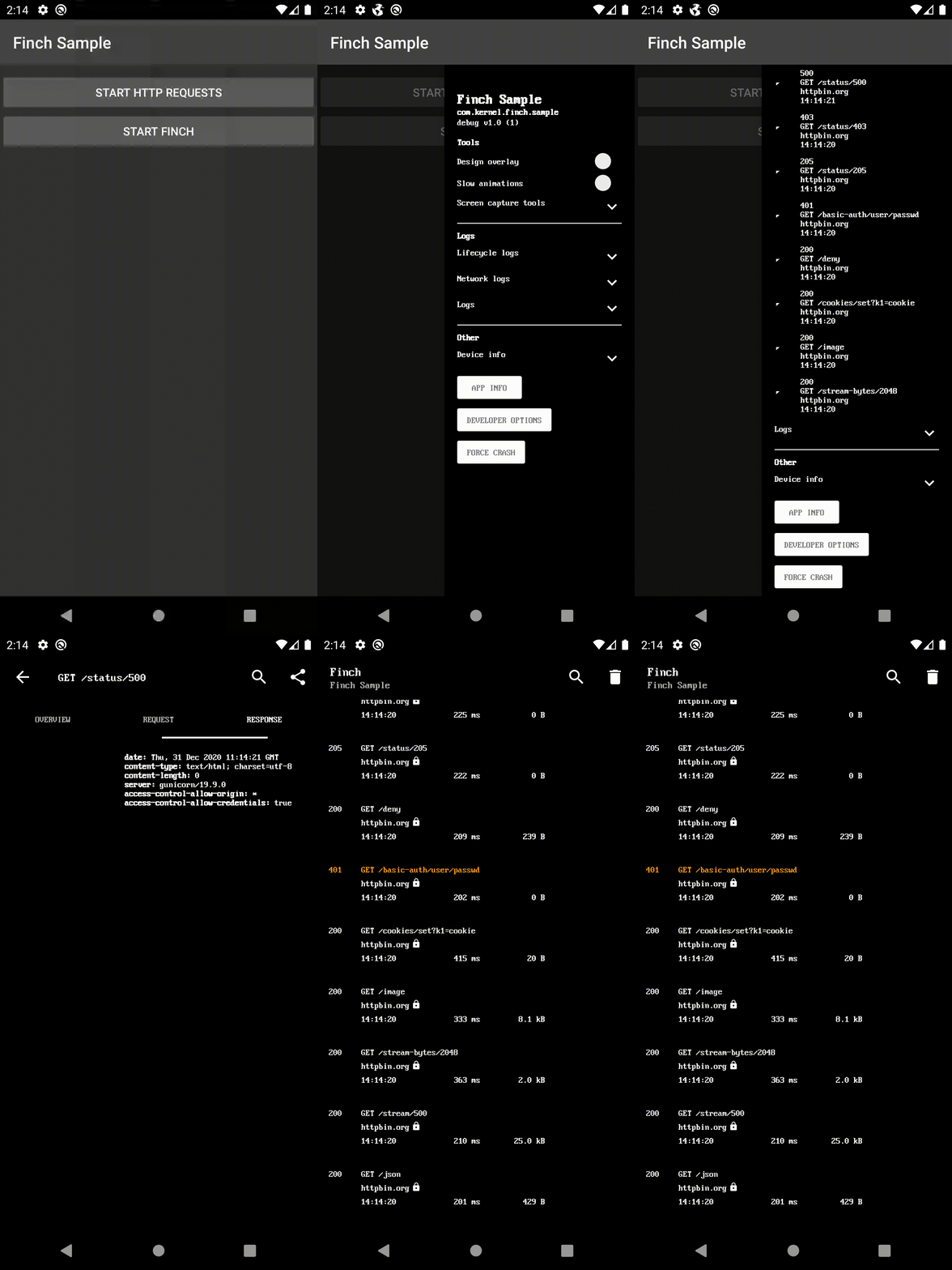
Dépendance Gradle
Ajoutez-le dans votre build.gradle racine à la fin des repositories :
dependencyResolutionManagement {
    repositoriesMode.set(RepositoriesMode.FAIL_ON_PROJECT_REPOS)
    repositories {
        mavenCentral()
        maven { url 'https://jitpack.io' }
    }
}
Choisissez une implémentation UI et ajoutez la dépendance :
- ui-activity - Le menu de débogage comme un nouvel écran.
- ui-bottom-sheet - Le menu de débogage comme une feuille modale inférieure.
- ui-dialog - Le menu de débogage comme une boîte de dialogue modale.
- ui-drawer - Le menu de débogage comme un tiroir de navigation latéral.
- ui-view - Le menu de débogage comme une vue.
- noop - Pour la version de production.
dependencies {
    debugImplementation 'com.github.kernel0x.finch:ui-drawer:2.3.6'
    releaseImplementation 'com.github.kernel0x.finch:noop:2.3.6'
    // optional only for OkHttp
    debugImplementation 'com.github.kernel0x.finch:log-okhttp:2.3.6'
    releaseImplementation 'com.github.kernel0x.finch:log-okhttp-noop:2.3.6'
    // optional only for GRPC
    debugImplementation 'com.github.kernel0x.finch:log-grpc:2.3.6'
    releaseImplementation 'com.github.kernel0x.finch:log-grpc-noop:2.3.6'
    // optional only for logs
    debugImplementation 'com.github.kernel0x.finch:log:2.3.6'
    releaseImplementation 'com.github.kernel0x.finch:log-noop:2.3.6'
}
Comment ça fonctionne
Initialisez une instance de Finch (de préférence dans la méthode onCreate() de l'application)
Finch.initialize(this)
Ensuite, vous devez ajouter les composants que vous souhaitez afficher dans le menu de débogage. Optionnellement, vous pouvez également configurer la journalisation et l'interception des événements réseau (avec OkHttp).
Journalisation
Pour ajouter des messages de journal dans le menu de débogage, il suffit d'appeler Finch.log() et d'ajouter FinchLogger à l'objet Configuration.
Finch.log("message")Finch.initialize(
application = this,
configuration = Configuration(
logger = FinchLogger,
...
),
)OkHttp
Ajouter FinchOkHttpLogger.logger à la méthode addInterceptor lors de la construction du client OkHttp et ajouter FinchOkHttpLogger à l'objet Configuration.
OkHttpClient.Builder()
    .addInterceptor(FinchOkHttpLogger.logger as? Interceptor ?: Interceptor { it.proceed(it.request()) })
    .build()
Finch.initialize(
application = this,
configuration = Configuration(
networkLoggers = listOf(FinchOkHttpLogger),
...
),
)Grpc
Ajouter FinchGrpcLogger.logger à la méthode intercept lors de la construction de ManagedChannel et ajouter FinchGrpcLogger à l'objet Configuration.
ManagedChannelBuilder.forAddress(networkConfig.hostname, networkConfig.port)
    .intercept(FinchGrpcLogger.logger as? ClientInterceptor ?: object : ClientInterceptor {
        override fun  interceptCall(
            method: MethodDescriptor?,
            callOptions: CallOptions?,
            next: Channel?
        ): ClientCall {
            return object : ForwardingClientCall.SimpleForwardingClientCall(
                next?.newCall(
                    method,
                    callOptions
                )
            ) {}
        }
    })
    .build()
Finch.initialize(
application = this,
configuration = Configuration(
networkLoggers = listOf(FinchGrpcLogger),
...
),
)Exemple d'initialisation
Voici un exemple minimal qui devrait fonctionner pour la plupart des projets
Finch.initialize(
    application = this,
    configuration = Configuration(
        logger = FinchLogger,
        networkLoggers = listOf(FinchOkHttpLogger)
    ),
    components = arrayOf(
        Header(
            title = getString(R.string.app_name),
            subtitle = BuildConfig.APPLICATION_ID,
            text = "${BuildConfig.BUILD_TYPE} v${BuildConfig.VERSION_NAME} (${BuildConfig.VERSION_CODE})"
        ),
        Padding(),
        Label("Tools", Label.Type.HEADER),
        DesignOverlay(),
        AnimationSpeed(),
        ScreenCaptureToolbox(),
        Divider(),
        Label("Logs", Label.Type.HEADER),
        LifecycleLogs(),
        NetworkLogs(),
        Logs(),
        Divider(),
        Label("Other", Label.Type.HEADER),
        DeviceInfo(),
        AppInfo(),
        DeveloperOptions(),
        ForceCrash()
    )
)
Cas courants
#### Environnement backend
data class Environment(
    val type: Type,
    override val title: Text = Text.CharSequence(type.name)
) : FinchListItemenum class Type {
    TEST,
    PROD
}
SingleSelectionList(
    title = "Backend environment",
    items = listOf(Environment(Type.TEST), Environment(Type.PROD)),
    initiallySelectedItemId = Type.TEST.name,
    isValuePersisted = true,
    onSelectionChanged = {
        when (it?.type) {
            Type.TEST -> {
                ...
            }            Type.PROD -> {
                ...
            }            else -> {
                // nothing
            }
        }
    }
),
#### Bascule de Fonctionnalités
fun Application.initializeDebugMenu(
    featureManager: FeatureManager
) {
    val toggles = featureManager.getAll().map {
        Switch(
            text = it.description,
            initialValue = it.isEnabled(),
            isEnabled = true,
            onValueChanged = { value ->
                featureManager.save(it.key, value)
                if (!it.canChangedInRuntime) {
                    Toast.makeText(this, "Restart app to apply changes!", Toast.LENGTH_LONG).show()
                }
            }
        )
    }
    Finch.initialize(
        ...
        components = arrayOf(
            ...
            Divider(),
            Label("Feature Toggles", Label.Type.HEADER),
            Switch(
                text = "Show",
                initialValue = false,
                isEnabled = true,
                id = "feature_toggles",
                onValueChanged = {
                    if (it) {
                        Finch.add(
                            components = toggles.toTypedArray(),
                            position = Position.Below("feature_toggles")
                        )
                    } else {
                        toggles.forEach { item ->
                            Finch.remove(item.id)
                        }
                    }
                }
            ),
            ...
        )
    )
}
#### Journaux
class LogTree : Timber.Tree() {
    override fun log(priority: Int, tag: String?, message: String, t: Throwable?) {
        FinchLogger.log(message)
    }
}
fun Application.initializeDebugMenu() {
...
Timber.plant(LogTree())
Finch.initialize(
application = this,
configuration = Configuration(
logger = FinchLogger,
),
...
)
}Components
CheckBox Divider ItemList KeyValueList Label LongText MultipleSelectionList Padding ProgressBar SingleSelectionList Slider Switch TextInput AnimationSpeed AppInfo DesignOverlay DeveloperOptions DeviceInfo ForceCrash Header LifecycleLogs Logs LoremIpsumGenerator NetworkLogsProguard
-keep,allowobfuscation,allowshrinking class com.google.gson.reflect.TypeToken
-keep,allowobfuscation,allowshrinking class * extends com.google.gson.reflect.TypeToken
Versions
Consultez l’onglet Versions pour toutes les informations sur les versions.
--- Tranlated By Open Ai Tx | Last indexed: 2025-12-25 ---