Finch
Finch ofrece un menú de depuración personalizable para el desarrollo de aplicaciones Android. No afecta el código de producción. Los desarrolladores pueden añadir fácilmente sus propias funciones de depuración personalizadas con pasos simples.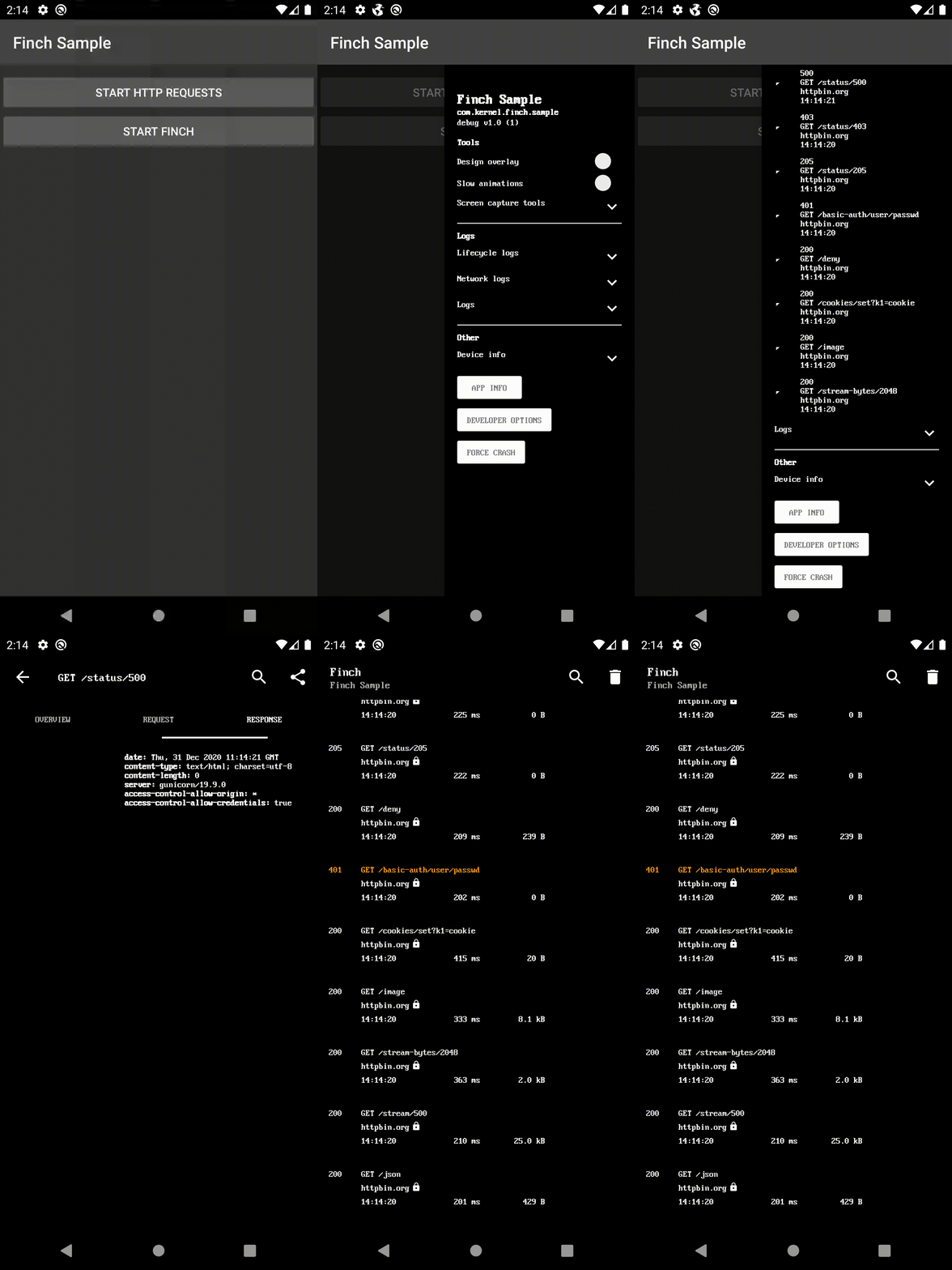
Dependencia de Gradle
Agrégalo en tu build.gradle raíz al final de los repositorios:
dependencyResolutionManagement {
    repositoriesMode.set(RepositoriesMode.FAIL_ON_PROJECT_REPOS)
    repositories {
        mavenCentral()
        maven { url 'https://jitpack.io' }
    }
}
Elija una implementación de UI y agregue la dependencia:
- ui-activity - El menú de depuración como una nueva pantalla.
- ui-bottom-sheet - El menú de depuración como una hoja inferior modal.
- ui-dialog - El menú de depuración como un cuadro de diálogo modal.
- ui-drawer - El menú de depuración como un cajón de navegación lateral.
- ui-view - El menú de depuración como una vista.
- noop - Para la compilación de lanzamiento.
dependencies {
    debugImplementation 'com.github.kernel0x.finch:ui-drawer:2.3.6'
    releaseImplementation 'com.github.kernel0x.finch:noop:2.3.6'
    // optional only for OkHttp
    debugImplementation 'com.github.kernel0x.finch:log-okhttp:2.3.6'
    releaseImplementation 'com.github.kernel0x.finch:log-okhttp-noop:2.3.6'
    // optional only for GRPC
    debugImplementation 'com.github.kernel0x.finch:log-grpc:2.3.6'
    releaseImplementation 'com.github.kernel0x.finch:log-grpc-noop:2.3.6'
    // optional only for logs
    debugImplementation 'com.github.kernel0x.finch:log:2.3.6'
    releaseImplementation 'com.github.kernel0x.finch:log-noop:2.3.6'
}
Cómo funciona
Inicialice una instancia de Finch (preferiblemente en el método onCreate() de la Aplicación)
Finch.initialize(this)
A continuación, debe agregar qué componentes desea mostrar en el menú de depuración. Opcionalmente, también puede configurar el registro y la intercepción de eventos de red (con OkHttp).
Registro
Para agregar mensajes de registro en el menú de depuración, simplemente llame a Finch.log() y agregue FinchLogger al objeto Configuration.
Finch.log("message")Finch.initialize(
application = this,
configuration = Configuration(
logger = FinchLogger,
...
),
)OkHttp
Agregue FinchOkHttpLogger.logger al método addInterceptor al construir el cliente OkHttp y agregue FinchOkHttpLogger al objeto Configuration.
OkHttpClient.Builder()
    .addInterceptor(FinchOkHttpLogger.logger as? Interceptor ?: Interceptor { it.proceed(it.request()) })
    .build()
Finch.initialize(
application = this,
configuration = Configuration(
networkLoggers = listOf(FinchOkHttpLogger),
...
),
)Grpc
Agregue FinchGrpcLogger.logger al método intercept al construir ManagedChannel y agregue FinchGrpcLogger al objeto Configuration.
ManagedChannelBuilder.forAddress(networkConfig.hostname, networkConfig.port)
    .intercept(FinchGrpcLogger.logger as? ClientInterceptor ?: object : ClientInterceptor {
        override fun  interceptCall(
            method: MethodDescriptor?,
            callOptions: CallOptions?,
            next: Channel?
        ): ClientCall {
            return object : ForwardingClientCall.SimpleForwardingClientCall(
                next?.newCall(
                    method,
                    callOptions
                )
            ) {}
        }
    })
    .build()
Finch.initialize(
application = this,
configuration = Configuration(
networkLoggers = listOf(FinchGrpcLogger),
...
),
)Ejemplo de inicialización
Aquí hay un ejemplo mínimo que debería funcionar para la mayoría de los proyectos
Finch.initialize(
    application = this,
    configuration = Configuration(
        logger = FinchLogger,
        networkLoggers = listOf(FinchOkHttpLogger)
    ),
    components = arrayOf(
        Header(
            title = getString(R.string.app_name),
            subtitle = BuildConfig.APPLICATION_ID,
            text = "${BuildConfig.BUILD_TYPE} v${BuildConfig.VERSION_NAME} (${BuildConfig.VERSION_CODE})"
        ),
        Padding(),
        Label("Tools", Label.Type.HEADER),
        DesignOverlay(),
        AnimationSpeed(),
        ScreenCaptureToolbox(),
        Divider(),
        Label("Logs", Label.Type.HEADER),
        LifecycleLogs(),
        NetworkLogs(),
        Logs(),
        Divider(),
        Label("Other", Label.Type.HEADER),
        DeviceInfo(),
        AppInfo(),
        DeveloperOptions(),
        ForceCrash()
    )
)
Casos comunes
#### Entorno de backend
data class Environment(
    val type: Type,
    override val title: Text = Text.CharSequence(type.name)
) : FinchListItemenum class Type {
    TEST,
    PROD
}
SingleSelectionList(
    title = "Backend environment",
    items = listOf(Environment(Type.TEST), Environment(Type.PROD)),
    initiallySelectedItemId = Type.TEST.name,
    isValuePersisted = true,
    onSelectionChanged = {
        when (it?.type) {
            Type.TEST -> {
                ...
            }            Type.PROD -> {
                ...
            }            else -> {
                // nothing
            }
        }
    }
),
fun Application.initializeDebugMenu(
    featureManager: FeatureManager
) {
    val toggles = featureManager.getAll().map {
        Switch(
            text = it.description,
            initialValue = it.isEnabled(),
            isEnabled = true,
            onValueChanged = { value ->
                featureManager.save(it.key, value)
                if (!it.canChangedInRuntime) {
                    Toast.makeText(this, "Restart app to apply changes!", Toast.LENGTH_LONG).show()
                }
            }
        )
    }
    Finch.initialize(
        ...
        components = arrayOf(
            ...
            Divider(),
            Label("Feature Toggles", Label.Type.HEADER),
            Switch(
                text = "Show",
                initialValue = false,
                isEnabled = true,
                id = "feature_toggles",
                onValueChanged = {
                    if (it) {
                        Finch.add(
                            components = toggles.toTypedArray(),
                            position = Position.Below("feature_toggles")
                        )
                    } else {
                        toggles.forEach { item ->
                            Finch.remove(item.id)
                        }
                    }
                }
            ),
            ...
        )
    )
}class LogTree : Timber.Tree() {
override fun log(priority: Int, tag: String?, message: String, t: Throwable?) {
FinchLogger.log(message)
}
}fun Application.initializeDebugMenu() {
...
Timber.plant(LogTree())
Finch.initialize(
application = this,
configuration = Configuration(
logger = FinchLogger,
),
...
)
}Components
CheckBox Divider ItemList KeyValueList Label LongText MultipleSelectionList Padding ProgressBar SingleSelectionList Slider Switch TextInput AnimationSpeed AppInfo DesignOverlay DeveloperOptions DeviceInfo ForceCrash Header LifecycleLogs Logs LoremIpsumGenerator NetworkLogsProguard
-keep,allowobfuscation,allowshrinking class com.google.gson.reflect.TypeToken
-keep,allowobfuscation,allowshrinking class * extends com.google.gson.reflect.TypeToken
Lanzamientos
Consulta la pestaña Lanzamientos para toda la información sobre lanzamientos.
--- Tranlated By Open Ai Tx | Last indexed: 2025-12-25 ---