Finch
Finch offers a customizable debug menu for Android app development. It does not affect production code. Developers can easily add their own custom debugging features with simple steps.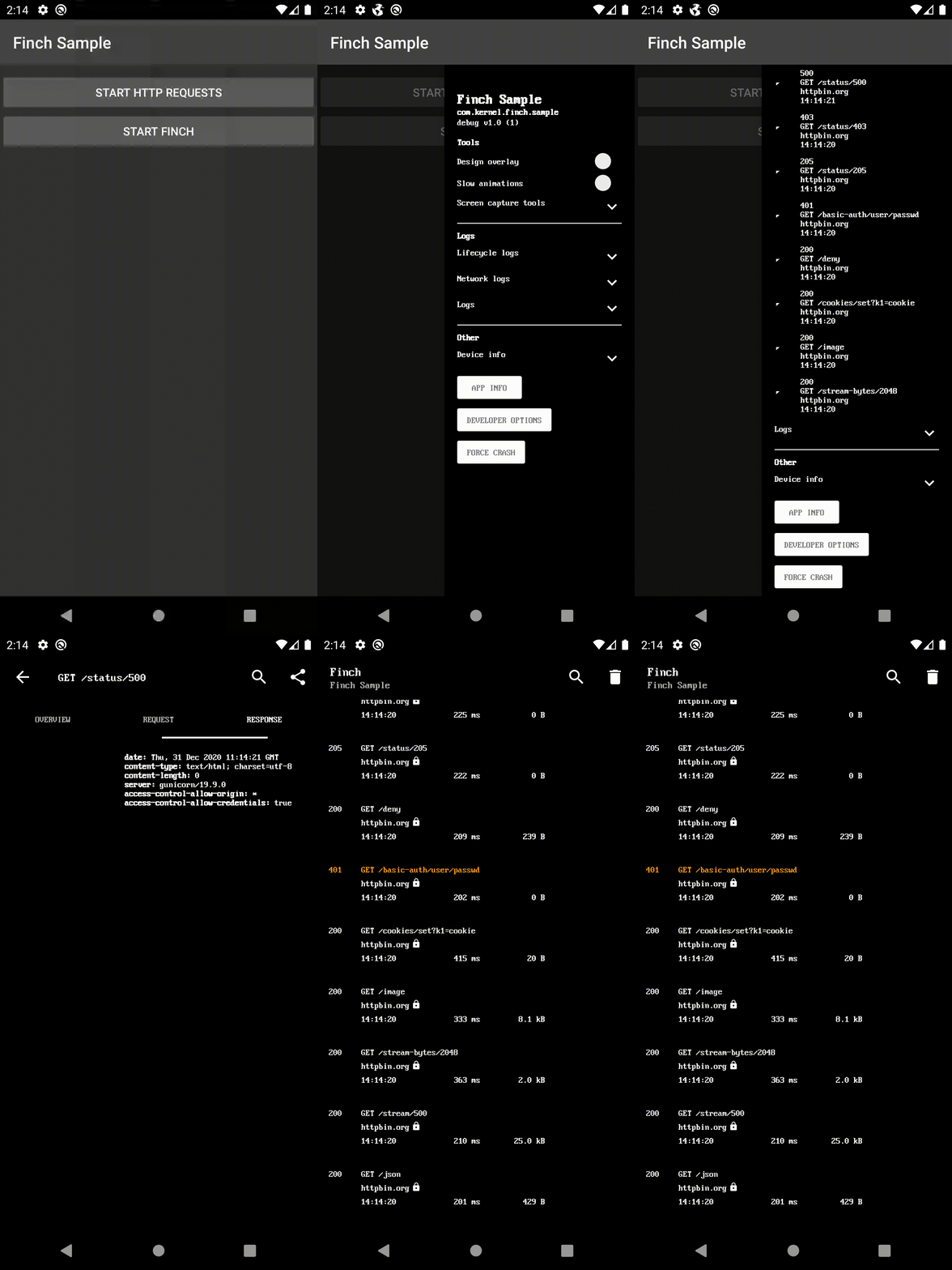
Gradle Dependency
Add it in your root build.gradle at the end of repositories:
dependencyResolutionManagement {
    repositoriesMode.set(RepositoriesMode.FAIL_ON_PROJECT_REPOS)
    repositories {
        mavenCentral()
        maven { url 'https://jitpack.io' }
    }
}
- ui-activity - The debug menu as a new screen.
- ui-bottom-sheet - The debug menu as a modal bottom sheet.
- ui-dialog - The debug menu as a modal dialog.
- ui-drawer - The debug menu as a side navigation drawer.
- ui-view - The debug menu as a view.
- noop - For release build.
dependencies {
    debugImplementation 'com.github.kernel0x.finch:ui-drawer:2.3.6'
    releaseImplementation 'com.github.kernel0x.finch:noop:2.3.6'
    // optional only for OkHttp
    debugImplementation 'com.github.kernel0x.finch:log-okhttp:2.3.6'
    releaseImplementation 'com.github.kernel0x.finch:log-okhttp-noop:2.3.6'
    // optional only for GRPC
    debugImplementation 'com.github.kernel0x.finch:log-grpc:2.3.6'
    releaseImplementation 'com.github.kernel0x.finch:log-grpc-noop:2.3.6'
    // optional only for logs
    debugImplementation 'com.github.kernel0x.finch:log:2.3.6'
    releaseImplementation 'com.github.kernel0x.finch:log-noop:2.3.6'
}
How to works
Initialize an instance of Finch (preferably in the Application's onCreate() method)
Finch.initialize(this)
Next, you need to add which components you want to display in the debug menu. Optionally, you can additionally configure logging and interception network events (with OkHttp).
Logging
To add log messages in Debug Menu simple calling Finch.log() and add FinchLogger to Configuration object.
Finch.log("message")Finch.initialize(
application = this,
configuration = Configuration(
logger = FinchLogger,
...
),
)OkHttp
Add FinchOkHttpLogger.logger to the method addInterceptor in building OkHttp Client and add FinchOkHttpLogger to Configuration object.
OkHttpClient.Builder()
    .addInterceptor(FinchOkHttpLogger.logger as? Interceptor ?: Interceptor { it.proceed(it.request()) })
    .build()
Finch.initialize(
application = this,
configuration = Configuration(
networkLoggers = listOf(FinchOkHttpLogger),
...
),
)Grpc
Add FinchGrpcLogger.logger to the method intercept when building ManagedChannel and add FinchGrpcLogger to the Configuration object.
ManagedChannelBuilder.forAddress(networkConfig.hostname, networkConfig.port)
    .intercept(FinchGrpcLogger.logger as? ClientInterceptor ?: object : ClientInterceptor {
        override fun  interceptCall(
            method: MethodDescriptor?,
            callOptions: CallOptions?,
            next: Channel?
        ): ClientCall {
            return object : ForwardingClientCall.SimpleForwardingClientCall(
                next?.newCall(
                    method,
                    callOptions
                )
            ) {}
        }
    })
    .build()
Finch.initialize(
application = this,
configuration = Configuration(
networkLoggers = listOf(FinchGrpcLogger),
...
),
)Example initialize
Here is a minimal example that should work for most projects
Finch.initialize(
    application = this,
    configuration = Configuration(
        logger = FinchLogger,
        networkLoggers = listOf(FinchOkHttpLogger)
    ),
    components = arrayOf(
        Header(
            title = getString(R.string.app_name),
            subtitle = BuildConfig.APPLICATION_ID,
            text = "${BuildConfig.BUILD_TYPE} v${BuildConfig.VERSION_NAME} (${BuildConfig.VERSION_CODE})"
        ),
        Padding(),
        Label("Tools", Label.Type.HEADER),
        DesignOverlay(),
        AnimationSpeed(),
        ScreenCaptureToolbox(),
        Divider(),
        Label("Logs", Label.Type.HEADER),
        LifecycleLogs(),
        NetworkLogs(),
        Logs(),
        Divider(),
        Label("Other", Label.Type.HEADER),
        DeviceInfo(),
        AppInfo(),
        DeveloperOptions(),
        ForceCrash()
    )
)
Common cases
#### Backend environment
data class Environment(
    val type: Type,
    override val title: Text = Text.CharSequence(type.name)
) : FinchListItemenum class Type {
    TEST,
    PROD
}
SingleSelectionList(
    title = "Backend environment",
    items = listOf(Environment(Type.TEST), Environment(Type.PROD)),
    initiallySelectedItemId = Type.TEST.name,
    isValuePersisted = true,
    onSelectionChanged = {
        when (it?.type) {
            Type.TEST -> {
                ...
            }            Type.PROD -> {
                ...
            }            else -> {
                // nothing
            }
        }
    }
),
#### Feature Toggles
fun Application.initializeDebugMenu(
    featureManager: FeatureManager
) {
    val toggles = featureManager.getAll().map {
        Switch(
            text = it.description,
            initialValue = it.isEnabled(),
            isEnabled = true,
            onValueChanged = { value ->
                featureManager.save(it.key, value)
                if (!it.canChangedInRuntime) {
                    Toast.makeText(this, "Restart app to apply changes!", Toast.LENGTH_LONG).show()
                }
            }
        )
    }
    Finch.initialize(
        ...
        components = arrayOf(
            ...
            Divider(),
            Label("Feature Toggles", Label.Type.HEADER),
            Switch(
                text = "Show",
                initialValue = false,
                isEnabled = true,
                id = "feature_toggles",
                onValueChanged = {
                    if (it) {
                        Finch.add(
                            components = toggles.toTypedArray(),
                            position = Position.Below("feature_toggles")
                        )
                    } else {
                        toggles.forEach { item ->
                            Finch.remove(item.id)
                        }
                    }
                }
            ),
            ...
        )
    )
}
#### Logs
class LogTree : Timber.Tree() {
    override fun log(priority: Int, tag: String?, message: String, t: Throwable?) {
        FinchLogger.log(message)
    }
}
fun Application.initializeDebugMenu() {
...
Timber.plant(LogTree())
Finch.initialize(
application = this,
configuration = Configuration(
logger = FinchLogger,
),
...
)
}Components
CheckBox Divider ItemList KeyValueList Label LongText MultipleSelectionList Padding ProgressBar SingleSelectionList Slider Switch TextInput AnimationSpeed AppInfo DesignOverlay DeveloperOptions DeviceInfo ForceCrash Header LifecycleLogs Logs LoremIpsumGenerator NetworkLogsProguard
-keep,allowobfuscation,allowshrinking class com.google.gson.reflect.TypeToken
-keep,allowobfuscation,allowshrinking class * extends com.google.gson.reflect.TypeToken
Releases
Checkout the Releases tab for all release info.
--- Tranlated By Open Ai Tx | Last indexed: 2025-12-25 ---