🌐 Language








#### See https://github.com/june07/nimv3 for updates, as the project was upgraded to Manifest Version 3 following Google's changes.
NiM (Node.js --inspector Manager)
###### Streamlines your development process- Google Chrome Web Store) (works with any Chromium browsers: Google's Chrome, Microsoft's Edge, Opera, Vivaldi, Brave, Epic, and more... )
- Microsoft Edge Addons (Works with the Microsoft's Edge browser https://www.microsoftedgeinsider.com/en-us/)
Blog Posts/Updates:
- Why I wrote NiM https://blog.june07.com/inspect-broke-my-workflow/
- Custom DevTools feature: https://blog.june07.com/nim-custom-devtools-url/
Easier than about::inspect (chrome://inspect/#devices)
NiM manages the Chrome DevTools window/tab lifecycle, allowing you to focus more on what matters... debugging your code. You no longer have to copy/paste DevTools URLs or keep opening/closing tabs/windows.
NiM automatically detects the URL generated when running node (locally or remotely) with the --inspect option. NiM gives you the choice to automatically open and close Chrome DevTools in a tab or window. Just toggle the Manual/Auto setting and then start a debugging session. DevTools will open either when you click the "Open DevTools" button or after the specified timeout period. If set to auto close, once your debugging session ends, the DevTools tab/window will close automatically.
- Manage and monitor local and remote debugging sessions
- Manual or automatic control of DevTools interface
- Open DevTools in a new tab or window
- Make DevTools focused or inactive on start
- Customize duration between v8 Inspector probes
- Autosave settings
- Debug node processes launched by VSCode
Setup / Usage / How To
Simple and basic... just install the Chrome Extension in any of the following ways:
- Install via Chrome Web Store:
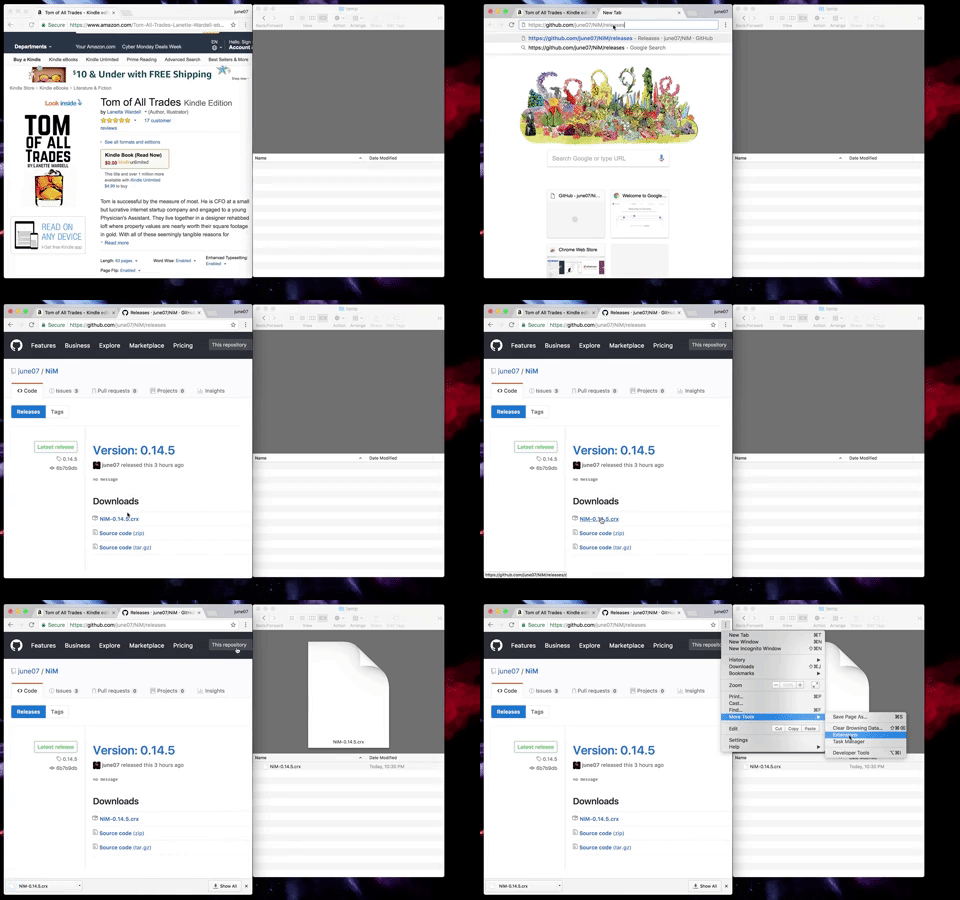
- Or, download the .crx file directly from releases as shown here:
Need Additional Information?
- NiM post-install page provides some help https://blog.june07.com/nim-install
- Debugging NiM itself https://blog.june07.com/debugging-nim/
Any and all feedback is encouraged and welcome. Send us an email!

--- Tranlated By Open Ai Tx | Last indexed: 2025-08-31 ---