Trimmer


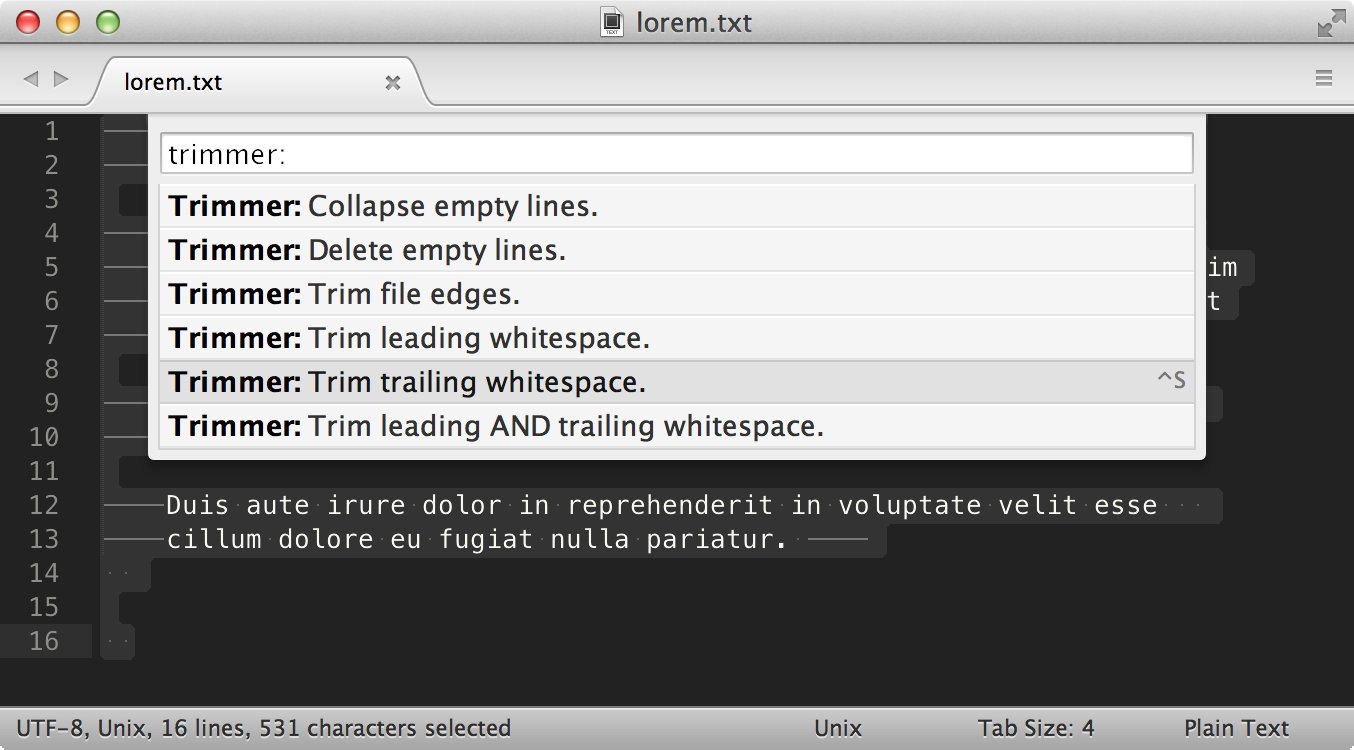
Trimmer is a Sublime Text plug-in for cleaning up whitespace.
Features
- Trim whitespace at the end of each line.
- Trim whitespace at the start of each line.
- Trim whitespace at the start and end of each line.
- Trim whitespace from selection(s).
- Delete empty, whitespace only lines.
- Collapse multiple consecutive empty lines into one empty line.
- Collapse multiple consecutive spaces into one space.
- Trim empty, whitespace only lines at the beginning and end of file.
- Remove blank space characters.
- Normalize spaces (consecutive spaces reduced, empty lines removed and lines trimmed).
- Tokenize a string by collapsing consecutive spaces, and trimming leading and trailing spaces.
- Delete empty, whitespace only HTML and XML tags.
- Remove code comments and collapse lines.
- Delete adjacent duplicate lines.
Additional Features
A Replace Smart Characters command that performs the following actions:
- Smart single quotes:
’_to_' - Smart double quotes:
“_to_" - Prime:
′_to_' - Double Prime:
″_to_" - German quotes:
„_to_"and‚_to_' - Ellipsis:
…_to_... - Em dash:
—_to_--- - En dash:
–_to_-- - Bullet:
•_to_* - Middle dot:
·_to_- - Em space _to_ three spaces
- En space _to_ two spaces
- Non-breaking space _to_ one space
- Thin space _to_ one space
- Hair space _to_ one space
- Left angle quote:
«_to_<< - Right angle quote:
»_to_>> - Copyright symbol:
©_to_(C) - Trademark symbol:
™_to_(T) - Registered trademark symbol:
®_to_(R)
Watch a Quick Demo
Install
Trimmer is compatible with both Sublime Text 2 and 3 and all supported Operating Systems.
Package Control
The easiest, and recommended way to install Trimmer is using Package Control.
From the main application menu, navigate to:
Tools->Command Palette...->Package Control: Install Package, type
Git
To install Trimmer using Git, change to your Sublime Text Packages directory and clone the Trimmer repository.
For example, on OS X... start a new Terminal session and enter the following commands:
$ cd ~/Library/Application\ Support/Sublime\ Text\ 3/Packages/
$ git clone https://github.com/jonlabelle/Trimmer
Manually
Download and extract the zip or tarball to your Sublime Text packages directory.
Default Sublime Text Packages Paths:
- OS X:
~/Library/Application Support/Sublime Text [2|3]/Packages - Linux:
~/.Sublime Text [2|3]/Packages - Windows:
%APPDATA%/Sublime Text [2|3]/Packages
[2|3] part with the appropriate Sublime Text
version for your installation.
Usage
All commands are accessible from the Command Palette using prefix
_Trimmer_, and in the Main Menu under Edit -> Line -> _Trimmer_ command.
Key Bindings
The _default_ key binding will trim trailing whitespace at the end of each of line (entire file).
- OS X:
Ctrl + S - Linux:
Ctrl + Alt + S - Windows:
Ctrl + Alt + S
Trimmer Command API
| Command | Description | Context |
| ---------------------------------- | ------------------------------------------------------------------------------------------------------ | ------------------------- |
| trimmer | trim whitespace at the end of each line | entire file |
| trim_leading_whitespace | trim whitespace at the start of each line | selection, or entire file |
| trim_leading_trailing_whitespace | trim whitespace at the start and end of each line | selection, or entire file |
| trim_selections | trim whitespace from selection(s) | selection |
| delete_empty_lines | delete empty, whitespace only lines | selection, or entire file |
| collapse_lines | collapse multiple consecutive empty lines into one empty line | selection, or entire file |
| collapse_spaces | collapse multiple consecutive spaces into one space | selection, or entire file |
| trim_edges | trim empty, whitespace only lines at the beginning and end of the file | entire file |
| remove_blank_spaces | remove all blank space characters (tab, cr, ff, vt, space) | selection, or entire file |
| normalize_spaces | consecutive spaces reduced, empty lines removed and lines trimmed | selection, or entire file |
| replace_smart_characters | replace smart characters (smart quotes, em/en dash, ellipsis, nbsp) | selection, or entire file |
| tokenize_string | convert a string to a token by collapsing consecutive spaces, and trimming leading and trailing spaces | selection, or entire file |
| delete_empty_tags | delete empty, whitespace only html and xml tags | selection, or entire file |
| remove_comments | remove code comments and collapse lines | selection, or entire file |
| delete_adjacent_duplicate_lines | delete adjacent duplicate lines | selection, or entire file |
Author
License
Trimmer is licensed under the MIT license.
--- Tranlated By Open Ai Tx | Last indexed: 2026-06-15 ---