🌐 Language
TTS-Vue Web Version
✅ Online Demo (Recommended): https://xiaoying.work (🎁 10,000 characters free every day)>
🚀 New product: Professional voice-over service / More stable / Supports packages / More voices supported / Task queue
🎤 Microsoft speech synthesis tool, Web version, built with Vue + ElementPlus + Vite.
Hosted Version / Try it Online
This repository is a reference implementation of an open-source Web UI. If you need a more stable and feature-rich service, we recommend using our official hosted version.
| Feature | Self-hosted (this repository) | XiaoYing.work (Official Hosted) | | :------------------- | :------------------------------------ | :------------------------------------------------------- | | Deployment Difficulty | Need to deploy backend and configure environment yourself | Ready to use, no deployment required | | Free Quota | Depends on backend configuration | 10,000 characters free per day | | Stability | Depends on local network environment | High availability SLA, dedicated line acceleration | | Functionality | Basic speech synthesis | Account system, task queue, more voices, API support | | Maintenance | Community maintained | Official continuous updates and maintenance | | Applicable Scenarios | Learning, personal tinkering | Production environment, professional dubbing, frequent use |
Website Examples
Hosted Website Interface
https://xiaoying.work (🎁 10,000 characters free per day)
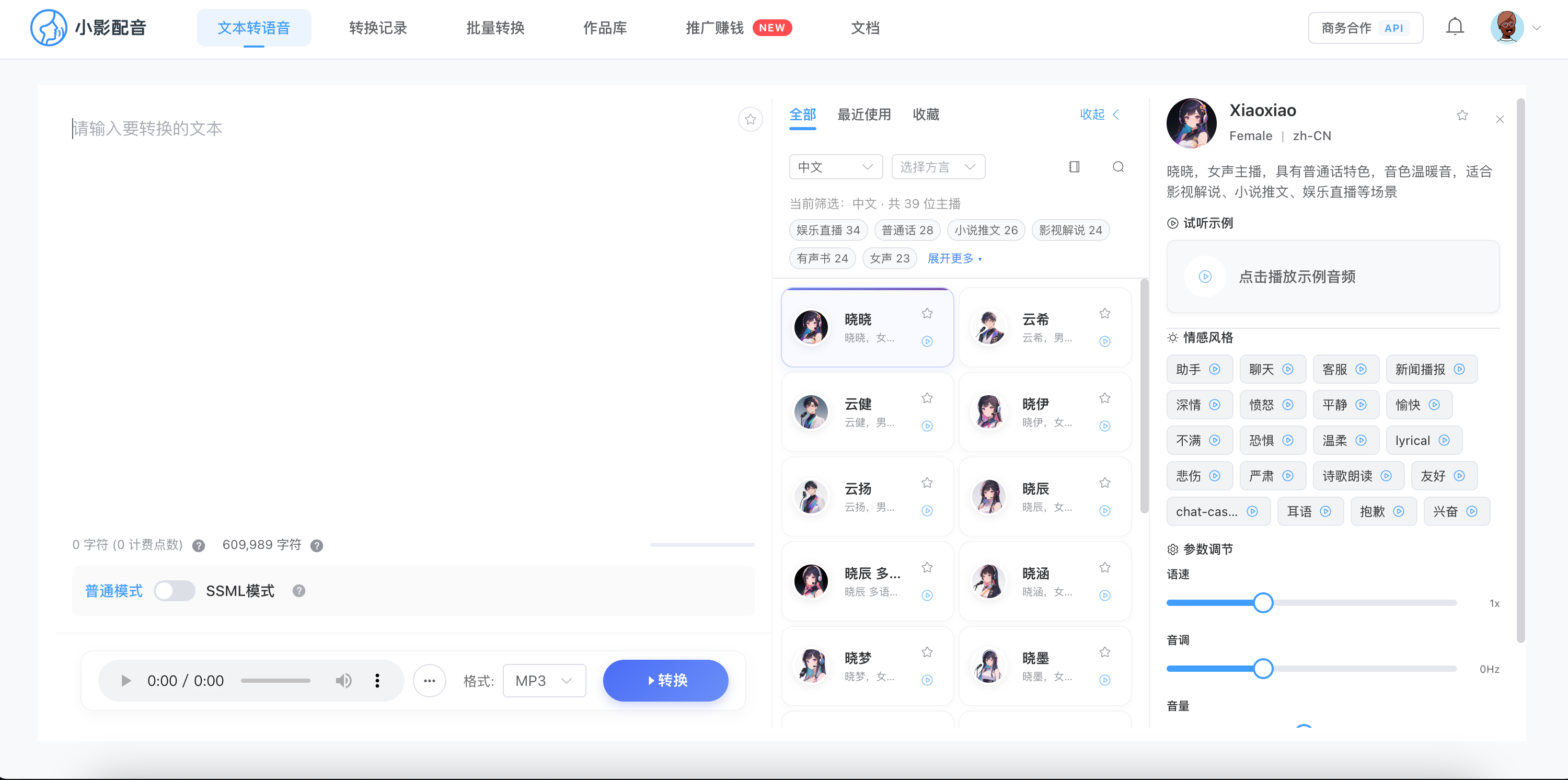
https://web.tts88.top
New Version Interface
Old Version Interface
Features
- 🌐 Completely web-based, no need to install desktop applications
- 🔊 Supports various Microsoft speech synthesis voices
- 🚀 Supports TTS88 API integration
- 🆓 Supports free TTS calls, daily free quota
- 🧠 Supports text generation with OpenAI
- 🌍 Supports multiple languages: Chinese, English, Spanish
- 🔐 Browser fingerprint recognition for a more secure user experience
Latest Updates
Interface Refactoring and Feature Enhancement (v2.2.0)
- 📱 UI Refactoring: Fixed top navigation, text box uses sticky mode, optimized mobile adaptation
- 🔤 SSML Enhancement: Added SSML formatting function, automatically updates SSML with settings changes
- 🎵 Player Optimization: Integrated player into the main interface, improved audio playback and download experience
- 🎞️ Subtitle Feature: Newly added online subtitle generation function to enhance content creation efficiency
- 🌓 Theme Optimization: Improved interface performance in dark mode, added global theme switching
- 🛠️ Advanced Settings: Optimized free TTS service interface, added speed and pitch configuration
- 💡 Interaction Experience: Added tooltip function to enhance user guidance
- 🔄 Dependency Upgrade: Vue upgraded to 3.5.11, ElementPlus upgraded to 2.9.9
- 🌐 Link Update: Updated GitHub repository address
Free TTS Service Integration (v2.1.0)
- 🆕 Free TTS Feature: No API key required, free quota available daily
- 👤 Browser Fingerprint Recognition: Ensures fair use of free quota for each user
- 🔄 Quota Status Display: Real-time display of remaining free characters and reset time
- 🌐 Server Status Detection: Automatically detects connection status of free TTS server
- 🛡️ Enhanced Error Handling: More user-friendly error prompts and status feedback
- 🎛️ Free TTS Settings Panel: Easy for users to configure and view quota information
Interface and User Experience Optimization (v2.0.0)
- ✨ Settings Area Optimization: Settings panel supports collapsing, click "Voice Settings" title to expand/collapse
- 🔘 Smart Button Positioning: "Start Conversion" button moved to the top, no need to scroll to click
- 💬 Status Prompt Enhancement: Added intuitive conversion status prompt text
- 🎨 Visual Effect Improvement: Buttons feature light animation for enhanced user experience
- 📱 Responsive Layout Optimization: Improved display on different screen sizes
Development Plan
📢 Important Notice: Desktop version is under development!
We are developing a cross-platform desktop application version with more features and a better user experience.
Stay tuned for updates and follow the project for the latest information.
Quick Start
Development Environment
# 克隆仓库
git clone https://github.com/henryhu55/tts-web-vue.git安装依赖
yarn install启动开发服务器
yarn dev
Production Build
# 构建生产版本
yarn build预览生产版本
yarn preview
Deployment
After building, deploy the contents of the dist directory to any static web server.
API Configuration
This web version currently supports free TTS service, TTS88 API, and OpenAI API:
Free TTS Service Configuration
- Find the "Free TTS Service" option on the settings page
- The system defaults to a configured free TTS server address
- You can check the remaining free quota and reset time for the day
- Each browser client has an independent free quota
TTS88 API Configuration
- Find the "Third-Party API URL" setting option on the settings page
- Enter your TTS88 API address
- If you have an API key, enter it in the "TTS88 API Key" field
OpenAI API Configuration
- Find the OpenAI settings option on the settings page
- Enter your OpenAI API key
- Select the model to use (default is gpt-3.5-turbo)
- If using self-hosting or proxy, you can set a custom API Base URL
Notes
- Data is only stored in the browser's local storage; refreshing or clearing the cache does not affect other users
- Converted audio files can be played directly in the browser or downloaded locally
- The free TTS service has a daily usage quota limit; exceeding it requires waiting for the next day’s reset
Technology Stack
- Vue 3.2
- Pinia
- ElementPlus
- Vite
License
MIT License
Getting Started
Notice
This software and code are for personal learning and testing purposes only. Please delete it within 24 hours after downloading and do not use it for commercial purposes; otherwise, the consequences are at your own risk. I am not responsible for any legal consequences caused by illegal use. This software will never charge any fees. If you paid any extra fees before using this software, or paid for the source code or finished software, then you have definitely been scammed!
Please indicate the source when redistributing. It is forbidden to induce others to obtain the software repository, download address, and installation package via joining groups, private messages, etc.
Feedback and version release QQ group:
【tts-web-vue Feedback Group 1】279895662
--- Tranlated By Open Ai Tx | Last indexed: 2026-01-04 ---