


Third Party to Intervals.icu
App to sync workouts between TrainingPeaks, TrainerRoad and Intervals.icu.
Runs on MacOS (DMG), Windows (EXE installer), Linux (AppImage). Alternatively there is Docker image and executable JAR.
All files are available for download on Release page.
Only for educational purposes

New Docker image location ⚠️
New image url: ghcr.io/freekode/tp2intervals
Old image url: ghcr.io/freekode/tp2intervals/tp2intervals
TrainerRoad Updates
I don't have access to TrainerRoad anymore. The account I used canceled the subscription. I don't use the platform and it's too expensive to have it for occasional fixes. To fix issues I can only rely on logs and HAR files from you.
List of features
TrainingPeaks
Athlete account
- Sync planned workouts in calendar between Intervals.icu and TrainingPeaks (for today and tomorrow with free TP account)
- Copy whole training plan from TrainingPeaks
- Create training plan or workout folder on Intervals.icu from planned workouts on TrainingPeaks
- Copy whole training plan and workout library from TrainingPeaks
- Sync planned workouts in calendar from TrainerRoad to TrainingPeaks or Intervals.icu
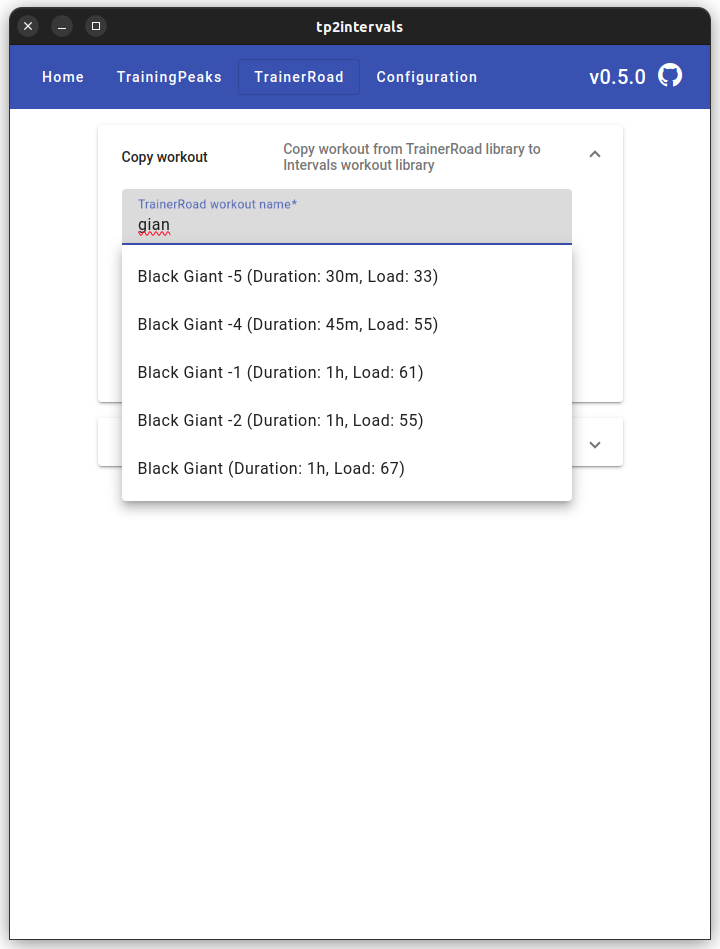
- Copy workouts from TrainerRoad library to Intervals
- Create training plan or workout folder on Intervals.icu from planned workouts on TrainerRoad
Configuration
Before using the application you need to configure access to platforms. Access to Intervals.icu is required, access to other platforms is optional.After you gathered all required configuration, you can click Confirm button. If everything is fine, you will be redirected to the home page.
If your configuration is wrong. You will see an error that there is no access to particular platform. Check all your values and save configuration again.
Intervals.icu
Copy API key and Athlete Id from Settings page in Developer Settings section on Intervals.icu web page.TrainingPeaks
To use TrainingPeaks copy all cookies from request https://tpapi.trainingpeaks.com/users/v3/token and put it on Configuration page.
The app automatically will remove redundant parts and only require cookie will remain. Follow guide below how to do that.
The app requires Production_tpAuth cookie (key and value, smth like Production_tpAuth=very_long_string).
Another guide is available here

TrainerRoad
Configuration is very similar to TrainingPeaks. Copy all cookies from requesthttps://tpapi.trainingpeaks.com/users/v3/token and put it on Configuration page.
The app automatically will remove redundant parts and only require cookie will remain. Follow guide below how to do that.Cookie SharedTrainerRoadAuth (key and value, smth like SharedTrainerRoadAuth=very_long_string) is required for the app.

Be aware, Firefox cuts long strings in Dev Tool window. Copy cookie value with right click -> Copy Value.
Other ways to run the app
Executable JAR
The project has executable jar with web UI. It requires JDK 21. To run jar:java -jar tp2intervals.jarhttp://localhost:8080. To change the port, start the jar with the parameter:java -Dserver.port=9090 -jar tp2intervals.jarDocker
Docker image also built for every releaseservices:
app:
image: ghcr.io/freekode/tp2intervals:latest
container_name: tp2intervals
volumes:
- ./tp2intervals.sqlite:/tp2intervals.sqlite
ports:
- '8080:8080'
FAQ
General
- Ramp steps in TrainerRoad are not supported
- MacOS arm64 Error:
"tp2intervals" is damaged and can’t be opened.
xattr -d com.apple.quarantine /Applications/tp2intervals.app and then open app again
- MacOS app is not signed. Usually you need to open it twice
- Windows The app will ask to access local network and Internet, you need to allow it. After all it makes HTTP requests
- More info you can find on the forum https://forum.intervals.icu/t/tp2intervals-copy-trainingpeaks-and-trainerroad-workouts-plans-to-intervals/63375
Info regarding scheduling for the next day with TrainingPeaks free account
Officially if you have a free TP account, you can't plan workouts for future dates, but practically you can. You can plan a workout for the next day relative to TrainingPeaks server local time. The server is in UTC-6 time zone. Let's check some examples:Example 1. Your TZ is UTC+2 and current local date time 20.05.2024 06:00. It means at this moment TP server local date time is 19.05.2024 22:00. Therefore, you can plan workouts for 20.05.2024. But you can't plan workouts for 21.05.2024, you can do it in 2 hours, because in 2 hours server local time will be 20.05.2024 00:00.
Example 2. Your TZ is UTC+12, current local date time 20.05.2024 18:00. TP server local date time is 20.05.2024 00:00. At this moment, you can plan workouts for 21.05.2024.
Visible time difference with worldtimebuddy
Troubleshooting
To identify the problems with any platform, logs from the users helps very much.Gather logs from guide below. And in case of TrainerRoad platform try to record HAR file. Send the files directly to me.
#### How to get logs
- Go to Configuration
- In General section check Debug Mode, click Confirm
- Reproduce your issue
- Find log file according to your system
- Linux: ~/.config/tp2intervals/logs/main.log
- MacOS: ~/Library/Logs/tp2intervals/main.log
- Windows: %USERPROFILE%\AppData\Roaming\tp2intervals\logs\main.log
- JAR: ./tp2intervals.log
- Open new tab in your browser
- Open dev tools, check Preserve log (Firefox Cog -> Persist Logs)

- Next steps are very important, as they simulate what the app does.
- In dev tools, click Export HAR (Firefox - Cog -> Save All as HAR), save the file and send it to me

--- Tranlated By Open Ai Tx | Last indexed: 2026-05-20 ---