使用您的英特尔Arc GPU运行Ollama、Stable Diffusion和自动语音识别
[博客]
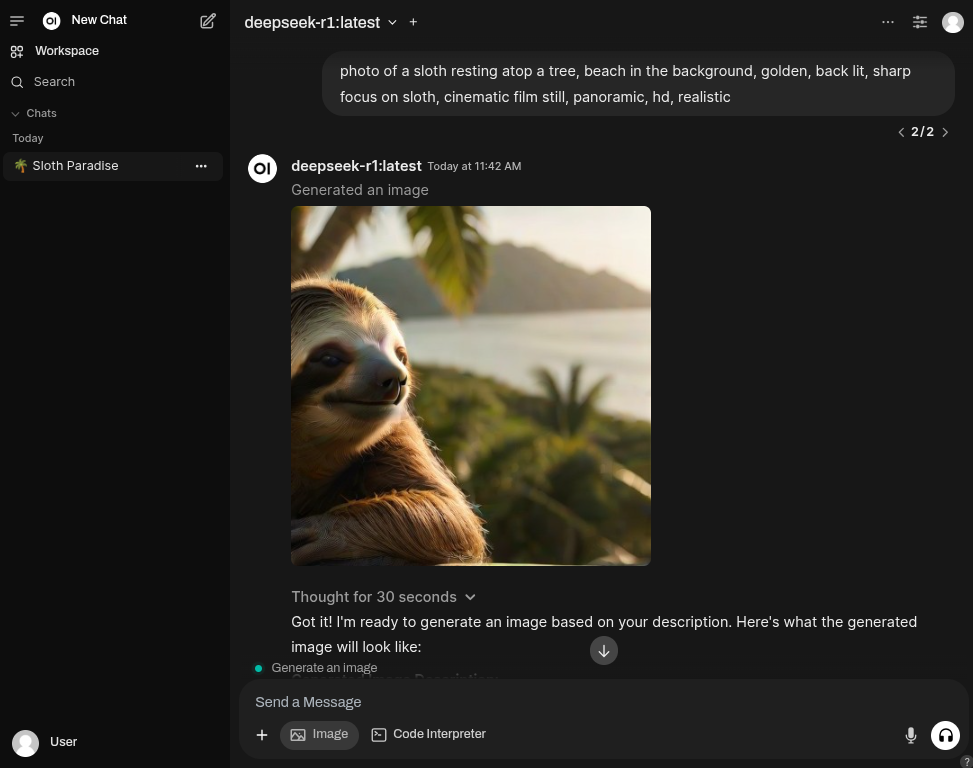
轻松部署基于Docker的解决方案,使用Open WebUI作为用户友好的 AI界面,使用Ollama集成大型语言模型(LLM)。
此外,您还可以运行ComfyUI或SD.Next的docker容器, 以简化Stable Diffusion功能。
您还可以运行一个可选的docker容器,使用OpenAI Whisper执行自动语音识别(ASR)任务。
所有这些容器均通过使用Intel® Extension for PyTorch 针对Linux系统上的英特尔Arc系列GPU进行了优化。
服务
- Ollama
- 在搭载英特尔Arc GPU的Linux电脑上运行llama.cpp和Ollama,配合IPEX-LLM。
- 按照Intel的指南构建。
- 以官方Intel ipex-llm docker镜像作为基础容器。
- 使用所需包的最新版本,优先采用前沿功能而非稳定性。
- 开放端口
11434,供其他工具连接您的Ollama服务。 - Open WebUI
- 使用Open WebUI的官方发行版。
WEBUI_AUTH关闭,实现免认证使用。ENABLE_OPENAI_API和ENABLE_OLLAMA_API标志分别设置为关闭和开启,仅允许通过Ollama交互。ENABLE_IMAGE_GENERATION设置为true,允许您从UI生成图像。IMAGE_GENERATION_ENGINE设置为automatic1111(兼容SD.Next)。- ComfyUI
- 功能最强大且模块化的扩散模型GUI、API及后端,具有图形/节点接口。
- 以官方Intel® Extension for PyTorch作为基础容器。
- SD.Next
- 基于Automatic1111的全能AI生成图像解决方案。
- 以官方Intel® Extension for PyTorch作为基础容器。
- 使用定制版本的SD.NextDockerfile,
- OpenAI Whisper
- 通过大规模弱监督实现的强大语音识别
- 以官方 Intel® PyTorch 扩展 作为基础容器
设置
运行以下命令以启动带有 Open WebUI 的 Ollama 实例$ git clone https://github.com/eleiton/ollama-intel-arc.git
$ cd ollama-intel-arc
$ podman compose up对于 ComfyUI
$ podman compose -f docker-compose.comfyui.yml up$ podman compose -f docker-compose.sdnext.yml up如果您想运行 Whisper 进行自动语音识别,请在另一个终端运行此命令:
$ podman compose -f docker-compose.whisper.yml up验证
运行以下命令以确认您的 Ollama 实例正在运行$ curl http://localhost:11434/
Ollama is running[ollama-intel-arc] | Found 1 SYCL devices:
[ollama-intel-arc] | | | | | |Max | |Max |Global | |
[ollama-intel-arc] | | | | | |compute|Max work|sub |mem | |
[ollama-intel-arc] | |ID| Device Type| Name|Version|units |group |group|size | Driver version|
[ollama-intel-arc] | |--|-------------------|---------------------------------------|-------|-------|--------|-----|-------|---------------------|
[ollama-intel-arc] | | 0| [level_zero:gpu:0]| Intel Arc Graphics| 12.71| 128| 1024| 32| 62400M| 1.6.32224+14|使用图像生成
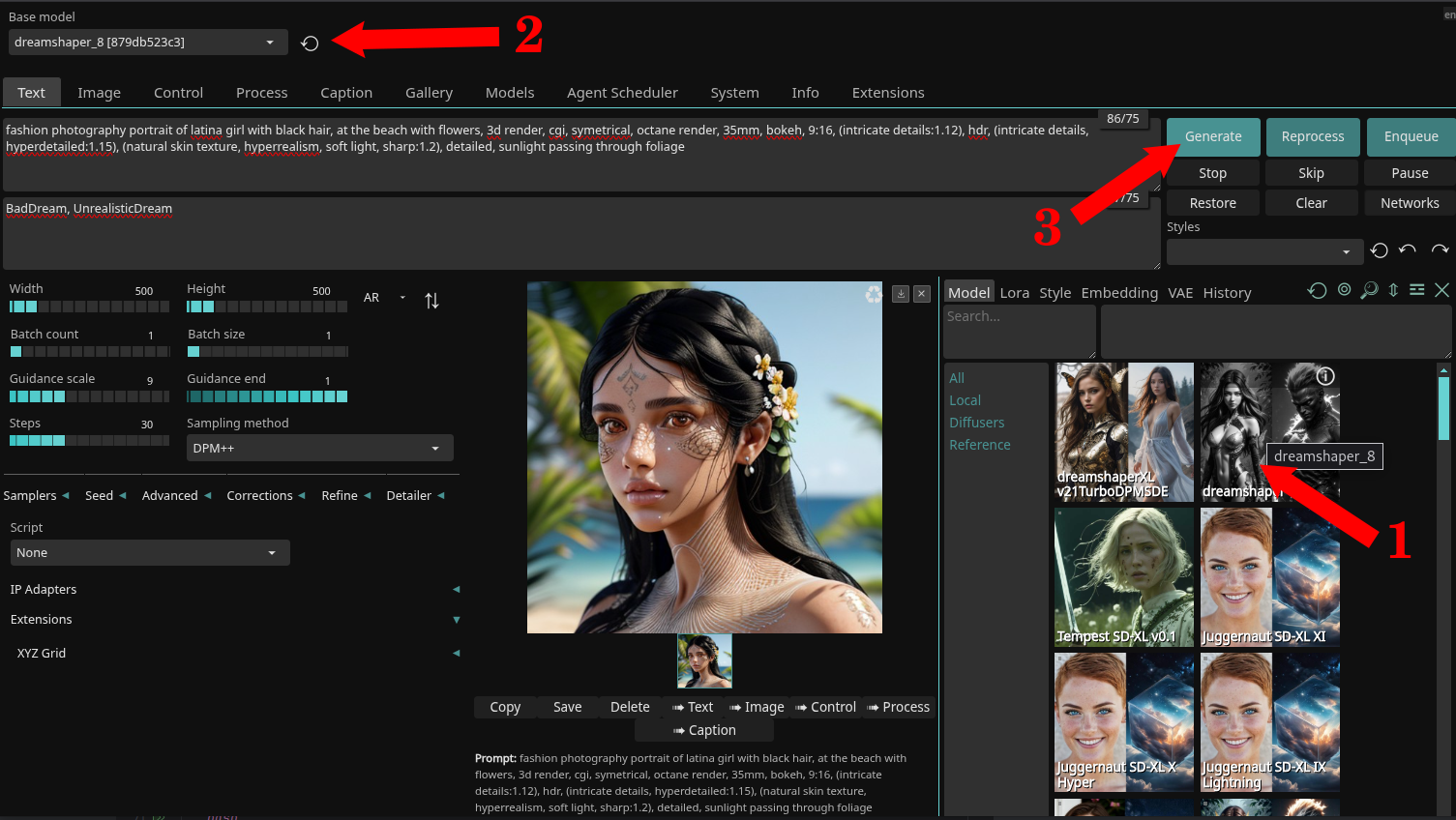
- 打开您的网页浏览器,访问 http://localhost:7860 以进入 SD.Next 网页。
- 在本演示中,我们将使用 DreamShaper 模型。
- 按照以下步骤操作:
- 通过点击其图片下载
dreamshaper_8模型(1)。 - 等待下载完成(约 2GB 大小),然后在下拉框中选择它(2)。
- (可选)如果您想停留在 SD.Next 界面,可以自由探索(3)。
- 有关使用 SD.Next 的更多信息,请参阅官方文档。
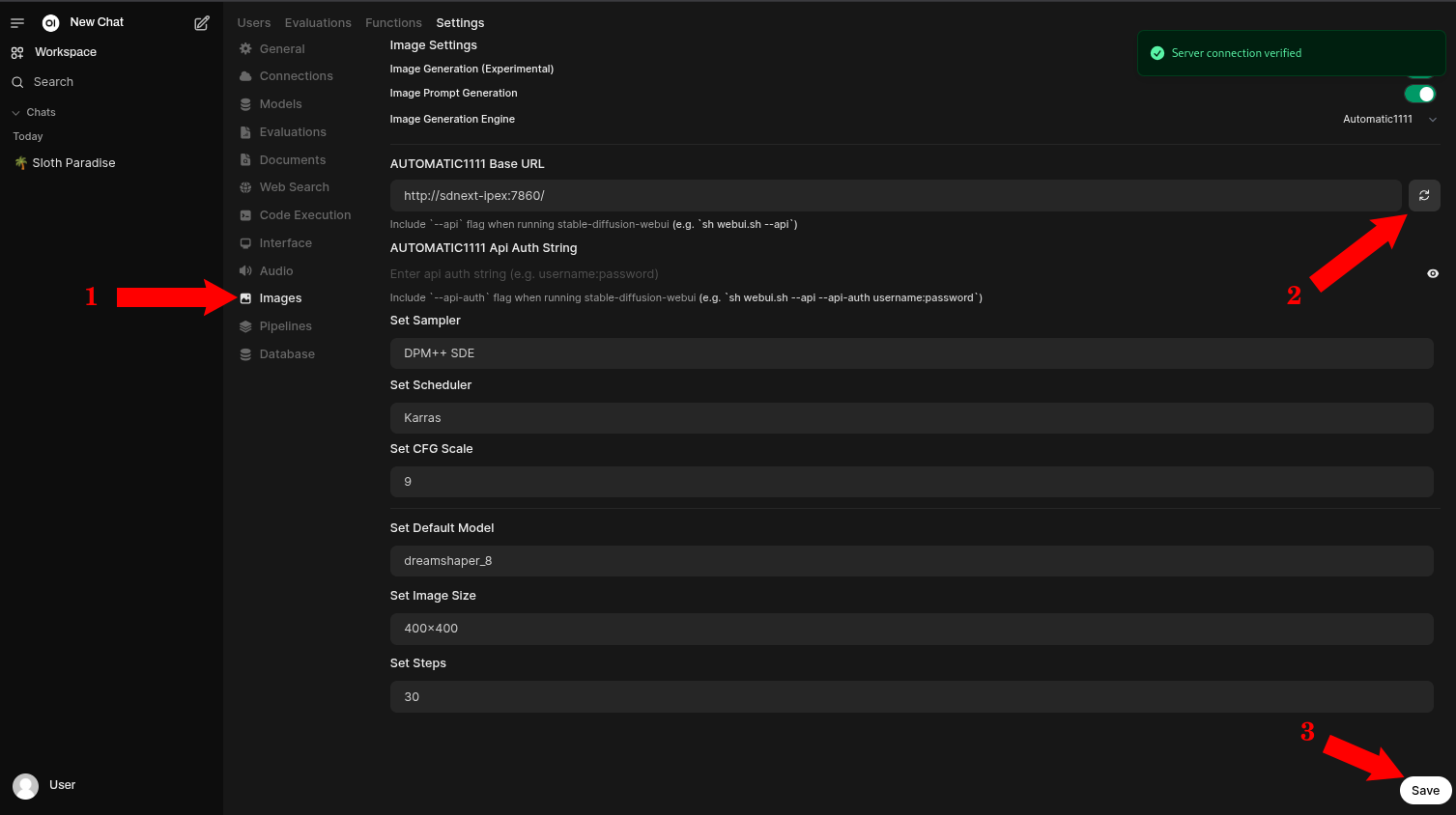
- 打开您的网页浏览器,访问 http://localhost:4040 以进入 Open WebUI 网页。
- 进入管理员设置页面。
- 进入图像部分(1)
- 确保所有设置正确无误,然后点击刷新按钮验证(2)
- (可选)如果您进行了更改,请保存它们。(3)
- 有关使用 Open WebUI 的更多信息,请参阅官方文档
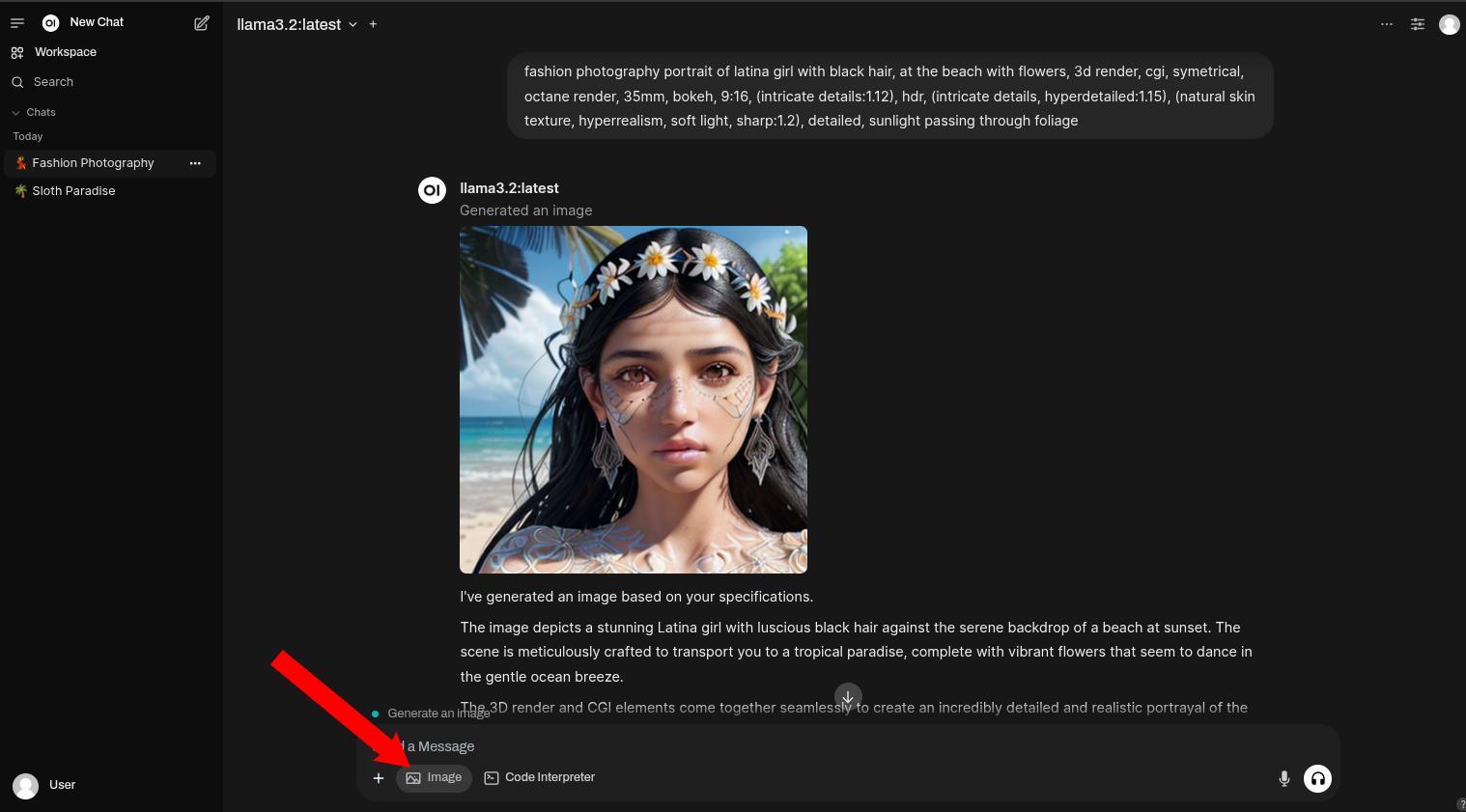
- 完成后,返回 Open WebUI 主页面并开始聊天。确保选择
Image按钮以表示您想生成图像。
使用自动语音识别
- 这是一个转录音频文件的命令示例:
podman exec -it whisper-ipex whisper https://www.lightbulblanguages.co.uk/resources/ge-audio/hobbies-ge.mp3 --device xpu --model small --language German --task transcribe- 响应:
  [00:00.000 --> 00:08.000]  Ich habe viele Hobbys. In meiner Freizeit mache ich sehr gerne Sport, wie zum Beispiel Wasserball oder Radfahren.
  [00:08.000 --> 00:13.000]  Außerdem lese ich gerne und lerne auch gerne Fremdsprachen.
  [00:13.000 --> 00:19.000]  Ich gehe gerne ins Kino, höre gerne Musik und treffe mich mit meinen Freunden.
  [00:19.000 --> 00:22.000]  Früher habe ich auch viel Basketball gespielt.
  [00:22.000 --> 00:26.000]  Im Frühling und im Sommer werde ich viele Radtouren machen.
  [00:26.000 --> 00:29.000]  Außerdem werde ich viel schwimmen gehen.
[00:29.000 --> 00:33.000] Am liebsten würde ich das natürlich im Meer machen.- 这是一个翻译音频文件的命令示例:
podman exec -it whisper-ipex whisper https://www.lightbulblanguages.co.uk/resources/ge-audio/hobbies-ge.mp3 --device xpu --model small --language German --task translate- 响应:
  [00:00.000 --> 00:02.000]  I have a lot of hobbies.
  [00:02.000 --> 00:05.000]  In my free time I like to do sports,
  [00:05.000 --> 00:08.000]  such as water ball or cycling.
  [00:08.000 --> 00:10.000]  Besides, I like to read
  [00:10.000 --> 00:13.000]  and also like to learn foreign languages.
  [00:13.000 --> 00:15.000]  I like to go to the cinema,
  [00:15.000 --> 00:16.000]  like to listen to music
  [00:16.000 --> 00:19.000]  and meet my friends.
  [00:19.000 --> 00:22.000]  I used to play a lot of basketball.
  [00:22.000 --> 00:26.000]  In spring and summer I will do a lot of cycling tours.
  [00:26.000 --> 00:29.000]  Besides, I will go swimming a lot.
[00:29.000 --> 00:33.000] Of course, I would prefer to do this in the sea.- 要使用您自己的音频文件而不是网络文件,请将它们放置在
~/whisper-files文件夹中,并像这样访问:
podman exec -it whisper-ipex whisper YOUR_FILE_NAME.mp3 --device xpu --model small --task translate更新容器
如果 ipex-llm-inference-cpp-xpu Docker 镜像或 Open WebUI Docker 镜像有新的更新,您可能需要更新您的容器,以保持最新状态。在进行任何更新之前,请确保停止您的容器
$ podman compose down latest镜像。$ podman compose pull之后,您可以运行 compose up 来重新启动您的服务。
$ podman compose up手动连接到您的 Ollama 容器
您可以通过运行以下命令直接连接到您的 Ollama 容器:$ podman exec -it ollama-intel-arc /bin/bash
$ /llm/ollama/ollama -v我的开发环境:
- Core Ultra 7 155H
- Intel® Arc™ 显卡(Meteor Lake-P)
- Fedora 41
参考资料
- Open WebUI 文档
- Docker - Intel ipex-llm 标签
- Docker - Intel pytorch 扩展
- GitHub - Intel ipex-llm 标签
- GitHub - Intel pytorch 扩展