Intel Arc GPUでOllama、Stable Diffusion、および自動音声認識を実行する
[ブログ]
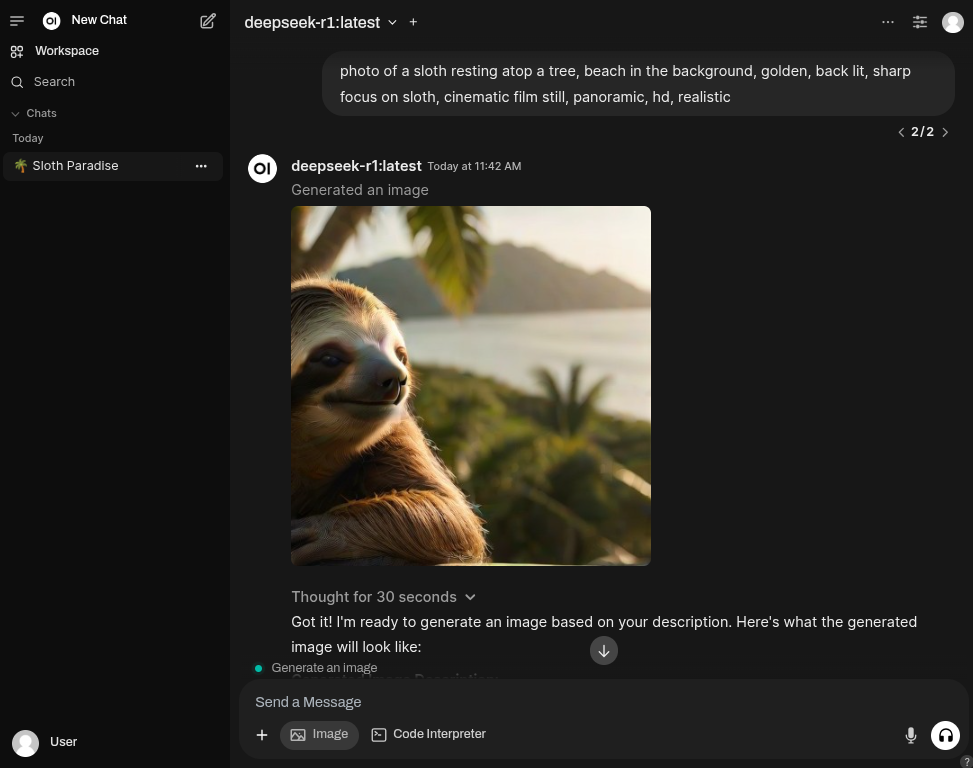
Open WebUIをユーザーフレンドリーな AIインターフェースとして使用し、Large Language Models(LLM)を統合するためにOllamaを利用する Dockerベースのソリューションを簡単に展開できます。
さらに、ComfyUIやSD.Nextのdockerコンテナを実行して、 Stable Diffusionの機能を効率化できます。
また、任意でOpenAI Whisperのdockerコンテナを実行し、 自動音声認識(ASR)タスクを実行することも可能です。
これらすべてのコンテナは、Intel® Extension for PyTorchを使用して、Linuxシステム上のIntel ArcシリーズGPU向けに最適化されています。
サービス
- Ollama
- LinuxコンピューターのIntel Arc GPU上でllama.cppとOllamaをIPEX-LLMで実行します。
- Intelのガイドラインに従って構築されています。
- 公式のIntel ipex-llm dockerイメージをベースコンテナとして使用。
- 最新のパッケージバージョンを使用し、安定性よりも最先端機能を優先しています。
- 他のツールがOllamaサービスに接続できるようにポート
11434を公開しています。 - Open WebUI
- Open WebUIの公式配布版を使用。
- 認証不要で利用できるように
WEBUI_AUTHはオフ。 ENABLE_OPENAI_APIはオフ、ENABLE_OLLAMA_APIはオンに設定し、Ollama経由の操作のみを許可。- UIから画像生成を可能にするため
ENABLE_IMAGE_GENERATIONはtrueに設定。 - 画像生成エンジンはautomatic1111に設定(SD.Nextも互換性あり)。
- ComfyUI
- グラフ/ノードインターフェースを持つ最も強力でモジュール化された拡散モデルGUI、APIおよびバックエンド。
- 公式のIntel® Extension for PyTorchをベースコンテナとして使用。
- SD.Next
- Automatic1111ベースのAI生成画像のオールインワン。
- 公式のIntel® Extension for PyTorchをベースコンテナとして使用。
- Intel Extension for Pytorchイメージと互換性のあるカスタマイズ版SD.Nextのdockerファイルを使用。
- OpenAI Whisper
- 大規模な弱教師あり学習による堅牢な音声認識
- 基本コンテナとして公式の[Intel® Extension for PyTorch]を使用しています(https://pytorch-extension.intel.com/installation?platform=gpu)
セットアップ
以下のコマンドを実行して、Open WebUI付きのOllamaインスタンスを起動します$ git clone https://github.com/eleiton/ollama-intel-arc.git
$ cd ollama-intel-arc
$ podman compose upさらに、1つ以上の画像生成ツールを実行したい場合は、別のターミナルでこれらのコマンドを実行してください:
ComfyUIの場合
$ podman compose -f docker-compose.comfyui.yml up$ podman compose -f docker-compose.sdnext.yml up自動音声認識のためにWhisperを実行したい場合は、別のターミナルでこのコマンドを実行してください:
$ podman compose -f docker-compose.whisper.yml up検証
次のコマンドを実行して、Ollama インスタンスが起動して稼働していることを確認してください$ curl http://localhost:11434/
Ollama is running[ollama-intel-arc] | Found 1 SYCL devices:
[ollama-intel-arc] | | | | | |Max | |Max |Global | |
[ollama-intel-arc] | | | | | |compute|Max work|sub |mem | |
[ollama-intel-arc] | |ID| Device Type| Name|Version|units |group |group|size | Driver version|
[ollama-intel-arc] | |--|-------------------|---------------------------------------|-------|-------|--------|-----|-------|---------------------|
[ollama-intel-arc] | | 0| [level_zero:gpu:0]| Intel Arc Graphics| 12.71| 128| 1024| 32| 62400M| 1.6.32224+14|画像生成の使用方法
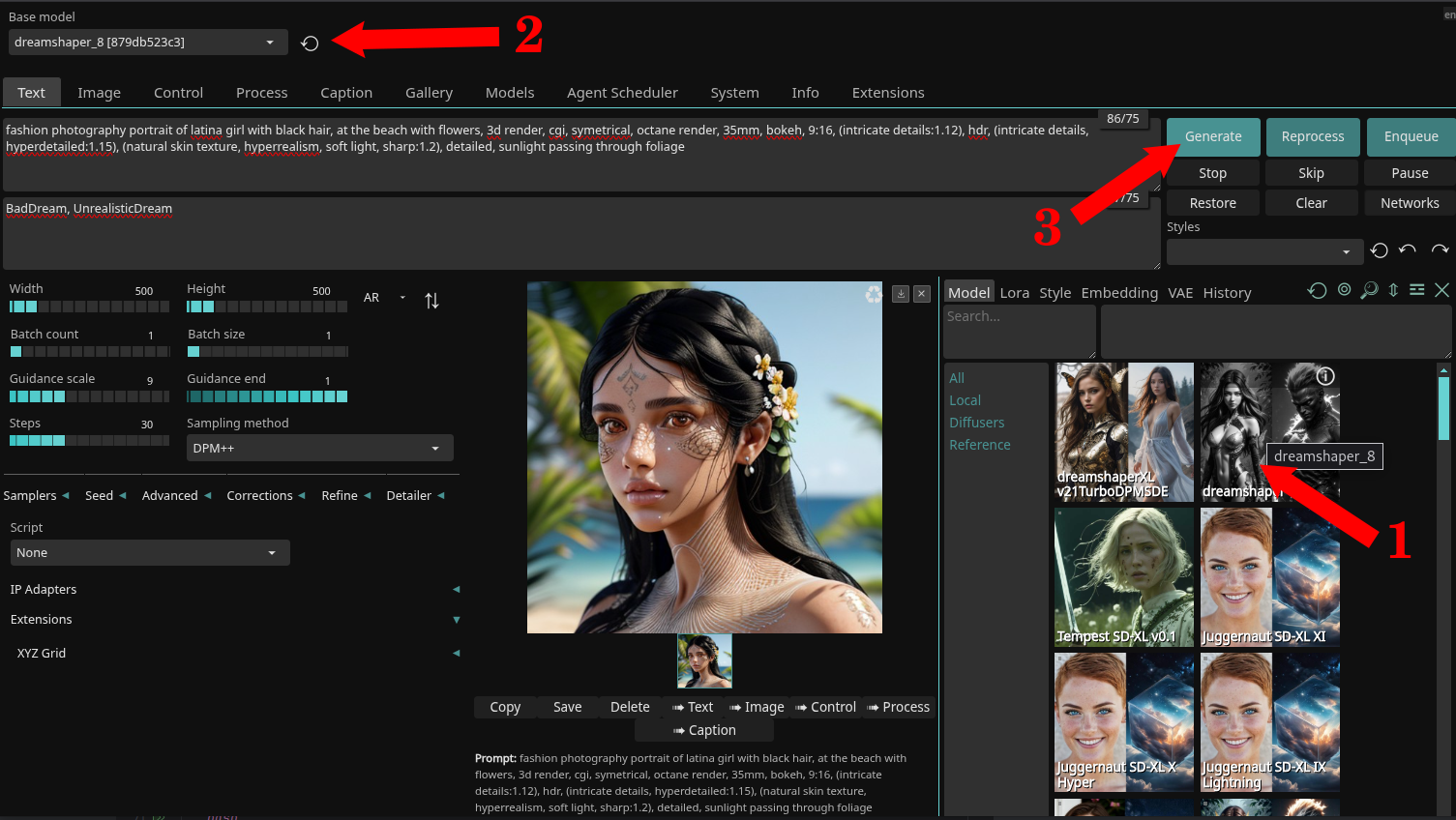
- Webブラウザを開き、http://localhost:7860 にアクセスしてSD.Nextのウェブページを表示します。
- このデモンストレーションでは、DreamShaperモデルを使用します。
- 以下の手順に従ってください:
- 画像をクリックして
dreamshaper_8モデルをダウンロードします(1)。 - ダウンロードが完了するまで待ちます(約2GBのサイズ)その後、ドロップダウンボックスで選択します(2)。
- (オプション)SD.NextのUIに留まりたい場合は、自由に探索してください(3)。
- SD.Nextの使用方法の詳細については、公式のドキュメントを参照してください。
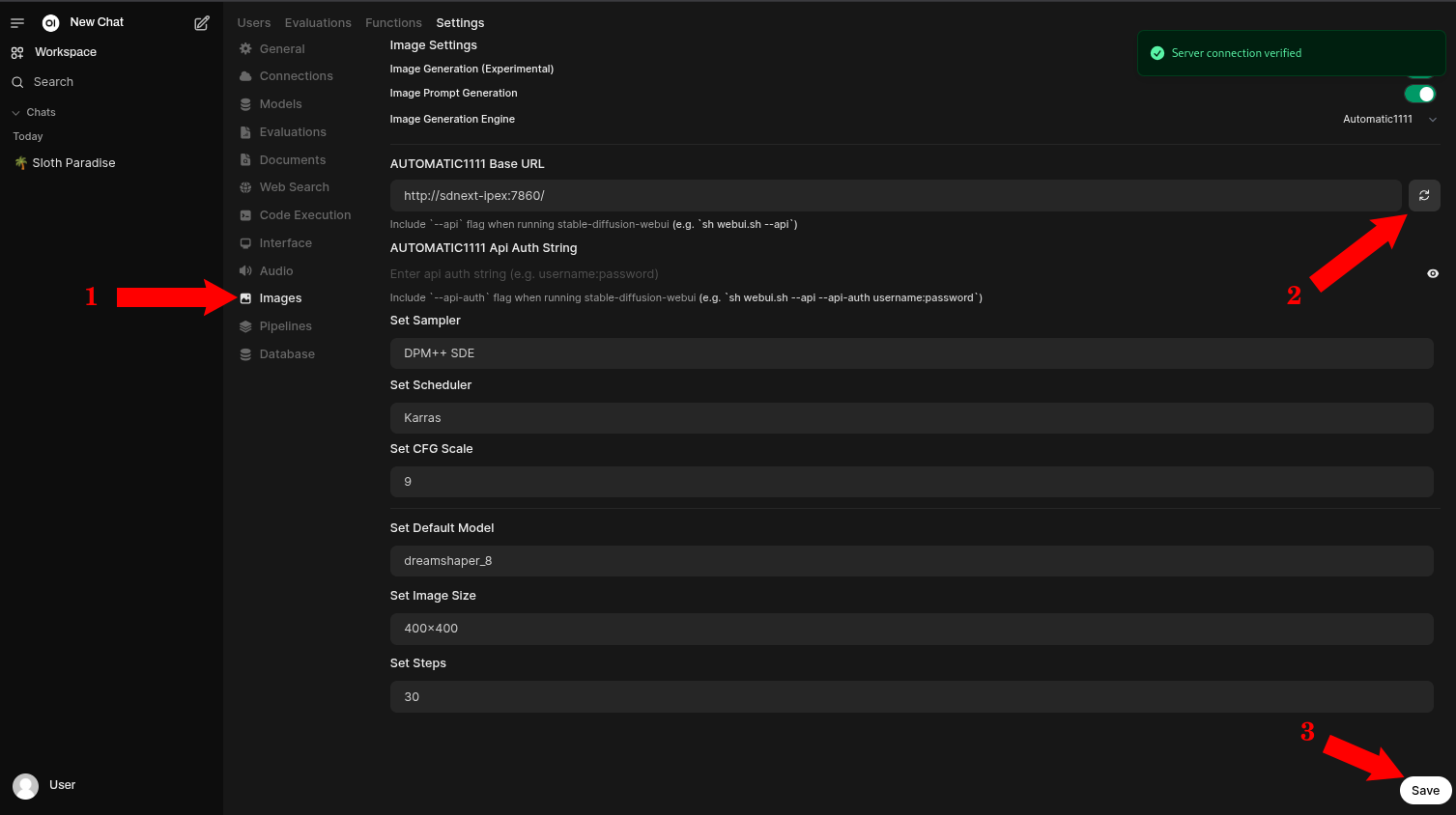
- Webブラウザを開き、http://localhost:4040 にアクセスしてOpen WebUIのウェブページを表示します。
- 管理者用の設定ページに移動します。
- 画像セクションに移動します(1)
- すべての設定が正しいことを確認し、更新ボタンを押して設定を検証します(2)
- (オプション)変更を加えた場合は保存します(3)
- Open WebUIの使用方法の詳細については、公式のドキュメントを参照してください。
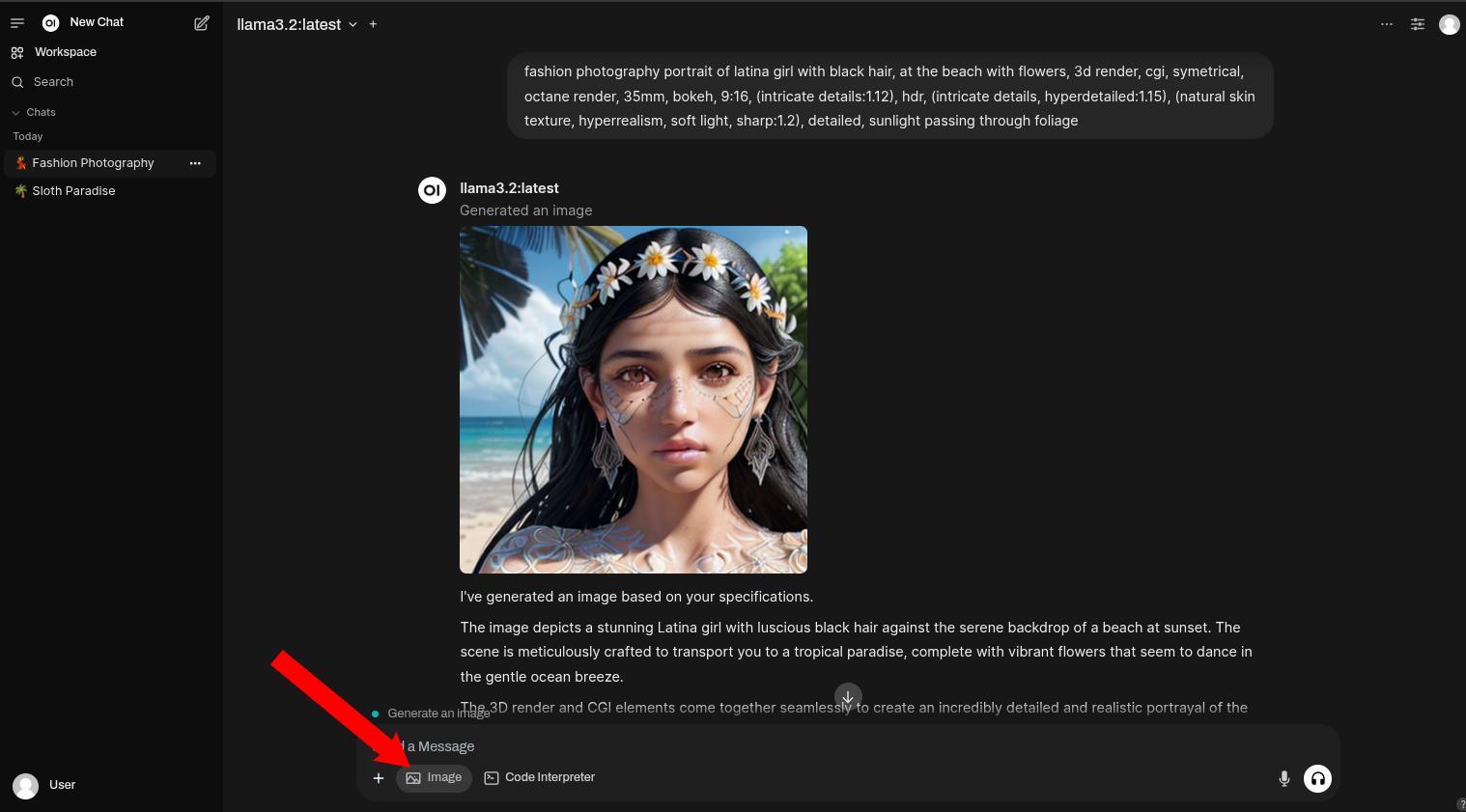
- 以上です。Open WebUIのメインページに戻り、チャットを開始します。画像生成を行いたい場合は必ず
Imageボタンを選択してください。
自動音声認識の使用方法
- これは音声ファイルを文字起こしするコマンドの例です:
podman exec -it whisper-ipex whisper https://www.lightbulblanguages.co.uk/resources/ge-audio/hobbies-ge.mp3 --device xpu --model small --language German --task transcribe- 応答:
  [00:00.000 --> 00:08.000]  Ich habe viele Hobbys. In meiner Freizeit mache ich sehr gerne Sport, wie zum Beispiel Wasserball oder Radfahren.
  [00:08.000 --> 00:13.000]  Außerdem lese ich gerne und lerne auch gerne Fremdsprachen.
  [00:13.000 --> 00:19.000]  Ich gehe gerne ins Kino, höre gerne Musik und treffe mich mit meinen Freunden.
  [00:19.000 --> 00:22.000]  Früher habe ich auch viel Basketball gespielt.
  [00:22.000 --> 00:26.000]  Im Frühling und im Sommer werde ich viele Radtouren machen.
  [00:26.000 --> 00:29.000]  Außerdem werde ich viel schwimmen gehen.
[00:29.000 --> 00:33.000] Am liebsten würde ich das natürlich im Meer machen.- これは音声ファイルを翻訳するコマンドの例です:
podman exec -it whisper-ipex whisper https://www.lightbulblanguages.co.uk/resources/ge-audio/hobbies-ge.mp3 --device xpu --model small --language German --task translate- 応答:
  [00:00.000 --> 00:02.000]  I have a lot of hobbies.
  [00:02.000 --> 00:05.000]  In my free time I like to do sports,
  [00:05.000 --> 00:08.000]  such as water ball or cycling.
  [00:08.000 --> 00:10.000]  Besides, I like to read
  [00:10.000 --> 00:13.000]  and also like to learn foreign languages.
  [00:13.000 --> 00:15.000]  I like to go to the cinema,
  [00:15.000 --> 00:16.000]  like to listen to music
  [00:16.000 --> 00:19.000]  and meet my friends.
  [00:19.000 --> 00:22.000]  I used to play a lot of basketball.
  [00:22.000 --> 00:26.000]  In spring and summer I will do a lot of cycling tours.
  [00:26.000 --> 00:29.000]  Besides, I will go swimming a lot.
[00:29.000 --> 00:33.000] Of course, I would prefer to do this in the sea.- ウェブファイルの代わりに自分の音声ファイルを使用するには、それらを
~/whisper-filesフォルダーに置き、次のようにアクセスします:
podman exec -it whisper-ipex whisper YOUR_FILE_NAME.mp3 --device xpu --model small --task translateコンテナの更新
ipex-llm-inference-cpp-xpu ドッカーイメージや Open WebUI ドッカーイメージに新しいアップデートがある場合、最新の状態を保つためにコンテナを更新したいかもしれません。更新の前に、必ずコンテナを停止してください
$ podman compose down latest イメージを取得するためにプルコマンドを実行するだけです。$ podman compose pull$ podman compose upOllamaコンテナへの手動接続
これらのコマンドを実行することで、Ollamaコンテナに直接接続できます:$ podman exec -it ollama-intel-arc /bin/bash
$ /llm/ollama/ollama -v私の開発環境:
- Core Ultra 7 155H
- Intel® Arc™ Graphics (Meteor Lake-P)
- Fedora 41
参考文献
- Open WebUI ドキュメント
- Docker - Intel ipex-llm タグ
- Docker - Intel extension for pytorch
- GitHub - Intel ipex-llm タグ
- GitHub - Intel extension for pytorch