Run Ollama, Stable Diffusion and Automatic Speech Recognition with your Intel Arc GPU
Effortlessly deploy a Docker-based solution that uses Open WebUI as your user-friendly AI Interface and Ollama for integrating Large Language Models (LLM).
Additionally, you can run ComfyUI or SD.Next docker containers to streamline Stable Diffusion capabilities.
You can also run an optional docker container with OpenAI Whisper to perform Automatic Speech Recognition (ASR) tasks.
All these containers have been optimized for Intel Arc Series GPUs on Linux systems by using Intel® Extension for PyTorch.
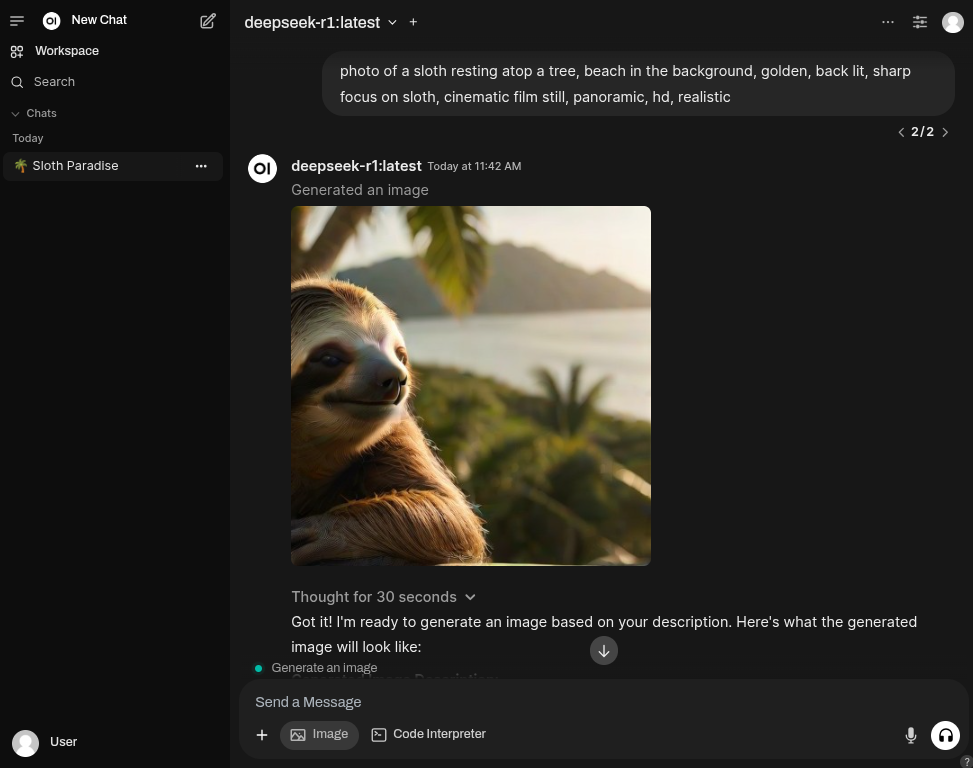
Services
- Ollama
- Runs llama.cpp and Ollama with IPEX-LLM on your Linux computer with Intel Arc GPU.
- Built following the guidelines from Intel.
- Uses the official Intel ipex-llm docker image as the base container.
- Uses the latest versions of required packages, prioritizing cutting-edge features over stability.
- Exposes port
11434for connecting other tools to your Ollama service. - Open WebUI
- Uses the official distribution of Open WebUI.
WEBUI_AUTHis turned off for authentication-free usage.ENABLE_OPENAI_APIandENABLE_OLLAMA_APIflags are set to off and on, respectively, allowing interactions via Ollama only.ENABLE_IMAGE_GENERATIONis set to true, allowing you to generate images from the UI.IMAGE_GENERATION_ENGINEis set to automatic1111 (SD.Next is compatible).- ComfyUI
- The most powerful and modular diffusion model GUI, api and backend with a graph/nodes interface.
- Uses as the base container the official Intel® Extension for PyTorch
- SD.Next
- All-in-one for AI generative image based on Automatic1111
- Uses as the base container the official Intel® Extension for PyTorch
- Uses a customized version of the SD.Next docker file, making it compatible with the Intel Extension for Pytorch image.
- OpenAI Whisper
- Robust Speech Recognition via Large-Scale Weak Supervision
- Uses as the base container the official Intel® Extension for PyTorch
Setup
Run the following commands to start your Ollama instance with Open WebUI$ git clone https://github.com/eleiton/ollama-intel-arc.git
$ cd ollama-intel-arc
$ podman compose upAdditionally, if you want to run one or more of the image generation tools, run these commands in a different terminal:
For ComfyUI
$ podman compose -f docker-compose.comfyui.yml up$ podman compose -f docker-compose.sdnext.yml upIf you want to run Whisper for automatic speech recognition, run this command in a different terminal:
$ podman compose -f docker-compose.whisper.yml upValidate
Run the following command to verify your Ollama instance is up and running$ curl http://localhost:11434/
Ollama is running[ollama-intel-arc] | Found 1 SYCL devices:
[ollama-intel-arc] | | | | | |Max | |Max |Global | |
[ollama-intel-arc] | | | | | |compute|Max work|sub |mem | |
[ollama-intel-arc] | |ID| Device Type| Name|Version|units |group |group|size | Driver version|
[ollama-intel-arc] | |--|-------------------|---------------------------------------|-------|-------|--------|-----|-------|---------------------|
[ollama-intel-arc] | | 0| [level_zero:gpu:0]| Intel Arc Graphics| 12.71| 128| 1024| 32| 62400M| 1.6.32224+14|Using Image Generation
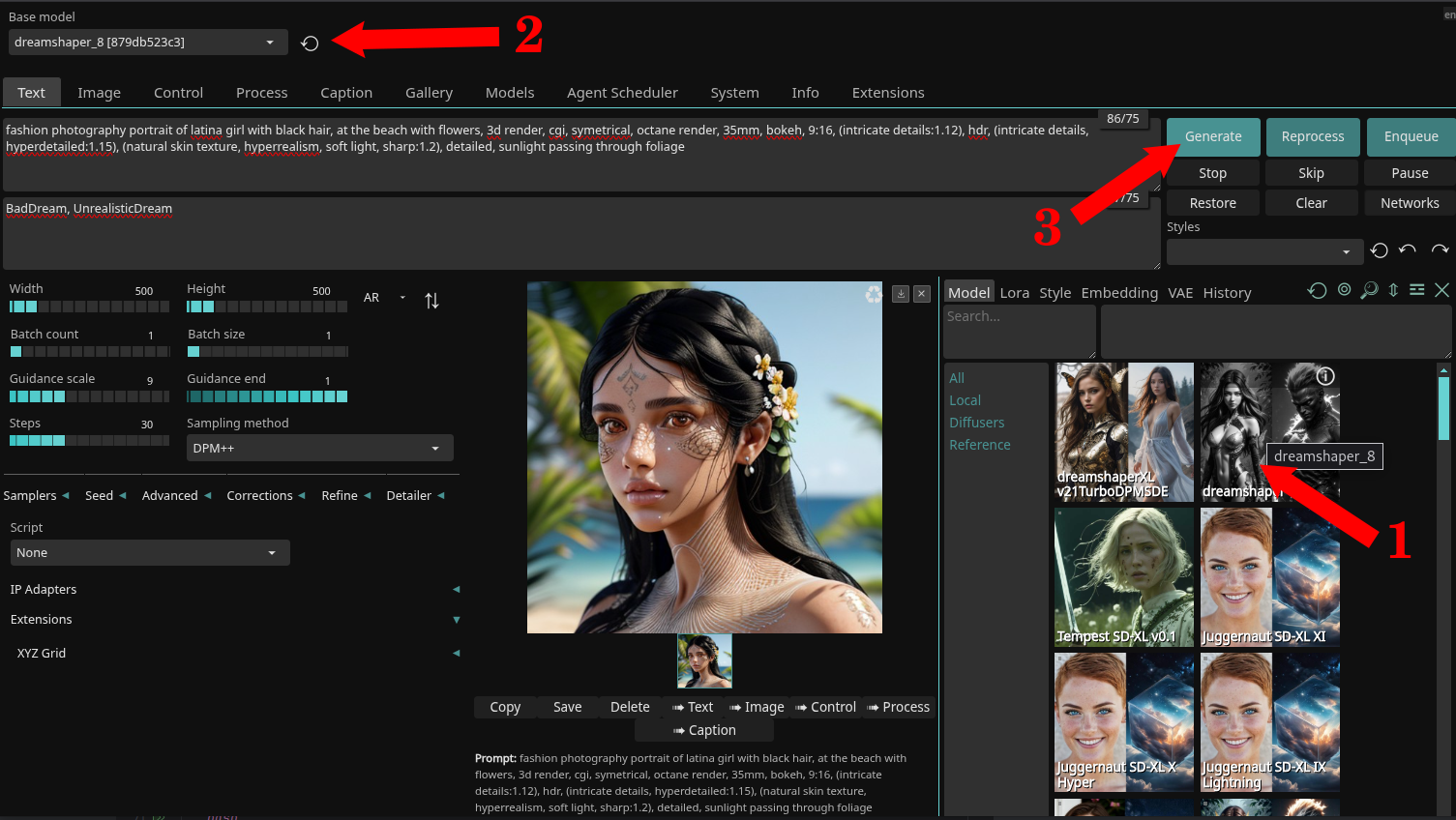
- Open your web browser to http://localhost:7860 to access the SD.Next web page.
- For the purposes of this demonstration, we'll use the DreamShaper model.
- Follow these steps:
- Download the
dreamshaper_8model by clicking on its image (1). - Wait for it to download (~2GB in size) and then select it in the dropbox (2).
- (Optional) If you want to stay in the SD.Next UI, feel free to explore (3).
- For more information on using SD.Next, refer to the official documentation.
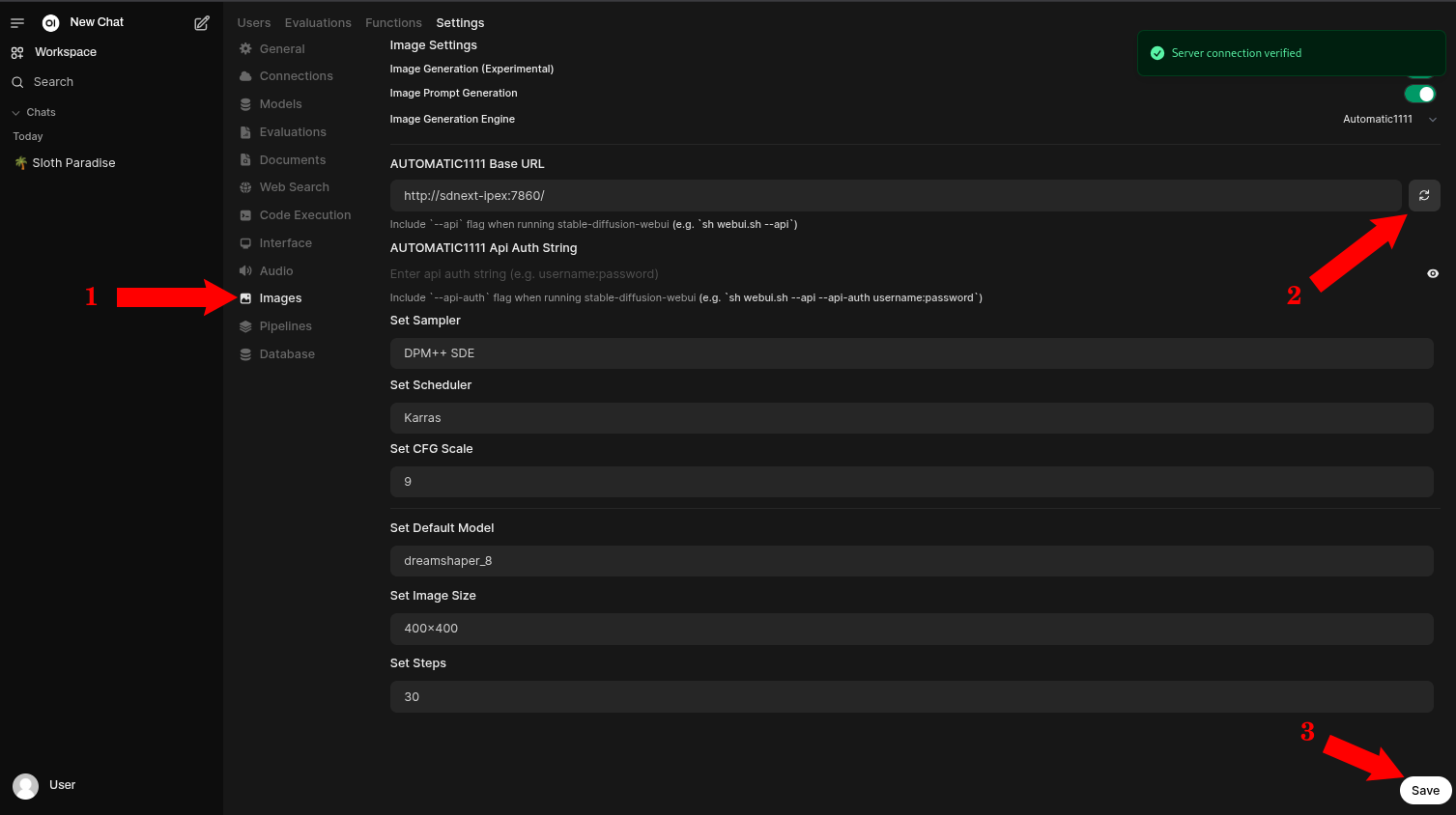
- Open your web browser to http://localhost:4040 to access the Open WebUI web page.
- Go to the administrator settings page.
- Go to the Image section (1)
- Make sure all settings look good, and validate them pressing the refresh button (2)
- (Optional) Save any changes if you made them. (3)
- For more information on using Open WebUI, refer to the official documentation
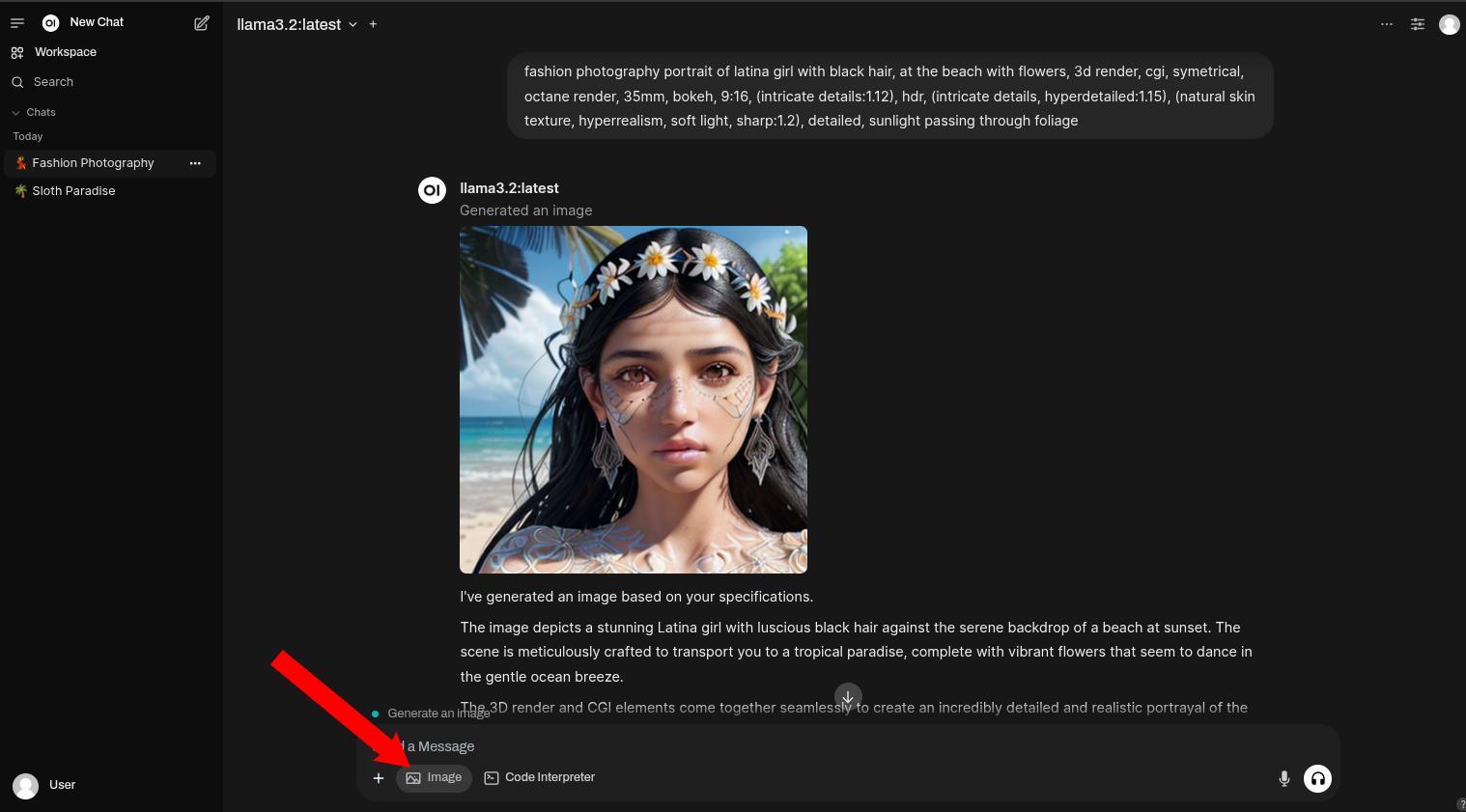
- That's it, go back to Open WebUI main page and start chatting. Make sure to select the
Imagebutton to indicate you want to generate Images.
Using Automatic Speech Recognition
- This is an example of a command to transcribe audio files:
podman exec -it whisper-ipex whisper https://www.lightbulblanguages.co.uk/resources/ge-audio/hobbies-ge.mp3 --device xpu --model small --language German --task transcribe- Response:
  [00:00.000 --> 00:08.000]  Ich habe viele Hobbys. In meiner Freizeit mache ich sehr gerne Sport, wie zum Beispiel Wasserball oder Radfahren.
  [00:08.000 --> 00:13.000]  Außerdem lese ich gerne und lerne auch gerne Fremdsprachen.
  [00:13.000 --> 00:19.000]  Ich gehe gerne ins Kino, höre gerne Musik und treffe mich mit meinen Freunden.
  [00:19.000 --> 00:22.000]  Früher habe ich auch viel Basketball gespielt.
  [00:22.000 --> 00:26.000]  Im Frühling und im Sommer werde ich viele Radtouren machen.
  [00:26.000 --> 00:29.000]  Außerdem werde ich viel schwimmen gehen.
[00:29.000 --> 00:33.000] Am liebsten würde ich das natürlich im Meer machen.- This is an example of a command to translate audio files:
podman exec -it whisper-ipex whisper https://www.lightbulblanguages.co.uk/resources/ge-audio/hobbies-ge.mp3 --device xpu --model small --language German --task translate- Response:
  [00:00.000 --> 00:02.000]  I have a lot of hobbies.
  [00:02.000 --> 00:05.000]  In my free time I like to do sports,
  [00:05.000 --> 00:08.000]  such as water ball or cycling.
  [00:08.000 --> 00:10.000]  Besides, I like to read
  [00:10.000 --> 00:13.000]  and also like to learn foreign languages.
  [00:13.000 --> 00:15.000]  I like to go to the cinema,
  [00:15.000 --> 00:16.000]  like to listen to music
  [00:16.000 --> 00:19.000]  and meet my friends.
  [00:19.000 --> 00:22.000]  I used to play a lot of basketball.
  [00:22.000 --> 00:26.000]  In spring and summer I will do a lot of cycling tours.
  [00:26.000 --> 00:29.000]  Besides, I will go swimming a lot.
[00:29.000 --> 00:33.000] Of course, I would prefer to do this in the sea.- To use your own audio files instead of web files, place them in the
~/whisper-filesfolder and access them like this:
podman exec -it whisper-ipex whisper YOUR_FILE_NAME.mp3 --device xpu --model small --task translateUpdating the containers
If there are new updates in the ipex-llm-inference-cpp-xpu Docker image or in the Open WebUI Docker image, you may want to update your containers to stay up to date.Before any updates, be sure to stop your containers
$ podman compose down latest images.$ podman compose pull$ podman compose upManually connecting to your Ollama container
You can connect directly to your Ollama container by running these commands:$ podman exec -it ollama-intel-arc /bin/bash
$ /llm/ollama/ollama -vMy development environment:
- Core Ultra 7 155H
- Intel® Arc™ Graphics (Meteor Lake-P)
- Fedora 41
References
- Open WebUI documentation
- Docker - Intel ipex-llm tags
- Docker - Intel extension for pytorch
- GitHub - Intel ipex-llm tags
- GitHub - Intel extension for pytorch