ACEBench: ツール使用のマッチポイントを制するのは誰か?
English | 中文
📚 コンテンツ
---🛠️ 更新情報 [[トップに戻る]](#content)
[2025.10.29]
1 normal_atom_enum_9、normal_atom_number_17、および normal_atom_list_34 データセットの可能な回答を修正しました。
📘 1\. アブストラクト [[トップに戻る]](#content)
Large Language Models (LLMs) have demonstrated significant potential in decision-making and reasoning, particularly when integrated with various tools to effectively solve complex problems. However, existing benchmarks for evaluating LLMs' tool usage face several limitations: (1) limited evaluation scenarios, often lacking assessments in real multi-turn dialogue contexts; (2) narrow evaluation dimensions, with insufficient detailed assessments of how LLMs use tools; and (3) reliance on LLMs or real API executions for evaluation, which introduces significant overhead. To address these challenges, we introduce ACEBench, a comprehensive benchmark for assessing tool usage in LLMs. ACEBench categorizes data into three primary types based on evaluation methodology: Normal, Special, and Agent. "Normal" evaluates tool usage in basic scenarios; "Special" evaluates tool usage in situations with ambiguous or incomplete instructions; "Agent" evaluates tool usage through multi-agent interactions to simulate real-world, multi-turn dialogues. We conducted extensive experiments using ACEBench, analyzing various LLMs in-depth and providing a more granular examination of error causes across different data types.
📊 2.Benchmarkデータ分析 [[トップに戻る]](#content)
APIのドメイン
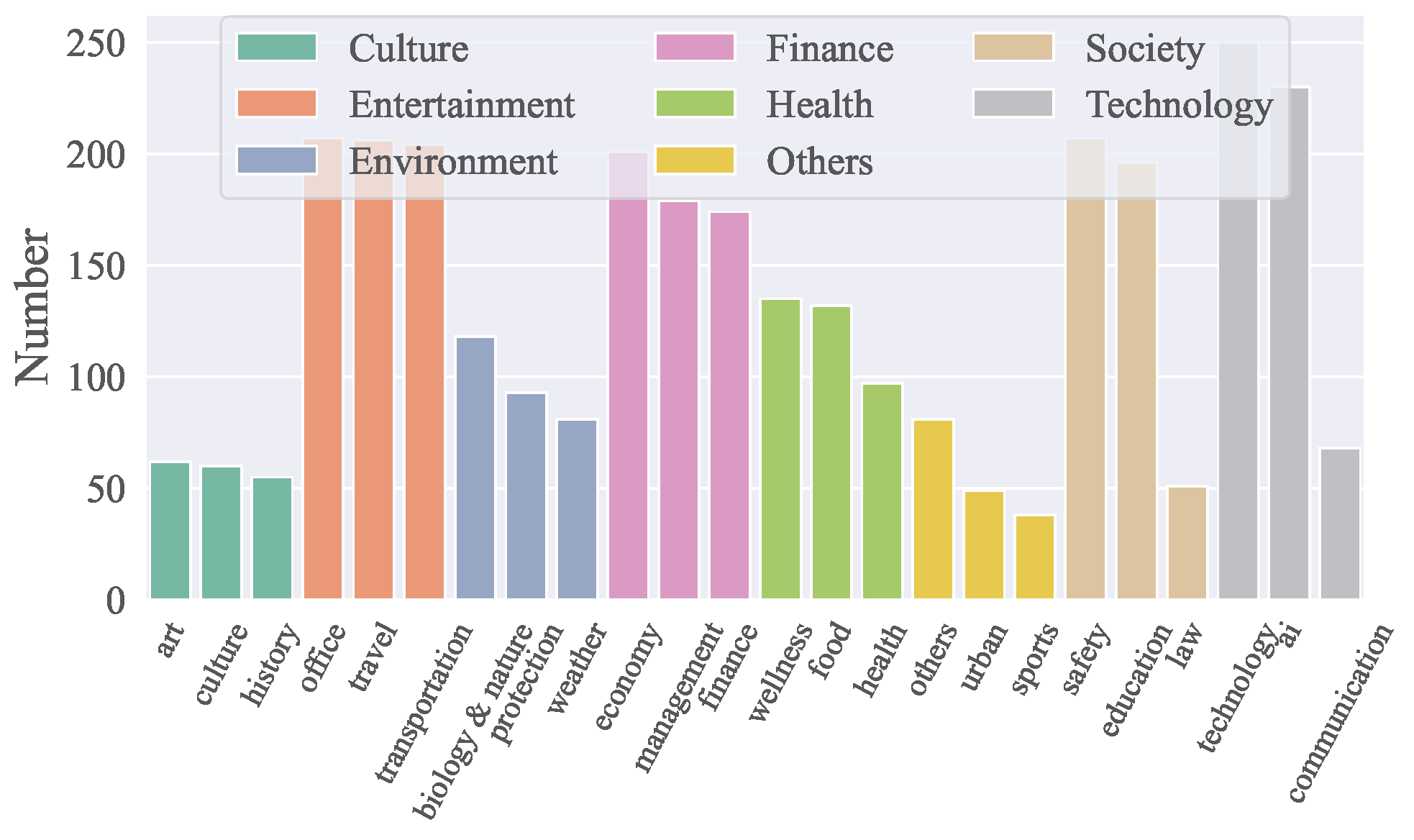
- ACEBenchは、技術、金融、エンターテインメント、社会、健康、文化、環境など、8つの主要ドメインと68のサブドメインをカバーしています。
- 中国語と英語の両方で合計4,538のAPIが含まれています。
- ドメイン別のAPI分布は下図に示されています:
データ構成
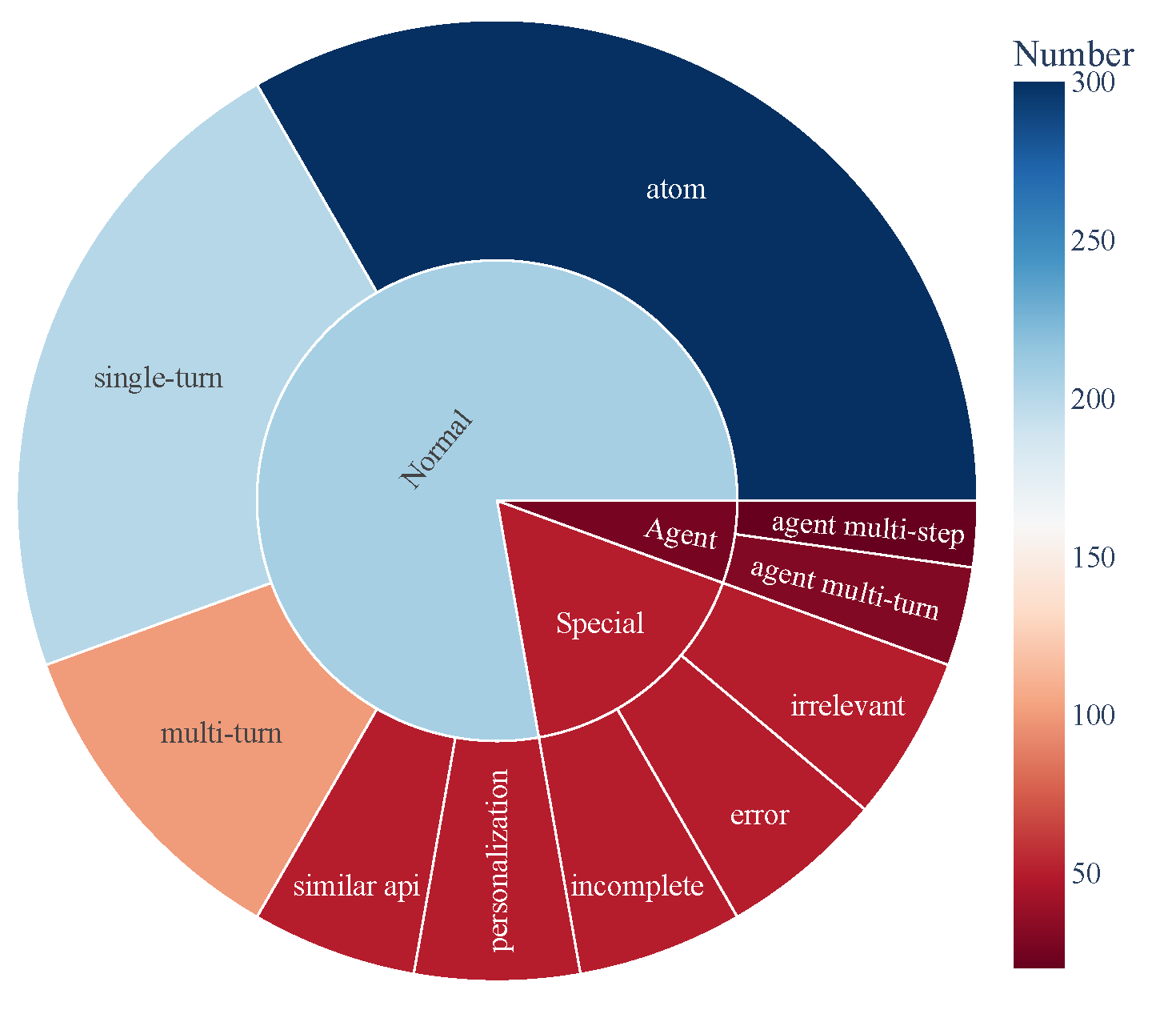
- ACEBenchは主に3つのテストサンプルカテゴリで構成されています:
- Normal: 基本的なツール使用シナリオ。
- Agent: ユーザーと環境のマルチターンインタラクション。
- Special: 複数ステップを要する複雑なシナリオや実行不可能なツール呼び出しを扱うもの。
- データ構成は下図に示され、ツール使用能力の包括的なカバレッジを示しています:
🏆 3\. リーダーボード [[トップに戻る]](#content)
| モデル | normal | special | agent | overall | | ------------------------------------- | ------ | ------- | ----- | ------- | | クローズドソースモデル | | gpt-4o-2024-11-20 | 0.927 | 0.933 | 0.715 | 0.896 | | gpt-4-turbo-2024-04-09 | 0.917 | 0.913 | 0.725 | 0.886 | | qwen-max | 0.887 | 0.740 | 0.685 | 0.817 | | o1-preview | 0.830 | 0.793 | 0.735 | 0.806 | | deepseek-chat | 0.926 | 0.733 | 0.350 | 0.785 | | gpt-4o-mini-2024-07-18 | 0.834 | 0.813 | 0.390 | 0.760 | | claude-3-5-sonnet-20241022 | 0.835 | 0.820 | 0.350 | 0.756 | | gemini-1.5-pro | 0.822 | 0.800 | 0.250 | 0.728 | | o1-mini | 0.774 | 0.673 | 0.610 | 0.722 | | doubao-pro-32k | 0.750 | 0.593 | 0.235 | 0.628 | | オープンソースモデル | | Qwen2.5-Coder-32B-Instruct-local | 0.908 | 0.813 | 0.715 | 0.853 | | Qwen2.5-32B-Instruct-local | 0.852 | 0.747 | 0.690 | 0.799 | | Qwen2.5-72B-Instruct-local | 0.873 | 0.773 | 0.525 | 0.793 | | Qwen2.5-Coder-14B-Instruct-local | 0.868 | 0.647 | 0.525 | 0.756 | | Qwen2.5-14B-Instruct-local | 0.790 | 0.540 | 0.250 | 0.640 | | Llama-3.1-70B-Instruct-local | 0.753 | 0.473 | 0.435 | 0.629 | | Qwen2.5-7B-Instruct-local | 0.759 | 0.447 | 0.125 | 0.578 | | DeepSeek-Coder-V2-Lite-Instruct-local | 0.688 | 0.413 | 0.015 | 0.511 | | Qwen2.5-Coder-7B-Instruct-local | 0.735 | 0.193 | 0.125 | 0.496 | | watt-tool-8B-local | 0.763 | 0.100 | 0.040 | 0.474 | | ToolACE-8B-local | 0.782 | 0.013 | 0.040 | 0.462 | | Hammer2.1-7b-local | 0.627 | 0.260 | 0.185 | 0.461 | | Meta-Llama-3.1-8B-Instruct-local | 0.450 | 0.267 | 0.040 | 0.338 | | Qwen2.5-Coder-3B-Instruct-local | 0.495 | 0.100 | 0.065 | 0.323 | | Phi-3-mini-128k-instruct-local | 0.389 | 0.253 | 0.015 | 0.295 | | Qwen2.5-3B-Instruct-local | 0.408 | 0.127 | 0.065 | 0.280 | | Llama-3.2-3B-Instruct-local | 0.327 | 0.100 | 0.000 | 0.216 | | xLAM-7b-r-local | 0.187 | 0.013 | 0.075 | 0.123 | | Hammer2.1-3b-local | 0.118 | 0.013 | 0.015 | 0.074 |
🛠️ 4\. セットアップ [[トップに戻る]](#content)
推論と評価に必要な依存関係をインストールするには、以下のコマンドを実行してください:
pip install -r requirements.txt🗂️ 5\. データ [[トップへ戻る]](#content)
すべてのデータは data_all ディレクトリに保存されており、英語と中国語の部分に分かれています。これらはそれぞれ data_en と data_zh フォルダにあります。各フォルダには複数の JSON ファイルが含まれており、ファイル名は data_{category}.json の形式で、category はデータの種類を表しています。
data_all/
├── possible_answer_en/
│   ├── data_{normal}.json
│   ├── data_{special}.json
│   ├── data_{agent}.json
├── possible_answer_zh/
│   ├── data_{normal}.json
│   ├── data_{special}.json
│   ├── data_{agent}.json
...
🧠 6\. 推論 [[トップへ戻る]](#content)
6.1 推論スクリプト
cmodelsで推論を実行するには、generate.pyスクリプトを使用します。このスクリプトはさまざまなモデル、カテゴリ、言語をサポートしています。
基本的な使い方
python generate.py  --model   --model_path
--category  --language
Arguments:
--model: 推論に使用するモデルを指定します。--model_path: モデルのローカルパスを指定します(オープンソースモデルのみ)。--category: 評価するタスクまたはデータセットのカテゴリを定義します。利用可能なカテゴリはeval_checker/eval_checker_constant.pyで確認できます。--language: 入出力の言語を指定します。対応言語:"en"(英語)、"zh"(中国語)
6.2\. 推論例
クローズドソースモデルの場合
python generate.py --model qwen-max --category test_all --language zhpython generate.py --model Qwen2.5-3B-Instruct-local --model-path /mnt/nas/ckpt/Qwen2.5-3B-Instruct --category test_all --language zh6.3\. 注意事項
- プログラムを実行する前に、環境変数 .env ファイルが正しく設定されていることを確認してください。OpenAI を呼び出すには外部ネットワークを使用する必要があります。環境変数 https_proxy と http_proxy を設定してください。gemini モデルを使用するには、日本のプロキシを使用する必要があります。
- 評価対象のモデルは model_inference/inference_map.py にマッピングする必要があります。OpenAI を通じて呼び出すモデルは APIModelInference リストに追加でき、カスタマイズした推論モデルは CommonInference リストに追加できます。ローカルモデルの名前は -local で終わります。
- カスタマイズした評価モデルを追加するには、model_inference/model_infer.py を参照してモデルクラスを model_dict に追加してください。
- オープンソースモデルを Hugging Face 上で評価する場合は、LLaMA-Factory を使用して LoRA ウェイトを組み合わせてから推論することを推奨します。
📈 7. 評価 [[トップへ戻る]](#content)
モデルの性能を評価するには、eval_main.py スクリプトを使用します。このスクリプトは様々な評価指標に対応しており、オープンソースおよびクローズドソースモデルの両方に使用できます。
基本的な使い方
python eval_main.py --model --category --language 📄 引用
当社の論文やリソースが役に立った場合は、ぜひ当社の論文を引用してください。
@article{chen2025acebench,
  title={ACEBench: Who Wins the Match Point in Tool Learning?},
  author={Chen, Chen and Hao, Xinlong and Liu, Weiwen and Huang, Xu and Zeng, Xingshan and Yu, Shuai and Li, Dexun and Wang, Shuai and Gan, Weinan and Huang, Yuefeng and others},
  journal={arXiv preprint arXiv:2501.12851},
  year={2025}
}
--- Tranlated By Open Ai Tx | Last indexed: 2025-12-19 ---