BIRD-INTERACT 1.0 






⚠️ Announcement
Please note that before your evaluation process, when Docker loads the databases, errors may occasionally occur due to environment inconsistency (these will not terminate the process but will appear in the Docker logs). As a result, some databases may fail to load properly, leading to empty databases. This will cause the evaluation results to be abnormally low. 👉 Therefore, we strongly recommend checking the Docker logs for any errors before running the evaluation and verifying that all databases have been successfully loaded.👉 We have updated the Submission Guidelines, where the customized agent scaffolds are supported. Please feel free to take a look at our detailed submission guidelines here.
📰 News
- [2026-03-29] 🔥🔥🔥 BIRD-Interact-ADK: We release BIRD-Interact-ADK, a Google ADK-based implementation with modular 3-microservices (agent, user simulator, and DB Env) architecture. Easily swap in your own agent, user simulator, or DB environment. Supports parallel execution and any LiteLlm-compatible LLM provider. Recommend to use this implementation for your research.
- [2026-02-08] 🔥🔥🔥 Our Bird-Interact paper has been accepted at ICLR 2026 (Oral)! See you in Rio 🇧🇷!
- [2025-11-06] 🐛 Bug Fix & 🐳 Docker update: Update the sqlglot version to 26.16.4 to fix the bug that the sql parser cannot parse the SQL correctly for user simulator. You could fix this by re-install it by
pip install sqlglot==26.16.4in thebird_interact_evalenv. Thebird_interact_evalimage is also updated, so you could also pull it and recreate thebird_interact_evalcontainer. - [2025-10-21] 🐳 Docker update: We added the docker for Full DB Env. And we pushed 3 docker images (Base/Full DB Env and the evaluation environment for both
a-Interactandc-Interact) to Docker Hub to facilitate the environment setup. No need to download the DB dumps and build the images manually! - [2025-10-08] 📝 Our Bird-Interact paper is now publicly available!
- [2025-08-26] 🚀 We're excited to announce the release of the BIRD-Interact-Full (600) set!
c-interact and a-interact portions.
👉 For more details, please visit our project website.- [2025-08-26] 📬 We'll be sending the Ground Truth & Test cases to our mailing list this week.
- [2025-08-26] 💾 On another note, we've also released a SQLite version of LiveSQLBench-Lite for easier local research.
- [2025-08-22] Bug Fix: In Bird-Interact-Agent code, we fixed a bug that when evaluating phase-2 SQL, the stored phase-1 SQL cannot be executed successfully, leading to a lower success rate of Phase-2. This bug only affects those tasks where phase1 sql does some operations on the database, e.g. CREATE table, etc.
🧸 Overview
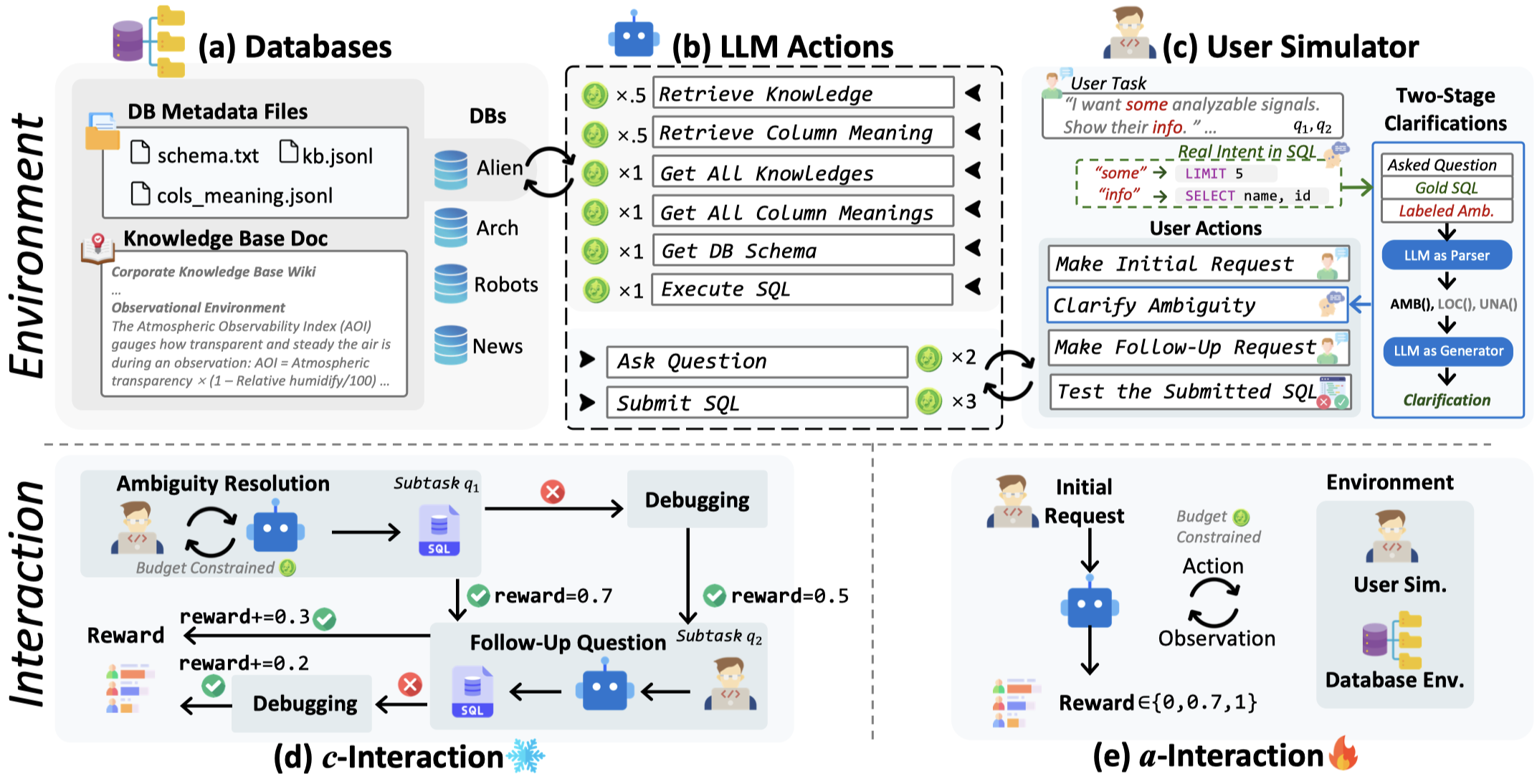
BIRD-INTERACT, an interactive text-to-SQL benchmark, re-imagines Text-to-SQL evaluation via lens of dynamic interactions. The environment blends a hierarchical knowledge base, database documentation and a function-driven user simulator to recreate authentic enterprise environments across full CRUD operations. It offers two rigorous test modes: (1) passive Conversational Interaction and (2) active Agentic Interaction, spanning 600 annotated tasks including Business Intelligence (BI), CRUD operations and etc., each guarded by executable test cases. Typical evaluations trigger 1,968-5,496 interaction turns between model and user simulator, while state-of-the-art reasoning models currently solve only ≈24% and ≈18% of tasks, underscoring the benchmark's challenge.
✅ Two Evaluation Modes
BIRD-INTERACT supports two evaluation modes as mentioned above:
- c-Interact: Conversational Interaction which is a passive mode and the workflow is fixed. The code and detailed information can be found in
bird_interact_conv. - a-Interact: Agentic Interaction which is an embodied active mode where the workflow is dynamic and led by models. The code and detailed information can be found in
bird_interact_agent.
🐣 Lite Version
We are releasing a lite version of BIRD-INTERACT, bird-interact-lite-exp, which includes 270 high-quality real-world tasks specifically for PostgreSQL. This is a good starting point for quick experimentation.
🦜 Full Version
The full version of BIRD-INTERACT, bird-interact-full, is a comprehensive benchmark that includes 600 tasks for PostgreSQL. It covers a wide range of SQL operations and user queries. The full version is coming soon.
Model Performance Results on BIRD-INTERACT-FULL
#### 1. c-Interact Text-to-SQL Performance | Rank | Model Name | Normalized Reward | Avg Cost (USD)/Task | Level | |:----:|:-------------------|:-----------------:|:-------------------:|:------------------:| | 1 | Gemini-2.5-Pro | 20.92 | $0.04 | 🏆 Excellent Chat | | 2 | O3-Mini | 20.27 | $0.07 | 🏆 Excellent Chat | | 3 | Claude-Sonnet-4 | 18.35 | $0.29 | 💎 Good Chat | | 4 | Qwen-3-Coder-480B | 17.75 | $0.11 | 💎 Good Chat | | 5 | Deepseek-Chat-V3.1 | 15.15 | $0.12 | ✨ Standard | | 6 | Claude-Sonnet-3.7 | 13.87 | $0.29 | ✨ Standard | | 7 | GPT-5 | 12.58 | $0.08 | ⚪ Basic |
#### 2. a-Interact Text-to-SQL Performance | Rank | Model Name | Normalized Reward | Avg Cost (USD)/Task | Level | |:----:|:-------------------|:-----------------:|:-------------------:|:------------------------:| | 1 | GPT-5 | 25.52 | $0.24 | 🏆 Excellent Interaction | | 2 | Claude-Sonnet-4 | 23.28 | $0.51 | 🏆 Excellent Interaction | | 3 | Claude-Sonnet-3.7 | 17.45 | $0.60 | 💎 Good Interaction | | 4 | Gemini-2.5-Pro | 17.33 | $0.22 | 💎 Good Interaction | | 5 | O3-Mini | 16.43 | $0.06 | ✨ Standard | | 6 | Deepseek-Chat-V3.1 | 13.47 | $0.06 | ✨ Standard | | 7 | Qwen-3-Coder-480B | 10.58 | $0.07 | ⚪ Basic |
\ Budget Parameters: Starting Budget/User Patience Budget, measured by our virtual currency bird-coin*s. Refer to bird_interact_agent/README.md for more details.
Interaction-Time Scaling (ITS)
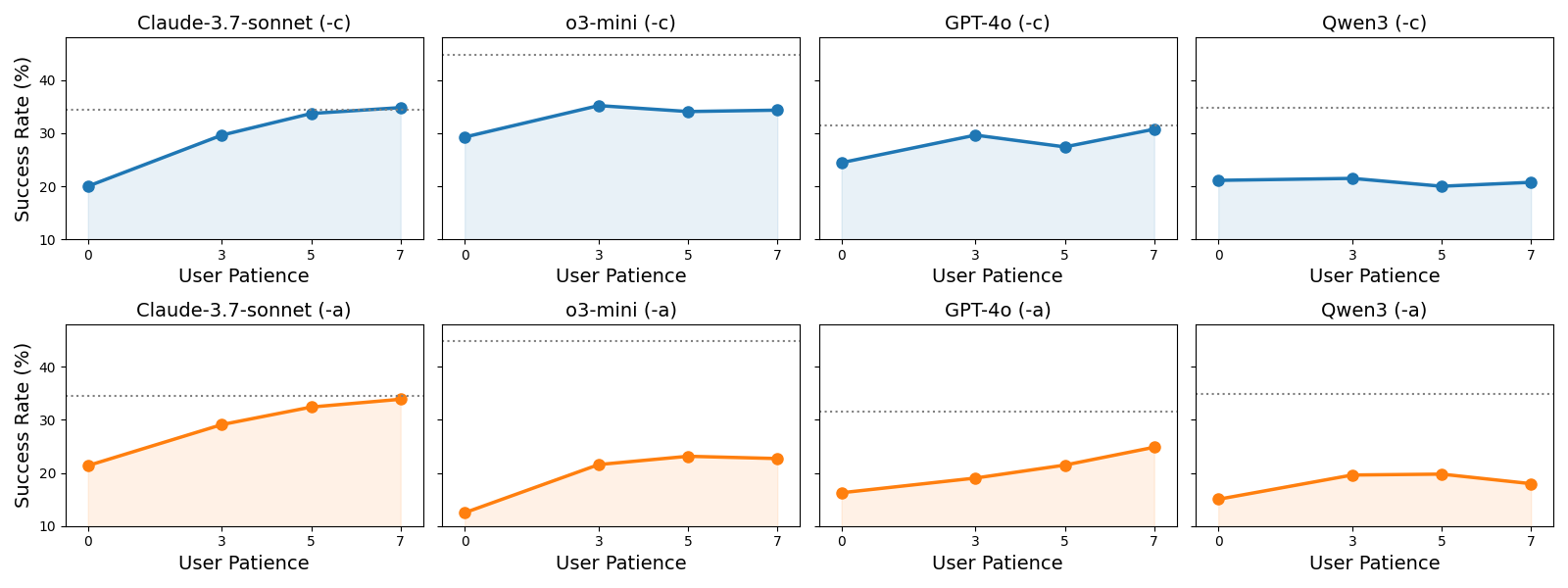
Interaction-Time Scaling (ITS) refers to a model's ability to continuously increase its end performance through multi-turn interactions. When this interactive performance surpasses the model's idealized single-turn performance on a fully specified, unambiguous task, we say it satisfies the ITS law. As user patience grows and interaction turns accumulate, performance keeps improving, demonstrating that the model can sustain effective communication over extended dialogue. Currently, we only find claude-3-7-sonnet satisfies the ITS law.
Environment Setup
- Run Docker containers for bird-interact-lite database, bird-interact-full database, and evaluation environment:
bird-interact-lite, you could comment out the postgresql_full service in docker-compose.yml to speed up the environment setup.
Start the environment by running:
cd env
docker compose pull
docker compose up -d
``
Wait for several minutes for database initialization.
You could track the building progress by:
`bash
docker compose logs -f --tail=100 bird_interact_postgresql_full # or bird_interact_postgresql for bird-interact-lite
`
If completed, you should see the logs without errors such as:
`bash
bird_interact_postgresql_full | 2025-10-28 17:58:30.413 HKT [1] LOG: database system is ready to accept connection
` If you have created containers before and want to recreate them, you could run the following command:
bash
docker compose down -v # this cmd removes the containers and the volumes
docker compose pull # pull the latest images from Docker Hub
docker compose up -d --force-recreate # build and start the containers again. --force-recreate means force the recreation of the containers.
# Or docker compose up -d --force-recreate bird_interact_eval to only recreate the bird_interact_eval container about evalution code environment.
`
This runs 3 containers using prebuilt images from Docker Hub:
bird_interact_postgresql: PostgreSQL database for bird-interact-lite
bird_interact_postgresql_full: PostgreSQL database for bird-interact-full
bird_interact_eval: Evaluation environment for both a-Interact and c-Interact. Now, you could start the evaluation environment by executing the following command:
`bash
docker compose exec bird_interact_eval bash
`
- (Optional) Build the environment manually (if you want to build the images from scratch):
- Download the database dumps
- bird-interact-lite. Unzip and rename it as
env/postgre_table_dumps.
bird-interact-full. Unzip and rename it as env/postgre_table_dumps_full.
Build the environment manually by running docker-compose.build.yml.
`bash
cd env/
docker compose -f docker-compose.build.yml build
docker compose -f docker-compose.build.yml up -d
`- (Recommended) Check the database containers are built and running successfully.
- Print the container build logs to ensure that the databases are built successfully without errors:
bash
docker logs bird_interact_postgresql > build_bird_interact_postgresql.log 2>&1
docker logs bird_interact_postgresql_full > build_bird_interact_postgresql_full.log 2>&1
`
If errors occur, "Errors occurred during import:" will be printed in the log files.- Check if the database containers are in good shape.
Use our provided Python script to verify database metadata:
`bash
docker compose exec bird_interact_eval bash
cd /app/env
python check_db_metadata.py --host bird_interact_postgresql
python check_db_metadata.py --host bird_interact_postgresql_full
`
Expected results:
- bird-interact-lite:
- 📈 Total Databases: 18
- 📋 Total Tables: 175
- 🔢 Total Columns: 2286
- 📈 Avg Rows per Table: 1,038.48
- 💾 Total Size: 207.15 MB (around)
- bird-interact-full:
- 📈 Total Databases: 22
- 📋 Total Tables: 244
- 🔢 Total Columns: 2011
- 📈 Avg Rows per Table: 1,121.19
- 💾 Total Size: 272.00 MB (around)
📦 Dataset Details
Dataset Description
- Database: The complete PostgreSQL database can be downloaded from bird-interact-lite and bird-interact-full.
- data: Each data instance contains the following main parts:
selected_database: The name of the database.
query: The unambiguous user query.
amb_user_query: The user query with injected ambiguities.
user_query_ambiguity: The ambiguities injected into the user query.
non_critical_ambiguity: The non-critical ambiguities like order, limit, etc.
knowledge_ambiguity: The ambiguities created by masked external knowledge.
sol_sql: The ground truth SQL solution.
preprocess_sql: SQL queries to run before executing the solution or prediction.
clean_up_sql: SQL queries to run after the test cases to revert any changes made to the database.
test_cases: A set of test cases to validate the predicted corrected SQL.
follow_up: The labeled follow up questions.
external_knowledge: The external knowledge related to the specific task.evaluation: The evaluation code is available in the ./evaluation directory.
Curated by: BIRD Team & Google Cloud
License: cc-by-sa-4.0
HuggingFace Dataset Card: bird-interact-lite
and bird-interact-full for PostgreSQL; and mini-interact for SQLite.
Dataset Uses
To avoid data leakage by auto-crawling, we do not include GT solution SQLs and test cases along with data.
please email bird.bench25@gmail.com with the tag
[bird-interact-lite GT&Test Cases] or [bird-interact-full GT&Test Cases] in the title for ground truth and test cases for the bird-interact-lite or bird-interact-full dataset, which will be sent automatically.Combine the public data with the ground truth and test cases
Then use the following script to combine the public data with the ground truth and test cases:
Take the full version as an example:
(1) Run:
bash cp /path/to/bird_interact_data.jsonl /path/to/bird-interact-full/bird_interact_data.jsonlThis will create a new file at/path/to/bird_interact_data.jsonlwith the combined data.(2) Then replace the original public data with the combined data:
Same for the other versions: bird-interact-lite, mini version, etc. Just set correct paths for the public data and the ground truth and test cases, and then replace the public data with the combined data.