Taskosaur

대화형 AI 작업 실행을 통한 오픈 소스 프로젝트 관리
📹 Taskosaur 작동 영상 보기
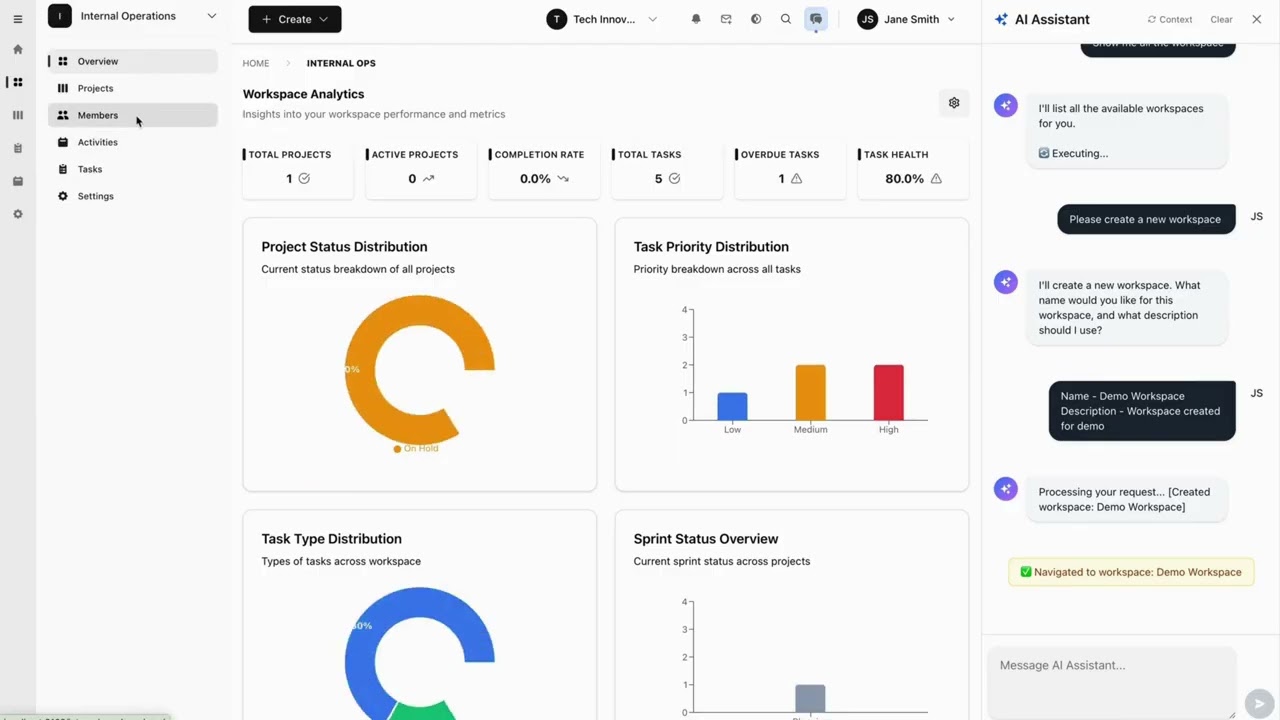
클릭하여 보기: Taskosaur에서 대화형 AI 작업 실행이 어떻게 작동하는지 확인하세요
Taskosaur는 앱 내 작업 실행을 위한 대화형 AI를 갖춘 오픈 소스 프로젝트 관리 플랫폼입니다. AI 어시스턴트는 자연스러운 대화를 통해 작업 생성부터 워크플로우 관리까지 프로젝트 관리 업무를 직접 애플리케이션 내에서 처리합니다.




Taskosaur는 전통적인 프로젝트 관리 기능과 대화형 AI 작업 실행을 결합하여 자연스러운 대화로 프로젝트를 관리할 수 있게 합니다. 메뉴와 양식을 탐색하는 대신, 필요한 작업을 설명하기만 하면 작업 생성, 업무 할당, 워크플로우 관리를 할 수 있습니다.
주요 기능
- 🤖 대화형 AI 작업 실행 - 앱 내에서 자연스러운 대화를 통해 프로젝트 작업을 실행
- 💬 자연어 명령어 - "지난주 고우선순위 버그로 스프린트 생성" 명령을 자동 실행
- 🏠 셀프 호스팅 - 데이터가 사용자의 인프라에 안전하게 보관
- 💰 자체 LLM 사용 가능 - OpenAI, Anthropic, OpenRouter 또는 로컬 모델 API 키 사용 가능
- 🔧 앱 내 브라우저 자동화 - AI가 인터페이스를 탐색하고 앱 내에서 직접 작업 수행
- 📊 완전한 프로젝트 관리 - 칸반 보드, 스프린트, 작업 의존성, 시간 추적
- 🌐 오픈 소스 - 비즈니스 소스 라이선스(BSL) 하에 제공
목차
빠른 시작
필수 조건
- Node.js 22+ 및 npm 10+
- PostgreSQL 16+ (또는 도커)
- Redis 7+ (또는 도커)
도커 설정 (권장)
Taskosaur를 가장 빠르게 시작하는 방법은 Docker Compose를 사용하는 것입니다:
- 저장소 복제하기
git clone https://github.com/Taskosaur/Taskosaur.git taskosaur
cd taskosaur
``
- 환경 변수 설정
`bash
cp .env.example .env
`
이것은 앱에서 사용하는 .env 파일을 생성하며, 필요에 따라 값을 사용자 정의할 수 있습니다.
- Docker Compose로 시작하기
`bash
docker compose -f docker-compose.dev.yml up
`
이 작업을 자동으로 수행합니다:
- ✅ PostgreSQL과 Redis 시작
- ✅ 모든 의존성 설치
- ✅ Prisma 클라이언트 생성
- ✅ 데이터베이스 마이그레이션 실행
- ✅ 샘플 데이터로 데이터베이스 시드
- ✅ 백엔드와 프론트엔드 모두 시작
- 애플리케이션 접속
- 프론트엔드: http://localhost:3001
- 백엔드 API: http://localhost:3000
- API 문서: http://localhost:3000/api/docs
자세한 Docker 문서는 DOCKER_DEV_SETUP.md를 참조하세요.수동 설정
로컬에서 서비스를 실행하려면:
- 저장소 클론
`bash
git clone https://github.com/Taskosaur/Taskosaur.git taskosaur
cd taskosaur
`- 종속성 설치
bash
npm install
`
- 환경 설정
루트 디렉토리에 .env 파일을 생성하세요:
`env
# Database Configuration
DATABASE_URL="postgresql://taskosaur:taskosaur@localhost:5432/taskosaur" # Application
NODE_ENV=development
# Authentication & Security
JWT_SECRET="your-jwt-secret-key-change-this"
JWT_REFRESH_SECRET="your-refresh-secret-key-change-this-too"
JWT_EXPIRES_IN="15m"
JWT_REFRESH_EXPIRES_IN="7d"
# Encryption for sensitive data
ENCRYPTION_KEY="your-64-character-hex-encryption-key-change-this-to-random-value"
# Redis Configuration (for Bull Queue)
REDIS_HOST=localhost
REDIS_PORT=6379
REDIS_PASSWORD=
# Email Configuration (optional, for notifications)
SMTP_HOST=smtp.example.com
SMTP_PORT=587
SMTP_USER=your-email@taskosaur.com
SMTP_PASS=your-app-password
SMTP_FROM=noreply@taskosaur.com
EMAIL_DOMAIN="taskosaur.com"
# Frontend URL (for email links and CORS)
FRONTEND_URL=http://localhost:3001
CORS_ORIGIN="http://localhost:3001"
# Backend API URL (for frontend to connect to backend)
NEXT_PUBLIC_API_BASE_URL=http://localhost:3000/api
# File Upload
UPLOAD_DEST="./uploads"
MAX_FILE_SIZE=10485760
# Queue Configuration
MAX_CONCURRENT_JOBS=5
JOB_RETRY_ATTEMPTS=3
`
- 데이터베이스 설정
`bash
# Run database migrations
npm run db:migrate # Seed the database (idempotent - safe to run multiple times)
npm run db:seed
# Or seed with admin user only
npm run db:seed:admin
`- 애플리케이션 시작하기
bash
# Development mode (runs both frontend and backend)
npm run dev # Or start individually
npm run dev:frontend # Start frontend only (port 3001)
npm run dev:backend # Start backend only (port 3000)
`
- 애플리케이션 접속
- 프론트엔드: http://localhost:3001
- 백엔드 API: http://localhost:3000
- API 문서: http://localhost:3000/api/docs
개발
사용 가능한 명령어
모든 명령어는 루트 디렉토리에서 실행됩니다:
#### 개발
#### 빌드
#### 데이터베이스 작업모든 시드 명령은 멱등성(idempotent)을 가지며 여러 번 실행해도 안전합니다:
#### 테스트
#### 코드 품질
#### 정리 작업
bash git commit -m "feat: add feature" # Runs checks automatically--no-verifyGit 후크
Husky를 사용한 자동 코드 품질 검사:
- Pre-commit: 커밋 전 모든 작업 공간에서 린터 실행
- 코드 품질과 일관성 보장
로 우회 가능 (긴급 상황에만)
프로젝트 구조
"Set up a new marketing workspace with Q1 campaign project" "Move all high-priority bugs to in-progress and assign to John" "Create a sprint with tasks from last week's backlog" "Generate a report of Sarah's completed tasks this month" "Set up automated workflow: when task is marked done, create review subtask"`대화형 AI 작업 실행 설정
3단계로 대화형 AI 작업 실행 활성화:
- 조직 설정으로 이동
Go to Settings → Organization Settings → AI Assistant Settings`https://openrouter.ai/api/v1
- LLM API 키 추가하기
- "AI 채팅 활성화"를 ON으로 전환
- 호환 가능한 제공업체에서 API 키 추가:
- OpenRouter (100개 이상 모델, 무료 옵션):
https://api.openai.com/v1OpenAI (GPT 모델): https://api.anthropic.com/v1Anthropic (Claude 모델): Local AI (Ollama 등): 로컬 엔드포인트 AI로 관리 시작하기 AI 채팅 패널 열기 (반짝임 아이콘) 입력: _"Website Redesign이라는 새 프로젝트를 5개의 작업과 함께 생성해줘"_ AI가 워크플로우를 자동으로 실행 대화형 AI 작업 실행 방식
Taskosaur의 대화형 AI 작업 실행 기능은 앱 내에서 작업 실행을 위해 대화형 AI를 사용하며, 단순한 제안 제공이 아닌 직접 작업을 수행합니다:
대화형 AI 작업 실행 명령 예시:
- 앱 내 대화형 실행 - AI와 자연스럽게 대화하며 앱 내에서 직접 작업 실행
- 직접 브라우저 자동화 - AI가 인터페이스를 탐색하고 실시간으로 버튼 클릭
- 복잡한 워크플로우 실행 - 다단계 작업을 대화로 원활히 처리
- 컨텍스트 인지 작업 - 현재 프로젝트/작업 공간 컨텍스트 이해
- 자연어 인터페이스 - 명령어를 외울 필요 없이 자연스럽게 말하기
bash## 기능`_Taskosaur는 활발히 개발 중입니다. 다음 기능들은 계획된 역량을 나타내며, 그중 다수는 이미 구현되었고 나머지는 진행 중입니다._
🤖 대화형 AI 작업 실행 기능
🎯 앱 내 대화형 작업 실행
🧠 자연어 처리
- 앱 내 채팅 인터페이스: Taskosaur 내에서 AI와 직접 대화하며 작업 실행
- 브라우저 기반 작업 실행: AI가 인터페이스를 탐색하고, 양식을 작성하며, 실시간으로 작업 완료
- 다단계 워크플로우 처리: 단일 대화 명령으로 복잡한 워크플로우 실행
- 컨텍스트 이해: AI가 현재 작업 공간, 프로젝트, 팀 컨텍스트를 인식
- 선제적 제안: AI가 병목 현상을 파악하고 대화를 통해 개선사항 제안
⚡ 작업 실행
- 복잡한 프로젝트 관리 요청 이해
- 대화 입력에서 작업, 매개변수, 컨텍스트 추출
- 현재 컨텍스트에서 누락된 세부 사항 추론
🚀 프로젝트 워크플로우 지원
- 실시간 라이브 브라우저 자동화
- 여러 작업에 대한 일괄 처리
- 기존 워크플로우 내에서 작동
대화형 AI 작업 실행 예시:
- 스프린트 계획 및 작업 분석
- 팀 용량 기반 작업 할당
- 프로젝트 일정 예측
- "1분기 마케팅 캠페인 설정: 작업 공간 생성, 팀 추가, 표준 템플릿으로 3개 프로젝트 설정"
- "모든 연체 작업 분석 및 팀 용량과 우선순위에 따라 일정 재조정"
- "자동화 워크플로우 생성: 고우선순위 버그 → 시니어 개발자에게 할당 → 팀 리드에게 알림"
- "팀 속도 분석 및 개선 제안을 포함한 스프린트 회고 생성"
- "기존 프로젝트의 모든 디자인 작업을 새 작업 공간으로 이전하고 할당 업데이트"
조직 관리
- 멀티 테넌트 아키텍처: 격리된 데이터로 여러 조직 지원 예정
- 워크스페이스 조직: 더 나은 조직을 위해 워크스페이스 내 프로젝트 그룹화
- 역할 기반 접근 제어: 세분화된 권한 구현 (관리자, 매니저, 멤버, 뷰어)
- 팀 관리: 조직 간 팀원 초대 및 관리
프로젝트 관리
- 유연한 프로젝트 구조: 맞춤형 워크플로우로 프로젝트 생성 및 관리
- 스프린트 계획: 계획 및 추적이 가능한 애자일 스프린트 관리 예정
- 작업 의존성: 다양한 의존성 유형을 통한 작업 간 관계 작업 중
- 맞춤형 워크플로우: 다양한 프로젝트 요구에 맞는 상태 워크플로우 구현
작업 관리
- 풍부한 작업 유형: 작업, 버그, 에픽, 스토리, 하위 작업 지원
- 우선순위 관리: 최저에서 최고까지 작업 우선순위 설정
- 사용자 정의 필드: 프로젝트별 데이터를 캡처할 사용자 정의 필드 추가
- 레이블 및 태그: 맞춤형 레이블로 작업 조직화
- 시간 추적: 상세 로그와 함께 작업에 소요된 시간 추적
- 파일 첨부: 작업에 파일 및 문서 첨부
- 댓글 및 멘션: @멘션을 통한 작업 댓글 협업
- 작업 구독자: 작업 업데이트 및 알림 구독
다양한 뷰
- 칸반 보드: 드래그 앤 드롭이 가능한 시각적 작업 관리
- 캘린더 뷰: 예정된 일정 및 타임라인 시각화
- 간트 차트: 예정된 프로젝트 타임라인 및 의존성 시각화
- 목록 뷰: 전통적인 표 기반 작업 목록
- 분석 대시보드: 프로젝트 지표, 소진 차트, 팀 속도 작업 중
자동화 및 통합
- 자동화 규칙: 맞춤형 자동화 워크플로우 예정
- 이메일 알림: 작업 업데이트에 대한 자동 이메일 알림
- 실시간 업데이트: WebSocket 연결을 통한 실시간 업데이트
- 활동 로그: 모든 변경 사항에 대한 종합 감사 추적
- 검색 기능: 프로젝트 및 작업 전반에 걸친 글로벌 검색 작업 중
분석 및 보고
- 스프린트 번다운 차트: 계획된 스프린트 진행 상황 추적
- 팀 속도: 시간 경과에 따른 팀 성과 모니터링 계획
- 작업 분배: 작업 할당 및 작업 부하 분석 작업 중
- 맞춤 보고서: 프로젝트별 맞춤 보고서 생성 계획
빠른 시작
사전 준비 사항
- Node.js 22+ 및 npm
- PostgreSQL 13+
- Redis 6+ (백그라운드 작업용)
설치
- 리포지토리 클론
bash git clone https://github.com/Taskosaur/Taskosaur.git taskosaur cd taskosaur``
- 종속성 설치
bash npm install`이 작업은 자동으로 다음을 수행합니다:.env루트 디렉토리에 다음 구성을 포함한
- 모든 작업 공간 종속성(프론트엔드 및 백엔드) 설치
- 코드 품질을 위한 Husky git 훅 설정
- 환경 설정
파일을 생성하세요:`
env # Database Configuration DATABASE_URL="postgresql://your-db-username:your-db-password@localhost:5432/taskosaur"`# Authentication JWT_SECRET="your-jwt-secret-key-change-this" JWT_REFRESH_SECRET="your-refresh-secret-key-change-this-too" JWT_EXPIRES_IN="15m" JWT_REFRESH_EXPIRES_IN="7d"
# Redis Configuration (for Bull Queue) REDIS_HOST=localhost REDIS_PORT=6379 REDIS_PASSWORD=
# Email Configuration (for notifications) SMTP_HOST=smtp.gmail.com SMTP_PORT=587 SMTP_USER=your-email@gmail.com SMTP_PASS=your-app-password SMTP_FROM=noreply@taskosaur.com
# Frontend URL (for email links) FRONTEND_URL=http://localhost:3000
# File Upload UPLOAD_DEST="./uploads" MAX_FILE_SIZE=10485760
# Queue Configuration MAX_CONCURRENT_JOBS=5 JOB_RETRY_ATTEMPTS=3
# Frontend Configuration NEXT_PUBLIC_API_BASE_URL=http://localhost:3001/api
`
- 데이터베이스 설정
bash # Run database migrations npm run db:migrate`# Seed the database with core data npm run db:seed
`
- 애플리케이션 시작하기
bash # Development mode (with hot reload for both frontend and backend) npm run dev`# Or start individually npm run dev:frontend # Start frontend only npm run dev:backend # Start backend only
.env
- 애플리케이션 접속
- 프론트엔드: http://localhost:3000
- 백엔드 API: http://localhost:3001/api
- API 문서: http://localhost:3001/api/docs
개발
사용 가능한 명령어
모든 명령어는 루트 디렉토리에서 실행됩니다. 환경 변수는 루트
파일에서 자동으로 로드됩니다.#### 개발
Start both frontend and backend
npm run devStart individually
npm run dev:frontend # Start frontend dev server npm run dev:backend # Start backend dev server with hot reload
#### 빌드
Build all workspaces
npm run buildBuild individually
npm run build:frontend # Build frontend for production npm run build:backend # Build backend for production npm run build:dist # Build complete distribution package
#### 데이터베이스 작업
#### 테스트
#### 코드 품질
#### 정리 작업
코드 품질 및 Git 후크
Prettier, ESLint, 및 Husky를 사용한 자동 코드 포매팅 및 린팅.
Lint all workspaces
npm run lint # Lint all workspacesLint individually
npm run lint:frontend # Frontend only npm run lint:backend # Backend onlyFormat backend code
npm run format # Format backend code with Prettier
사전 커밋 훅: Husky를 통해 커밋 시마다 코드를 자동으로 포맷, 린트 및 검증합니다.
Commits run checks automatically
git commit -m "feat: add feature"Bypass checks in emergencies only
git commit -m "fix: urgent hotfix" --no-verify
프로젝트 구조
배포
프로덕션 배포
#### 도커 사용 (권장)
Clone the repository
git clone https://github.com/Taskosaur/Taskosaur.git taskosaur cd taskosaurSetup environment variables
cp .env.example .envbash⚠️ 중요:.env파일을 편집하고 보안이 강화된 프로덕션 값을 업데이트하세요:JWT_SECRET,JWT_REFRESH_SECRET,ENCRYPTION_KEY에 대해 강력하고 고유한 비밀 키를 생성하세요FRONTEND_URL보안 데이터베이스 자격 증명을 설정하세요 도메인 URL을 구성하세요 ( ,CORS_ORIGIN,NEXT_PUBLIC_API_BASE_URL)이메일 알림을 위한 SMTP 설정을 구성하세요 프로덕션 환경에서는 예제/기본 값을 절대 사용하지 마세요
Build and run with Docker Compose
docker-compose -f docker-compose.prod.yml up -d
#### 수동 배포프로덕션 전제 조건:
- Node.js 22+ LTS
- PostgreSQL 13+
- Redis 6+
- 리버스 프록시 (Nginx 권장)
배포 단계:
From root directory
npm installRun database migrations
npm run db:migrate:deployGenerate Prisma client
npm run db:generateBuild distribution package
npm run build:distStart the application
Backend: dist/main.js
Frontend: dist/public/
Serve with your preferred Node.js process manager (PM2, systemd, etc.)
env NODE_ENV=production#### 프로덕션 환경 변수.env프로덕션용
파일을 업데이트하세요:
Database Configuration
DATABASE_URL="postgresql://username:password@your-db-host:5432/taskosaur"Authentication
JWT_SECRET="your-secure-production-jwt-secret" JWT_REFRESH_SECRET="your-secure-production-refresh-secret"Redis Configuration
REDIS_HOST="your-redis-host" REDIS_PORT=6379 REDIS_PASSWORD="your-redis-password"CORS Configuration
CORS_ORIGIN="https://your-domain.com"Frontend Configuration
NEXT_PUBLIC_API_BASE_URL=https://api.your-domain.com/api FRONTEND_URL=https://your-domain.com `
#### 호스팅 플랫폼추천 플랫폼:
- 백엔드: Railway, Render, DigitalOcean App Platform
- 프론트엔드: Vercel, Netlify, Railway
- 데이터베이스: Railway PostgreSQL, Supabase, AWS RDS
- Redis: Railway Redis, Redis Cloud, AWS ElastiCache
API 문서
API 문서는 Swagger를 사용하여 자동 생성됩니다:
- 개발: http://localhost:3000/api/docs
- 운영:
https://api.your-domain.com/api/docs기여하기
기여를 환영합니다! 자세한 내용은 기여 가이드라인을 참조하세요.
- 저장소를 포크하세요
- 기능 브랜치 생성 (
)
변경사항 커밋 (
git commit -m 'feat: add amazing feature')
브랜치에 푸시 ( git push origin feature/amazing-feature`)
개발 가이드라인
- 코드 스타일: 기존 코드 스타일을 따르며, 커밋 시 린터가 자동 실행됩니다
- TypeScript: 엄격한 TypeScript와 적절한 타입 주석을 사용하세요
- 테스트: 새로운 기능 및 버그 수정에 대한 테스트를 작성하세요
- 문서화: API 변경사항에 대한 문서를 업데이트하세요
- 커밋 메시지: 관례적인 커밋 메시지 사용 (feat, fix, docs 등)
라이선스
이 프로젝트는 Business Source License 하에 라이선스가 부여됩니다 - 자세한 내용은 LICENSE 파일을 참조하세요.
감사의 글
- NestJS - 백엔드 프레임워크
- Next.js - 프론트엔드 프레임워크
- Prisma - 데이터베이스 ORM
- Tailwind CSS - CSS 프레임워크
지원
---Taskosaur 팀이 사랑을 담아 만들었습니다
--- Tranlated By Open Ai Tx | Last indexed: 2026-02-13 ---