🌐 언어
ZigTUI
Zig용 크로스플랫폼 TUI 라이브러리, Ratatui에서 영감을 받았습니다.
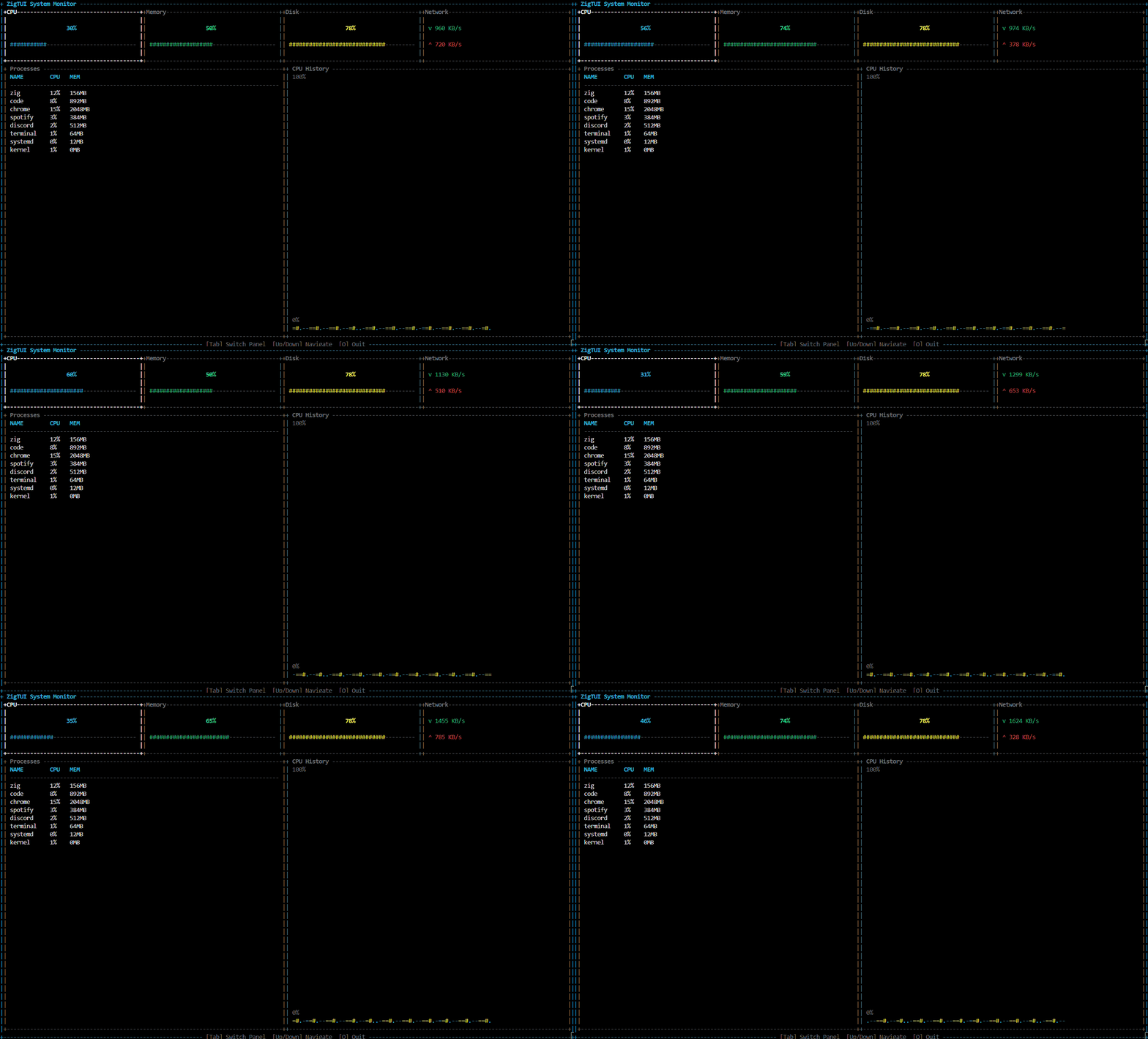
주요 기능
- 크로스 플랫폼 — Windows, Linux, macOS
- 효율적인 렌더링 — 셀 기반 디핑, 변경된 부분만 다시 그림
- 위젯 — 블록, 단락, 리스트, 게이지, 테이블
- 15가지 내장 테마 — Nord, Dracula, Gruvbox, Catppuccin, Tokyo Night...
- Kitty 그래픽 프로토콜 — 이미지 표시(유니코드 대체 지원)
- 숨겨진 할당 없음 — 명시적 메모리 관리
요구 사항
- Zig 0.15.0 이상
- Windows 10+ / Linux / macOS
설치
zig fetch --save git+https://github.com/adxdits/zigtui.git// build.zig
const zigtui = b.dependency("zigtui", .{ .target = target, .optimize = optimize });const exe = b.addExecutable(.{
.name = "myapp",
.root_module = b.createModule(.{
.root_source_file = b.path("src/main.zig"),
.target = target,
.optimize = optimize,
.imports = &.{
.{ .name = "zigtui", .module = zigtui.module("zigtui") },
},
}),
});
대안: Git 서브모듈
git submodule add https://github.com/adxdits/zigtui.git libs/zigtuiconst zigtui_module = b.addModule("zigtui", .{
.root_source_file = b.path("libs/zigtui/src/lib.zig"),
});빠른 시작
const std = @import("std");
const tui = @import("zigtui");pub fn main() !void {
    var gpa = std.heap.GeneralPurposeAllocator(.{}){};
    defer _ = gpa.deinit();
    const allocator = gpa.allocator();    var backend = try tui.backend.init(allocator);
    defer backend.deinit();    var terminal = try tui.terminal.Terminal.init(allocator, backend.interface());
    defer terminal.deinit();    try terminal.hideCursor();
    defer terminal.showCursor() catch {};    var running = true;
    while (running) {
        const event = try backend.interface().pollEvent(100);
        if (event == .key) {
            if (event.key.code == .esc or (event.key.code == .char and event.key.code.char == 'q'))
                running = false;
        }        try terminal.draw({}, struct {
            fn render(_: void, buf: *tui.render.Buffer) !void {
                tui.widgets.Block{
                    .title = "Hello ZigTUI — press 'q' to quit",
                    .borders = tui.widgets.Borders.all(),
                    .border_style = .{ .fg = .cyan },
                }.render(buf.getArea(), buf);
            }
        }.render);
    }
}
위젯
// Block — container with border/title
tui.widgets.Block{ .title = "Panel", .borders = tui.widgets.Borders.all() }// Paragraph — text display
tui.widgets.Paragraph{ .text = "Hello!", .wrap = true }
// List — scrollable items
tui.widgets.List{ .items = &items, .selected = 0, .highlight_style = .{ .bg = .blue } }
// Gauge — progress bar
tui.widgets.Gauge{ .ratio = 0.75, .label = "75%" }
// Table — tabular data
tui.widgets.Table{ .header = &columns, .rows = &rows }
Themes
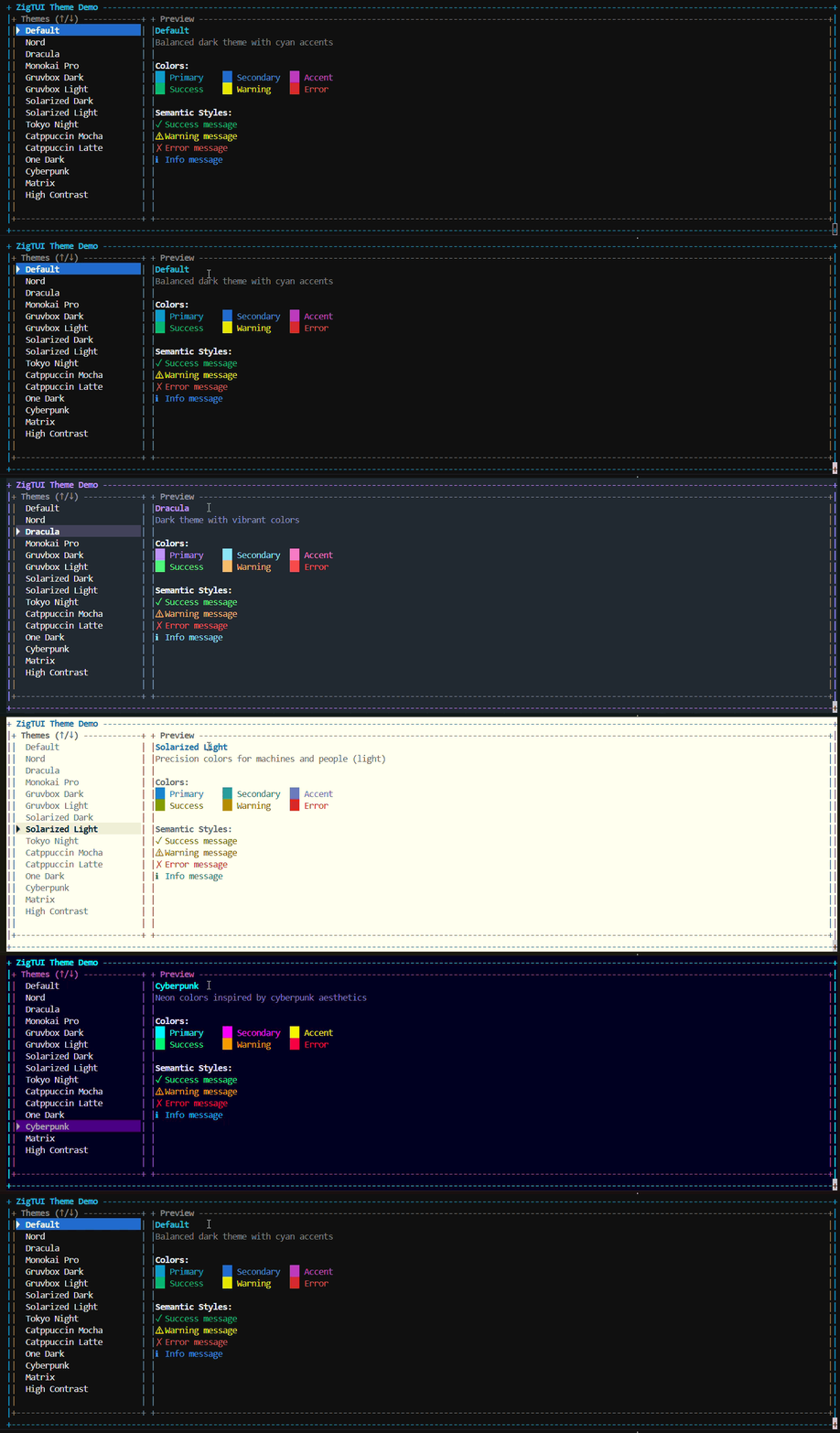
const theme = tui.themes.catppuccin_mocha;tui.widgets.Block{
    .title = "Dashboard",
    .style = theme.baseStyle(),
    .border_style = theme.borderFocusedStyle(),
};
사용 가능: default, nord, dracula, monokai, gruvbox_dark, gruvbox_light, solarized_dark, solarized_light, tokyo_night, catppuccin_mocha, catppuccin_latte, one_dark, cyberpunk, matrix, high_contrast
모든 테마를 미리 보려면 zig build run-themes를 실행하세요.
예제
zig build run-dashboard   # System monitor demo
zig build run-kitty       # Image display demo
zig build run-themes      # Theme showcase
Kitty 그래픽
Kitty 그래픽 프로토콜을 지원하는 터미널에서 이미지를 표시합니다. 자동으로 유니코드 블록으로 대체됩니다.
var gfx = tui.Graphics.init(allocator);
defer gfx.deinit();var bmp = try tui.graphics.bmp.loadFile(allocator, "image.bmp");
const image = tui.Image{ .data = bmp.data, .width = bmp.width, .height = bmp.height, .format = .rgba };
if (gfx.supportsImages()) {
if (try gfx.drawImage(image, .{ .x = 0, .y = 0 })) |seq| try backend.write(seq);
} else {
gfx.renderImageToBuffer(image, buffer, area); // Unicode fallback
}
지원: Kitty, WezTerm, foot, Konsole (부분 지원) 대체: Windows Terminal, iTerm2, Terminal.app
플랫폼 지원
| 플랫폼 | 터미널 | 비고 | |----------|----------|-------| | Windows 10 이상 | Windows Terminal, WezTerm | 네이티브 콘솔 API | | 리눅스 | 모든 ANSI 호환 터미널 | POSIX termios | | macOS | Kitty, WezTerm, Terminal.app | POSIX termios |
라이선스
MIT
기여
이슈 및 PR 환영합니다.
--- Tranlated By Open Ai Tx | Last indexed: 2026-02-06 ---