janitor
Objective
Janitor is a standalone tool that monitors the availability of your IOT devices and alerts you in case a device goes missing or stops transmitting data. This is particularly useful if you have many sensors, possibly with unstable hardware or connection, so you can take action in case of any issues and monitor the stability of your devices.Janitor does not aim to implement any additional functionalities, therefore is not an alternative to your other home automation software (e.g. HASS). Focusing on solely this functionality will enable to keep this tool simple and efficient.
Janitor currently supports the following monitoring methods:
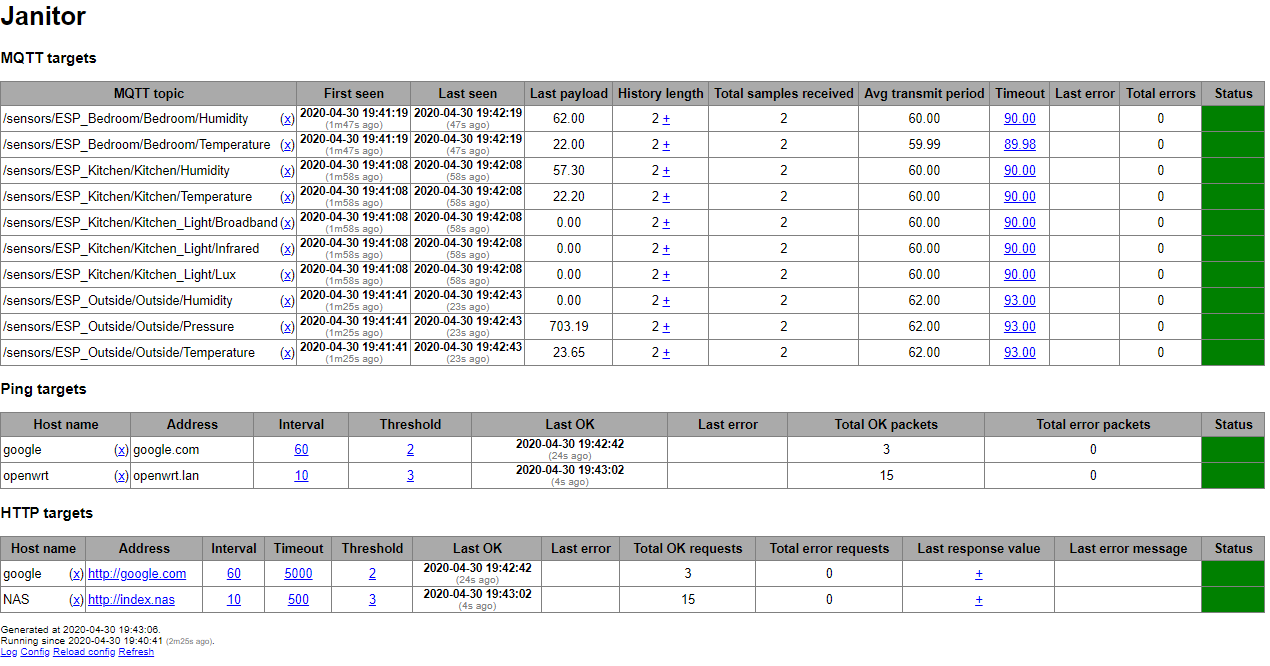
- MQTT: Janitor will subscribe to predefined MQTT topics and monitor incoming messages. An average transmit frequency will be calculated for each channel and in case no new messages are received within this interval, Janitor will alert you (the threshold can be configured as a multiple of the average frequency or as absolute values per topic). This method is particularly useful for any kind of sensors submitting data regularly via MQTT (e.g. temperature).
- Ping: Janitor will ping predefined hosts with a predefined frequency (configurable on a per host basis) and will alert you in case of no reply (the threshold used for consecutively missed pings can be configured). This method is useful for any kind of IOT devices e.g. sensors, cameras etc.
- HTTP: Janitor will send a HTTP GET request to predefined addresses and check for reply, and, optionally, whether the reply contains a predefined string. Janitor will alert you in case of consecutively unsuccessful requests above the configured threshold. The frequency and timeout are also configurable per address. This method is useful for any kind of services with a web interface (e.g. APIs, hosted services etc.).
- Exec: Janitor will execute a preconfigured command and check for its exit code. Janitor will alert you in case of consecutively unsuccessful executions above the configured threshold. The frequency and timeout are also configurable per command. With this method you can implement any kind of custom monitoring.
- Telegram: Janitor will send a message to a predefined Telegram channel.
- Gotify: Janitor will send a push message to Gotify.
- MQTT: Janitor will publish a message to a preconfigured topic on a preconfigured MQTT server. The message will contain a JSON payload (see sample config for example). This is suitable for automations e.g. in HASS.
- Exec: Janitor will execute a preconfigured command. This enables creating any type of custom alerting method.
Finally, Janitor includes a simple JSON api with the following endpoints:
/api/dataprovides a snapshot of all monitoring related data./api/statsprovides the count of monitoring targets in functional/dysfunctional state./api/metricsprovides target statistics in Prometheus metrics format.
Screenshot
Building and installing
Janitor is written in Go and will compile to a single standalone binary. Janitor should compile and work both on Linux and on Windows.
For compiling, use at least Go version 1.16 and execute the following commands to clone the repository and build the binary:
$ git clone https://github.com/a-bali/janitor.git $ cd janitor $ go build
This will create the standalone binary named janitor that you can place anywhere you like. Pre-built binaries for releases
are available on Github.
Configuration and usage
For configuration, a YAML formatted file is required. Please use the sample configuration file and change it according to your needs, following the comments in the file. Most of the variables are optional and have reasonable defaults, for details please see the comments. You can reference environment variables with $ENV_VAR or ${ENV_VAR} which will be substituted by their value if they exist (or with an empty string if they don't.).
A minimal but already operational configuration can be as short as follows (assuming Janitor's web interface will be available on its default port which is 8080):
monitor: mqtt: server: mymqtt.server targets:
- topic: "/sensors/#"
Once you created a configuration file, Janitor can be launched as follows:
$ janitor path/to/your/configfile.yml
Janitor will log to standard output. The log is viewable on the web interface as well, where you can delete monitored targets and reload the configuration file (e.g. in case you added new targets or changed any of the settings).
Janitor will not daemonize itself. It is recommended to create a systemd service for janitor in case you want it running continuously.
Running with Docker
The latest version of Janitor is available on Docker Hub abali/janitor. To use this, map your configuration file to /janitor/config.yml:
$ docker run -v $(pwd)/config.yml:/janitor/config.yml -p 8080:8080 abali/janitor
Alternatively, you can use the supplied Dockerfile to build a container yourself :
$ git clone https://github.com/a-bali/janitor.git $ cd janitor $ docker build . -t janitor $ docker run -v $(pwd)/config.yml:/janitor/config.yml -p 8080:8080 janitor
Future plans and contributing
Janitor's objective is clear and simple: to monitor the availability and operation of IOT devices and alert in case if any issues. Any future improvements should follow this objective and thus either add new ways of monitoring, or add new ways of alerting.
Janitor is open source software and you are encouraged to send pull requests via Github that improve the software.
License
Janitor is licensed under GPL 3.0.
--- Tranlated By Open Ai Tx | Last indexed: 2025-12-25 ---