GOT-OCR-2-GUI
See English version here
🛑Support discontinued, future updates will be casual
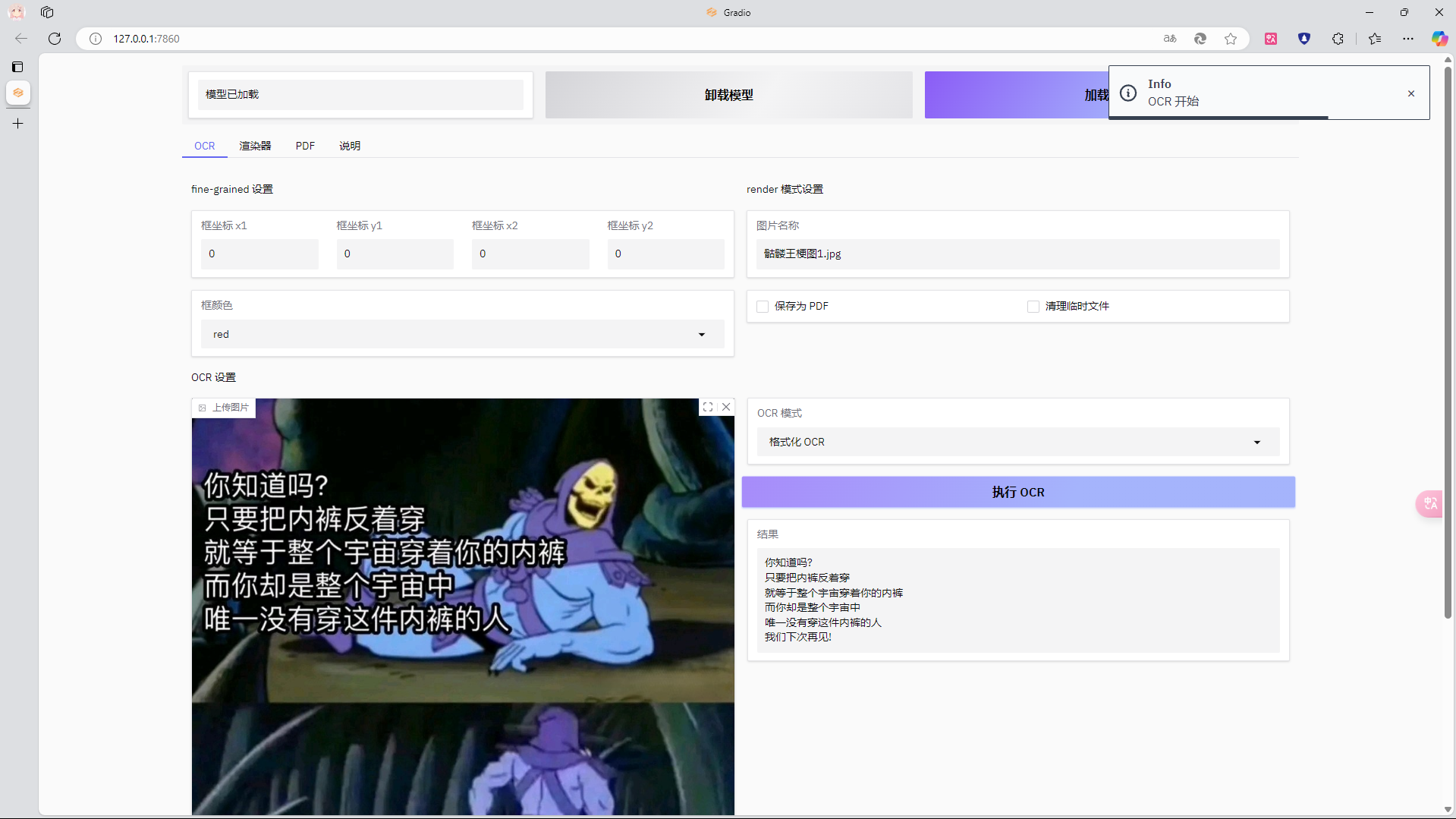
About this project
Model weights: Mirror site, Original site Original GitHub: GOT-OCR2.0 This project was developed on Windows, I personally have not used Linux and am not familiar with it, so I cannot guarantee it will run properly on Linux. If you want to deploy on Linux, you can refer to this issue Some code comes from: GLM4 , Deepseek
Please give a star
To do
- [x] Localize log content
- [ ] Support new model stepfun-ai/GOT-OCR-2.0-hf
- [ ] Optimize error handling logic related to PDF
- [x] Support GGUF model, hoping to accelerate inference (thanks to issue #19 for the help)
- [ ] Improve support for GGUF models
- [x] New rendering mode: optimize performance, support more output formats
- [ ] Remove/hide old renderer
Usage
If you do not have the folders mentioned here, please create one
Choose a branch
#### Alpha
The fastest updating branch, the latest changes will be committed to this branch. Code may sometimes be untested. Very unstable, sometimes even unusable.
#### main
A relatively stable branch, but some new features may be missing.
Dependencies
This environment has been tested to work properly under python 3.11.9
#### torch
Choose the appropriate GPU version of torch installation from the torch official website
I previously used Stable 2.4.1 + cu124
Currently using Stable 2.0.1 + cu118, which can resolve 1 Torch is not compiled with Flash Attention, and no other issues have been found so far
#### PyMuPDF
In practice, if installed directly from requirements.txt, it will report ModuleNotFoundError: No module named 'frontend',
but installing separately does not cause this issue, the specific reason is unclear
Additionally, if it still reports ModuleNotFoundError, uninstall fitz and PyMuPDF first, then reinstalling should solve it; in practice, pip install -U PyMuPDF
does not work
pip install fitz
pip install PyMuPDF
#### Installing with pip
pip install -r requirements.txtAlso, someone mentioned encountering conflicts when installing dependencies using requirements.txt, but I did not find any issues here, and pipdeptree did not show any conflicts. The requirements.txt is directly from pip freeze of my own virtual environment, so it should be fine.
However, since such issues have indeed occurred, here is a requirements-noversion.txt without version numbers for you to try:
For more information, please see this issue #4
pip install -r requirements-noversion.txt#### Others
, download the compressed package and place it in theedge_driver folderEveryone should have Edge on their computer, right? Hopefully? This thing comes pre-installed...
The file structure should be:
> GOT-OCR-2-GUI
└─edge_driver
├─msedgedriver.exe
└─...
``Download Model Files
Only one of the following models is needed to perform OCR, but to enable automatic model loading, you need the Safetensors model
Support for GGUF models is not yet complete; you can currently try it separately in the GGUF tab
#### Safetensors
- Download into the models
folder - Don’t miss any files
- If it is a new GOT-OCR-2-HF
model (currently unsupported), download into themodels-hffolder (but support has not been added yet) - The file structure should be:
#### GGUFGGUF models are supported by
got.cpp
Go to the MosRat/got.cpp repository to download the models, put Encode.onnx into gguf\Encoder.onnx, and place the remaining Decoder GGUF models into gguf\decodersGetting Started
- If you want to use the command line, use
If you want to use a graphical interface, use GUI.py
If you want to modify settings, use Config Manager.py
If you want to perform automated rendering operations, use Renderer.py; it will automatically render all .jpg and .png images in the imgs folder> GUI users can ignore this, but CLI users remember to put the images you want to OCR into the
imgs folder (CLI currently only detects .jpg and .png images)Localization Support
- You can find
.json files for various languages in the Locales folder; CLI and GUI language files are stored separately
In the gui subfolder, besides the language.json files, there is an instructions folder containing built-in GUI tutorials named language.md
To modify language support, just change the value of 'language' in config.json; available options correspond to the filenames of language.json without the extension
To add language support, in CLI just add a new language.json (I strongly recommend using an existing file as a starting point), and in GUI you also need the matching language.md file
You can use Config Manager.py to manage language and other configuration filesNotes
- If the script crashes, try running it with
cmd using python + filename; I have experienced crashes during my own testing and don’t know why
Do not delete markdown-it.js in the result folder, otherwise PDF export will fail!> If you accidentally delete it, a backup can be found in the
scripts folder; just copy one over- Make sure the
torch you install is the GPU version because the script uses device_map='cuda'FAQ
- Q: CLI.py: error: the following arguments are required: --path/-P
- A: Use PowerShell; CMD seems to have this bug and the cause is currently unknown
---
- Q: What is an "HTML local file"? Are there HTML files not saved locally?
- A: Although the model outputs HTML files saved locally, they use external scripts, so even if the file is local, a network connection is needed to open it. Therefore, I downloaded the external scripts locally, as mentioned earlier
. This is mainly to prevent PDF export failures caused by network issues.
- Q: Why did my model fail to load?
- A: Check if you are missing any files. The model files downloaded from Baidu Cloud seem to be incomplete; I recommend downloading them from the previously mentioned Huggingface.
---
- Q: Do you have any suggestions for deploying this project?
- A: See this issue #5
---
- Q: Where can I find the help documentation?
- A: For GUI users, you can find it under the
Instructions tab; for CLI users, you can use .\CLI.py --help to view the argparse auto-generated help documentation, or .\CLI.py --detailed-help` to see more detailed help documentation.Star History
---
Tranlated By Open Ai Tx | Last indexed: 2026-01-12
---