🛡️ LoLTrackGuard:检测英雄联盟中的脚本行为
LoLTrackGuard 是一个轻量级系统,用于检测《英雄联盟》游戏视频中可疑的鼠标行为。它结合了基于 YOLOv8 的光标检测和 LSTM 自编码器,以识别光标移动模式中的异常——无需游戏日志或侵入式工具。
- 🎯 输入:1080p 30FPS 游戏视频
- 🖱️ 第一步:使用训练好的 YOLO 模型检测光标位置
- 📐 第二步:提取并归一化运动特征(速度,加速度等)
- 🧠 第三步:输入 LSTM 自编码器以评分异常
- 📊 输出:带有每秒异常评分的 CSV 文件
📁 项目结构
LoLTrackGuard-MAIN/
├── cursor_templates/                # Cursor icon PNGs with transparency (for FakeDataGenerator)
├── extension/                       # C++/CUDA Acceleration Module
│   ├── setup.py                     # Build script
│   └── src/                         # C++ and CUDA source files
├── model/                           # Trained LSTM models for anomaly detection
│   ├── detection_model.keras        # Default trained LSTM model
│   ├── detection_model2.keras       # Alternate model versions
│   └── detection_model3.keras
├── mouse_positions/                # Output CSVs from cursorDetector with raw mouse position data
├── pipeline/                       # Core logic scripts
│   ├── analyzer.py                 # Runs analysis using a trained model
│   ├── cursorDetector.py          # Detects cursor in videos using YOLO and outputs CSV
│   ├── cursorDetector_accelerated.py # High-Performance version (C++/Numba)
│   ├── dataModifier.py            # Extracts motion features and normalizes them
│   └── modelTrainer.py            # Trains LSTM anomaly detection model
├── utils/                          # Resource files and utility scripts
│   ├── cursorDetector_x.pt        # Primary YOLOv8 model for cursor detection
│   ├── FakeDataGenerator.py       # Script to generate synthetic training data for YOLO
│   └── universal_scaler.joblib    # Saved standardizer for feature normalization
├── train_pipeline.py               # Full training pipeline: from video to trained model
├── analyze_pipeline.py             # Full analysis pipeline: from video to anomaly scores
├── requirements.txt                # Python dependencies
└── README.md                       # Project documentation
⚙️ Project Setup
1. Install Git LFS (for large model files)
# Install Git LFS from: https://git-lfs.github.com/
git lfs install
2. 安装依赖项
pip install -r requirements.txt🔍 使用方法:分析流程(analyze_pipeline.py)
🎯 目的
使用预训练模型检测游戏录制中的鼠标移动异常。
⚠️ 重要提示: 您的输入视频必须是1080p 30 FPS,以确保光标检测和特征对齐的准确性。
🚀 运行
python analyze_pipeline.py📊 流程
1. Select a video file (e.g. MP4 screen recording with visible cursor)
- Run YOLOv8 to detect and record mouse positions (X, Y, time)
- Automatically extract movement features (velocity, acceleration, etc.)
- Apply the pre-trained scaler to normalize features
- Feed sequences into LSTM autoencoder
- Calculate reconstruction error for each 1-second action
- Save anomaly scores to CSV
📂 输出
analysis_results/:包含每个动作的重建误差的 CSV 文件- 每行对应一个 1 秒序列(30 帧),表示异常程度
🧠 训练你自己的模型
如果你想训练自己的 LSTM 自编码器模型:
- 使用
pipeline/dataModifier.py从原始鼠标位置 CSV 文件中提取特征。 - 使用
utils/universal_scaler.joblib对特征向量进行归一化。 - 使用
pipleline/modelTrainer.py在处理后的序列上训练新模型。
🧪 工作原理
1. 通过 YOLOv8 和合成数据进行光标检测
为什么选择光标? 本项目的目标是分析主播或内容创作者的第一人称游戏画面。相比角色行为,鼠标光标轨迹提供了更直接、更可靠的信号来检测潜在的脚本行为。
收集了 鼠标指针 文件和用作背景的 游戏录像
使用 FakeDataGenerator.py 生成了超过 70,000 张带标签的合成图像:
- 每帧叠加一个随机选取的光标模板
- 光标大小、亮度、饱和度和全局模糊均随机化
🖼️ 图 1:光标检测示例
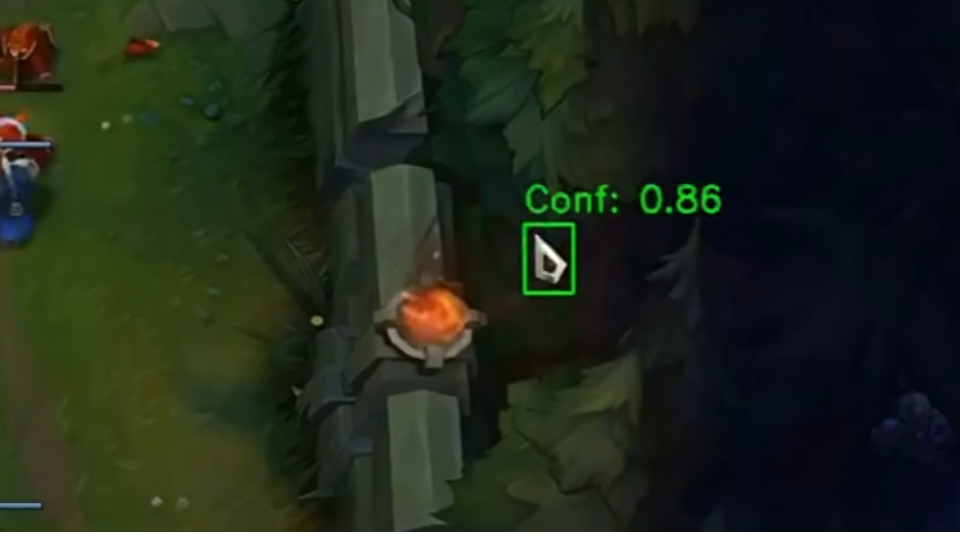
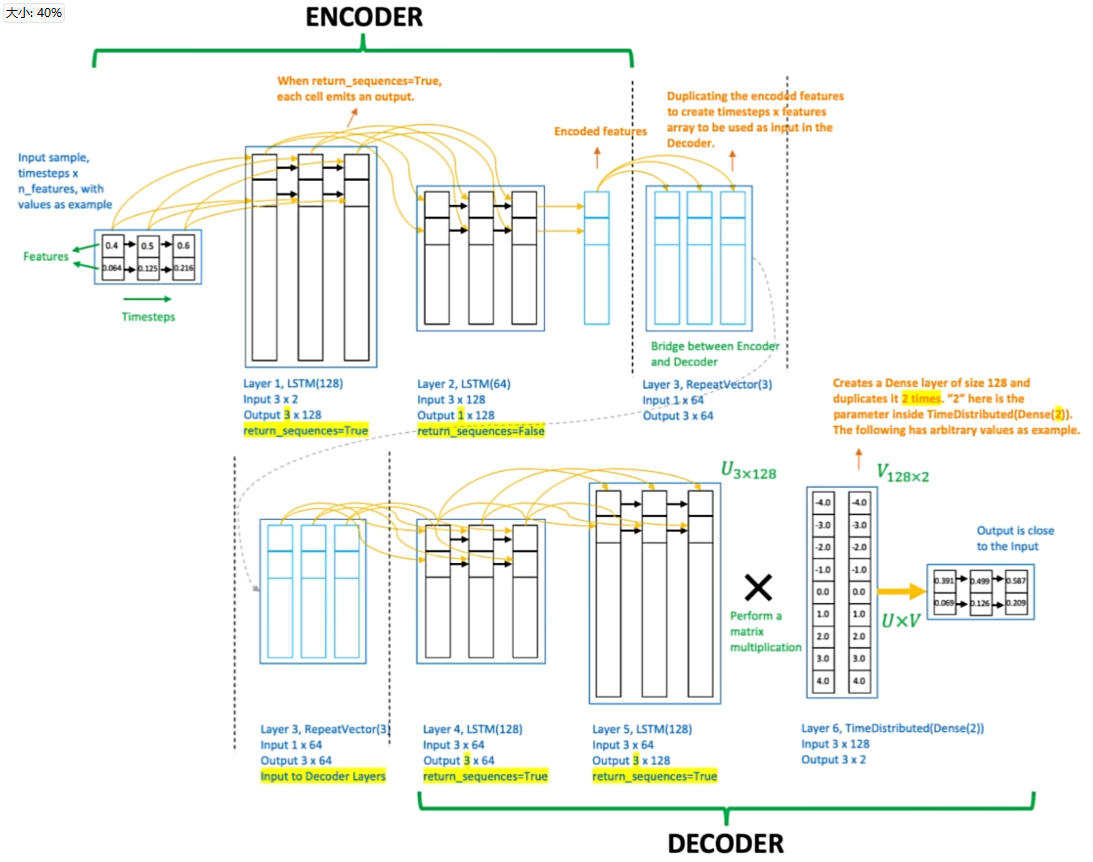
2. 通过 LSTM 自编码器进行行为建模
为了避免在识别作弊者时产生主观判断,使用纯粹基于经过验证的人类数据(非作弊比赛)训练的LSTM自编码器。
该模型学习重构正常的人类鼠标移动模式。在推断阶段,任何具有较高重构误差的序列都会被标记为潜在异常,无需手动定义规则。
🧠 图2:LSTM自编码器示意图
3. 使用真实职业玩家数据进行特征工程
收集了50个职业英雄联盟玩家的第一人称重放,提取了超过150万次鼠标移动。
通过dataModifier.py处理原始光标坐标,具体包括:
- 从原始(X,Y)数据中提取工程特征
- 用时间增量替代绝对时间戳
- 计算每帧的速度、加速度(X/Y)、角速度和移动距离
- 使用
universal_scaler.joblib进行归一化
这超过50万的动作序列被输入LSTM进行训练。
4. 通过重构误差进行结果评估
运行完整分析流程后,analyzer.py脚本使用训练好的LSTM自编码器处理提取的特征序列。
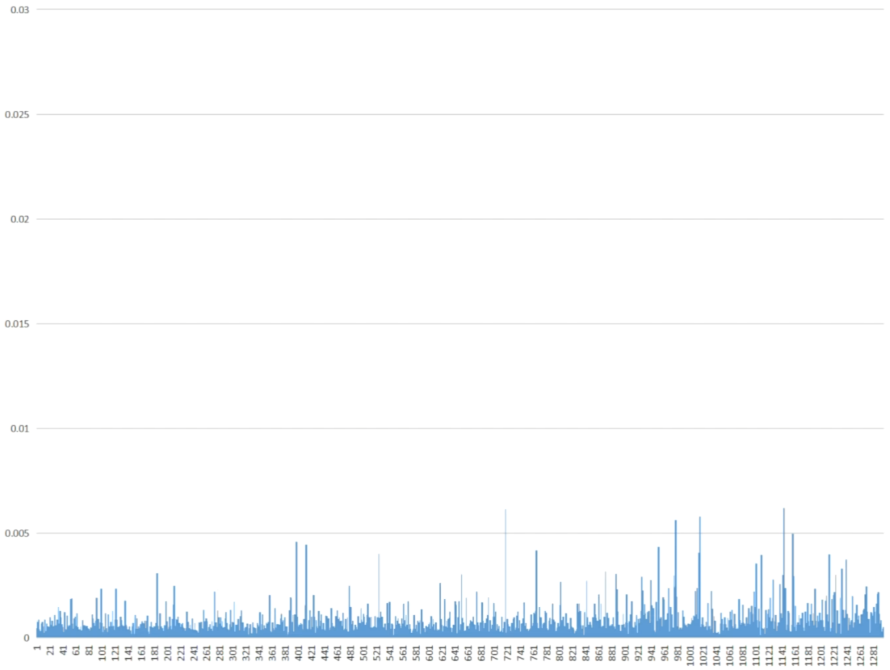
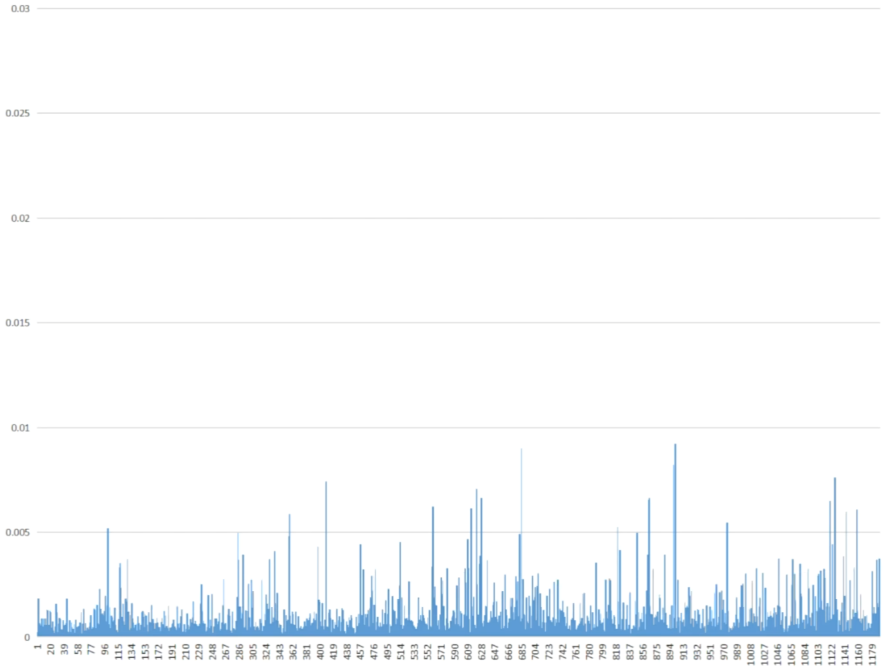
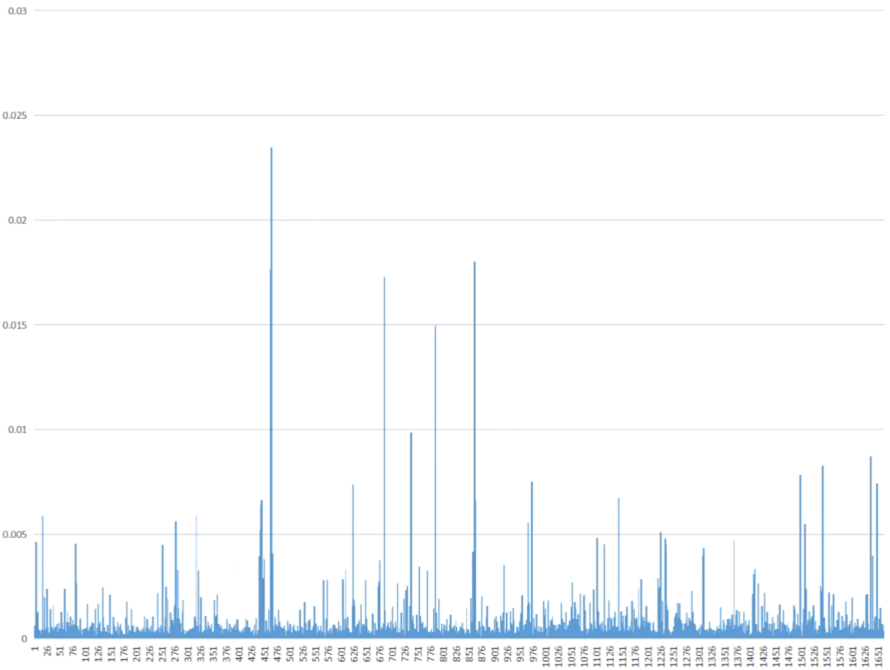
对于每个动作(一秒钟的鼠标移动序列),模型计算一个重构误差:
- 低误差 → 行为与学习到的人类模式相似
- 高误差 → 行为异常,可能是脚本或辅助行为
结果保存为CSV文件,存放在analysis_results/目录中,每行对应一个检测到的动作及其相关异常分数。
🎮 图3:职业玩家鼠标移动(训练期间未见数据)
👤 图4:普通玩家鼠标移动
⚠️ 图5:可疑游戏鼠标移动
🚀 高性能模式(C++/CUDA)
LoLTrackGuard 现已包含加速处理管线。
特性
- 混合加速:如果未编译 C++ 扩展,自动使用
Numba(JIT CUDA)和Threading。 - 异步视频解码:解耦读取与推理。
- 自定义 CUDA 内核:预处理滤波器以突出显示光标候选。
安装(可选 C++ 扩展)
为获得最大性能,可编译本地 C++ 扩展:- 确保已安装
CUDA Toolkit和Visual Studio(MSVC)。 - 在
extension/setup.py中配置 OpenCV 路径。 - 运行:
   cd extension
   python setup.py install
   cd ..
   ``用法
运行加速检测器:--- Tranlated By Open Ai Tx | Last indexed: 2026-02-15 ---