🛡️ LoLTrackGuard: LoL에서 스크립트 행동 탐지
LoLTrackGuard는 리그 오브 레전드 게임플레이 영상에서 의심스러운 마우스 행동을 감지하는 경량 시스템입니다. YOLOv8 기반 커서 감지와 LSTM 오토인코더를 결합하여 커서 움직임 패턴의 이상을 식별합니다 — 게임 로그나 침입 도구가 필요하지 않습니다.
- 🎯 입력: 1080p 30FPS 게임플레이 영상
- 🖱️ 1단계: 훈련된 YOLO 모델을 사용해 커서 위치 감지
- 📐 2단계: 운동 특성(속도, 가속도 등) 추출 및 정규화
- 🧠 3단계: LSTM 오토인코더에 입력하여 이상 점수 산출
- 📊 출력: 초당 이상 점수를 포함한 CSV
📁 프로젝트 구조
LoLTrackGuard-MAIN/
├── cursor_templates/                # Cursor icon PNGs with transparency (for FakeDataGenerator)
├── extension/                       # C++/CUDA Acceleration Module
│   ├── setup.py                     # Build script
│   └── src/                         # C++ and CUDA source files
├── model/                           # Trained LSTM models for anomaly detection
│   ├── detection_model.keras        # Default trained LSTM model
│   ├── detection_model2.keras       # Alternate model versions
│   └── detection_model3.keras
├── mouse_positions/                # Output CSVs from cursorDetector with raw mouse position data
├── pipeline/                       # Core logic scripts
│   ├── analyzer.py                 # Runs analysis using a trained model
│   ├── cursorDetector.py          # Detects cursor in videos using YOLO and outputs CSV
│   ├── cursorDetector_accelerated.py # High-Performance version (C++/Numba)
│   ├── dataModifier.py            # Extracts motion features and normalizes them
│   └── modelTrainer.py            # Trains LSTM anomaly detection model
├── utils/                          # Resource files and utility scripts
│   ├── cursorDetector_x.pt        # Primary YOLOv8 model for cursor detection
│   ├── FakeDataGenerator.py       # Script to generate synthetic training data for YOLO
│   └── universal_scaler.joblib    # Saved standardizer for feature normalization
├── train_pipeline.py               # Full training pipeline: from video to trained model
├── analyze_pipeline.py             # Full analysis pipeline: from video to anomaly scores
├── requirements.txt                # Python dependencies
└── README.md                       # Project documentation
⚙️ Project Setup
1. Install Git LFS (for large model files)
# Install Git LFS from: https://git-lfs.github.com/
git lfs install
2. 종속성 설치
pip install -r requirements.txt🔍 사용법: 분석 파이프라인 (analyze_pipeline.py)
🎯 목적
사전 학습된 모델을 사용하여 게임 플레이 녹화에서 마우스 움직임의 이상을 감지합니다.
⚠️ 중요: 올바른 커서 감지 및 특징 정렬을 위해 입력 비디오는 1080p 30 FPS여야 합니다.
🚀 실행
python analyze_pipeline.py📊 흐름
1. Select a video file (e.g. MP4 screen recording with visible cursor)
- Run YOLOv8 to detect and record mouse positions (X, Y, time)
- Automatically extract movement features (velocity, acceleration, etc.)
- Apply the pre-trained scaler to normalize features
- Feed sequences into LSTM autoencoder
- Calculate reconstruction error for each 1-second action
- Save anomaly scores to CSV
📂 출력
analysis_results/: 액션별 재구성 오류를 나열한 CSV 파일 포함- 각 행은 1초 시퀀스(30프레임)에 해당하며, 이상 수준을 나타냄
🧠 자체 모델 학습하기
자체 LSTM 오토인코더 모델을 학습하려면:
pipeline/dataModifier.py를 사용해 원시 마우스 위치 CSV 파일에서 특징 추출utils/universal_scaler.joblib를 사용해 특징 벡터 정규화pipleline/modelTrainer.py를 사용해 처리된 시퀀스에 대해 새 모델 학습
🧪 작동 원리
1. YOLOv8 및 합성 데이터를 통한 커서 감지
왜 커서인가? 이 프로젝트의 목표는 스트리머나 콘텐츠 크리에이터의 1인칭 게임 플레이 영상을 분석하는 것입니다. 캐릭터 행동과 비교할 때, 마우스 커서 궤적이 잠재적 스크립팅 탐지에 더 직접적이고 신뢰할 수 있는 신호를 제공합니다.
수집된 마우스 포인터 파일과 게임 리플레이를 배경으로 사용
FakeDataGenerator.py를 사용해 70,000개 이상의 라벨된 합성 이미지 생성:
- 각 프레임에 무작위 선택된 커서 템플릿 오버레이
- 커서 크기, 밝기, 채도, 전체 블러 무작위화
🖼️ 그림 1: 커서 감지 예시
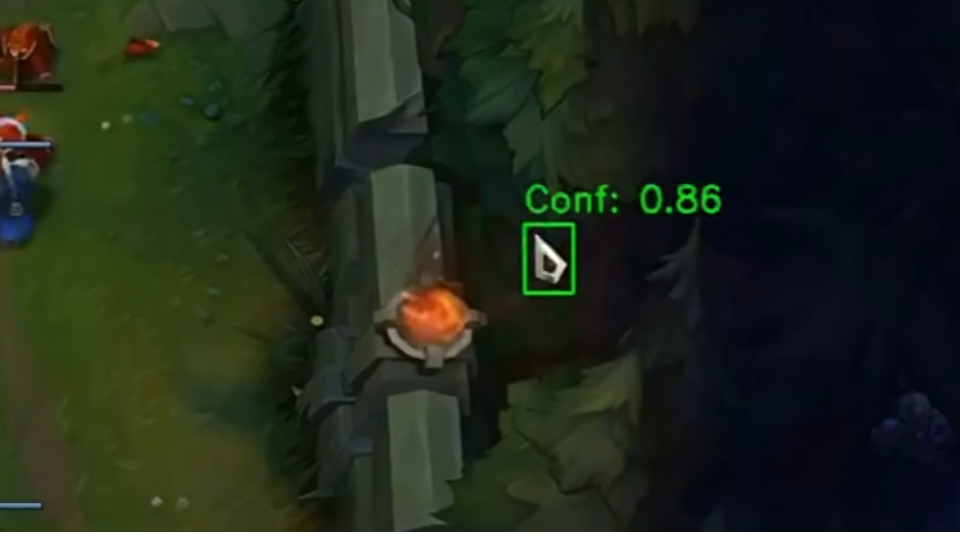
2. LSTM 오토인코더를 통한 행동 모델링
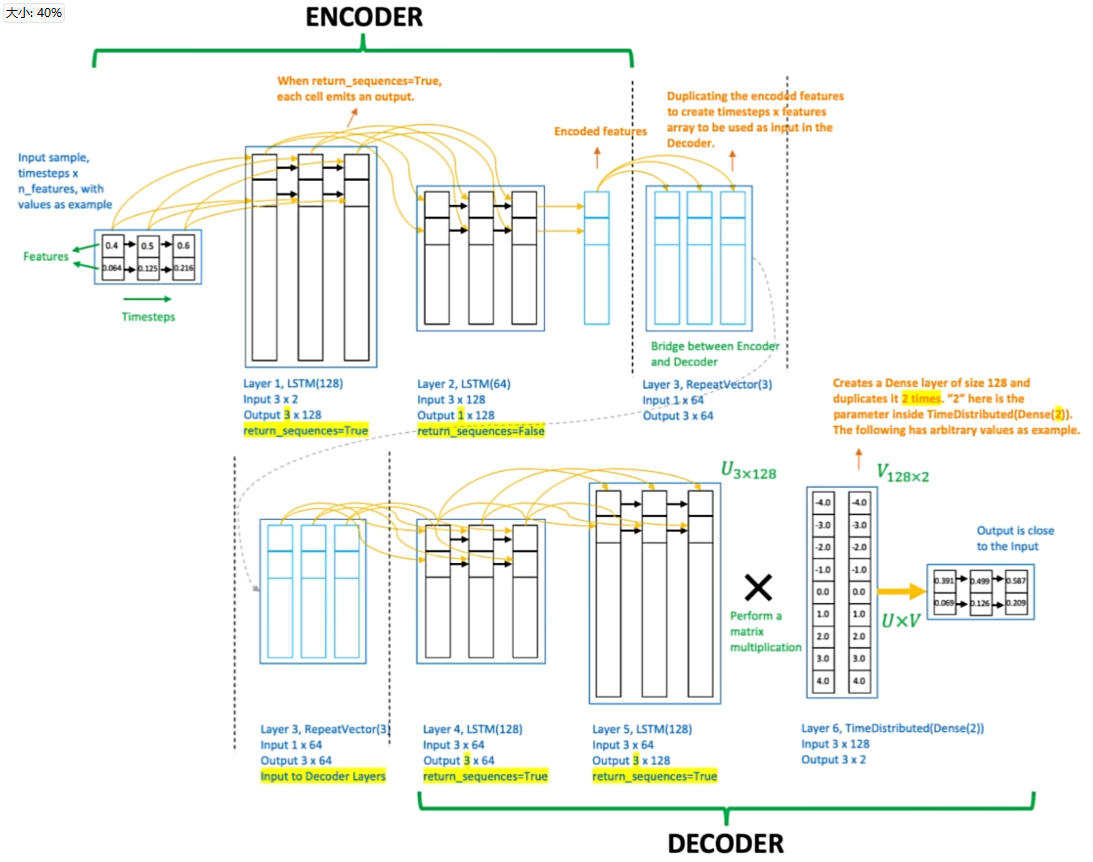
치터를 식별할 때 주관적인 판단을 피하기 위해, 검증된 인간 데이터(비치팅 경기)만으로 훈련된 LSTM 오토인코더를 사용합니다.
모델은 정상적인 인간 마우스 움직임 패턴을 재구성하는 법을 학습합니다. 추론 시에는 높은 재구성 오류가 발생하는 시퀀스를 잠재적 이상으로 표시하며, 수동 규칙 정의가 필요 없습니다.
🧠 그림 2: LSTM 오토인코더 다이어그램
3. 실제 프로 선수 데이터로 특성 엔지니어링
프로 LoL 선수들의 50개 1인칭 리플레이를 수집하고, 150만 개 이상의 마우스 움직임을 추출했습니다.
원시 커서 좌표는 dataModifier.py를 통해 처리되며:
- 원시 (X, Y) 데이터에서 엔지니어링된 특성 추출
- 절대 타임스탬프를 시간 델타로 대체
- 프레임별 속도, 가속도(X/Y), 각속도 및 이동 거리 계산
universal_scaler.joblib을 적용하여 정규화 수행
이 50만 개가 넘는 동작 시퀀스가 LSTM 훈련에 투입됩니다.
4. 재구성 오류를 통한 결과 평가
전체 분석 파이프라인을 실행한 후, analyzer.py 스크립트는 훈련된 LSTM 오토인코더를 사용해 추출된 특성 시퀀스를 처리합니다.
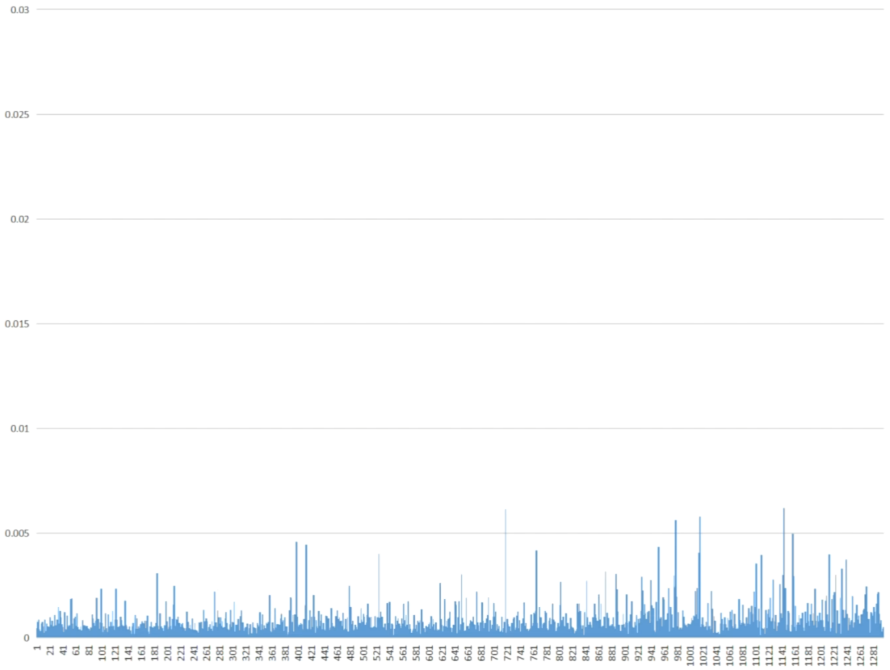
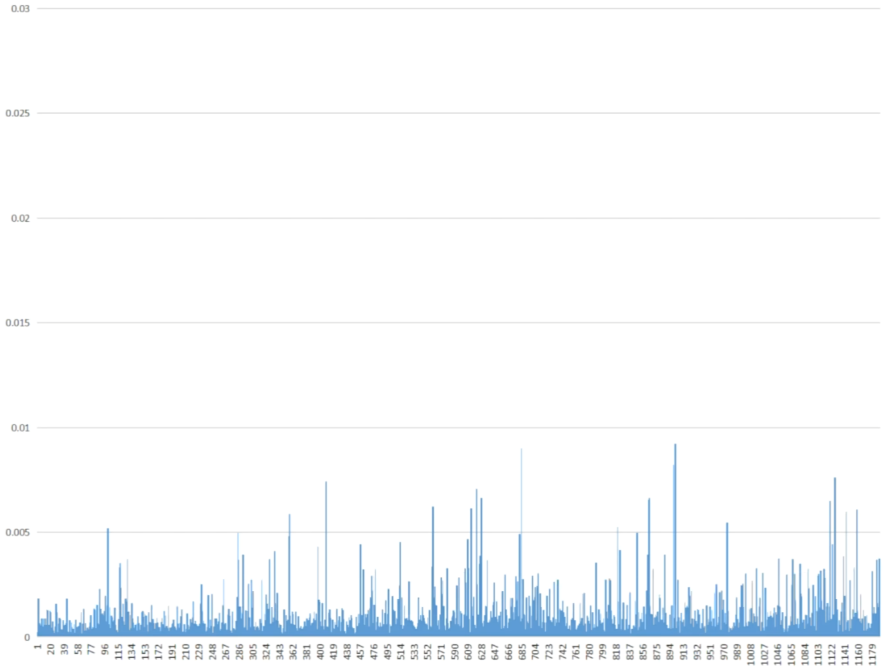
각 동작(1초간의 마우스 움직임 시퀀스)에 대해 모델은 재구성 오류를 계산합니다:
- 낮은 오류 → 학습된 인간 패턴과 유사한 행동
- 높은 오류 → 비정상적이고 스크립트 또는 보조 프로그램 가능성이 있는 행동
결과는 analysis_results/ 폴더에 CSV 파일로 저장되며, 각 행은 감지된 하나의 동작과 관련된 이상 점수를 나타냅니다.
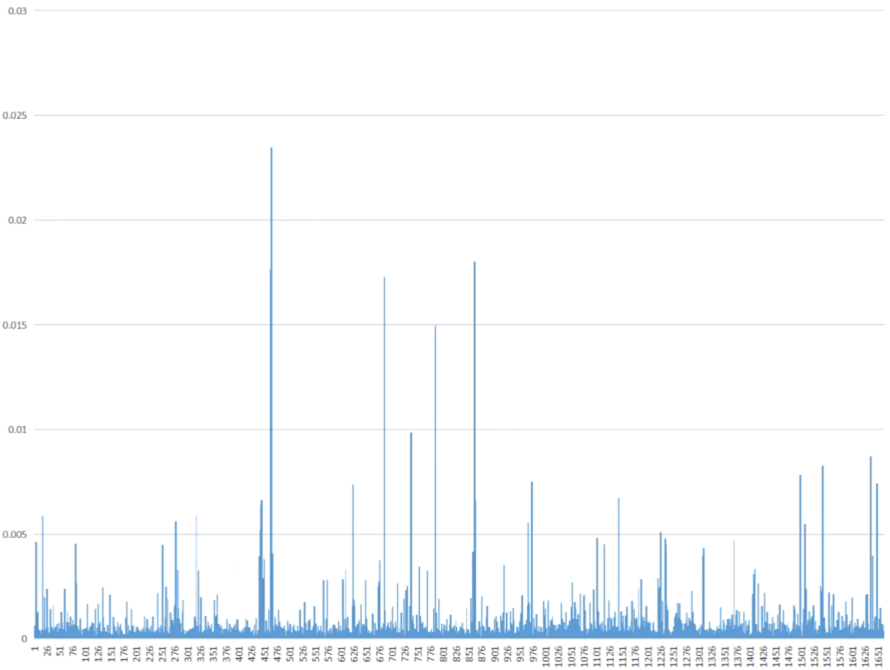
🎮 그림 3: 프로 선수 마우스 움직임 (훈련 중 미사용 데이터)
👤 그림 4: 일반 플레이어 마우스 움직임
⚠️ 그림 5: 의심스러운 게임플레이 마우스 움직임
🚀 고성능 모드 (C++/CUDA)
LoLTrackGuard는 이제 가속 처리 파이프라인을 포함합니다.
기능
- 하이브리드 가속: C++ 확장이 컴파일되지 않은 경우
Numba(JIT CUDA) 및Threading을 자동으로 사용합니다. - 비동기 비디오 디코딩: 읽기와 추론을 분리합니다.
- 맞춤형 CUDA 커널: 커서 후보를 강조하는 전처리 필터.
설정 (선택적 C++ 확장)
최대 성능을 위해 네이티브 C++ 확장을 컴파일할 수 있습니다:CUDA Toolkit및Visual Studio(MSVC)가 설치되어 있는지 확인하세요.extension/setup.py에서 OpenCV 경로를 구성하세요.- 다음을 실행하세요:
   cd extension
   python setup.py install
   cd ..
   ``사용법
가속화된 감지기를 실행합니다:--- Tranlated By Open Ai Tx | Last indexed: 2026-02-15 ---