🛡️ LoLTrackGuard:LoLにおけるスクリプト行動検出
LoLTrackGuard は、League of Legends のゲームプレイ映像における疑わしいマウス挙動を検出する軽量システムです。YOLOv8ベースのカーソル検出とLSTMオートエンコーダを組み合わせて、カーソル移動パターンの異常を特定します — ゲームログや侵襲的なツールは不要です。
- 🎯 入力:1080p 30FPS ゲームプレイ映像
- 🖱️ ステップ1:学習済みYOLOモデルでカーソル位置を検出
- 📐 ステップ2:動きの特徴(速度、加速度など)を抽出・正規化
- 🧠 ステップ3:LSTMオートエンコーダに入力し異常スコアを算出
- 📊 出力:秒単位の異常スコアを含むCSV
📁 プロジェクト構成
LoLTrackGuard-MAIN/
├── cursor_templates/                # Cursor icon PNGs with transparency (for FakeDataGenerator)
├── extension/                       # C++/CUDA Acceleration Module
│   ├── setup.py                     # Build script
│   └── src/                         # C++ and CUDA source files
├── model/                           # Trained LSTM models for anomaly detection
│   ├── detection_model.keras        # Default trained LSTM model
│   ├── detection_model2.keras       # Alternate model versions
│   └── detection_model3.keras
├── mouse_positions/                # Output CSVs from cursorDetector with raw mouse position data
├── pipeline/                       # Core logic scripts
│   ├── analyzer.py                 # Runs analysis using a trained model
│   ├── cursorDetector.py          # Detects cursor in videos using YOLO and outputs CSV
│   ├── cursorDetector_accelerated.py # High-Performance version (C++/Numba)
│   ├── dataModifier.py            # Extracts motion features and normalizes them
│   └── modelTrainer.py            # Trains LSTM anomaly detection model
├── utils/                          # Resource files and utility scripts
│   ├── cursorDetector_x.pt        # Primary YOLOv8 model for cursor detection
│   ├── FakeDataGenerator.py       # Script to generate synthetic training data for YOLO
│   └── universal_scaler.joblib    # Saved standardizer for feature normalization
├── train_pipeline.py               # Full training pipeline: from video to trained model
├── analyze_pipeline.py             # Full analysis pipeline: from video to anomaly scores
├── requirements.txt                # Python dependencies
└── README.md                       # Project documentation
⚙️ Project Setup
1. Install Git LFS (for large model files)
# Install Git LFS from: https://git-lfs.github.com/
git lfs install
2. 依存関係のインストール
pip install -r requirements.txt🔍 使い方:分析パイプライン(analyze_pipeline.py)
🎯 目的
プレトレーニング済みモデルを使用して、ゲームプレイ録画からマウス移動の異常を検出します。
⚠️ 重要: 適切なカーソル検出と特徴の整合性を確保するために、入力動画は1080p 30 FPSである必要があります。
🚀 実行
python analyze_pipeline.py📊 フロー
1. Select a video file (e.g. MP4 screen recording with visible cursor)
- Run YOLOv8 to detect and record mouse positions (X, Y, time)
- Automatically extract movement features (velocity, acceleration, etc.)
- Apply the pre-trained scaler to normalize features
- Feed sequences into LSTM autoencoder
- Calculate reconstruction error for each 1-second action
- Save anomaly scores to CSV
📂 出力
analysis_results/: アクションごとの再構成誤差をリストしたCSVファイルを含む- 各行は1秒間のシーケンス(30フレーム)に対応し、異常レベルを示す
🧠 独自モデルの訓練
独自のLSTMオートエンコーダモデルを訓練したい場合:
pipeline/dataModifier.pyを使って、生のマウスポジションCSVファイルから特徴を抽出します。utils/universal_scaler.joblibを使って特徴ベクトルを正規化します。pipleline/modelTrainer.pyを使って、処理済みシーケンス上で新しいモデルを訓練します。
🧪 仕組みの説明
1. YOLOv8と合成データによるカーソル検出
なぜカーソル? このプロジェクトの目的は、ストリーマーやコンテンツクリエイターの一人称ゲームプレイ映像を分析することです。キャラクターの動きに比べ、マウスカーソルの軌跡はスクリプト検出においてより直接的で信頼できる信号を提供します。
収集したのは マウスポインタ ファイルと、背景としての ゲームのリプレイ映像。
FakeDataGenerator.py を使って、70,000枚以上のラベル付き合成画像を生成:
- 各フレームにランダムに選んだカーソルテンプレートを重ねる
- カーソルのサイズ、明るさ、彩度、全体的なぼかしをランダム化
🖼️ 図1: カーソル検出例
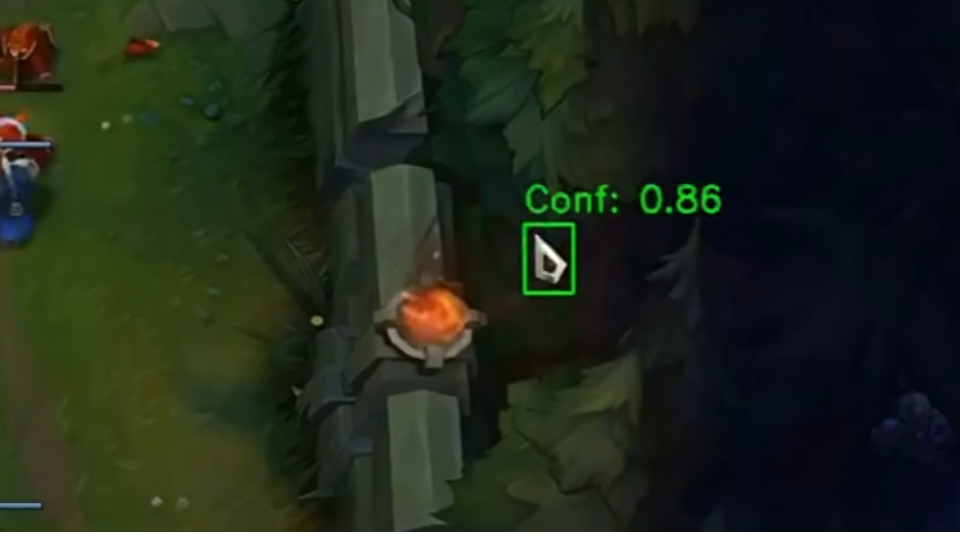
2. LSTMオートエンコーダによる行動モデリング
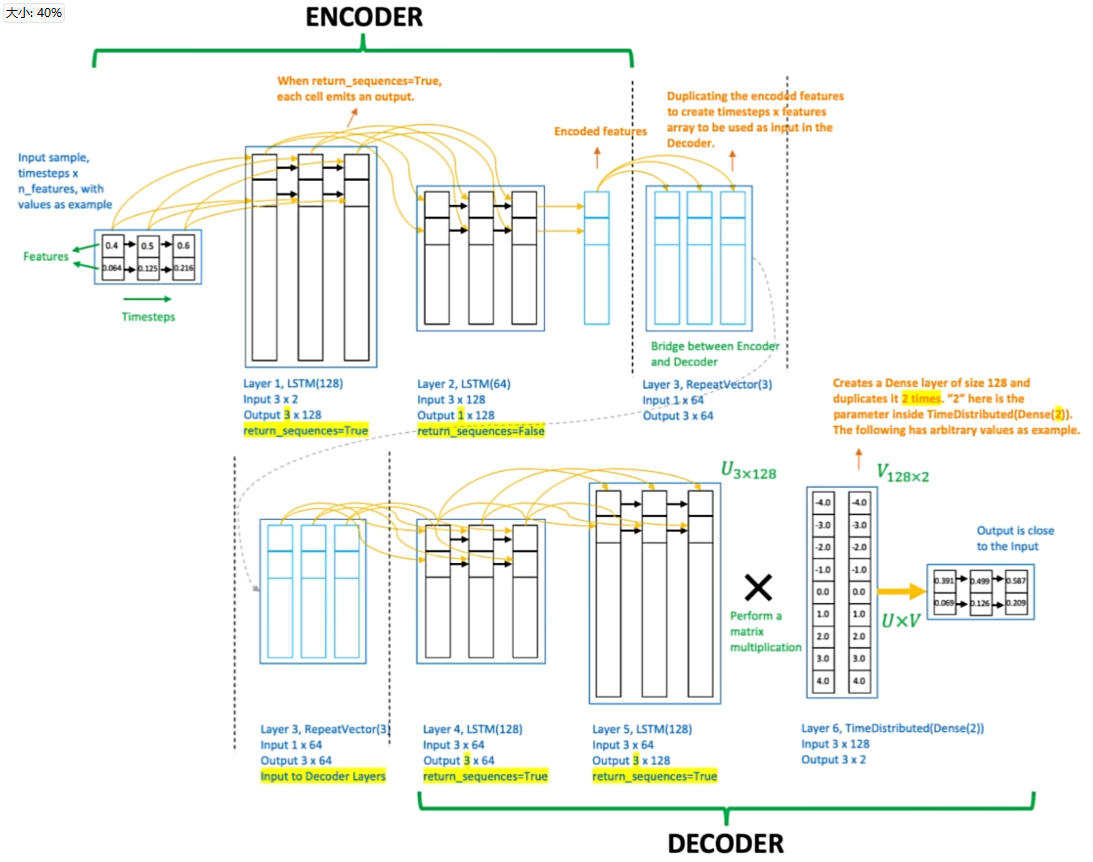
チーターの識別における主観的判断を避けるために、検証済みの人間データ(不正行為のない試合)のみで学習したLSTMオートエンコーダーを使用します。
モデルは正常な人間のマウス動作パターンを再構築することを学習します。推論時には、高い再構築誤差を持つシーケンスを手動ルール定義なしに潜在的な異常としてフラグ付けします。
🧠 図2: LSTMオートエンコーダーの図
3. プロ選手の実データによる特徴量エンジニアリング
プロのLoLプレイヤーから50本の一人称視点リプレイを収集し、150万回以上のマウス移動を抽出しました。
生のカーソル座標はdataModifier.pyで処理され、以下を行います:
- 生の(X, Y)データから特徴量を抽出
- 絶対タイムスタンプを時間差分に置き換え
- フレームごとの速度、加速度(X/Y)、角速度、移動距離を計算
- 正規化のために
universal_scaler.joblibを適用
これら50万以上のアクションシーケンスをLSTMに入力して学習させます。
4. 再構築誤差による結果評価
解析パイプラインを実行後、analyzer.pyスクリプトは学習済みLSTMオートエンコーダーを用いて特徴量シーケンスを処理します。
各アクション(1秒間のマウス動作シーケンス)について、モデルは再構築誤差を算出します:
- 誤差が低い → 学習済みの人間パターンに類似した挙動
- 誤差が高い → 異常でスクリプトや支援の可能性あり
結果はanalysis_results/にCSVファイルとして保存され、各行は検出されたアクションとそれに対応する異常スコアを示します。
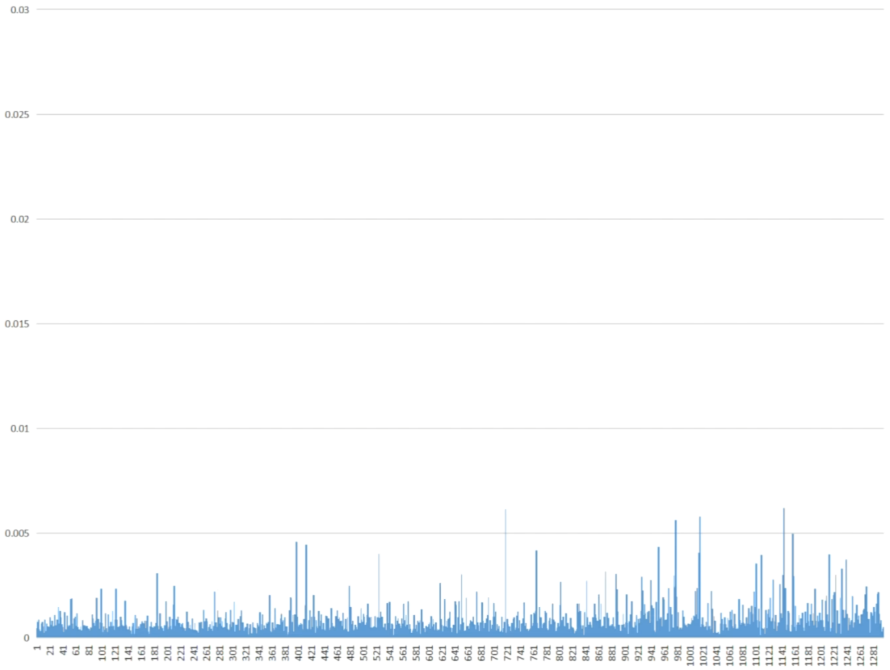
🎮 図3: プロ選手のマウス動作(学習時未使用データ)
👤 図4:通常プレイヤーのマウス移動
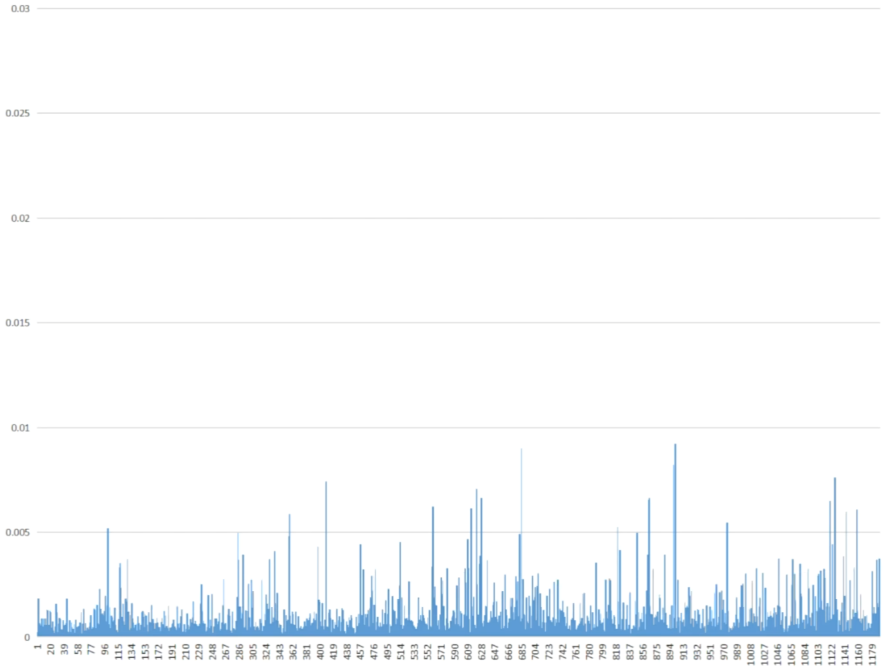
⚠️ 図5:疑わしいプレイのマウス移動
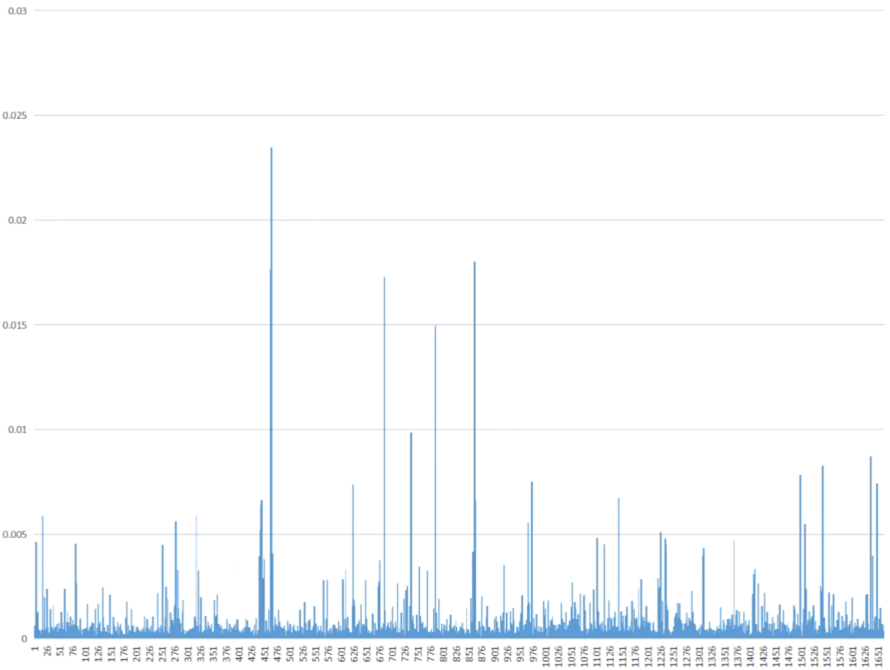
🚀 高性能モード(C++/CUDA)
LoLTrackGuardは、加速処理パイプラインを搭載しました。
特徴
- ハイブリッド加速:C++拡張がコンパイルされていない場合、自動で
Numba(JIT CUDA)とThreadingを使用します。 - 非同期ビデオデコード:読み込みと推論を分離します。
- カスタムCUDAカーネル:カーソル候補を強調する前処理フィルター。
セットアップ(オプションのC++拡張)
最大のパフォーマンスを得るには、ネイティブのC++拡張をコンパイルしてください:CUDA ToolkitとVisual Studio(MSVC)がインストールされていることを確認します。extension/setup.pyでOpenCVのパスを設定します。- 次を実行:
   cd extension
   python setup.py install
   cd ..
   ``使用方法
高速化された検出器を実行する:--- Tranlated By Open Ai Tx | Last indexed: 2026-02-15 ---