🛡️ LoLTrackGuard: Detecting Scripted Behavior in LoL
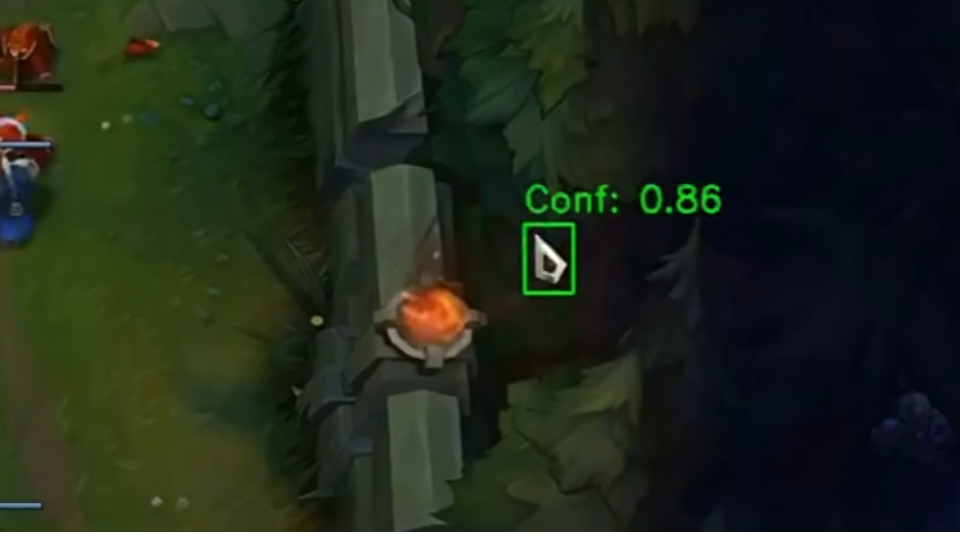
LoLTrackGuard is a lightweight system for detecting suspicious mouse behavior in League of Legends gameplay videos. It combines YOLOv8-based cursor detection with an LSTM autoencoder to identify anomalies in cursor movement patterns — no game logs or invasive tools required.
- 🎯 Input: 1080p 30FPS gameplay video
- 🖱️ Step 1: Detect cursor positions using a trained YOLO model
- 📐 Step 2: Extract and normalize motion features (velocity, acceleration, etc.)
- 🧠 Step 3: Feed into LSTM autoencoder to score anomalies
- 📊 Output: CSV with per-second anomaly scores
📁 Project Structure
LoLTrackGuard-MAIN/
├── cursor_templates/                # Cursor icon PNGs with transparency (for FakeDataGenerator)
├── extension/                       # C++/CUDA Acceleration Module
│   ├── setup.py                     # Build script
│   └── src/                         # C++ and CUDA source files
├── model/                           # Trained LSTM models for anomaly detection
│   ├── detection_model.keras        # Default trained LSTM model
│   ├── detection_model2.keras       # Alternate model versions
│   └── detection_model3.keras
├── mouse_positions/                # Output CSVs from cursorDetector with raw mouse position data
├── pipeline/                       # Core logic scripts
│   ├── analyzer.py                 # Runs analysis using a trained model
│   ├── cursorDetector.py          # Detects cursor in videos using YOLO and outputs CSV
│   ├── cursorDetector_accelerated.py # High-Performance version (C++/Numba)
│   ├── dataModifier.py            # Extracts motion features and normalizes them
│   └── modelTrainer.py            # Trains LSTM anomaly detection model
├── utils/                          # Resource files and utility scripts
│   ├── cursorDetector_x.pt        # Primary YOLOv8 model for cursor detection
│   ├── FakeDataGenerator.py       # Script to generate synthetic training data for YOLO
│   └── universal_scaler.joblib    # Saved standardizer for feature normalization
├── train_pipeline.py               # Full training pipeline: from video to trained model
├── analyze_pipeline.py             # Full analysis pipeline: from video to anomaly scores
├── requirements.txt                # Python dependencies
└── README.md                       # Project documentation
⚙️ Project Setup
1. Install Git LFS (for large model files)
# Install Git LFS from: https://git-lfs.github.com/
git lfs install
2. Install dependencies
pip install -r requirements.txt🔍 How to Use: Analysis Pipeline (analyze_pipeline.py)
🎯 Purpose
Detect anomalies in mouse movement from gameplay recordings using a pre-trained model.
⚠️ Important: Your input video must be in 1080p 30 FPS to ensure proper cursor detection and feature alignment.
🚀 Run
python analyze_pipeline.py📊 Flow
1. Select a video file (e.g. MP4 screen recording with visible cursor)
- Run YOLOv8 to detect and record mouse positions (X, Y, time)
- Automatically extract movement features (velocity, acceleration, etc.)
- Apply the pre-trained scaler to normalize features
- Feed sequences into LSTM autoencoder
- Calculate reconstruction error for each 1-second action
- Save anomaly scores to CSV
📂 Output
analysis_results/: Contains CSV files listing the reconstruction error per action- Each row corresponds to a 1-second sequence (30 frames), indicating anomaly level
🧠 Train Your Own Model
If you want to train your own LSTM autoencoder model:
- Use
pipeline/dataModifier.pyto extract features from your raw mouse position CSV files. - Use
utils/universal_scaler.joblibto normalize the feature vectors. - Use
pipleline/modelTrainer.pyto train a new model on the processed sequences.
🧪 How This Works
1. Cursor Detection via YOLOv8 and Synthetic Data
Why Cursor? The goal of this project is to analyze first-person gameplay footage from streamers or content creators. Compared to character behavior, mouse cursor trajectories provide a more direct and reliable signal for detecting potential scripting.
Collected mouse pointer files and replays of games as backgrounds
Used FakeDataGenerator.py to generate over 70,000 labeled synthetic images:
- Each frame is overlaid with a randomly selected cursor template
- Cursor size, brightness, saturation, and global blur are randomized
🖼️ Figure 1: Cursor Detection Example
2. Behavioral Modeling via LSTM Autoencoder
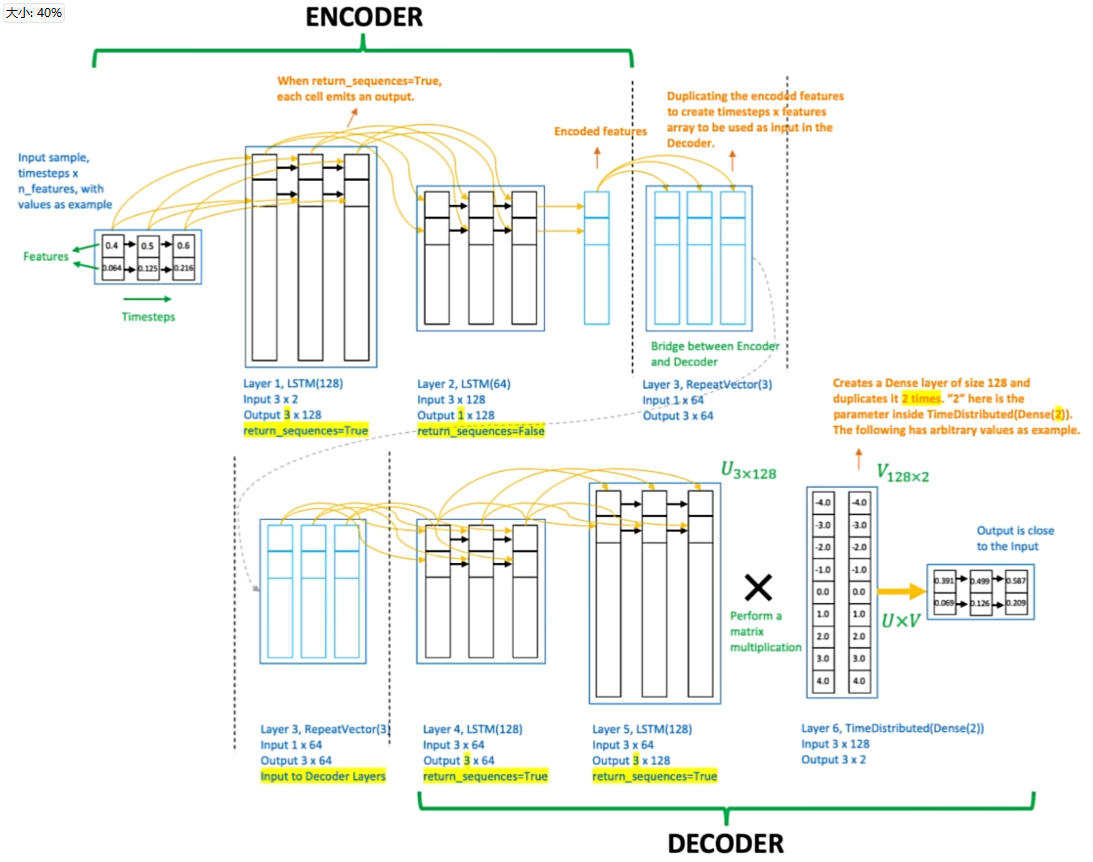
To avoid subjective judgment in identifying cheaters, use an LSTM autoencoder trained purely on verified human data (non-cheating matches).
The model learns to reconstruct normal human mouse movement patterns. During inference, it flags any sequences with high reconstruction error as potential anomalies, without requiring manual rule definitions.
🧠 Figure 2: LSTM Autoencoder Diagram
3. Feature Engineering with Real Pro Player Data
Collected 50 first-person replays from professional LoL players, extracting over 1.5 million mouse movements.
The raw cursor coordinates are processed using dataModifier.py, which:
- Extracts engineered features from raw (X, Y) data
- Replaces absolute timestamps with time deltas
- Computes per-frame velocity, acceleration (X/Y), angular velocity, and movement distance
- Applies
universal_scaler.joblibfor normalization
These 500,000+ action sequences are fed into the LSTM for training.
4. Result Evaluation via Reconstruction Error
After running the full analysis pipeline, the analyzer.py script processes the extracted feature sequences using the trained LSTM autoencoder.
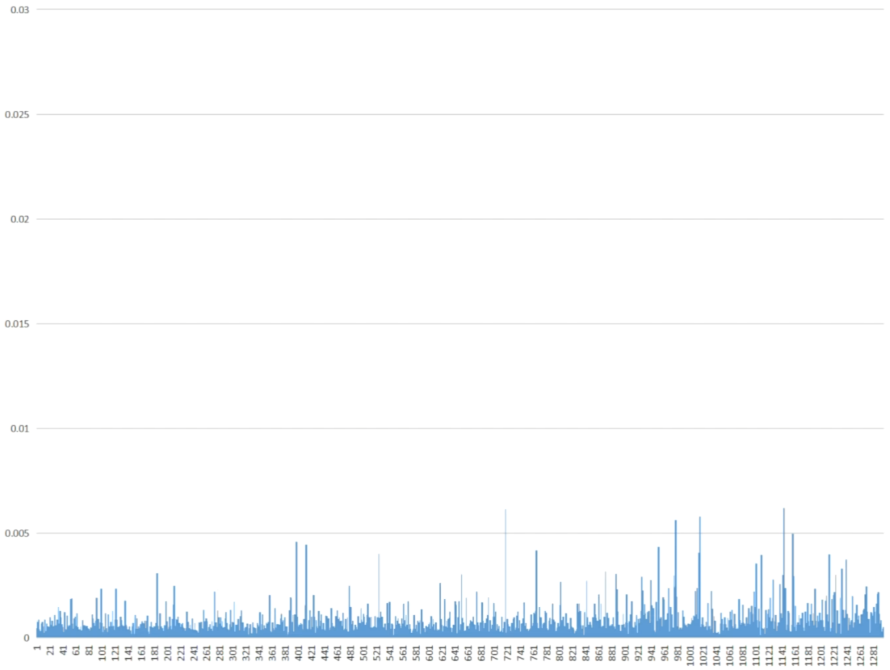
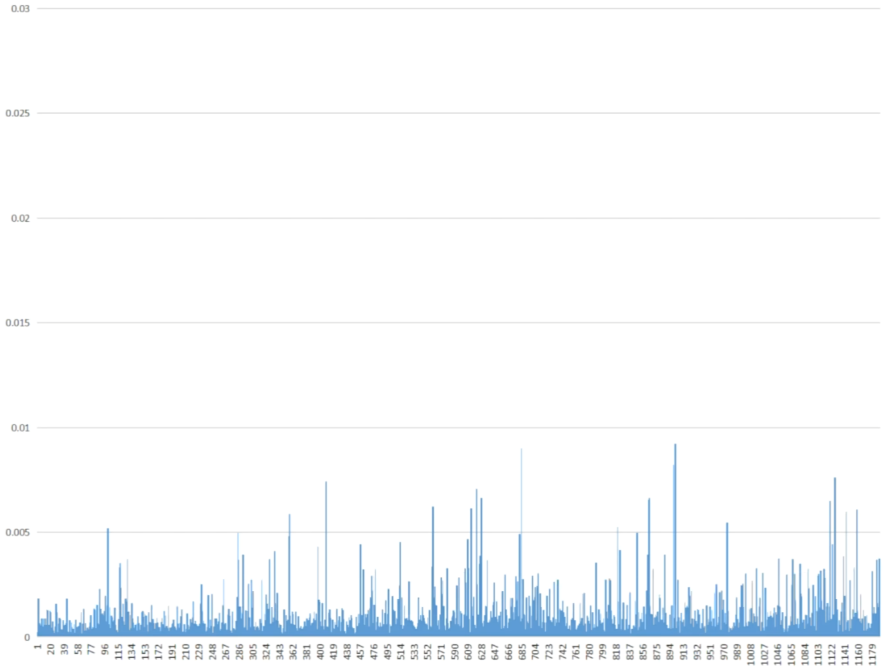
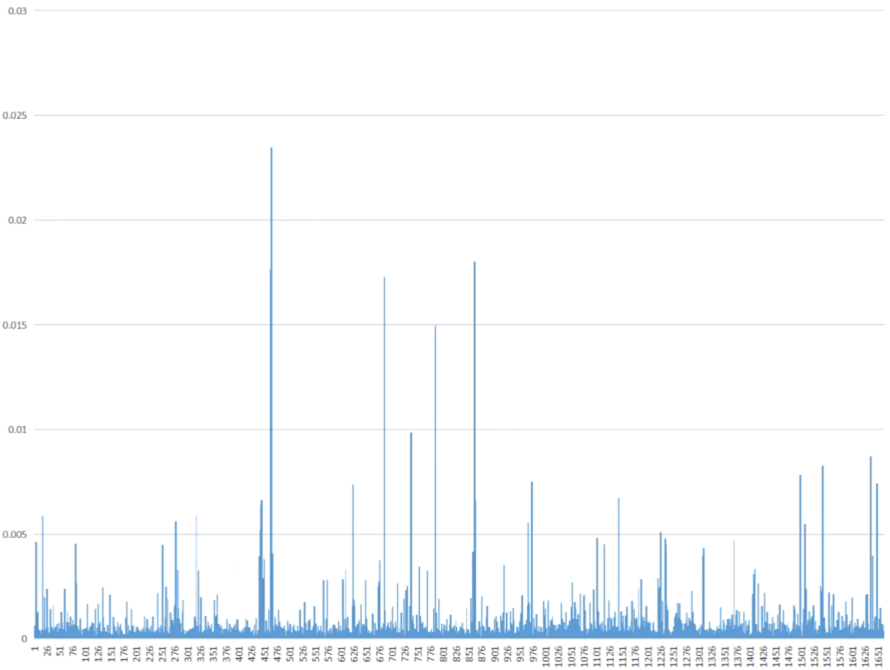
For each action (a 1-second sequence of mouse movement), the model calculates a reconstruction error:
- Low error → behavior is similar to learned human patterns
- High error → behavior is abnormal and potentially scripted or assisted
The results are saved to analysis_results/ as CSV files, where each row corresponds to one detected action with its associated anomaly score.
🎮 Figure 3: Pro Player Mouse Movement (Unseen During Training)
👤 Figure 4: Regular Player Mouse Movement
⚠️ Figure 5: Suspicious Gameplay Mouse Movement
🚀 High-Performance Mode (C++/CUDA)
LoLTrackGuard now includes an accelerated processing pipeline.
Features
- Hybrid Acceleration: Automatically uses
Numba(JIT CUDA) andThreadingif the C++ extension is not compiled. - Async Video Decoding: Decouples reading from inference.
- Custom CUDA Kernels: Pre-processing filters to highlight cursor candidates.
Setup (Optional C++ Extension)
For maximum performance, you can compile the native C++ extension:- Ensure
CUDA ToolkitandVisual Studio(MSVC) are installed. - Configure OpenCV paths in
extension/setup.py. - Run:
   cd extension
   python setup.py install
   cd ..
   ``Usage
Run the accelerated detector:--- Tranlated By Open Ai Tx | Last indexed: 2026-02-15 ---