🌐 Idioma
Gluetun WebUI
Uma interface web leve para monitorar e controlar o Gluetun — o container cliente VPN para Docker.



Funcionalidades
- ✨ Suporte Multi-VPN — Monitore e controle até 20 instâncias Gluetun simultaneamente
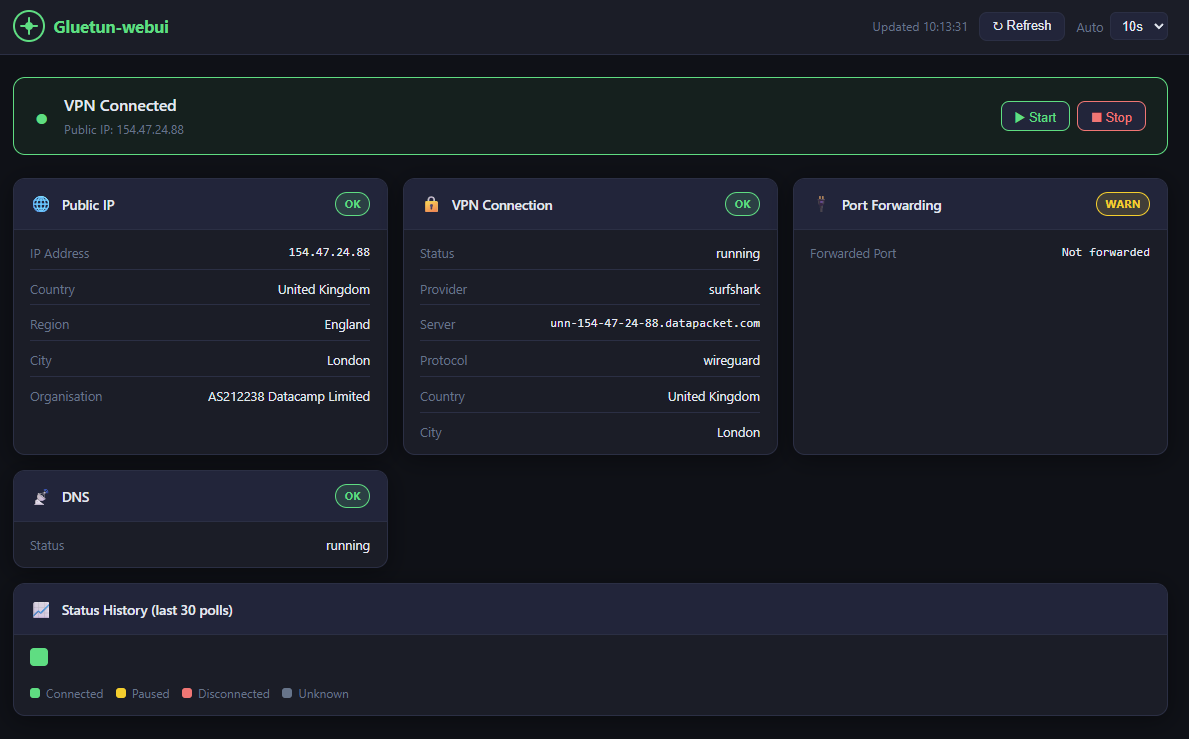
- Banner de status VPN ao vivo (conectado / pausado / desconectado)
- IP público de saída, país, região, cidade e organização
- Provedor de VPN, protocolo (WireGuard / OpenVPN), detalhes do servidor
- Status de encaminhamento de portas e DNS
- Controles para iniciar / parar VPN
- Atualização automática com intervalo configurável (5s – 60s)
- Últimos 30 ciclos de consulta codificados por cor na barra de histórico
- Design responsivo (mobile, tablet, desktop)
Capturas de Tela
Requisitos
- Docker + Docker Compose
- Gluetun executando com seu servidor de controle HTTP habilitado (porta padrão
8000) - Gluetun e gluetun-webui na mesma rede Docker
linux/amd64 e linux/arm64 (funciona em Mac Intel/Apple Silicon, Linux e Windows).Início Rápido
Opção A1: Instância Única (Recomendado)
Adicione gluetun-webui ao seu arquivo compose existente juntamente com o Gluetun:
gluetun-webui:
image: scuzza/gluetun-webui:latest
container_name: gluetun-webui
ports:
- "127.0.0.1:3000:3000"
environment:
- GLUETUN_CONTROL_URL=http://gluetun:8000
# Uncomment if Gluetun auth is enabled:
#- GLUETUN_API_KEY=yourtoken
#- GLUETUN_USER=username
#- GLUETUN_PASSWORD=password
networks:
- your_network_name
restart: unless-stopped
read_only: true
tmpfs:
- /tmp
security_opt:
- no-new-privileges:true
cap_drop:
- ALL
healthcheck:
test: ["CMD", "wget", "-qO-", "http://localhost:3000/api/health"]
interval: 30s
timeout: 5s
start_period: 10s
retries: 3Opção A2: Múltiplas Instâncias
Monitore 2 ou mais instâncias do Gluetun com dashboards separados:
gluetun-webui:
image: scuzza/gluetun-webui:latest
container_name: gluetun-webui
ports:
- "127.0.0.1:3000:3000"
environment:
- GLUETUN_1_NAME=VPN - London
- GLUETUN_1_URL=http://gluetun-1:8000
- GLUETUN_1_API_KEY=token1
- GLUETUN_2_NAME=VPN - Amsterdam
- GLUETUN_2_URL=http://gluetun-2:8000
- GLUETUN_2_API_KEY=token2
- GLUETUN_3_NAME=VPN - Singapore
- GLUETUN_3_URL=http://gluetun-3:8000
- GLUETUN_3_API_KEY=token3
networks:
- your_network_name
restart: unless-stopped
read_only: true
tmpfs:
- /tmp
security_opt:
- no-new-privileges:true
cap_drop:
- ALL
Opção B: Construir Localmente
git clone https://github.com/Sir-Scuzza/gluetun-webui.git
cd gluetun-webui
docker compose up -d --build
Em seguida, execute (qualquer uma das opções):
docker compose up -dA interface está disponível em http://localhost:3000
Configuração de Rede
Tanto o Gluetun quanto o gluetun-webui devem estar na mesma rede Docker para que http://gluetun:8000 seja resolvido corretamente.
Mesmo arquivo compose — basta adicionar ambos os serviços à mesma rede (mais comum):
services:
gluetun:
networks:
- arr-stack
gluetun-webui:
networks:
- arr-stack
networks:
arr-stack:
driver: bridgeArquivos compose separados — referencie a rede existente do Gluetun como externa. Encontre o nome da sua rede com docker network ls:
networks:
  ext-network:
    external: true
    name: your_gluetun_network_name
Suporte a Multi-VPN
Múltiplas Instâncias
gluetun-webui suporta o monitoramento e controle de múltiplas instâncias Gluetun simultaneamente. Cada instância é exibida como um painel separado em uma grade responsiva.
Configuração: Use variáveis de ambiente numeradas:
gluetun-webui:
image: scuzza/gluetun-webui:latest
environment:
# Instance 1
- GLUETUN_1_NAME=VPN 1
- GLUETUN_1_URL=http://gluetun-1:8000
- GLUETUN_1_API_KEY=token1 # optional
# Instance 2
- GLUETUN_2_NAME=VPN 2
- GLUETUN_2_URL=http://gluetun-2:8000
- GLUETUN_2_API_KEY=token2 # optional
# Instance 3
- GLUETUN_3_NAME=VPN 3
- GLUETUN_3_URL=http://gluetun-3:8000
- GLUETUN_3_USER=admin
- GLUETUN_3_PASSWORD=secret # optional (HTTP Basic auth)
Suportado: Até 20 instâncias (via GLUETUN_1_URL até GLUETUN_20_URL)
Responsivo: 1 dashboard largura total → 2 meia largura → 3 um terço da largura → 4 um quarto da largura → rolável a partir de 5+
Compatibilidade Reversa
Se nenhuma variável numerada estiver configurada, retorna ao modo legado de instância única:
environment:
- GLUETUN_CONTROL_URL=http://gluetun:8000 # legacy
- GLUETUN_API_KEY=token
Autenticação por Instância
Cada instância pode ter autenticação diferente:
# Instance with API key
- GLUETUN_1_API_KEY=my-secret-token
Instance with HTTP Basic auth
- GLUETUN_2_USER=admin
- GLUETUN_2_PASSWORD=mysecret
Instance with no auth
- GLUETUN_3_URL=http://gluetun-3:8000 # auth optional
Configuração
| Variável | Padrão | Descrição |
|---|---|---|
| GLUETUN_1_ até GLUETUN_20_ | _(vazio)_ | Configuração multi-instância (até 20 instâncias) |
| GLUETUN_{N}_URL | – | URL do servidor de controle HTTP do Gluetun para a instância N |
| GLUETUN_{N}_NAME | Instance {N} | Nome de exibição para a instância N |
| GLUETUN_{N}_API_KEY | _(vazio)_ | Token Bearer para a instância N (se autenticação ativada) |
| GLUETUN_{N}_USER | _(vazio)_ | Usuário para autenticação HTTP Basic (instância N) |
| GLUETUN_{N}_PASSWORD | _(vazio)_ | Senha para autenticação HTTP Basic (instância N) |
| GLUETUN_CONTROL_URL | http://gluetun:8000 | Legado – apenas uma instância (fallback se não houver variáveis GLUETUN_1_*) |
| GLUETUN_API_KEY | _(vazio)_ | Legado – Token Bearer para uma única instância |
| GLUETUN_USER | _(vazio)_ | Legado – Usuário para autenticação HTTP Basic |
| GLUETUN_PASSWORD | _(vazio)_ | Legado – Senha para autenticação HTTP Basic |
| PORT | 3000 | Porta em que a interface web escuta |
| TRUST_PROXY | false | Defina como true se rodar atrás de um proxy reverso (nginx, Traefik, etc.) |
Segurança
- A porta está vinculada a
127.0.0.1— não exposta à rede - O container roda como não-root, com sistema de arquivos somente leitura e capacidades reduzidas
- Limitação de taxa aplicada a todas as rotas da API
- Detalhes de erros upstream são registrados apenas no servidor — mensagens genéricas retornadas ao navegador
Configuração do proxy reverso
Se você executar o gluetun-webui atrás de um proxy reverso (nginx, Traefik, Caddy, etc.), defina TRUST_PROXY=true nas suas variáveis de ambiente:
gluetun-webui:
image: scuzza/gluetun-webui:latest
environment:
- GLUETUN_CONTROL_URL=http://gluetun:8000
- TRUST_PROXY=true # Required for reverse proxies
Isso permite que o aplicativo analise corretamente X-Forwarded-For e cabeçalhos relacionados para limitar taxas e detectar IPs de forma precisa. Nota: Só ative isso se você realmente estiver atrás de um proxy reverso, pois ele confia nos cabeçalhos de proxy do seu proxy reverso.
Autenticação de proxy reverso
Os controles de iniciar/parar VPN não possuem autenticação embutida. Se você expuser a interface além do localhost, coloque-a atrás de um proxy reverso com autenticação HTTP Basic.
Caddy (Caddyfile):
your.domain.com {
  basicauth {
    user $2a$14$
  }
  reverse_proxy localhost:3000
} caddy hash-passwordNginx (nginx.conf):
location / {
  auth_basic "Restricted";
  auth_basic_user_file /etc/nginx/.htpasswd;
  proxy_pass http://localhost:3000;
}htpasswd -c /etc/nginx/.htpasswd userTraefik (rótulos Docker):
labels:
- "traefik.enable=true"
- "traefik.http.routers.gluetun-webui.rule=Host(
your.domain.com)"
- "traefik.http.routers.gluetun-webui.middlewares=auth"
- "traefik.http.middlewares.auth.basicauth.users=user:$$apr1$$
"
htpasswd -nb user passwordAgradecimentos
- Gluetun — O contêiner de cliente VPN para o qual esta webui foi criada
- gluetun-monitor — Ótima ferramenta de monitoramento para usar junto com esta webui
- Desenvolvimento Assistido por IA — Este projeto foi desenvolvido com assistência de IA
Licença
MIT
--- Tranlated By Open Ai Tx | Last indexed: 2026-05-29 ---