🌐 Lingua
Gluetun WebUI
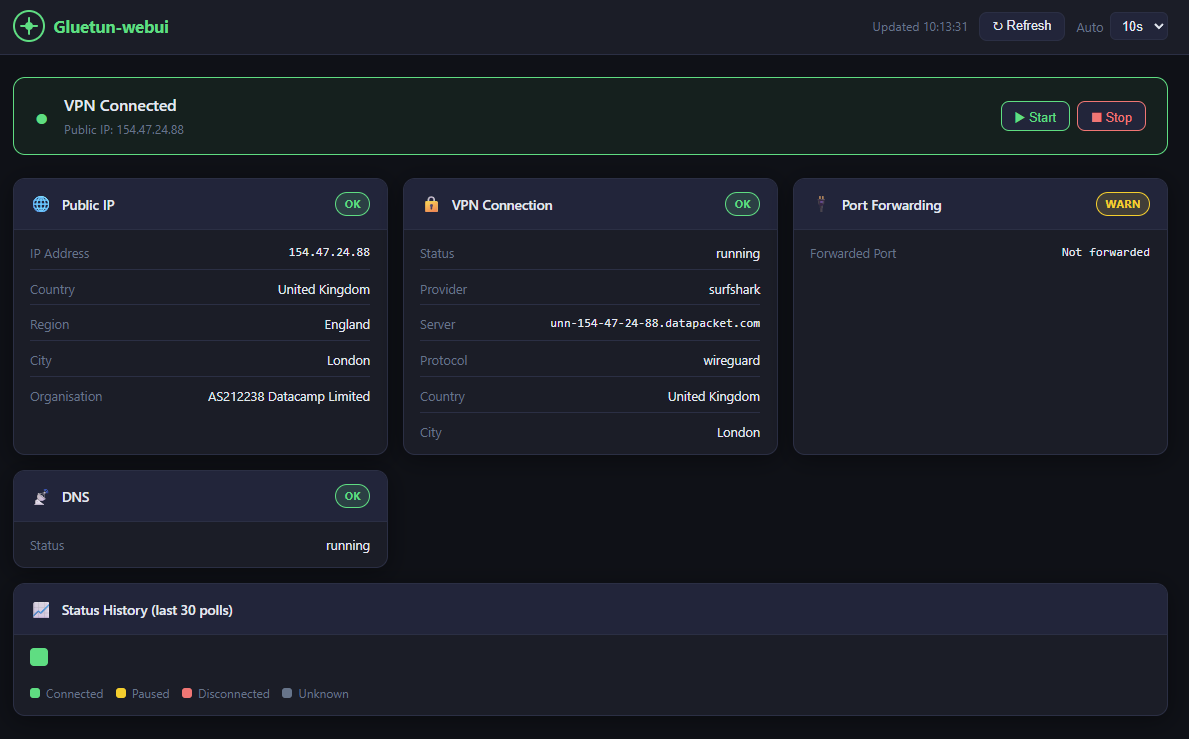
Una Web UI leggera per monitorare e controllare Gluetun — il client VPN container per Docker.



Caratteristiche
- ✨ Supporto Multi-VPN — Monitora e controlla fino a 20 istanze Gluetun simultaneamente
- Banner di stato VPN in tempo reale (connesso / in pausa / disconnesso)
- IP di uscita pubblico, paese, regione, città e organizzazione
- Provider VPN, protocollo (WireGuard / OpenVPN), dettagli server
- Stato del port forwarding e DNS
- Controlli Avvia / Ferma VPN
- Aggiornamento automatico con intervallo configurabile (5s – 60s)
- Ultimi 30 tick di polling codificati a colori nella barra cronologica
- Design responsivo (mobile, tablet, desktop)
Screenshot
Requisiti
- Docker + Docker Compose
- Gluetun in esecuzione con il server di controllo HTTP abilitato (porta predefinita
8000) - Gluetun e gluetun-webui sulla stessa rete Docker
linux/amd64 e linux/arm64 (funziona su Mac Intel/Apple Silicon, Linux e Windows).Avvio Rapido
Opzione A1: Istanza Singola (Consigliata)
Aggiungi gluetun-webui al tuo file compose esistente insieme a Gluetun:
gluetun-webui:
image: scuzza/gluetun-webui:latest
container_name: gluetun-webui
ports:
- "127.0.0.1:3000:3000"
environment:
- GLUETUN_CONTROL_URL=http://gluetun:8000
# Uncomment if Gluetun auth is enabled:
#- GLUETUN_API_KEY=yourtoken
#- GLUETUN_USER=username
#- GLUETUN_PASSWORD=password
networks:
- your_network_name
restart: unless-stopped
read_only: true
tmpfs:
- /tmp
security_opt:
- no-new-privileges:true
cap_drop:
- ALL
healthcheck:
test: ["CMD", "wget", "-qO-", "http://localhost:3000/api/health"]
interval: 30s
timeout: 5s
start_period: 10s
retries: 3Opzione A2: Istanze Multiple
Monitora 2 o più istanze Gluetun con dashboard separate:
gluetun-webui:
image: scuzza/gluetun-webui:latest
container_name: gluetun-webui
ports:
- "127.0.0.1:3000:3000"
environment:
- GLUETUN_1_NAME=VPN - London
- GLUETUN_1_URL=http://gluetun-1:8000
- GLUETUN_1_API_KEY=token1
- GLUETUN_2_NAME=VPN - Amsterdam
- GLUETUN_2_URL=http://gluetun-2:8000
- GLUETUN_2_API_KEY=token2
- GLUETUN_3_NAME=VPN - Singapore
- GLUETUN_3_URL=http://gluetun-3:8000
- GLUETUN_3_API_KEY=token3
networks:
- your_network_name
restart: unless-stopped
read_only: true
tmpfs:
- /tmp
security_opt:
- no-new-privileges:true
cap_drop:
- ALL
Opzione B: Compilare Localmente
git clone https://github.com/Sir-Scuzza/gluetun-webui.git
cd gluetun-webui
docker compose up -d --build
Quindi eseguire (una delle due opzioni):
docker compose up -dL'interfaccia utente è disponibile su http://localhost:3000
Configurazione della rete
Sia Gluetun che gluetun-webui devono essere sulla stessa rete Docker affinché http://gluetun:8000 venga risolto correttamente.
Stesso file compose — basta aggiungere entrambi i servizi alla stessa rete (caso più comune):
services:
gluetun:
networks:
- arr-stack
gluetun-webui:
networks:
- arr-stack
networks:
arr-stack:
driver: bridgeFile di compose separati — fai riferimento alla rete esistente di Gluetun come esterna. Trova il nome della tua rete con docker network ls:
networks:
  ext-network:
    external: true
    name: your_gluetun_network_name
Supporto Multi-VPN
Istanza Multiple
gluetun-webui supporta il monitoraggio e il controllo di più istanze di Gluetun simultaneamente. Ogni istanza viene visualizzata come una dashboard separata in una griglia reattiva.
Configurazione: Usa variabili d'ambiente numerate:
gluetun-webui:
image: scuzza/gluetun-webui:latest
environment:
# Instance 1
- GLUETUN_1_NAME=VPN 1
- GLUETUN_1_URL=http://gluetun-1:8000
- GLUETUN_1_API_KEY=token1 # optional
# Instance 2
- GLUETUN_2_NAME=VPN 2
- GLUETUN_2_URL=http://gluetun-2:8000
- GLUETUN_2_API_KEY=token2 # optional
# Instance 3
- GLUETUN_3_NAME=VPN 3
- GLUETUN_3_URL=http://gluetun-3:8000
- GLUETUN_3_USER=admin
- GLUETUN_3_PASSWORD=secret # optional (HTTP Basic auth)
Supportato: Fino a 20 istanze (tramite GLUETUN_1_URL fino a GLUETUN_20_URL)
Reattivo: 1 dashboard a piena larghezza → 2 a metà larghezza → 3 a un terzo di larghezza → 4 a un quarto di larghezza → scrollabile da 5+
Compatibilità Retroattiva
Se non vengono configurate variabili numerate, si torna alla modalità legacy a istanza singola:
environment:
- GLUETUN_CONTROL_URL=http://gluetun:8000 # legacy
- GLUETUN_API_KEY=token
Autenticazione per Istanza
Ogni istanza può avere un'autenticazione diversa:
# Instance with API key
- GLUETUN_1_API_KEY=my-secret-token
Instance with HTTP Basic auth
- GLUETUN_2_USER=admin
- GLUETUN_2_PASSWORD=mysecret
Instance with no auth
- GLUETUN_3_URL=http://gluetun-3:8000 # auth optional
Configurazione
| Variabile | Predefinito | Descrizione |
|---|---|---|
| GLUETUN_1_ a GLUETUN_20_ | _(vuoto)_ | Configurazione multi-istanza (fino a 20 istanze) |
| GLUETUN_{N}_URL | – | URL del server di controllo HTTP Gluetun per l'istanza N |
| GLUETUN_{N}_NAME | Istanza {N} | Nome visualizzato per l'istanza N |
| GLUETUN_{N}_API_KEY | _(vuoto)_ | Token Bearer per l'istanza N (se autenticazione abilitata) |
| GLUETUN_{N}_USER | _(vuoto)_ | Nome utente per autenticazione HTTP Basic (istanza N) |
| GLUETUN_{N}_PASSWORD | _(vuoto)_ | Password per autenticazione HTTP Basic (istanza N) |
| GLUETUN_CONTROL_URL | http://gluetun:8000 | Legacy – solo istanza singola (fallback se nessuna variabile GLUETUN_1_*) |
| GLUETUN_API_KEY | _(vuoto)_ | Legacy – Token Bearer per istanza singola |
| GLUETUN_USER | _(vuoto)_ | Legacy – Nome utente per autenticazione HTTP Basic |
| GLUETUN_PASSWORD | _(vuoto)_ | Legacy – Password per autenticazione HTTP Basic |
| PORT | 3000 | Porta su cui ascolta la web UI |
| TRUST_PROXY | false | Impostare su true se eseguito dietro un reverse proxy (nginx, Traefik, ecc.) |
Sicurezza
- La porta è vincolata a
127.0.0.1— non esposta sulla rete - Il container viene eseguito come non-root con filesystem in sola lettura e capacità ridotte
- Limitazione della frequenza applicata a tutte le rotte API
- I dettagli degli errori upstream sono registrati solo lato server — messaggi generici restituiti al browser
Configurazione reverse-proxy
Se esegui gluetun-webui dietro un reverse proxy (nginx, Traefik, Caddy, ecc.), imposta TRUST_PROXY=true nelle variabili di ambiente:
gluetun-webui:
image: scuzza/gluetun-webui:latest
environment:
- GLUETUN_CONTROL_URL=http://gluetun:8000
- TRUST_PROXY=true # Required for reverse proxies
Questo permette all'app di interpretare correttamente le intestazioni X-Forwarded-For e correlate per un limite di velocità accurato e rilevamento IP. Nota: Abilita questa opzione solo se sei effettivamente dietro un reverse proxy, poiché si fidano delle intestazioni proxy provenienti dal tuo reverse proxy.
Autenticazione reverse proxy
I controlli di avvio/arresto della VPN non hanno autenticazione integrata. Se esponi l'interfaccia oltre localhost, posizionala dietro un reverse proxy con autenticazione HTTP Basic.
Caddy (Caddyfile):
your.domain.com {
  basicauth {
    user $2a$14$
  }
  reverse_proxy localhost:3000
} caddy hash-passwordNginx (nginx.conf):
location / {
  auth_basic "Restricted";
  auth_basic_user_file /etc/nginx/.htpasswd;
  proxy_pass http://localhost:3000;
}htpasswd -c /etc/nginx/.htpasswd userTraefik (etichette Docker):
labels:
- "traefik.enable=true"
- "traefik.http.routers.gluetun-webui.rule=Host(
your.domain.com)"
- "traefik.http.routers.gluetun-webui.middlewares=auth"
- "traefik.http.middlewares.auth.basicauth.users=user:$$apr1$$
"
htpasswd -nb user passwordRingraziamenti
- Gluetun — Il container client VPN per cui è stata creata questa webui
- gluetun-monitor — Ottimo strumento di monitoraggio da abbinare a questa webui
- Sviluppo Assistito da AI — Questo progetto è stato realizzato con l'assistenza dell'AI
Licenza
MIT
--- Tranlated By Open Ai Tx | Last indexed: 2026-05-29 ---