🌐 Language
Gluetun WebUI
A lightweight web UI for monitoring and controlling Gluetun — the VPN client container for Docker.



Features
- ✨ Multi-VPN Support — Monitor & control up to 20 Gluetun instances simultaneously
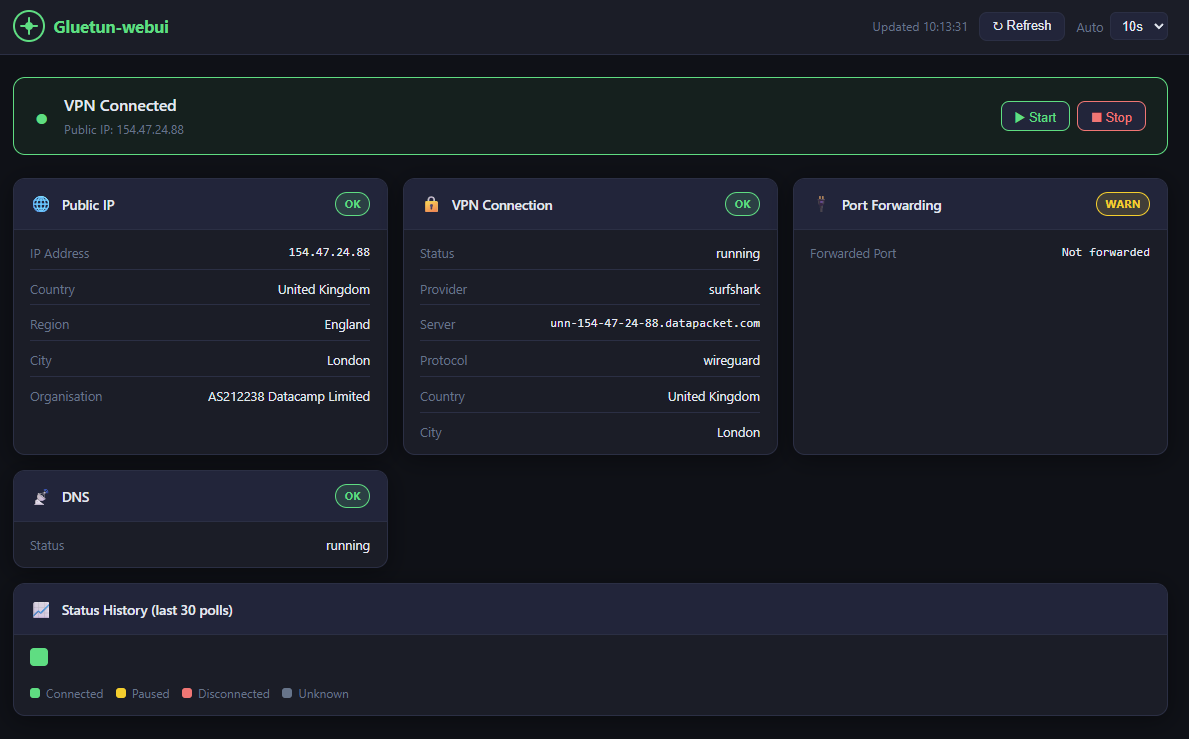
- Live VPN status banner (connected / paused / disconnected)
- Public exit IP, country, region, city, and organisation
- VPN provider, protocol (WireGuard / OpenVPN), server details
- Port forwarding and DNS status
- Start / Stop VPN controls
- Auto-refresh with configurable interval (5s – 60s)
- Last 30 poll ticks colour-coded in history bar
- Responsive design (mobile, tablet, desktop)
Screenshots
Requirements
- Docker + Docker Compose
- Gluetun running with its HTTP control server enabled (default port
8000) - Gluetun and gluetun-webui on the same Docker network
linux/amd64 and linux/arm64 (works on Mac Intel/Apple Silicon, Linux, and Windows).Quick Start
Option A1: Single Instance (Recommended)
Add gluetun-webui to your existing compose file alongside Gluetun:
gluetun-webui:
image: scuzza/gluetun-webui:latest
container_name: gluetun-webui
ports:
- "127.0.0.1:3000:3000"
environment:
- GLUETUN_CONTROL_URL=http://gluetun:8000
# Uncomment if Gluetun auth is enabled:
#- GLUETUN_API_KEY=yourtoken
#- GLUETUN_USER=username
#- GLUETUN_PASSWORD=password
networks:
- your_network_name
restart: unless-stopped
read_only: true
tmpfs:
- /tmp
security_opt:
- no-new-privileges:true
cap_drop:
- ALL
healthcheck:
test: ["CMD", "wget", "-qO-", "http://localhost:3000/api/health"]
interval: 30s
timeout: 5s
start_period: 10s
retries: 3Option A2: Multiple Instances
Monitor 2+ Gluetun instances with separate dashboards:
gluetun-webui:
image: scuzza/gluetun-webui:latest
container_name: gluetun-webui
ports:
- "127.0.0.1:3000:3000"
environment:
- GLUETUN_1_NAME=VPN - London
- GLUETUN_1_URL=http://gluetun-1:8000
- GLUETUN_1_API_KEY=token1
- GLUETUN_2_NAME=VPN - Amsterdam
- GLUETUN_2_URL=http://gluetun-2:8000
- GLUETUN_2_API_KEY=token2
- GLUETUN_3_NAME=VPN - Singapore
- GLUETUN_3_URL=http://gluetun-3:8000
- GLUETUN_3_API_KEY=token3
networks:
- your_network_name
restart: unless-stopped
read_only: true
tmpfs:
- /tmp
security_opt:
- no-new-privileges:true
cap_drop:
- ALL
Option B: Build Locally
git clone https://github.com/Sir-Scuzza/gluetun-webui.git
cd gluetun-webui
docker compose up -d --builddocker compose up -dThe UI is available at http://localhost:3000
Network Setup
Both Gluetun and gluetun-webui must be on the same Docker network so http://gluetun:8000 resolves correctly.
Same compose file — just add both services to the same network (most common):
services:
gluetun:
networks:
- arr-stack
gluetun-webui:
networks:
- arr-stack
networks:
arr-stack:
driver: bridgeSeparate compose files — reference Gluetun's existing network as external. Find your network name with docker network ls:
networks:
  ext-network:
    external: true
    name: your_gluetun_network_name
Multi-VPN Support
Multiple Instances
gluetun-webui supports monitoring and controlling multiple Gluetun instances simultaneously. Each instance displays as a separate dashboard in a responsive grid.
Configuration: Use numbered environment variables:
gluetun-webui:
image: scuzza/gluetun-webui:latest
environment:
# Instance 1
- GLUETUN_1_NAME=VPN 1
- GLUETUN_1_URL=http://gluetun-1:8000
- GLUETUN_1_API_KEY=token1 # optional
# Instance 2
- GLUETUN_2_NAME=VPN 2
- GLUETUN_2_URL=http://gluetun-2:8000
- GLUETUN_2_API_KEY=token2 # optional
# Instance 3
- GLUETUN_3_NAME=VPN 3
- GLUETUN_3_URL=http://gluetun-3:8000
- GLUETUN_3_USER=admin
- GLUETUN_3_PASSWORD=secret # optional (HTTP Basic auth)
Supported: Up to 20 instances (via GLUETUN_1_URL through GLUETUN_20_URL)
Responsive: 1 full-width dashboard → 2 half-width → 3 third-width → 4 quarter-width → scrollable at 5+
Backward Compatibility
If no numbered variables are configured, falls back to legacy single-instance mode:
environment:
- GLUETUN_CONTROL_URL=http://gluetun:8000 # legacy
- GLUETUN_API_KEY=token
Per-Instance Authentication
Each instance can have different authentication:
# Instance with API key
- GLUETUN_1_API_KEY=my-secret-token
Instance with HTTP Basic auth
- GLUETUN_2_USER=admin
- GLUETUN_2_PASSWORD=mysecret
Instance with no auth
- GLUETUN_3_URL=http://gluetun-3:8000 # auth optional
---
Configuration
| Variable | Default | Description |
|---|---|---|
| GLUETUN_1_ to GLUETUN_20_ | _(empty)_ | Multi-instance config (up to 20 instances) |
| GLUETUN_{N}_URL | – | Gluetun HTTP control server URL for instance N |
| GLUETUN_{N}_NAME | Instance {N} | Display name for instance N |
| GLUETUN_{N}_API_KEY | _(empty)_ | Bearer token for instance N (if auth enabled) |
| GLUETUN_{N}_USER | _(empty)_ | Username for HTTP Basic auth (instance N) |
| GLUETUN_{N}_PASSWORD | _(empty)_ | Password for HTTP Basic auth (instance N) |
| GLUETUN_CONTROL_URL | http://gluetun:8000 | Legacy – single instance only (fallback if no GLUETUN_1_* vars) |
| GLUETUN_API_KEY | _(empty)_ | Legacy – Bearer token for single instance |
| GLUETUN_USER | _(empty)_ | Legacy – Username for HTTP Basic auth |
| GLUETUN_PASSWORD | _(empty)_ | Legacy – Password for HTTP Basic auth |
| PORT | 3000 | Port the web UI listens on |
| TRUST_PROXY | false | Set to true if running behind a reverse proxy (nginx, Traefik, etc.) |
Security
- Port is bound to
127.0.0.1— not exposed to the network - Container runs as non-root with read-only filesystem and dropped capabilities
- Rate limiting applied to all API routes
- Upstream error details are logged server-side only — generic messages returned to the browser
Reverse-proxy configuration
If you run gluetun-webui behind a reverse proxy (nginx, Traefik, Caddy, etc.), set TRUST_PROXY=true in your environment variables:
gluetun-webui:
image: scuzza/gluetun-webui:latest
environment:
- GLUETUN_CONTROL_URL=http://gluetun:8000
- TRUST_PROXY=true # Required for reverse proxies
This allows the app to correctly parse X-Forwarded-For and related headers for accurate rate limiting and IP detection. Note: Only enable this if you're actually behind a reverse proxy, as it trusts proxy headers from your reverse proxy.
Reverse-proxy authentication
The VPN start/stop controls have no built-in authentication. If you expose the UI beyond localhost, place it behind a reverse proxy with HTTP Basic auth.
Caddy (Caddyfile):
your.domain.com {
  basicauth {
    user $2a$14$
  }
  reverse_proxy localhost:3000
} caddy hash-passwordNginx (nginx.conf):
location / {
  auth_basic "Restricted";
  auth_basic_user_file /etc/nginx/.htpasswd;
  proxy_pass http://localhost:3000;
}htpasswd -c /etc/nginx/.htpasswd userTraefik (Docker labels):
labels:
- "traefik.enable=true"
- "traefik.http.routers.gluetun-webui.rule=Host(
your.domain.com)"
- "traefik.http.routers.gluetun-webui.middlewares=auth"
- "traefik.http.middlewares.auth.basicauth.users=user:$$apr1$$
"
htpasswd -nb user passwordAcknowledgments
- Gluetun — The VPN client container this webui was built for
- gluetun-monitor — Great monitoring tool to pair with this webui
- AI-Assisted Development — This project was built with AI assistance
License
MIT
--- Tranlated By Open Ai Tx | Last indexed: 2026-05-29 ---