EbookDownloader
A tool to download purchased e-books from different publishers.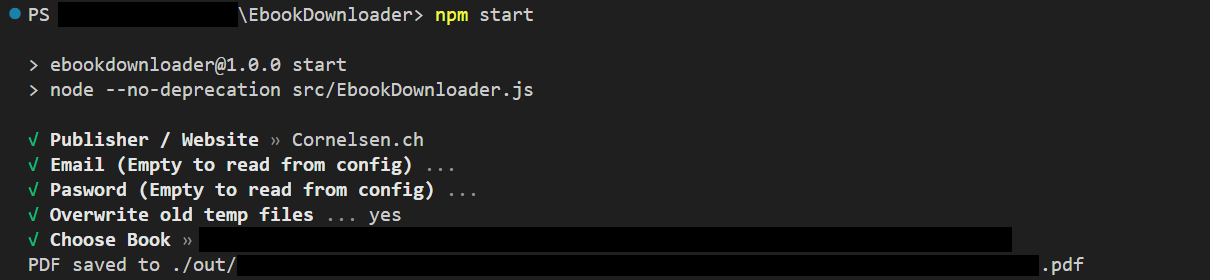
Table of Contents
- Supported Publishers (websites)
- Automatic Installation
- Manual Installation
- Running
- Saving Credentials
- Bildungslogin (Cornelsen / Westermann)
Supported Publishers (websites)
| Publisher | Website | Best Quality | Selectable Text | Hyperrefs | Notes | | --- | --- | --- | --- | --- | --- | | Cornelsen ("New Method") | cornelsen.de | Lossless PDF | ✓ | ✓ | | | Cornelsen ("Old Method") | cornelsen.de | Image (8617px x 11792px) composition | ✓ | ✗ | | | Cornelsen.CH | ebooks.cornelsen.ch | Lossless PDF | ✓ | ✗ | | | Cornelsen | scook.de | Image (?) composition | ✗ | ✗ | | | Allango Klett | allango.net | Lossless PDF | ✓ | ? | [1] | | Klett | klett.de | Image (3072px x 4096px) composition | ✓ | ✓ | | | Westermann | westermann.de | Image (2244px x 3071px) composition | ✓ | ✗ | | | C.C.BUCHNER | click-and-study.de | Image (1658px x 2211px) composition | ✓ | ✗ | | | C.C.BUCHNER | click-and-teach.de | Image (1658px x 2211px) composition | ✓ | ✗ | | | Book2Look | book2look.com | Lossless PDF | ✓ | ? | [2] | | kiosquemag | kiosquemag.com | Image (?) composition | ✗ | ✗ | | | Helbling Media App | helbling.com | Lossless PDF | ✓ | ✗ | |[1]: Website allows to download files that are not owned
[2]: No Account needed, only the book id
Automatic Installation
At first, clone or download the repository.The tool uses image processing libraries and has to be executed with nodejs, therefore some dependencies are required.
You can eiher use the installation scripts (init.bat for Windows, init.sh for Debian based distros) or use manual installation. The installation scripts will download all dependencies for you. To execute them, double click the .bat file on windows or execute the .sh file in the terminal on linux after adding execution permissions to the .sh file.
Manual Installation
At first, clone or download the repository. Then follow the os-specific instructions below:Windows
- Download
unifont-15.0.01.ttffrom http://www.unifoundry.com/pub/unifont/unifont-15.0.01/font-builds/unifont-15.0.01.ttf and put it in the project root - Install
ffmpegand put the ffmpeg executable (named asffmpeg) in the project root or add it to your path environment variable, if you need help you can follow this tutorial - Install
mutooland put the mutool executable (named asmutool) in the project root or add it to your path environment variable, you can find the most recent builds here. Search for releases withwindows. (only required for book2look and cornelsen.ch) - Install
nodejsandnpmif you haven't already, you can find help here - Run
npm install - Optionally install
image magickand put the magick executable (named asmagick) in the project root or add it to your path environment variable (required only for cornelsen "old method")
Linux
- Run
wget "http://www.unifoundry.com/pub/unifont/unifont-15.0.01/font-builds/unifont-15.0.01.ttf" - Install packages
ffmpeg,nodejs,mutool/mupdf-tools/mupdf(required for book2look and cornelsen.ch) and optionallyimagemagick(required only for cornelsen "old method") with your favorite package manager - Run
npm install
Linux/Darwin with Nix
- If you have nix-direnv, run
direnv allowto obtain all dependencies - Otherwise, run
nix-shell. - Run
wget "http://www.unifoundry.com/pub/unifont/unifont-15.0.01/font-builds/unifont-15.0.01.ttf"
Running
Complete the setup by runningnpm install in the project directory and
start the program by executing npm start from the project directory.Saving credentials to avoid entering them every time (optional)
You can save your credentials in aconfig.json file to avoid entering them every time you start the program. To do this, create a file named config.json in the project root and add the following content:{
"[PUBLISHER]": {
"email": "[YOUR_USERNAME_OR_EMAIL]",
"passwd": "[YOUR_PASSWORD]"
},
"[PUBLISHER]": {
"email": "[YOUR_USERNAME_OR_EMAIL]",
"passwd": "[YOUR_PASSWORD]"
}
[...]
}Replace all the square brackets with your data. Publisher keys are: cornelsen, klett, allango, scook, westermann, clicknstudy, clicknteach, kiosquemag, cornelsench, book2look, helbling
Bildungslogin
Cornelsen, Click-n-Study, Klett, and Westermann have token-login support, allowing login using Bildungslogin accounts.
Cornelsen
- Open Bildungslogin and log in
- Go into Storage devtools (SHIFT+F9, or alternatively press CTRL+SHIFT+I and click on Storage tab).
- Open the book
- Select Local storage in the devtools (possibly also need to select the website in it)
- Scroll down in the table that opens until you find
id_token. It should be a long alphanumeric string. - Copy it. (Double click, then ctrl+c)
- Use it as the password, and use
tokenas the username.
Click-and-Study
- Open Bildungslogin and log in
- Open the book
- Go into Storage devtools (SHIFT+F9, or alternatively press CTRL+SHIFT+I and click on Storage tab).
- Select Cookies in the devtools (possibly also need to select the website in it)
- Scroll down in the table that opens until you find
CASSID. It should have an alphanumeric string afterwards. - Copy that (the random looking characters). (Double click, then ctrl+c)
- Use it as the password, and use
tokenas the username.
Klett
- Open Bildungslogin and log in
- Open the book
- Go into Storage devtools (SHIFT+F9, or alternatively press CTRL+SHIFT+I and click on Storage tab).
- Select Cookies in the devtools (possibly also need to select the website in it)
- Scroll down in the table that opens until you find
SESSION. It should have an alphanumeric string afterwards. - Copy that (the random looking characters). (Double click, then ctrl+c)
- Use it as the password, and use the URL of the book viewer you are on as the username.
Westermann
- Open Bildungslogin and log in
- Open the book
- Go into Networking devtools (CTRL+SHIFT+E, or alternatively press CTRL+SHIFT+I and click on Network tab).
- Tick
Persist logs(possibly in Gear menu, likely at top right somewhere) - Reload the page
- Enter
/api/userinto the "Filter URLs" field of devtools - Click the first entry that does not say OPTIONS
- A little pane to the side should open. Click on its Headers tab
- Enter
authinto its "Filter headers" field (if available) - Scroll down until you find a long string of letters and numbers
- Copy it and paste it into a text document
- Copy it from there again, but make sure NOT to select the "Authorization: Bearer " part, only the long string at the end.
- Use it as the password, and use
tokenas the username.
Contributing
Feel free to create issues and pull requests to contribute to the project.
Disclaimer
This project is for educational purposes only. The project is not responsible for any misuse of the software. Depending on your jurisdiction, it may be illegal to use this software to download e-books without the consent of the publisher. In other jurisdictions, it may be legal to download e-books for personal use only. Please check your local laws before using this software.--- Tranlated By Open Ai Tx | Last indexed: 2026-06-02 ---