🌐 Language
Your Personal AI OS
Not a chatbot you open. An AI that is always on, always watching. Name it. Shape it. Connect it to everything you use. Reach it however you work. Open source, self-hosted, yours forever.





See it work
Watch CORE take a plain-text task, gather context from GitHub and memory, plan the work, run a Claude Code session, and open a PR:
Always watching. Always ready.
Most AI tools wait to be asked. CORE watches.
Connect it to your apps and it monitors activity across all of them. An email arrives from a client, a GitHub issue gets assigned, a Sentry alert fires, a meeting ends. CORE sees it, checks your memory and the skills you have set, and either handles it or surfaces it for your judgment. You do not trigger it. It notices on its own.
Install the CORE plugin in Claude Code, Codex, or Cursor and your agent conversations get watched too. Context discussed, decisions made, code written, all of it feeds the memory knowledge graph. The next task CORE picks up already knows what happened in your last session.
When it acts, it acts directly. It can reply to emails, update Linear issues, file GitHub PRs, send Slack messages, run terminal commands, drive a browser, and spawn a Claude Code or Codex session from any interface. Send a WhatsApp message from the airport and CORE can have a coding session running and a PR open before you board.
You decide where it acts independently and where it waits for your input. Automatically handle Sentry alerts but always ask before merging. Approve a plan before a coding session begins. Require confirmation before any email is sent. The level of autonomy is yours to set—per task, per app, per action.
Four ways to access it
A chatbot has a single interface. An OS offers many.
Voice. Press Ctrl+Option on Mac and say what needs to be done. CORE executes it in the background without interrupting your workflow.
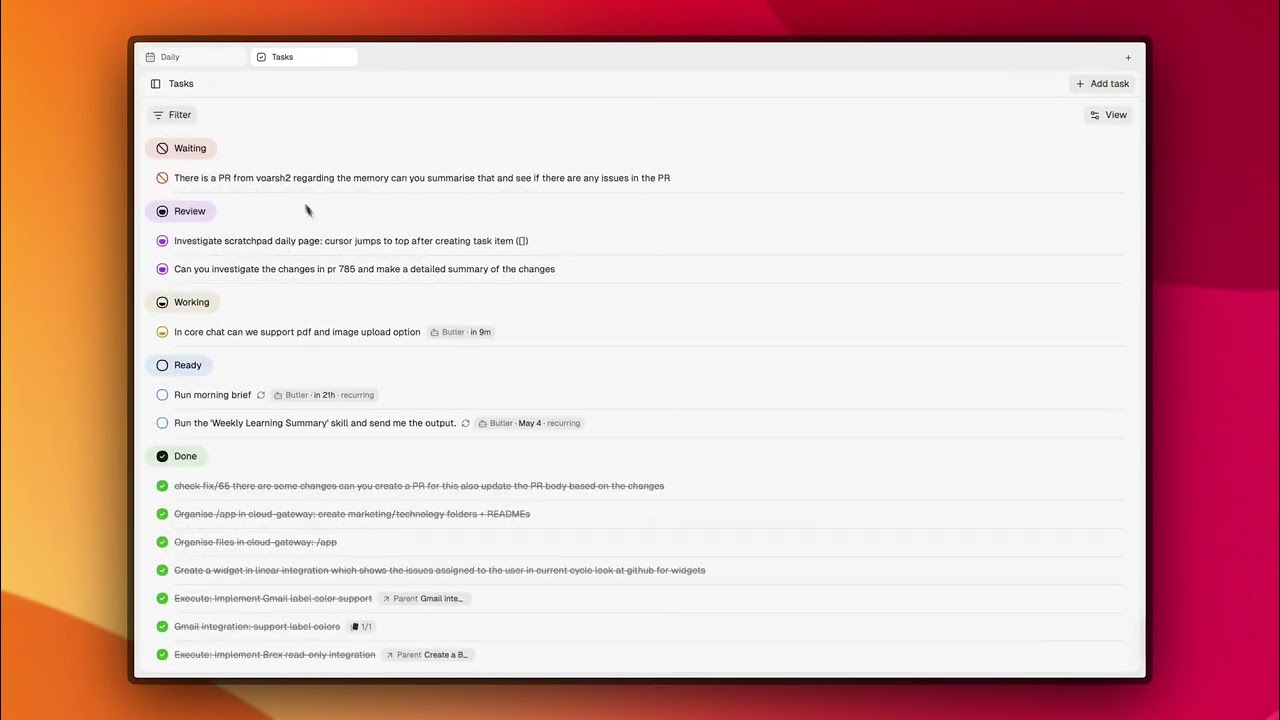
Scratchpad. Open your daily page and write [ ] Fix the auth bug from issue #47. CORE picks it up within 3 minutes, loads context from your repo and memory, and drafts a plan.
Messaging. WhatsApp, Slack, Telegram. Send a task from the airport, from your phone, from bed. CORE has your full context no matter where the message originates.
Chat. Open the dashboard and converse directly, like any assistant. For when you want a back-and-forth before delegating.
One AI, four surfaces, the same memory and context behind them all.
Make it yours
Give it a name. Choose its speaking style. Set the rules it follows everywhere.
Pick from five built-in personalities — TARS's dry efficiency, Alfred's loyal formality, Hudson's warm practicality — or craft your own. The personality carries through every task it handles, every plan it drafts, every message it sends for you.
Choose its voice for spoken interactions. From then on, it sounds and acts like the AI you configured, across every interface.
CORE in action
Say it, come back to a PR.
Press Ctrl+Option, speak: "Fix the race condition in the checkout flow from issue #312."
CORE loads the issue, pulls related commits and Slack threads, drafts a plan, and runs a Claude Code session. You return to a diff. You were never at your desk.
Write it at night, review it in the morning.
Scratchpad: [ ] Work through tonight's backlog starting at 11pm
CORE pulls from Linear, GitHub, and memory, prioritizes, and works through it while you sleep. Smooth runs are waiting for your review. Stuck sessions come back with one tight question, not a stalled tab.
Message it from anywhere.
WhatsApp from the airport: "Ship the auth refactor."
CORE already knows the branch, the context, and your preferences. It is running in Railway. It kicks off the session before you board.
Investigate alerts before they become incidents.
Sentry fires at 2am. CORE investigates, pulls related traces and prior incidents from memory, proposes a fix, and pings you on Slack: "Issue #847, fix proposed, awaiting your review." You approve from your phone.
Get a brief that already knows your week.
Recurring task, every morning at 8am. CORE pulls from email, GitHub, Linear, and Slack, surfaces what actually needs attention, skips what does not, and turns follow-ups into tasks automatically.
What is inside CORE
| | | |---|---| | Memory | Temporal knowledge graph across every tool and conversation. Preferences, decisions, goals, and directives, so every task starts with context loaded. | | Tasks | One-shot or recurring work units with your spec, CORE's plan, live state, and a dedicated chat thread. Each task can spawn coding, browser, or terminal sessions. | | Connectors | 50+ apps through one MCP endpoint, plus webhook triggers for proactive automation. GitHub, Linear, Jira, Slack, Gmail, Calendar, Sentry, Notion, Todoist, and more. | | Skills | Reusable instructions that fire automatically based on context. For example: "always pull related Linear issues before planning a fix," "run tests before opening a PR," or "post a Slack summary when a task completes." 100+ built-in, or write your own. | | Gateway | Runs Claude Code, Codex, browser agents, and terminal commands on your machine or in Docker and Railway, so CORE keeps working when your laptop is closed. | | Model agnostic | Bring your own provider: Anthropic, OpenAI, or open-weight models. Self-host the full stack for full isolation. |
How CORE compares
| | CORE | OpenClaw | Hermes Agent | Devin / Copilot | |---|:---:|:---:|:---:|:---:| | Multiple interfaces (voice, scratchpad, chat, messaging) | ✅ | Partial | ❌ | ❌ | | Persistent memory across tasks | ✅ | ❌ | ✅ | ❌ | | Delegates to coding agents (Claude Code, Codex) | ✅ | ❌ | ❌ | ✅ | | Structured task planning with human approval | ✅ | ❌ | ❌ | Partial | | Custom name, personality, and voice | ✅ | ❌ | ❌ | ❌ | | 50+ app connectors | ✅ | Partial | Partial | ❌ | | Terminal and browser access via gateway | ✅ | ✅ | ✅ | ✅ | | Human-in-loop by default | ✅ | ❌ | ❌ | ❌ | | Open source and self-hostable | ✅ | ✅ | ✅ | ❌ |
Quickstart
Open source and self-hosted. Your data stays in your infrastructure.
Choose your path:
| I want to... | How | |---|---| | Try it on my machine | Run the one-step install below (requires Docker) | | Deploy on a server or VPS | One-click Railway deploy | | Use the Mac app | Join the waitlist |
Install and start CORE:
npm install -g @redplanethq/corebrain && corebrain setupThe setup wizard asks for an install directory, AI provider, API key, and chat model. It generates secrets, starts the stack, and opens http://localhost:3033.
Most local installs take a few minutes once Docker is running.
Or deploy on Railway:

Connect a gateway so CORE can run coding agents, drive your browser, and access local folders:
corebrain login
corebrain gateway setup
Requirements: Docker 20.10+, Docker Compose 2.20+, 4 vCPU / 8GB RAM
Your first task (2 minutes after setup):
- Open the Scratchpad (your daily page at
http://localhost:3033) - Type
[ ] Summarize my open GitHub issuesor any task you would normally do yourself - CORE picks it up within 3 minutes, gathers context from connected apps, and drafts a plan
- Approve the plan and CORE runs it and brings back the result
Docs
- Memory - Temporal knowledge graph, fact classification, intent-driven retrieval
- Scratchpad - The daily surface where tasks and ideas start
- Tasks - Plans, state, recurring work, and task-scoped context
- Toolkit - 1000+ actions across 50+ apps via MCP
- CORE Agent - Triggers, memory, tools, and execution
- Gateway - WhatsApp, Slack, Telegram, email, web, and API access
- Skills - Reusable instructions for repeatable workflows
- Self-hosting - Full deployment guide
- Changelog - What has shipped
Benchmark
CORE achieves 88.24% average accuracy on the LoCoMo benchmark across single-hop, multi-hop, open-domain, and temporal reasoning. See the benchmark repo for full results and baseline comparisons.
Security
- CASA Tier 2 Certified
- TLS 1.3 in transit
- AES-256 at rest
- Your data is never used for model training
- Self-host for full isolation
- Security policy
- Vulnerabilities: harshith@poozle.dev
Community
We are building CORE in public.
We share the roadmap and architectural decisions openly because the hardest problems in building a personal OS are best solved with the people using it. Star the repo, self-host it, share what you build, and open issues for what is broken or missing.
- Discord - questions, ideas, show-and-tell
- Contributing docs - how to contribute to CORE
good-first-issue- start here
Self-host your personal AI OS.
--- Tranlated By Open Ai Tx | Last indexed: 2026-07-07 ---