wsl-screenshot-cli

CLI 工具,监控 Windows 剪贴板中的截图,使其可在 WSL 中粘贴(例如 Claude Code CLI、Codex CLI 等),同时保留 Windows 的粘贴功能。
在 Windows 上截图,然后在 WSL 终端中粘贴——你会得到一个文件路径。在画图中粘贴——你会得到图片。在资源管理器中粘贴——你会得到文件。所有这些同时实现。
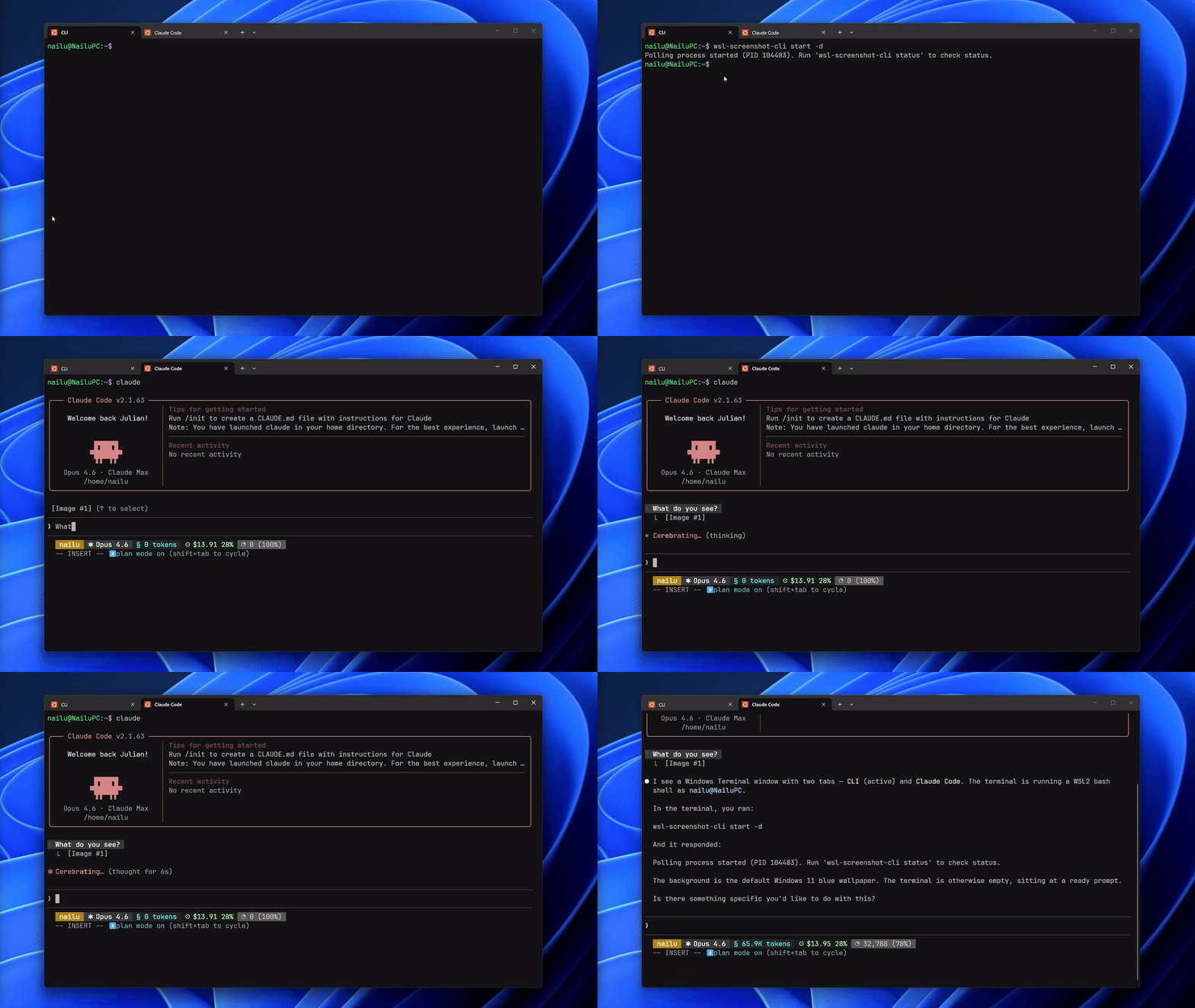
快速开始
wsl-screenshot-cli start --daemon   # start monitoring
wsl-screenshot-cli status           # check it's running
wsl-screenshot-cli stop             # stop monitoring
wsl-screenshot-cli update           # update to latest version
安装
快速安装(推荐)
curl -fsSL https://nailu.dev/wscli/install.sh | bash这将最新的二进制文件下载到 ~/.local/bin/。无需 Go 工具链。
通过 Go
go install github.com/nailuu/wsl-screenshot-cli@latest来自源文件
git clone https://github.com/Nailuu/wsl-screenshot-cli.git
cd wsl-screenshot-cli
go build -o wsl-screenshot-cli .
自动启动选项
选项 1 — 随 shell 自动启动(添加到 ~/.bashrc 或 ~/.zshrc):
wsl-screenshot-cli start --daemon --quiet提示:--quiet标志可以防止每次打开新终端时出现Polling process is already running的消息。
注意: 安装脚本将二进制文件放置在~/.local/bin/,该路径通常由~/.profile添加到 PATH 中(仅限登录 shell)。如果在.bashrc中出现command not found,请在上述行之前添加以下内容:
> if [ -d "$HOME/.local/bin" ] && [[ ":$PATH:" != ":$HOME/.local/bin:" ]]; then
export PATH="$HOME/.local/bin:$PATH"
fi
``选项 2 — 使用 Claude Code 钩子自动启动/停止(添加到 ~/.claude/settings.json):
json
{
"hooks": {
"SessionStart": [
{
"matcher": "",
"hooks": [
{
"type": "command",
"command": "wsl-screenshot-cli start --daemon --quiet 2>/dev/null; echo 'wsl-screenshot-cli started'"
}
]
}
],
"SessionEnd": [
{
"matcher": "",
"hooks": [
{
"type": "command",
"command": "wsl-screenshot-cli stop 2>/dev/null"
}
]
}
]
}
}
工作原理
subgraph Windows PS["PowerShell · STA"] DotNet[".NET Clipboard API"] CB["Clipboard"] end
subgraph Output PNG["SHA256.png"] end
CLI -- "start / stop / status" --> Poller Poller -- "poll every 250ms" --> GoClient GoClient -- "stdin / stdout" --> PS PS -- "CHECK" --> DotNet DotNet -- "read image" --> CB Poller -- "save & dedup" --> PNG
bash一个持久的powershell.exe -STA子进程通过一个简单的标准输入/输出文本协议(CHECK/UPDATE/EXIT)处理所有剪贴板访问。Go 端通过发送CHECK命令进行轮询;PowerShell 使用预编译的 .NET 剪贴板 API(System.Windows.Forms.Clipboard)进行变更检测——无运行时 C# 编译,因此即使 EDR 产品(SentinelOne、CrowdStrike 等)阻止csc.exe也能正常工作。DoEvents()泵送 Windows 消息以保持 STA 线程响应——防止在剪贴板操作期间资源管理器、截图工具和其他应用程序冻结。wslpath -w当检测到新截图时,轮询器:
- 从 PowerShell 接收以 base64 PNG 格式编码的图像
- 通过 SHA256 哈希进行去重并保存到磁盘
- 通过
将 WSL 路径转换为 Windows 路径CF_UNICODETEXT告诉 PowerShell 同时设置三种剪贴板格式 粘贴时发生了什么
截图捕获后,剪贴板同时包含三种格式:
| 粘贴位置 | 剪贴板格式 | 结果 | |---|---|---| | WSL 终端(Ctrl+Shift+V) |
| 文件路径:/tmp/.wsl-screenshot-cli/.png | | Windows 图像应用(画图等) |CF_BITMAP| 截图作为图像 | | Windows 资源管理器 / 文件对话框 |CF_HDROP| PNG 文件(作为文件粘贴) |使用
启动
Foreground (useful for debugging)
wsl-screenshot-cli startBackground daemon (typical usage)
wsl-screenshot-cli start --daemonCustom interval and output directory
wsl-screenshot-cli start --daemon --interval 1000 --output ~/screenshots/Debug mode — logs all PowerShell I/O
wsl-screenshot-cli start --verbosebash $ wsl-screenshot-cli status Status: running PID: 12345 Uptime: 2h 15m 30s CPU usage: 2.5% Memory: 45.2 MB Screenshots: 127 Output dir: /tmp/.wsl-screenshot-cli/ Log file: /tmp/.wsl-screenshot-cli.log| 标志 | 简写 | 默认值 | 描述 | |---|---|---|---| |--daemon|-d|false| 作为后台守护进程运行 | |--interval|-i|250| 轮询间隔(毫秒,100–5000) | |--output|-o|/tmp/.wsl-screenshot-cli/| 存储 PNG 的目录 | |--quiet|-q|false| 抑制信息消息 | |--verbose|-v|false| 记录所有 PowerShell 输入/输出以进行调试 |状态
停止
更新
bash CGO_ENABLED=1 go test -race -count=1 -v ./...从 GitHub 更新到最新版本。如果守护进程正在运行,更新前将先停止它。已经是最新版本时重新运行安装脚本将跳过下载。powershell.exe前提条件
- 启用 Windows 互操作的 WSL2
- WSL 中可访问的 PowerShell(
必须在 PATH 中)-raceGo 1.25+(仅在从源码构建时需要) 测试
要求
- Go 1.25+
- gcc — 需要用于
标志(cgo 依赖)。安装命令:`bash sudo apt update && sudo apt install -y gcc`运行测试
使用竞争检测器运行完整测试套件:
没有 gcc,您仍然可以在没有竞态检测的情况下运行测试:
项目结构
--- Tranlated By Open Ai Tx | Last indexed: 2026-06-14 ---