wsl-screenshot-cli

CLI tool that monitors the Windows clipboard for screenshots, making them pasteable in WSL (e.g. Claude Code CLI, Codex CLI, ...) while preserving Windows paste functionality.
Take a screenshot on Windows, then paste in your WSL terminal — you get a file path. Paste in Paint — you get the image. Paste in Explorer — you get the file. All at the same time.
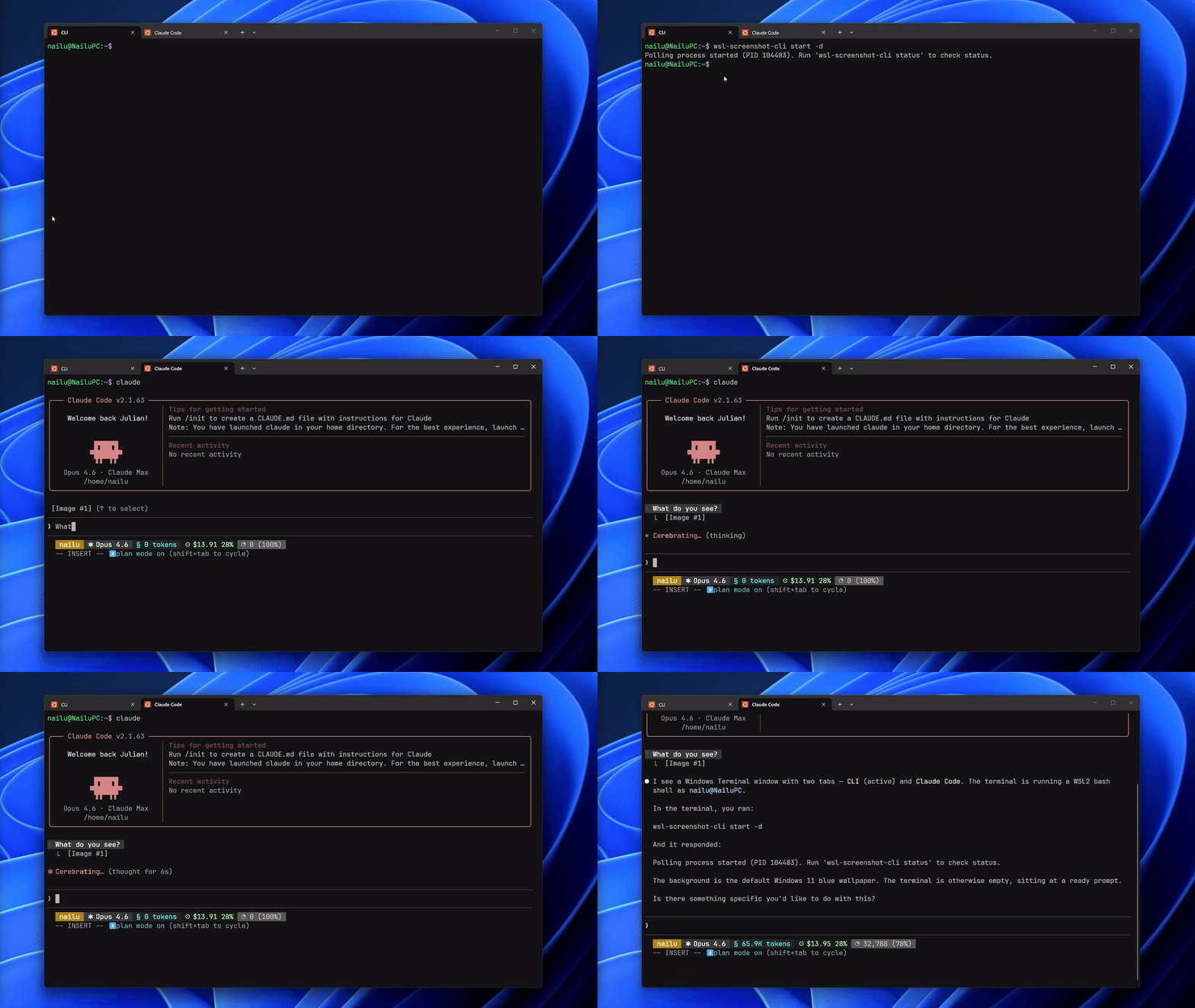
Quick Start
wsl-screenshot-cli start --daemon   # start monitoring
wsl-screenshot-cli status           # check it's running
wsl-screenshot-cli stop             # stop monitoring
wsl-screenshot-cli update           # update to latest version
Installation
Quick install (recommended)
curl -fsSL https://nailu.dev/wscli/install.sh | bashThis downloads the latest binary to ~/.local/bin/. No Go toolchain required.
Via Go
go install github.com/nailuu/wsl-screenshot-cli@latestFrom source
git clone https://github.com/Nailuu/wsl-screenshot-cli.git
cd wsl-screenshot-cli
go build -o wsl-screenshot-cli .
Auto-start options
Option 1 — Auto-start with your shell (add to ~/.bashrc or ~/.zshrc):
wsl-screenshot-cli start --daemon --quietTip: The--quietflag prevents thePolling process is already runningmessage from appearing each time you open a new terminal.
Note: The install script places the binary in~/.local/bin/, which is typically added to PATH by~/.profile(login shells only). If you getcommand not foundin.bashrc, add this before the line above:
> if [ -d "$HOME/.local/bin" ] && [[ ":$PATH:" != ":$HOME/.local/bin:" ]]; then
export PATH="$HOME/.local/bin:$PATH"
fi
``Option 2 — Auto-start/stop with Claude Code hooks (add to ~/.claude/settings.json):
json
{
"hooks": {
"SessionStart": [
{
"matcher": "",
"hooks": [
{
"type": "command",
"command": "wsl-screenshot-cli start --daemon --quiet 2>/dev/null; echo 'wsl-screenshot-cli started'"
}
]
}
],
"SessionEnd": [
{
"matcher": "",
"hooks": [
{
"type": "command",
"command": "wsl-screenshot-cli stop 2>/dev/null"
}
]
}
]
}
}
How It Works
subgraph Windows PS["PowerShell · STA"] DotNet[".NET Clipboard API"] CB["Clipboard"] end
subgraph Output PNG["SHA256.png"] end
CLI -- "start / stop / status" --> Poller Poller -- "poll every 250ms" --> GoClient GoClient -- "stdin / stdout" --> PS PS -- "CHECK" --> DotNet DotNet -- "read image" --> CB Poller -- "save & dedup" --> PNG
bashA persistentpowershell.exe -STAsubprocess handles all clipboard access via a simple stdin/stdout text protocol (CHECK/UPDATE/EXIT). The Go side polls by sendingCHECKcommands; PowerShell uses pre-compiled .NET Clipboard APIs (System.Windows.Forms.Clipboard) for change detection — no runtime C# compilation, so it works even when EDR products (SentinelOne, CrowdStrike, etc.) blockcsc.exe.DoEvents()pumps Windows messages to keep the STA thread responsive — preventing freezes in Explorer, Snipping Tool, and other apps during clipboard operations.wslpath -wWhen a new screenshot is detected, the poller:
- Receives the image as base64 PNG from PowerShell
- Deduplicates by SHA256 hash and saves to disk
- Converts the WSL path to a Windows path via
CF_UNICODETEXTTells PowerShell to set three clipboard formats at once What Happens When You Paste
After a screenshot is captured, the clipboard contains three formats simultaneously:
| Where you paste | Clipboard format | What you get | |---|---|---| | WSL terminal (Ctrl+Shift+V) |
| File path:/tmp/.wsl-screenshot-cli/.png | | Windows image app (Paint, etc.) |CF_BITMAP| The screenshot as an image | | Windows Explorer / file dialog |CF_HDROP| The PNG file (paste-as-file) |Usage
Start
Foreground (useful for debugging)
wsl-screenshot-cli startBackground daemon (typical usage)
wsl-screenshot-cli start --daemonCustom interval and output directory
wsl-screenshot-cli start --daemon --interval 1000 --output ~/screenshots/Debug mode — logs all PowerShell I/O
wsl-screenshot-cli start --verbosebash $ wsl-screenshot-cli status Status: running PID: 12345 Uptime: 2h 15m 30s CPU usage: 2.5% Memory: 45.2 MB Screenshots: 127 Output dir: /tmp/.wsl-screenshot-cli/ Log file: /tmp/.wsl-screenshot-cli.log| Flag | Short | Default | Description | |---|---|---|---| |--daemon|-d|false| Run as a background daemon | |--interval|-i|250| Polling interval in ms (100–5000) | |--output|-o|/tmp/.wsl-screenshot-cli/| Directory to store PNGs | |--quiet|-q|false| Suppress informational messages | |--verbose|-v|false| Log all PowerShell I/O for debugging |Status
### Stop
Update
bash CGO_ENABLED=1 go test -race -count=1 -v ./...Updates to the latest release from GitHub. If the daemon is running, it will be stopped before updating. Re-running the install script when already on the latest version will skip the download.powershell.exePrerequisites
- WSL2 with Windows interop enabled
- PowerShell accessible from WSL (
must be in PATH)-raceGo 1.25+ (only if building from source) Tests
Requirements
- Go 1.25+
- gcc — required for the
flag (cgo dependency). Install with:`bash sudo apt update && sudo apt install -y gcc`Running tests
Run the full suite with the race detector:
Without gcc, you can still run tests without race detection:
Project Structure
--- Tranlated By Open Ai Tx | Last indexed: 2026-06-14 ---