Tailscale with Amnezia-WG 2.0 (v1.88.2+)



Enhanced Tailscale client with Amnezia-WG 2.0 obfuscation: junk traffic, protocol signatures, and handshake/header masquerading to resist DPI and blocking. Until you enable AWG settings, it behaves like standard Tailscale.
Languages: English | 中文 | فارسی | Русский
For AWG v1.5 documentation, see doc/README-awg-v1.5.md.
Installation
| Platform | Command / Action |
| --- | --- |
| Linux | curl -fsSL https://raw.githubusercontent.com/LiuTangLei/tailscale-awg-installer/main/install-linux.sh \| bash |
| macOS* | curl -fsSL https://raw.githubusercontent.com/LiuTangLei/tailscale-awg-installer/main/install-macos.sh \| bash |
| Windows (Admin PowerShell) | iwr -useb https://raw.githubusercontent.com/LiuTangLei/tailscale-awg-installer/main/install-windows.ps1 \| iex |
| OpenWrt | See OpenWrt Installation |
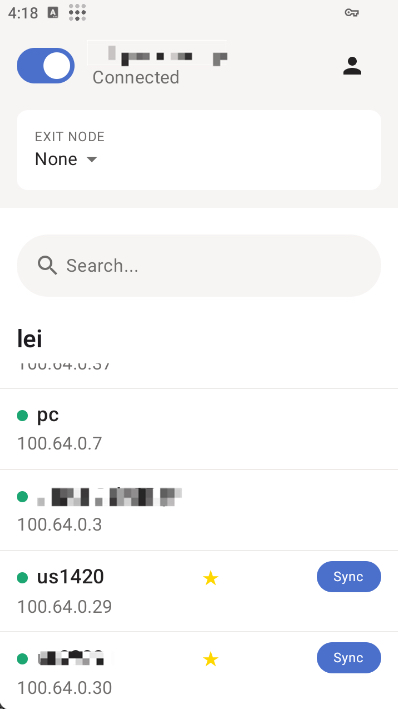
| Android | Download APK from releases |
- macOS: the installer uses CLI-only
tailscaled. If the official Tailscale.app is detected, you'll be prompted to remove it to avoid conflicts. - Android currently supports AWG config sync only. Use the in-app Sync button.
Docker Compose
The repository includes docker-compose.yml for running tailscaled with AWG support.
- State is stored in
./tailscale-statenext to the compose file, so node state and AWG settings survive container restarts and host reboots. - If you are upgrading from the old bind mount
/var/lib/tailscale:/var/lib/tailscale, copy the existing state first:
docker compose down
cp -a /var/lib/tailscale ./tailscale-state
update docker-compose.yml
docker compose up -d
Basic flow:
- Start the service:
docker compose up -d - Authenticate inside the container:
docker compose exec tailscaled tailscale up - Run AWG commands the same way, for example:
docker compose exec tailscaled tailscale awg sync
--login-server https://your-headscale-domain to tailscale up.Optional host alias:
alias tailscale='docker exec -it tailscaled tailscale'That alias only applies to the current shell. To keep it after reboot or a new terminal session, add it to ~/.bashrc or ~/.zshrc and reload your shell.
OpenWrt Installation
Default command:
wget -O /usr/bin/install.sh https://raw.githubusercontent.com/LiuTangLei/openwrt-tailscale-awg/main/install_en.sh && chmod +x /usr/bin/install.sh && /usr/bin/install.shMirror command for regions with restricted GitHub access:
wget -O /usr/bin/install.sh https://ghfast.top/https://raw.githubusercontent.com/LiuTangLei/openwrt-tailscale-awg/main/install.sh && chmod +x /usr/bin/install.sh && /usr/bin/install.shThis script is forked from GuNanOvO/openwrt-tailscale.
Mirrors
If GitHub is slow or blocked, you can self-host a prefix mirror such as https://your-mirror-site.com:
# Linux
curl -fsSL https://your-mirror-site.com/https://raw.githubusercontent.com/LiuTangLei/tailscale-awg-installer/main/install-linux.sh | bash -s -- --mirror https://your-mirror-site.commacOS
curl -fsSL https://your-mirror-site.com/https://raw.githubusercontent.com/LiuTangLei/tailscale-awg-installer/main/install-macos.sh | bash -s -- --mirror https://your-mirror-site.com
# Windows
$scriptContent = (iwr -useb https://your-mirror-site.com/https://raw.githubusercontent.com/LiuTangLei/tailscale-awg-installer/main/install-windows.ps1).Content; $scriptBlock = [scriptblock]::Create($scriptContent); & $scriptBlock -MirrorPrefix 'https://your-mirror-site.com/'If PowerShell blocks execution, use Set-ExecutionPolicy RemoteSigned or Bypass -Scope Process.
Quick Start
Tip: tailscale amnezia-wg is the same as tailscale awg.
- Log in:
# Official control server
tailscale upHeadscale
tailscale up --login-server https://your-headscale-domain- Configure AWG:
tailscale awg setPress Enter at the auto-generation prompt to generate recommended values for everything except i1-i5.
- On other devices, sync the same AWG config from this already-configured node:
- Desktop: run
tailscale awg syncon the other device - Android: tap Sync in the app on the other device
- Verify or reset when needed:
tailscale awg get
tailscale awg reset
Configuration Presets
| Goal | Example | Compatibility |
| --- | --- | --- |
| Basic junk traffic | tailscale awg set '{"jc":4,"jmin":64,"jmax":256}' | Works with standard Tailscale peers |
| Junk traffic + signatures | tailscale awg set '{"jc":2,"jmin":64,"jmax":128,"i1":" | Works with standard Tailscale peers |
| Handshake masquerading | tailscale awg set '{"s1":10,"s2":15,"s3":8,"s4":0}' | All AWG nodes must use the same s1-s4 |
| Full masquerading | tailscale awg set '{"s1":10,"s2":15,"s3":8,"s4":0,"h1":{"min":100000,"max":200000},"h2":{"min":300000,"max":350000},"h3":{"min":400000,"max":450000},"h4":{"min":500000,"max":550000}}' | All AWG nodes must use the same s1-s4 and h1-h4 |
| Full masquerading + signatures | tailscale awg set '{"s1":10,"s2":15,"s3":8,"s4":0,"h1":{"min":100000,"max":200000},"h2":{"min":300000,"max":350000},"h3":{"min":400000,"max":450000},"h4":{"min":500000,"max":550000},"i1":" | i1-i5 may differ per node; s1-s4 and h1-h4 must match |
Parameter Reference
jcwithjminandjmax: junk packet count and size range.i1-i5: optional CPS (Custom Protocol Signature) chain for custom protocol-mimicking packets.s1-s4: handshake padding or prefix fields; all AWG nodes must match.h1-h4: header field ranges in the form{"min": low, "max": high}; either set all four or none. The ranges must not overlap, and all AWG nodes must match.
Platform Support
| Platform | Arch | Status | | --- | --- | --- | | Linux | x86_64, ARM64 | ✅ Full | | macOS | Intel, Apple Silicon | ✅ Full | | Windows | x86_64, ARM64 | ✅ Installer | | OpenWrt | Various | ✅ Script | | Android | ARM64, ARM | ✅ APK (sync-only AWG) |
Advanced: CPS Protocol Signatures
CPS means Custom Protocol Signature. It lets you assemble custom obfuscation packets that can imitate arbitrary protocol headers; it is not limited to one specific protocol.
CPS format:
i{n} = ... Tags:
: static bytes
i1 = If i1 is unset, i2-i5 are skipped.
Troubleshooting
Verify installation:
tailscale version
tailscale awg get
If connectivity breaks, reset to standard WireGuard and start from a simple preset:
tailscale awg reset
tailscale awg set '{"jc":2,"jmin":64,"jmax":128}'
sudo journalctl -u tailscaled -ftailscale awg setLinks & Support
- Releases:
- Android APK:
- Installer issues:
- Amnezia-WG docs:
License
BSD 3-Clause License, same as upstream Tailscale.
--- Tranlated By Open Ai Tx | Last indexed: 2026-04-29 ---