Spicetify DJ Info
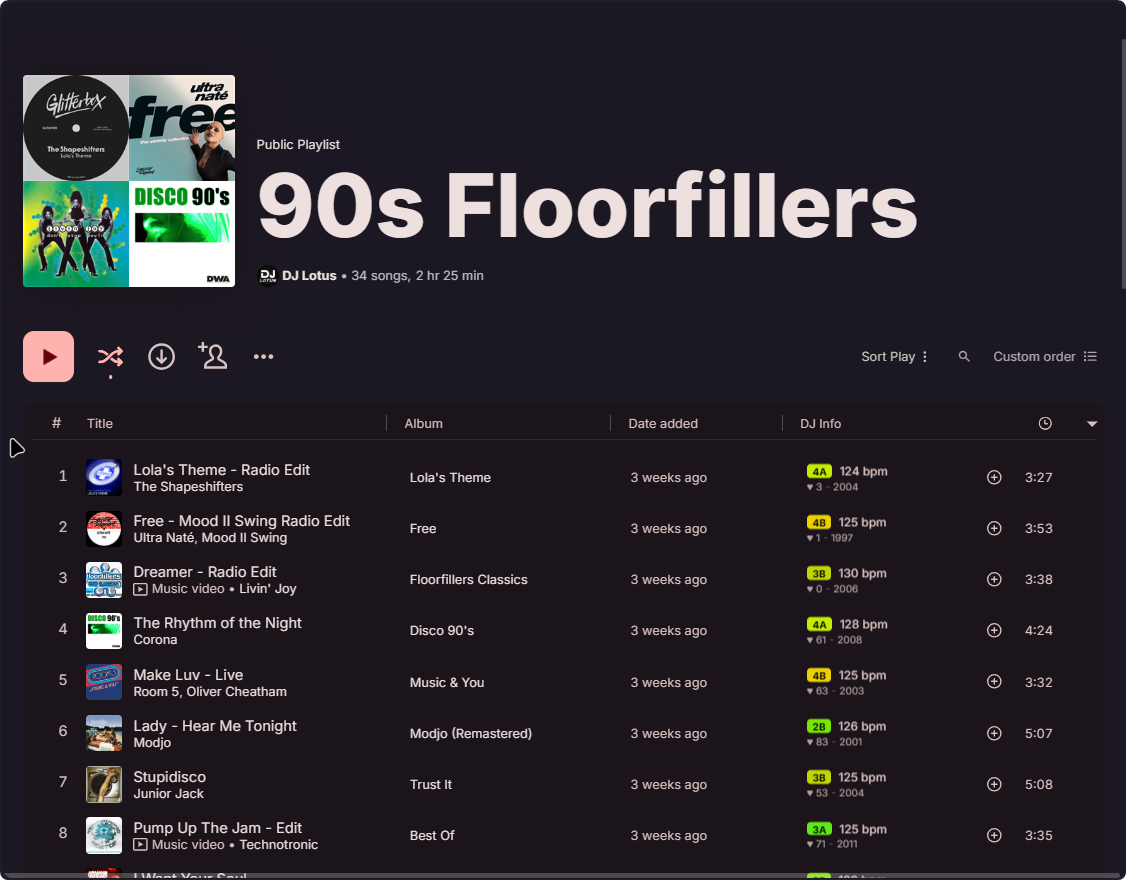
Welcome to the Spicetify DJ Info Extension! This extension enhances your Spicetify experience by providing valuable song analysis data for each track, including Key, BPM, Popularity and Year. With this extension, you can gain deeper insights into your music library and discover songs perfectly fitting into your DJ set or Playlist.
⭐Features
- Key: Identify the key of each song in either the standard notation (Dbm) or the Camelot system (3B). The Camelot system simplifies harmonic mixing by categorizing keys into groups that are harmonically compatible. This enables smoother transitions between songs during DJ sets or when creating cohesive playlists.
- BPM ♫ (Beats Per Minute): Get the tempo of each song, which indicates the speed or pace at which the music is played. BPM is useful for creating playlists with similar speed or for selecting songs for specific activities.
- Popularity ♥: Discover how popular your songs are by accessing their popularity ratings. This data can be helpful in understanding the overall reception and popularity of a track.
- Year: Find out when your songs were released. This data can be useful for creating playlists with songs from a specific time period.

💻 Installation
Copy dist/djinfo.mjs into your Spicetify extensions directory:
| Platform | Path |
| ------------ | ------------------------------------------------------------------------------------ |
| Linux | ~/.config/spicetify/Extensions or $XDG_CONFIG_HOME/.config/spicetify/Extensions/ |
| MacOS | ~/.config/spicetify/Extensions or $SPICETIFY_CONFIG/Extensions |
| Windows | %appdata%/spicetify/Extensions/ |
After putting the extension file into the correct folder, run the following command to install the extension:
spicetify config extensions djinfo.mjs
spicetify apply
Or you can manually edit your config-xpui.ini file. Add your desired extension filenames in the extensions key, separated by the | character.
Example:
[AdditionalOptions]
...
extensions = autoSkipExplicit.js|shuffle+.js|trashbin.js|djinfo.mjsspicetify applyMay cause issues with Star Ratings!
❌ Uninstallation
Run the following command to uninstall the extension (note the - on the end):
spicetify config extensions djinfo.mjs-
spicetify apply
You can also manually edit your config-xpui.ini file. Just remove the extensions' filename completely.
Example:
[AdditionalOptions]
...
extensions = autoSkipExplicit.js|shuffle+.js|trashbin.jsspicetify apply⚙️ Settings
You have the option to toggle the visibility of DJ information in the extension. By default, DJ information such as Key, BPM, Popularity, and Year are displayed for each song and also next to the currently playing song. However, if you prefer a cleaner interface, you can easily hide these separately.
To toggle the visibility of DJ information, follow these steps:
- Open Spotify
- Locate the menu icon on the top-right corner of the interface (your profile picture) and click on the icon
- In the menu, find the option 'DJ Info'
- In the sub-menu click on the toggle switch to hide or show whatever you want
- Click on Apply Changes to make your settings visible
📜 Changelog
V 2.4.0
- Updated to different API
- Improved styling
- Added new options for new audio features
V 2.3.3
- Fixed log spam
V 2.3.2
- Fixed layout with new mix UI
V 2.3.1
- Fixed the api breaking the extension
- Removed Danceability and Energy because they are not available in the new api
- Added a new UI for the DJ Info and improved the old version, which can still be used by disabling the rich ui
- Fixed Caching and migrated to a new system which uses IndexedDB instead of LocalStorage
- The new Camelot Key colors can be customized by overwriting the css variables
V 2.2.1
- Now finally works correctly in recommendations
- Cache was improved by far
- Data is fetched in batches, fixing missing data because of rate limits
- Working again with new Playlist UI
- Improved loading performance
- Improved Error logging
- Bugfixes for #16, #23, #24 and #25
V 2.1.1
- Fixed the styles in the recommended songs section
V 2.1.0
- Added the option to see DJ info in the recommended songs section
- Fixed a bug where the DJ info would not show up in the Discography section (#2)
- Fixed a bug in the queue (#9)
V 2.0.0
- Improved performance with storing data locally to speed up loading time and reduce API calls
- Reworked the Settings menu to toggle the visibility of DJ information much easier
V 1.1.0
- Added the option to toggle Year, Popularity, Danceability and Key in the standard notation
- Bugfixes
🌐 Credits & Thanks
A big shoutout to obafgkmdh and FixeQD for fixing the extension after the internal api broke and migrating the whole api to the internal protobuf based api and also for adding a better file structure with bundling!
And also thanks to Golevka2001 for the idea for better alignment of the DJ info in the playlist!
Big thanks to duffey for the main code of displaying something in the playlist and the now playing widget!
Also thanks to je09 for contributing the code for displaying both the standard notation and the Camelot system for the key aswell as the option to display it on the left side in now playing!
💬 Feedback and Contributions
If you encounter any issues or have suggestions for improving this extension, feel free to open an issue in the GitHub repository. Contributions are also welcome! Fork the repository, make your changes, and submit a pull request with your improvements.
⚖️ License
This project is licensed under the MIT License. Feel free to use, modify, and distribute the code as per the terms of this license.
Enjoy the enhanced music analysis experience with the Spicetify DJ Info Extension! If you find this extension useful, consider giving it a ⭐️ on GitHub. Thank you for using DJ Info!
--- Tranlated By Open Ai Tx | Last indexed: 2026-04-06 ---